Skip to content
This repository was archived by the owner on Jan 5, 2026. It is now read-only.

Conversation

@ceciliaavila
Copy link
Collaborator

@ceciliaavila ceciliaavila commented Apr 26, 2019

Proposed Changes

  • Enable echo controller in Microsoft.Bot.Builder.TestBot project by adding an environment variable with the name of the bot we want to use.
    image
    image
  • Add new DirectLineClientTests to FunctionalTests project to test sending a message to the TestBot deployed in Azure with ARM Templates and check its response.
    image

Steps to configure the Pipeline:

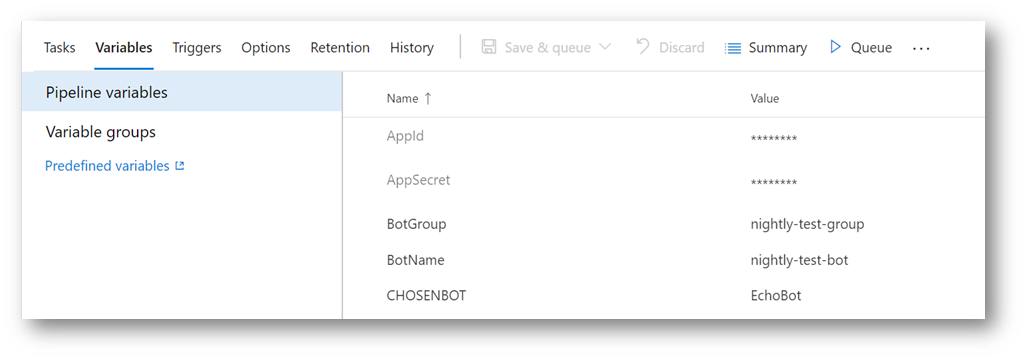
1- Define five environment variables: AppId, AppSecret, BotName, BotGroup and CHOSENBOT and mark the first two as Secrets.
image

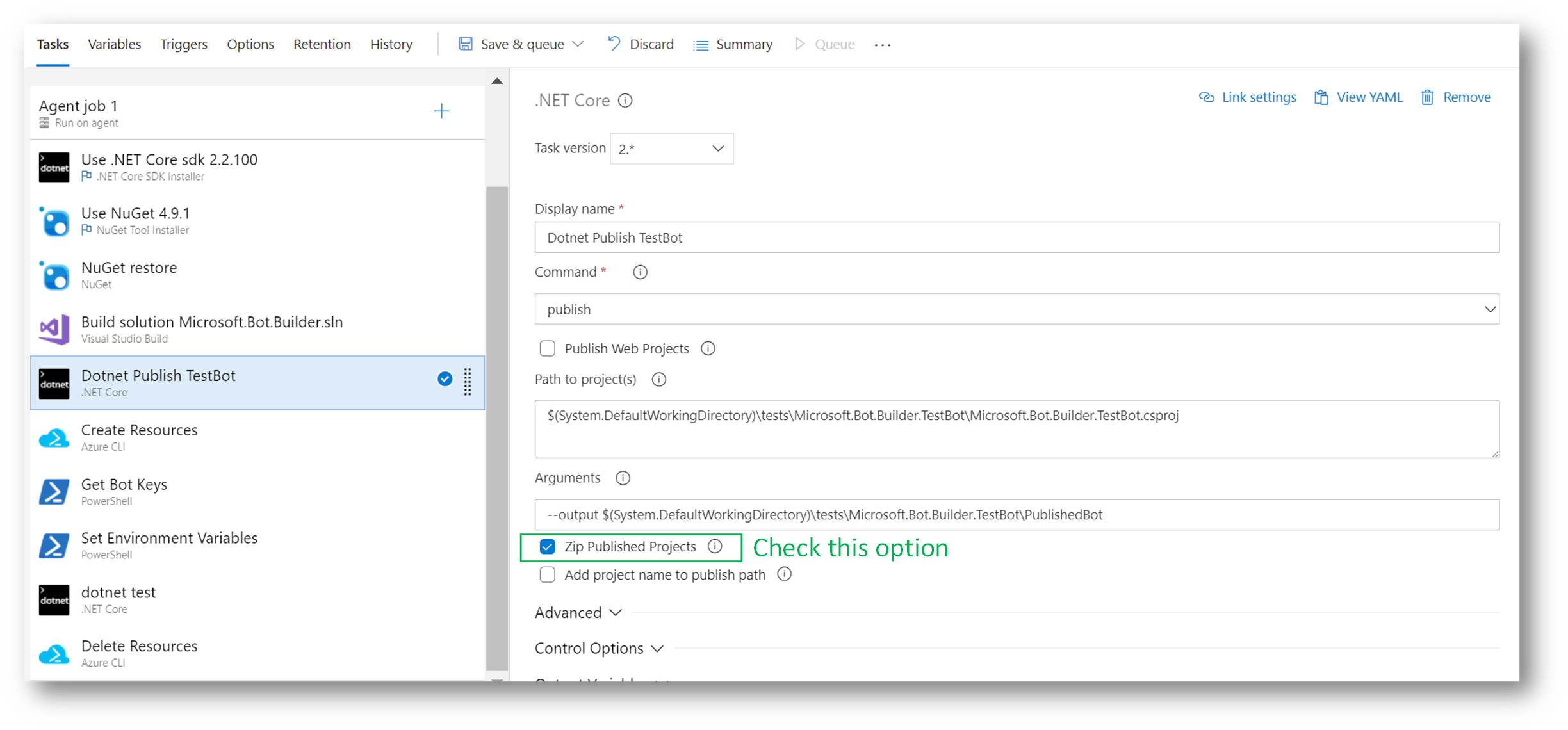
2- Add a Dotnet Task to publish the Test Bot project and leave it as a zip in a folder named PublishedBot.
image
In Arguments we need to set:

--output $(System.DefaultWorkingDirectory)\tests\Microsoft.Bot.Builder.TestBot\PublishedBot

3- Configure one Azure CLI Task to:

  • Run az deployment create command to create the resources in Azure.
  • Run az webapp deployment command to deploy the TestBot sample.
  • Run az bot direcline create command to connect the bot to the DirectLine channel.
  • Run az webapp config appsettings set command to set the bot as an EchoBot using an environment variable.
    image

The output goes into a json file from where we will recover the channel key later.

The script is:

call az deployment create --name "$(BotGroup)" --template-file "$(System.DefaultWorkingDirectory)\FunctionalTests\ExportedTemplate\template.json" --location "westus" --parameters appId=$(AppId) appSecret="$(AppSecret)" botId="$(BotName)" botSku=F0 newAppServicePlanName="$(BotName)" newWebAppName="$(BotName)" groupName="$(BotGroup)" groupLocation="westus" newAppServicePlanLocation="westus"

call az webapp deployment source config-zip --resource-group "$(BotGroup)" --name "$(BotName)" --src "$(System.DefaultWorkingDirectory)\tests\Microsoft.Bot.Builder.TestBot\PublishedBot\PublishedBot.zip"

call az bot directline create -n "$(BotName)" -g "$(BotGroup)" > "$(System.DefaultWorkingDirectory)\DirectLineCreate.json"

call az webapp config appsettings set --resource-group $(BotGroup) --name $(BotName) --settings CHOSENBOT=$(CHOSENBOT)

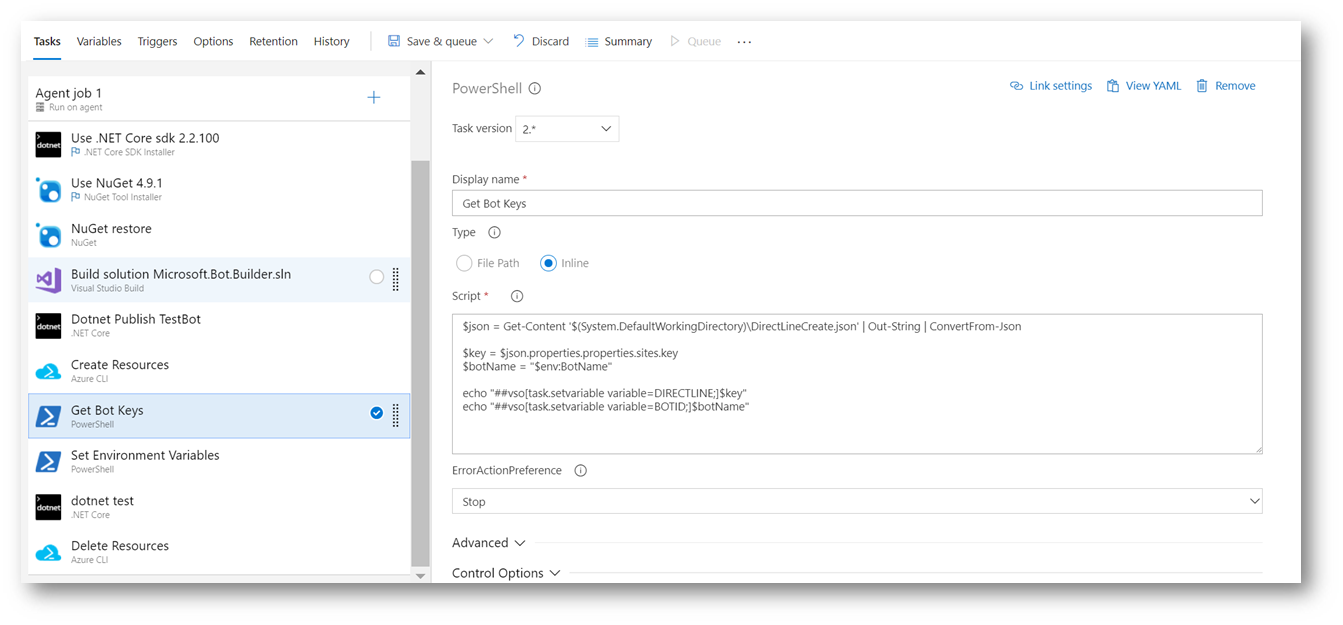
4- Add a new PowerShell Script Task to read the json file generated in the previous step and get the secret key to connect to the bot. It also sets an environment variable with this value.
image
The script is:

$json = Get-Content '$(System.DefaultWorkingDirectory)\DirectLineCreate.json' | Out-String | ConvertFrom-Json

$key = $json.properties.properties.sites.key
$botName = "$(BotName)"

echo "##vso[task.setvariable variable=DIRECTLINE;]$key"
echo "##vso[task.setvariable variable=BOTID;]$botName"

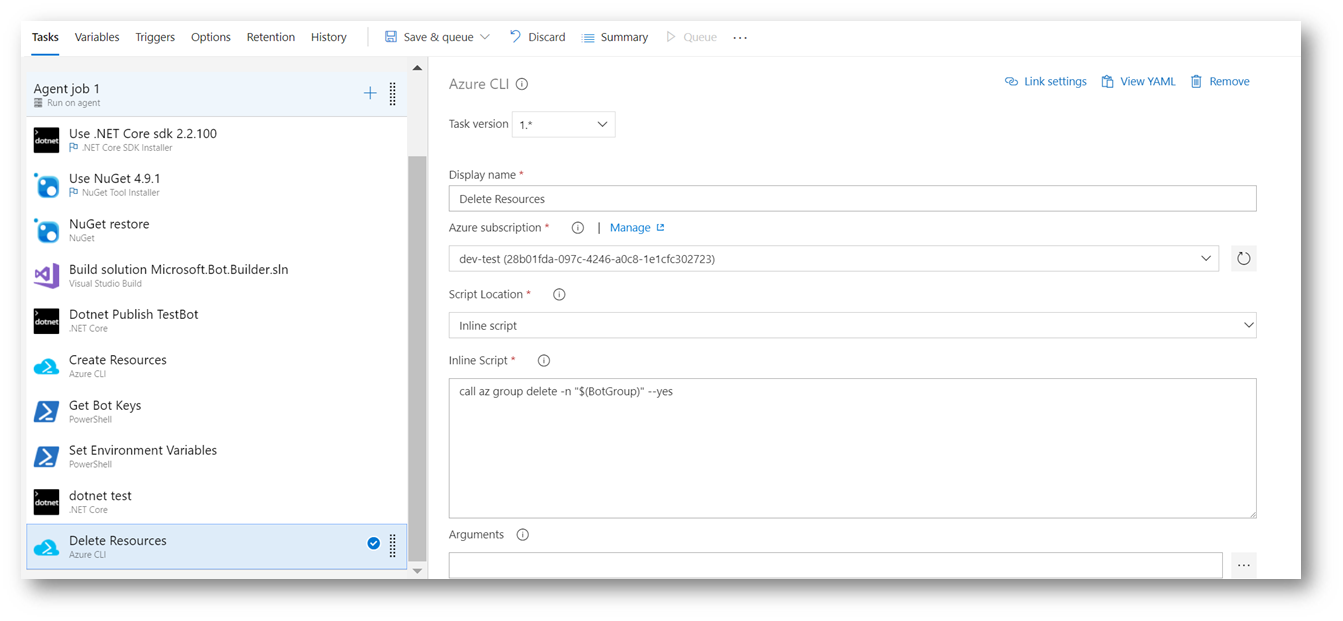
5- After the Tests run, add a new Azure CLI Task to delete the resource group we've created in the third step.
image
The script is:

call az group delete -n "$(BotGroup)" --yes

We strongly recommend setting this task to run Even if a previous task has failed, even if the build was canceled. With this setting, we will assure that the resources will be deleted from Azure even if the build fails at any step.

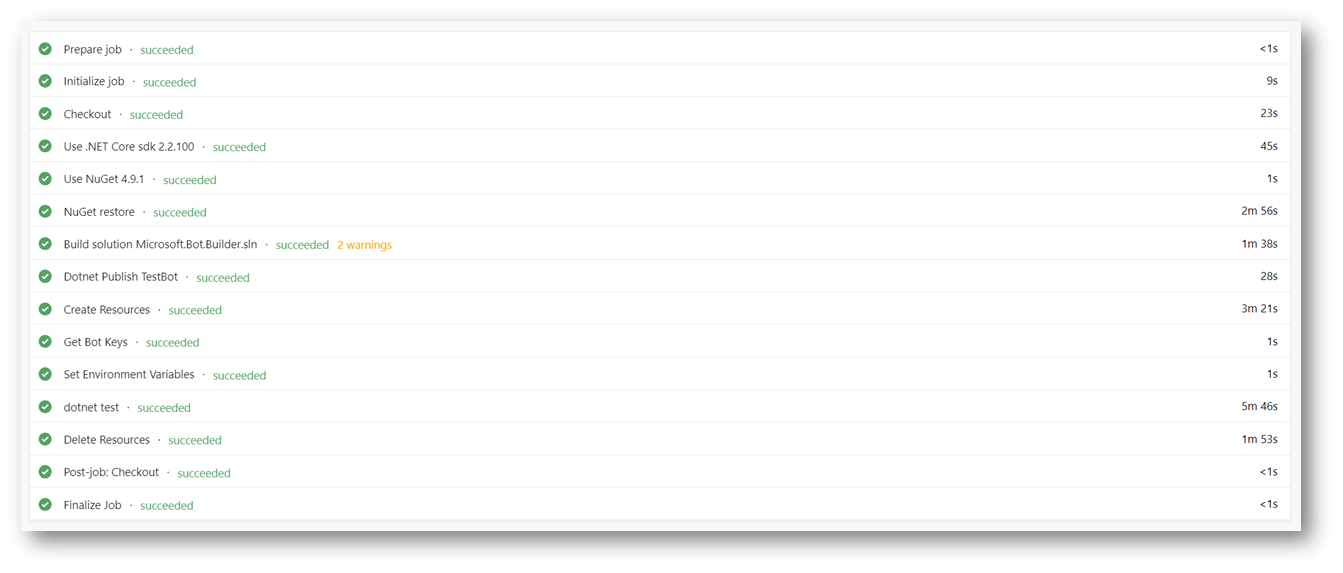
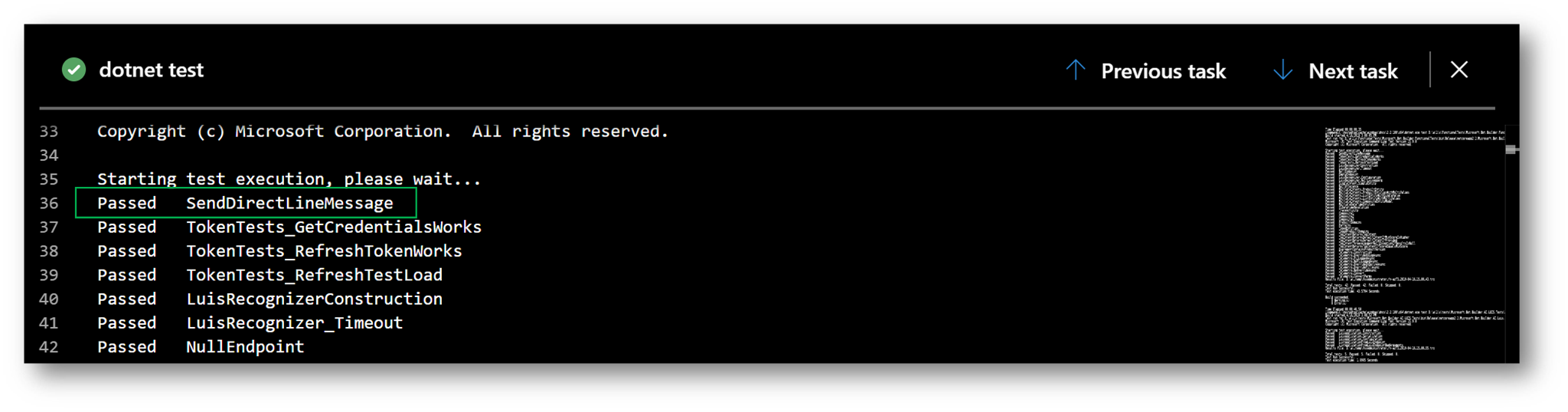
After running these steps, the Bot is deployed, tested and deleted.
image
image

@fuselabs
Copy link
Collaborator

No issues found in Microsoft.Bot.Builder.dll
No issues found in Microsoft.Bot.Builder.AI.Luis.dll
No issues found in Microsoft.Bot.Builder.AI.QnA.dll
No issues found in Microsoft.Bot.Builder.ApplicationInsights.dll
No issues found in Microsoft.Bot.Builder.Azure.dll
No issues found in Microsoft.Bot.Builder.Dialogs.dll
No issues found in Microsoft.Bot.Builder.TemplateManager.dll
No issues found in Microsoft.Bot.Configuration.dll
No issues found in Microsoft.Bot.Connector.dll
No issues found in Microsoft.Bot.Schema.dll

@gasper-az gasper-az closed this Apr 26, 2019
@ceciliaavila ceciliaavila reopened this Apr 29, 2019
@fuselabs
Copy link
Collaborator

No issues found in Microsoft.Bot.Builder.dll
No issues found in Microsoft.Bot.Builder.AI.Luis.dll
No issues found in Microsoft.Bot.Builder.AI.QnA.dll
No issues found in Microsoft.Bot.Builder.ApplicationInsights.dll
No issues found in Microsoft.Bot.Builder.Azure.dll
No issues found in Microsoft.Bot.Builder.Dialogs.dll
No issues found in Microsoft.Bot.Builder.TemplateManager.dll
No issues found in Microsoft.Bot.Configuration.dll
No issues found in Microsoft.Bot.Connector.dll
No issues found in Microsoft.Bot.Schema.dll

1 similar comment
@fuselabs
Copy link
Collaborator

No issues found in Microsoft.Bot.Builder.dll
No issues found in Microsoft.Bot.Builder.AI.Luis.dll
No issues found in Microsoft.Bot.Builder.AI.QnA.dll
No issues found in Microsoft.Bot.Builder.ApplicationInsights.dll
No issues found in Microsoft.Bot.Builder.Azure.dll
No issues found in Microsoft.Bot.Builder.Dialogs.dll
No issues found in Microsoft.Bot.Builder.TemplateManager.dll
No issues found in Microsoft.Bot.Configuration.dll
No issues found in Microsoft.Bot.Connector.dll
No issues found in Microsoft.Bot.Schema.dll

@fuselabs
Copy link
Collaborator

No issues found in Microsoft.Bot.Builder.dll
No issues found in Microsoft.Bot.Builder.AI.Luis.dll
No issues found in Microsoft.Bot.Builder.AI.QnA.dll
No issues found in Microsoft.Bot.Builder.ApplicationInsights.dll
No issues found in Microsoft.Bot.Builder.Azure.dll
No issues found in Microsoft.Bot.Builder.Dialogs.dll
No issues found in Microsoft.Bot.Builder.TemplateManager.dll
No issues found in Microsoft.Bot.Configuration.dll
No issues found in Microsoft.Bot.Connector.dll
No issues found in Microsoft.Bot.Schema.dll

@cleemullins cleemullins merged commit a646899 into master May 15, 2019
@cleemullins cleemullins deleted the feature/functional-test-bot-with-echo branch May 15, 2019 17:05
Sign up for free to subscribe to this conversation on GitHub. Already have an account? Sign in.

Labels

None yet

Projects

None yet

Development

Successfully merging this pull request may close these issues.

5 participants