






frontier_exploration_ros2 is a powerful open-source autonomous exploration package built for modern mobile robots. It is fast, reliable, and designed to make autonomous exploration feel practical, polished, and ready for real-world use.
Built and validated with ROS 2 Jazzy, it is still written with flexibility in mind. It fits naturally into Nav2-based projects, custom ROS 2 systems, and broader robotics workflows without making the exploration logic feel locked to a narrow setup.
More than a basic frontier package, it brings smarter exploration decisions and a stronger overall design. With map optimization before frontier detection, target ordering inspired by Minimum Ratio Traveling Salesman Problem (MRTSP), and an efficient modern C++ implementation, it offers a more capable and more refined exploration experience.
The MRTSP path also supports a bounded-horizon Dynamic Programming solver. It scores frontier candidates, keeps the strongest pool, searches a short route ahead, and dispatches only the first target so exploration stays fast and responsive.
It also improves long-running exploration with reusable caches, less repeated computation, and controlled memory use. Clear runtime controls for preemption, suppression, QoS, and completion handling make it easier to use in real projects.
In benchmarks against a variety of exploration algorithms under shared simulation scenarios, our package excelled in path complexity, elapsed time, and distance traveled, while maintaining low CPU and RAM usage.
The package successfully completed explorations with up to 99.9% coverage across challenging environments, including complex layouts, maze-like structures, dense obstacle areas, zigzag inducing areas, and large open spaces.
- Overview
- Performance
- Research Basis
- Status
- Version History
- Verified Environment
- Design Goals
- Flowchart Diagram
- Demo Repository
- Installation and Build
- Rviz Plugin
- Launch File Reference
- Greedy MRTSP vs Dynamic Programming
- Benchmark
- Nearest vs Greedy MRTSP Results
- Architecture
- Debug Observer
- Algorithm and Mathematics
- Integration Guide
- Quick Start
- QoS Configuration
- Parameter Reference
- TurtleBot3 Waffle Pi Example
- Testing
- Contributing
- License
- Maintainer
This package solves autonomous frontier exploration for occupancy-grid-based mobile robots. It detects frontiers on the boundary between known free space and unknown space, can optimize the decision map before WFD runs, selects and orders exploration targets with an MRTSP-based policy, and continues until frontier exhaustion. In the default ROS 2 integration, those targets are dispatched through Nav2.
The implementation keeps the WFD-style frontier extraction backbone and extends it with decision-map optimization before frontier extraction, MRTSP-based ordering that uses the Minimum Ratio Traveling Salesman Problem (MRTSP) idea, and runtime controls that are useful in production deployments:
- MRTSP solver modes: greedy matrix traversal or bounded-horizon Dynamic Programming
- pre-WFD decision-map optimization with bilateral filtering and dilation
- global and local costmap filtering during frontier validation and goal selection
- startup-only map QoS autodetect for first-time integration
- frontier snapshot caching and deterministic frontier signatures
- post-goal settle logic to avoid immediate instability after a goal is reached
- explicit controls for visible-reveal-gain preemption and blocked-goal skipping
- optional frontier suppression and suppressed-frontier waiting behavior
- optional completion-event publishing for external orchestration
- optional return-to-start behavior after frontier exhaustion
- reusable C++ library export for custom integration paths
The following table reports average performance measurements gathered across multiple scenarios.
Similar performance scaling can be expected, but actual results may vary depending on SLAM update rates, LiDAR scan frequency, and the overall data throughput.
| Metric | Average Exploration Package | Our Package (Nearest) | Our Package (Greedy MRTSP) |
|---|---|---|---|
| CPU usage range | %14.7 - %21.3 |
%3.5 - %4.3 |
%3.7 - %8.0 |
| Average CPU usage | %18.0 |
%3.7 |
%5.0 |
| Memory usage | %0.4 |
%0.2 |
%0.2 |
| Average RAM usage | ~100 MB |
~56 MB |
~56 MB |
Idle and load stay close to each other. Reusable caches and avoiding repeated work keep usage stable, which makes the package suitable for high-efficiency systems such as Raspberry Pi.
Visit Benchmark section for detailed analysis.
The paper Frontier Based Exploration for Autonomous Robot describes a WFD-style frontier detector built around a two-level breadth-first search. That paper provides the frontier-extraction backbone used here: expand through reachable map cells, detect frontier cells at the known/unknown boundary, and grow connected frontier clusters from those seeds.
Enhancing autonomous exploration for robotics via real time map optimization and improved frontier costs
The paper Enhancing autonomous exploration for robotics via real time map optimization and improved frontier costs adds two key ideas used in this package: map optimization before frontier extraction and a frontier cost model for exploration ordering with Minimum Ratio Traveling Salesman Problem (MRTSP) approach. Together with WFD, these ideas shape the package: WFD handles frontier detection, while optimized maps and multi-factor costs improve target selection.
The bounded-horizon Dynamic Programming solver uses techniques I learned in courses at the Computer Engineering Department of Yıldız Technical University. In this package, those techniques are applied to MRTSP ordering: score candidates with the same start-row cost used by the MRTSP matrix, keep the best candidate pool, and search a fixed-depth route inside that pool.
This improves ordering quality significantly without turning frontier selection into a heavy full-route solver. The robot still dispatches only the first frontier from the selected sequence, then replans after map and frontier updates.
This package is written and tested for ROS 2 Jazzy. That target is explicit in the build, launch, and dependency surface, and future ports to other ROS 2 distributions can be considered on demand.
Even though the public deliverable is a ROS 2 package, the implementation is intentionally kept universal in structure. The exploration logic lives in a reusable C++ core, transport details stay at the node boundary, topic and QoS contracts are explicit, and completion handling remains external instead of being tied to a project-specific workflow.
In practice, that makes the package easier to reuse in Nav2 deployments, custom ROS 2 stacks, and later adaptations where the core exploration behavior needs to move into a different system layout.
| Version | Summary |
|---|---|
v1.0.0 |
First release |
v1.1.0 |
Added visible-reveal-gain preemption to reduce path complexity and optimize traveled distance |
v1.2.0 |
Added smarter frontier ordering (MRTSP), map optimization before search, and performance improvements |
v1.3.0 |
Added runtime control service and CLI, cold-idle support, and the optional RViz control plugin |
v1.4.0 |
Added demo repository and improved Nav2 stability |
v1.5.0 |
Added bounded-horizon DP ordering, bug fixes, and performance and stability improvements |
v1.6.0 |
Added accurate distance calculation, grid based caching for map optimization, better distance and direction scoring for MRTSP, map processing refresh rate, better guarding for Nav2 failures. Optimized preemption CPU usage. Improved stability of the exploration and general performance. Deprecated nearest mode |
The implementation has been validated in a ROS 2 Jazzy exploration stack built around:
- Ubuntu 24.04
- ROS 2 Jazzy
- Gazebo Harmonic
- Nav2
- Slam Toolbox
- TurtleBot3 Waffle Pi
This is not the only supported integration path, but it is a verified environment in which the package has successfully completed frontier exploration with the expected map, costmap, TF, and navigation flow.
The verified TurtleBot3 Waffle Pi setup uses a 360-degree 12.0 m range 2D LiDAR and default parameters are adjusted according to this.
Exploration parameters can be affected by LiDAR characteristics, so they should be tuned for the actual sensor and environment.
The TurtleBot3 Waffle Pi is also a relatively small and slow robot, so parameter values may need to change on bigger and faster platforms.
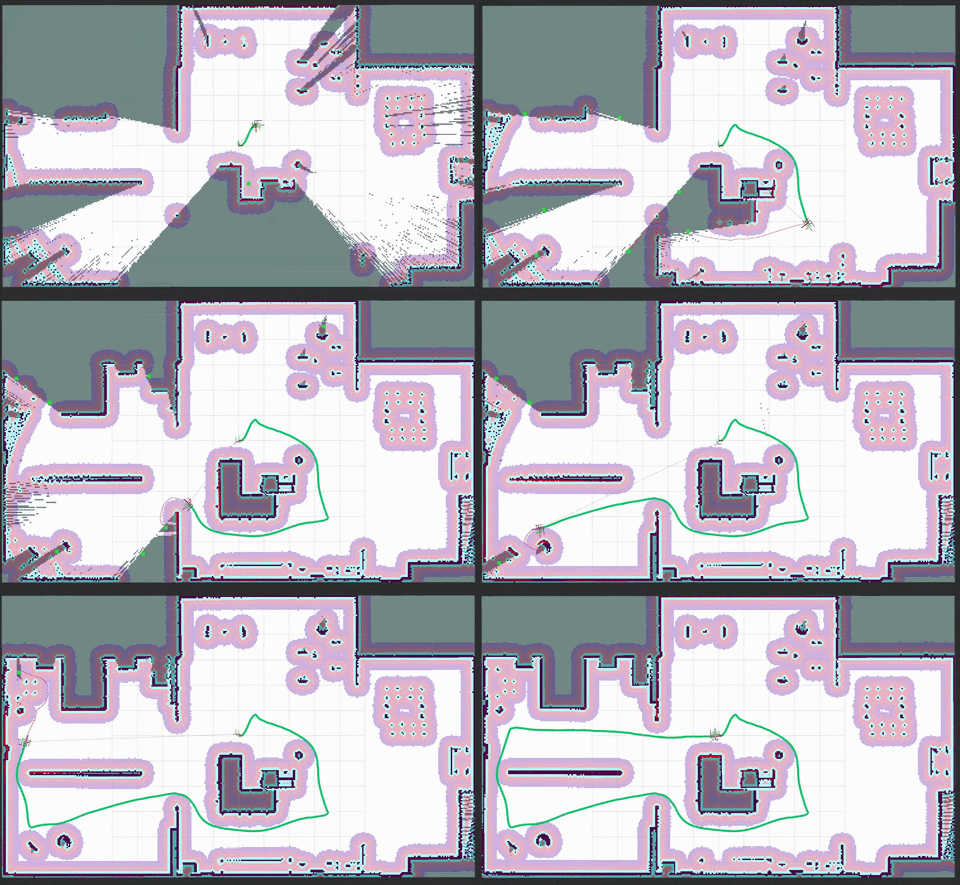
Tip
This demo uses MRTSP Scoring + Map Optimization + Early Preemption to achieve highly efficient, smart autonomous exploration with smoother and more purposeful navigation decisions.
- Provide a C++ exploration package that is fast, predictable, and easy to integrate into real robotics systems, with a verified ROS 2 Jazzy path.
- Keep WFD-style frontier extraction while improving frontier quality and exploration ordering through pre-WFD map optimization and MRTSP-based selection.
- Use a single MRTSP-style global ordering path with predictable dispatch semantics.
- Improve MRTSP route quality with bounded-horizon Dynamic Programming while keeping target selection lightweight for repeated replanning.
- Expose a clean parameter surface for topics, frames, QoS, decision-map tuning, goal behavior, and completion hooks.
- Keep the default node integration practical for Nav2 while keeping the decision logic separated from project-specific backends.
- Make namespace-aware deployment and multi-robot integration practical.
- Keep the package public and universal. The package should be usable without assuming a specific robot, simulator, map saver, or private stack.
           +-------------------------+
+----------| Map & Costmap Input     |
|          +-------------------------+
|                       |
|                       v
|          +-------------------------+
|          | Decision-Map            |
|          | Optimization            |
|          +-------------------------+
|                       |
|                       v
|          +-------------------------+
|          | WFD-Style               |
|          | Frontier Extraction     |
|          +-------------------------+
|                       |
|                       v
|          +---------------------------+
|          | Build MRTSP Candidate Set |
|          | and Cost Matrix           |
|          +---------------------------+
|                       |
|                       v
|              .----------------.
|            /                    \
|           /   MRTSP Solver       \
|          /      Selection         \
|         v                        v
|      greedy                      dp
|        |                         |
|        v                         v
|  +----------------+   +---------------------------+
|  | Greedy Matrix  |   | Score, Prune, and Search  |
|  | Traversal      |   | Bounded DP Horizon        |
|  +----------------+   +---------------------------+
|             \             /
|              v           v
|       +-----------------------+
|       | Ordered Frontier      |
|       | Sequence              |
|       +-----------------------+
|                  |
|                  v
|          +-------------------------+
|          | Dispatch Goal via Nav2  |
|          +-------------------------+
|                       |
|                       v
|          +-------------------------+
|          | Monitor & Handle        |
|          | Preemption/Blocking     |
|          +-------------------------+
|                       |
|                       v
|                  .-----------.
|                /               \
|               /     Frontiers    \
|              /     Exhausted?     \
|             v                   v
|            No                  Yes
|             |                   |
|             |                   v
|             |          +---------------------------+
|             |          | Publish Completion Event  |
|             |          +---------------------------+
|             |
+-------------+
Visit the demo repository to test the package, understand its behavior, and observe the exploration algorithms in action.
The demo repository provides a simulation environment and playground for tuning parameters, testing different configurations, and integrating the package into custom setups.
Docker support is included for easier setup and reproducible testing.
Runtime and build dependencies include:
- ROS 2 Jazzy
- Nav2
rclcppnav2_msgsnav_msgsgeometry_msgsstd_msgsvisualization_msgstf2tf2_rosament_cmake
git clone https://github.com/mertgulerx/frontier-exploration-ros2.git
cd frontier-exploration-ros2cd <your_workspace>
rosdep install --from-paths src --ignore-src -r -ycd <your_workspace>
source /opt/ros/jazzy/setup.bash
colcon build --packages-select frontier_exploration_ros2Warning
Default parameters are designed for TurtleBot3 Waffle Pi. Please don't forget to adjust them for your robot.
The packaged parameter file uses MRTSP ordering with bounded-horizon DP:
mrtsp_solver: dp
dp_solver_candidate_limit: 15
dp_planning_horizon: 10
To use the higher performance but lower accuracy greedy method, set mrtsp_solver: greedy.
Launch with the packaged parameter file:
ros2 launch frontier_exploration_ros2 frontier_explorer.launch.pyThe packaged launch file uses the packaged config/params.yaml defaults, and that baseline starts exploration immediately with autostart:=true.
Override the parameter file:
ros2 launch frontier_exploration_ros2 frontier_explorer.launch.py \
  params_file:=/absolute/path/to/params.yaml
Run under a namespace:
ros2 launch frontier_exploration_ros2 frontier_explorer.launch.py \
  namespace:=robot1
Enable simulation time:
ros2 launch frontier_exploration_ros2 frontier_explorer.launch.py \
  use_sim_time:=true
Override startup map durability:
ros2 launch frontier_exploration_ros2 frontier_explorer.launch.py \
  map_qos_durability:=volatile
Enable startup-only map QoS autodetect:
ros2 launch frontier_exploration_ros2 frontier_explorer.launch.py \
  map_qos_autodetect_on_startup:=true \
  map_qos_autodetect_timeout_s:=2.0
Keep the node in cold idle at launch time:
ros2 launch frontier_exploration_ros2 frontier_explorer.launch.py \
  autostart:=false
Disable the runtime control service while keeping automatic startup:
ros2 launch frontier_exploration_ros2 frontier_explorer.launch.py \
  autostart:=true \
control_service_enabled:=falseWhen control_service_enabled=true, the node exposes a control_exploration service using frontier_exploration_ros2/srv/ControlExploration. This service provides an explicit runtime control surface for exploration lifecycle management. It is available even when exploration starts automatically, and is mainly useful for stop, delayed start/stop, cold-idle orchestration, and optional self-shutdown flows. If autostart=false, the node keeps this service enabled regardless of the configured control_service_enabled value so the cold-idle session can still be started.
The packaged CLI helper provides a convenient terminal interface for that service:
frontier_exploration_ctl start
frontier_exploration_ctl start -t 10
frontier_exploration_ctl stop
frontier_exploration_ctl stop -t 10
frontier_exploration_ctl stop -q
frontier_exploration_ctl stop -t 10 -q
Command semantics:
startenables exploration. If the node is in cold idle, it recreates the required subscriptions and timers, resets session-local exploration state, and begins exploration after fresh input data arrive.stopdisables exploration, prevents further goal dispatch, and returns the node to cold idle so that map and costmap traffic are no longer processed.-t <seconds>schedules the request after the given delay instead of applying it immediately.stop -qperforms a normal stop sequence and then shuts down the explorer node process.
If the control service is disabled while autostart=true, the CLI helper and RViz control panel cannot send runtime commands to that explorer instance.
When the package is started with its own example launch file, stop -q also causes that launch session to exit after the explorer process stops. It does not attempt to terminate unrelated nodes, external launch parents, or arbitrary terminal sessions. Higher-level process orchestration remains outside the scope of this package.
frontier_exploration_ros2 also provides an optional RViz plugin for start and stop exploration control directly from RViz.
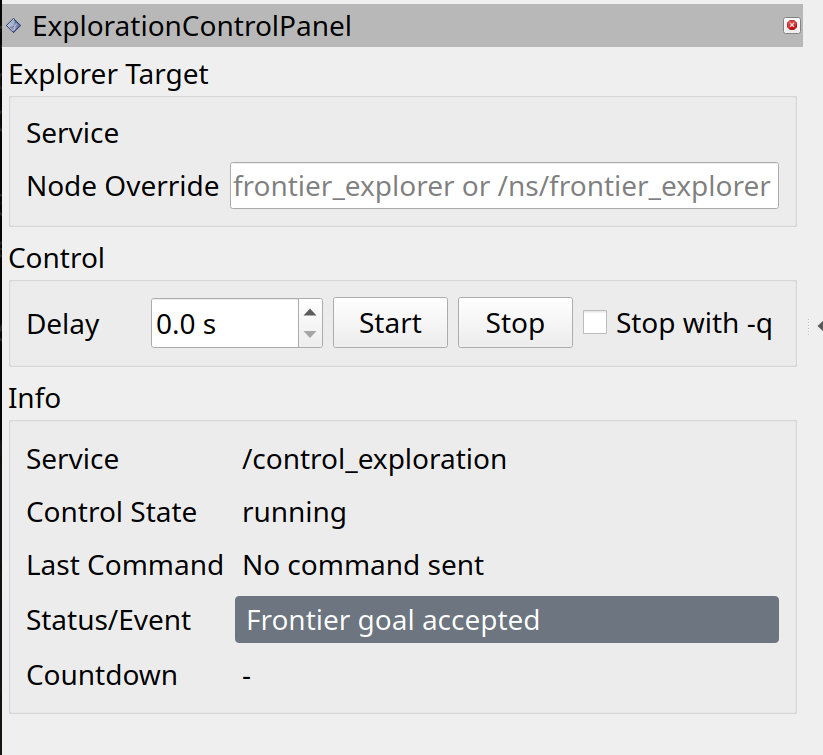
For details, inspect plugin's own README.md.
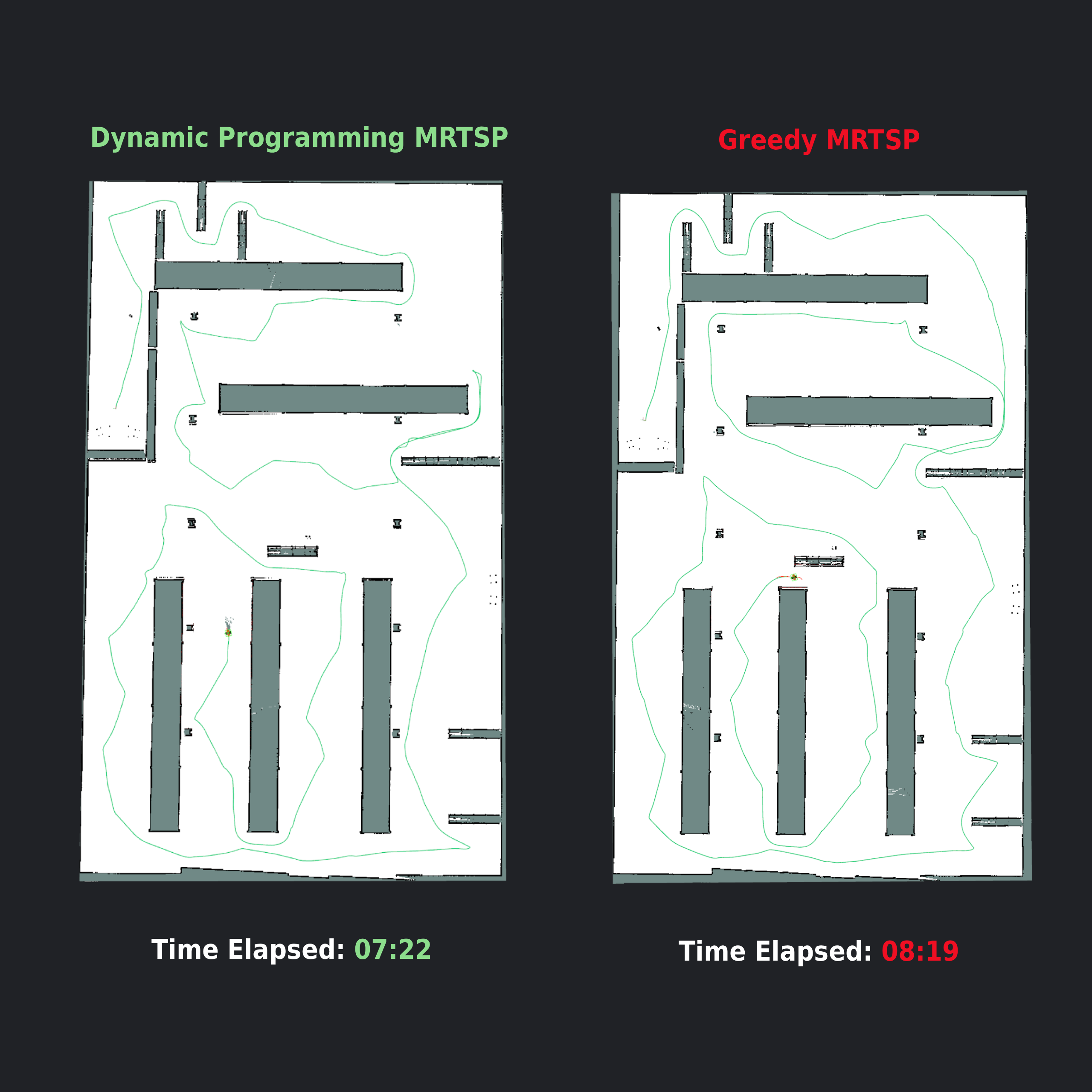
The MRTSP strategy can order frontiers with either a greedy matrix traversal or the bounded-horizon Dynamic Programming solver.
Greedy MRTSP is fast and useful as a baseline. It repeatedly chooses the best next frontier from the current node. This keeps the decision simple, but it only looks one step ahead.
Dynamic Programming keeps the same MRTSP cost model, then improves the route decision with limited lookahead. It scores candidates, keeps the strongest candidate pool, searches a bounded route sequence inside that pool, and dispatches only the first frontier. This preserves the package's replanning behavior while making the selected target more purposeful.
This helps when the cheapest immediate frontier leads to poor follow-up transitions. The DP solver can choose a slightly more expensive first frontier when the short route after it is better overall.
For MRTSP ordering, Dynamic Programming is a game-changing feature. It greatly improves decision quality by evaluating short frontier sequences instead of only the immediate next step, while adding only a small and controlled amount of extra computation through candidate pruning and a bounded planning horizon.
|
| Algorithm | Distance Traveled (m) | Time Elapsed (mm:ss) | Time Elapsed (s) |
|---|---|---|---|
| Dynamic Programming | 263.72 | 07:22 | 442 |
| Greedy MRTSP | 273.52 | 08:19 | 499 |
| m_explore_ros2 | 338.61 | 09:47 | 587 |
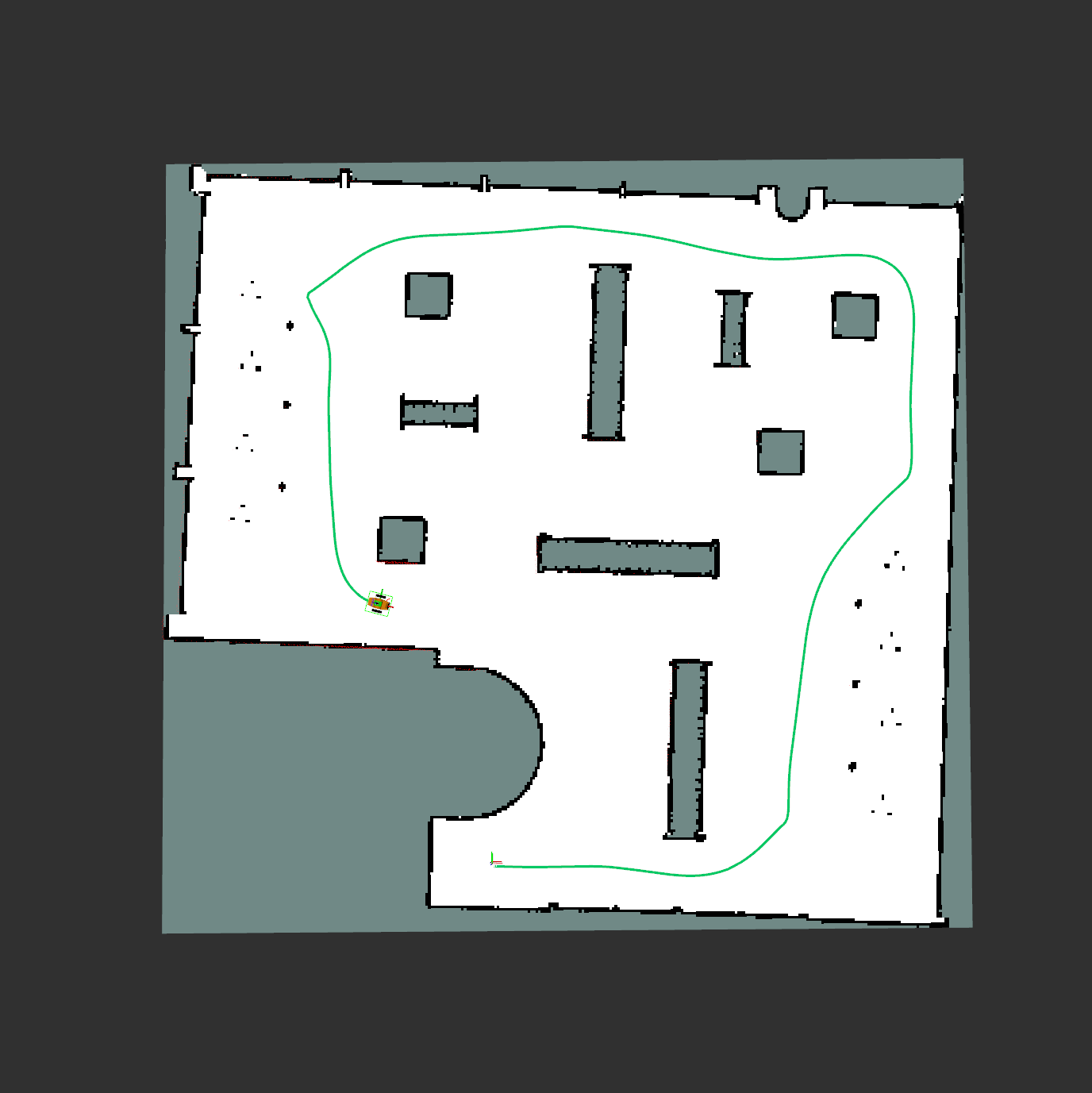
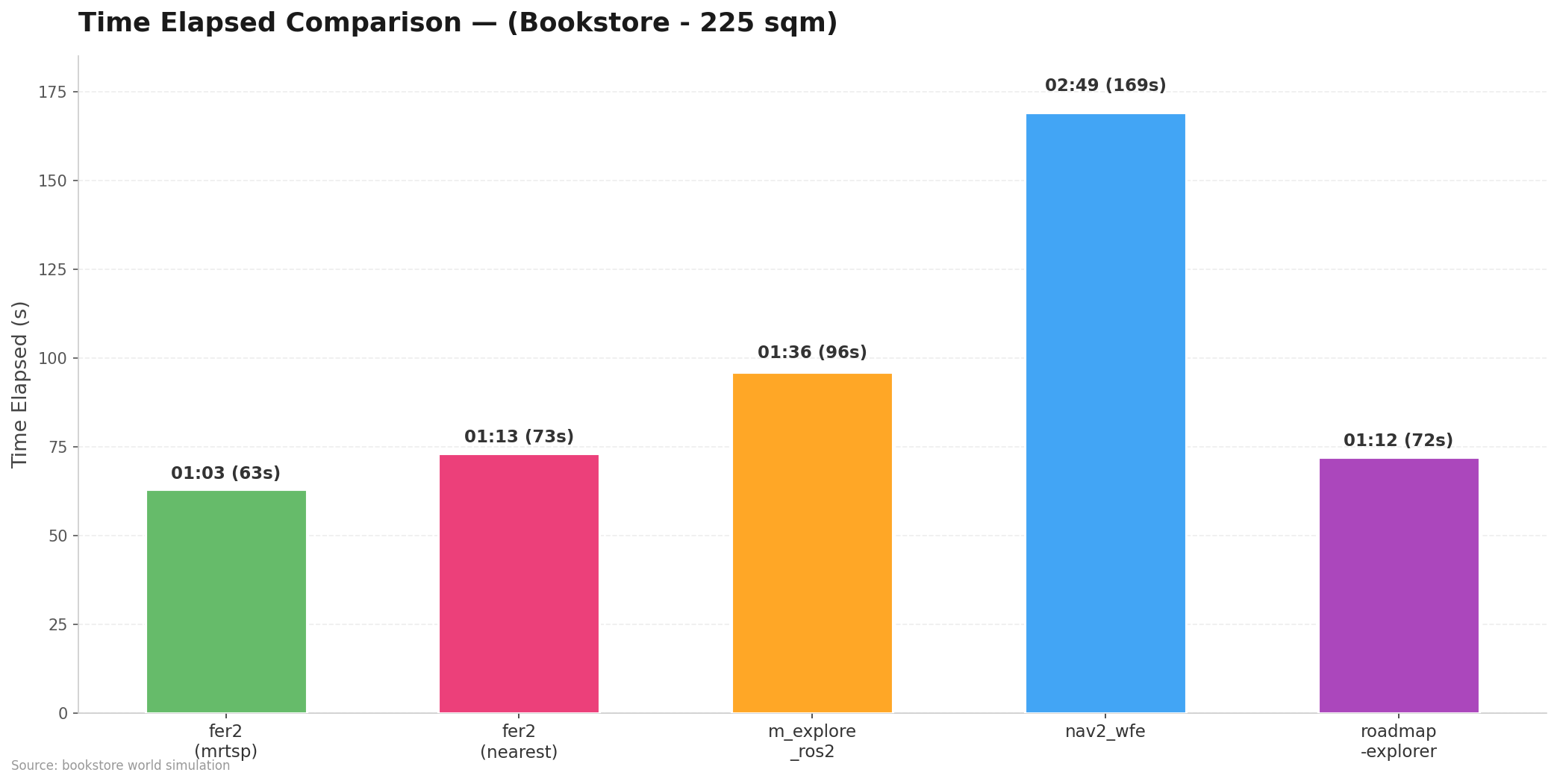
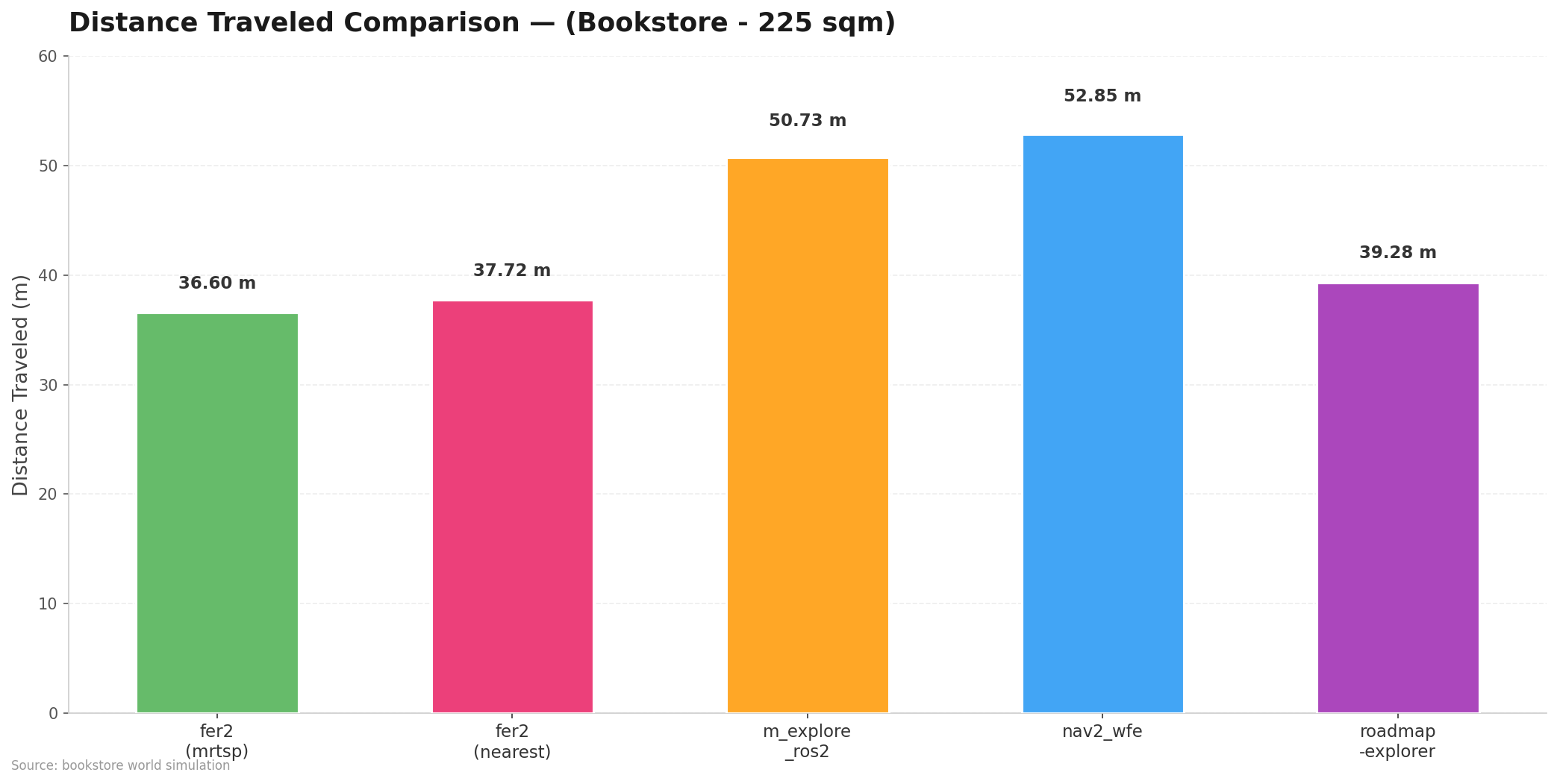
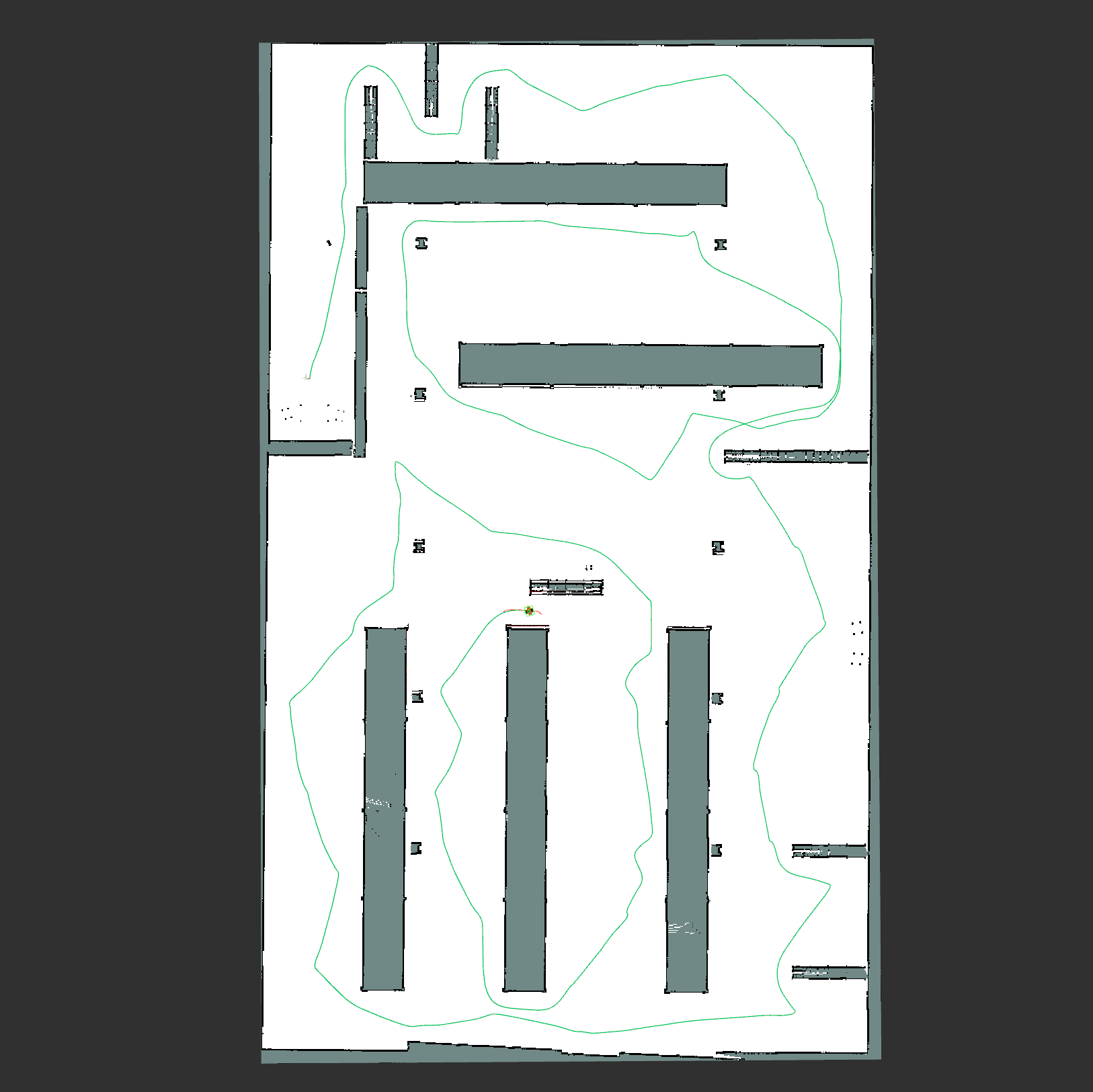
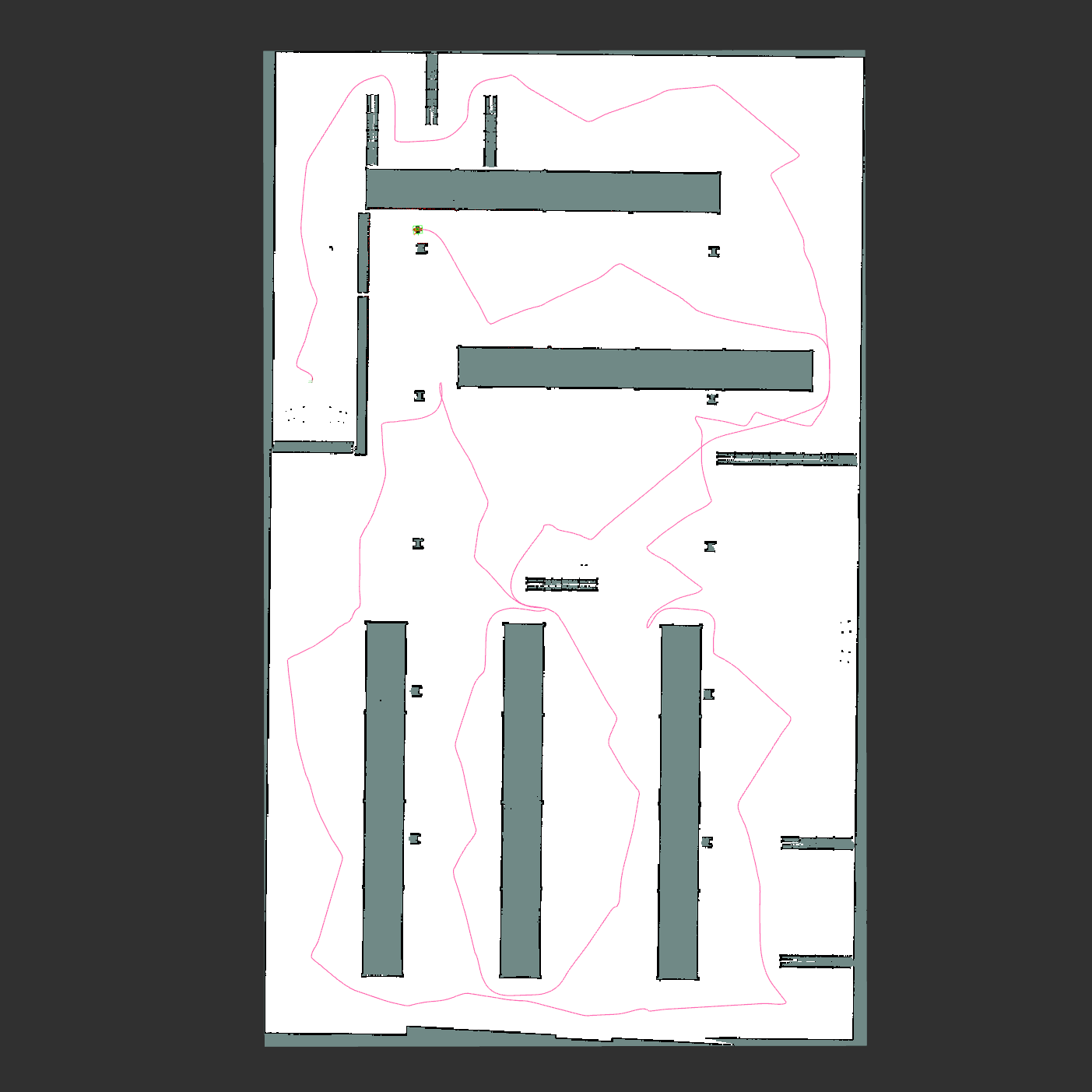
We have tested and evaluated similar exploration packages that use different approaches in a shared simulation environment. Under these scenarios:
- Bookstore: Medium size and obstacle dense maze-like environment. Spanning 225 m² (2,400 sq ft).
- Warehouse: Large-scale (Six times larger than the
Bookstore), complex and realistic environment. Spanning 1,500 m² (16,000 sq ft).
We gathered single core CPU usage, RAM usage, distance traveled, time elapsed and path complexity results, a key metric for evaluating how efficiently robots navigate during exploration.
Detailed results are available in the benchmark repository.
| Package | Single Core CPU Usage (%) | RAM Usage (MB) | Distance Traveled (m) | Time Elapsed (mm:ss) | Time Elapsed (s) |
|---|---|---|---|---|---|
frontier_exploration_ros2 (greedy mrtsp) |
7.4 | 56.5 | 36.60 | 01:03 | 63 |
frontier_exploration_ros2 (nearest) |
4.0 | 56.6 | 37.72 | 01:13 | 73 |
m_explore_ros2 |
2.4 | 51.9 | 50.73 | 01:36 | 96 |
nav2_wavefront_frontier_exploration |
10.3 | 100.7 | 52.85 | 02:49 | 169 |
roadmap-explorer |
32.8 | 111.8 | 39.28 | 01:12 | 72 |
|
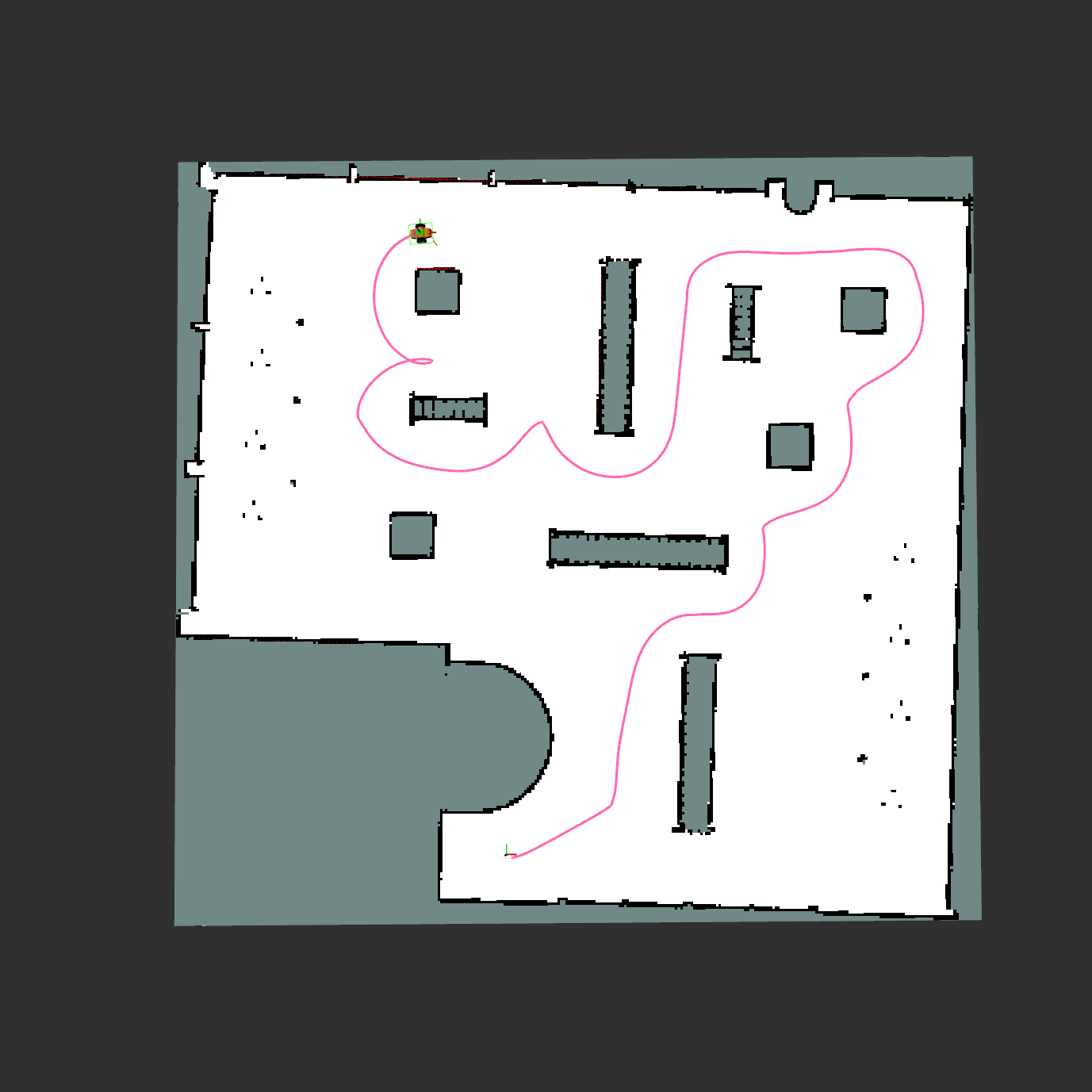
|
| frontier_exploration_ros2 (Greedy MRTSP) | frontier_exploration_ros2 (nearest) |
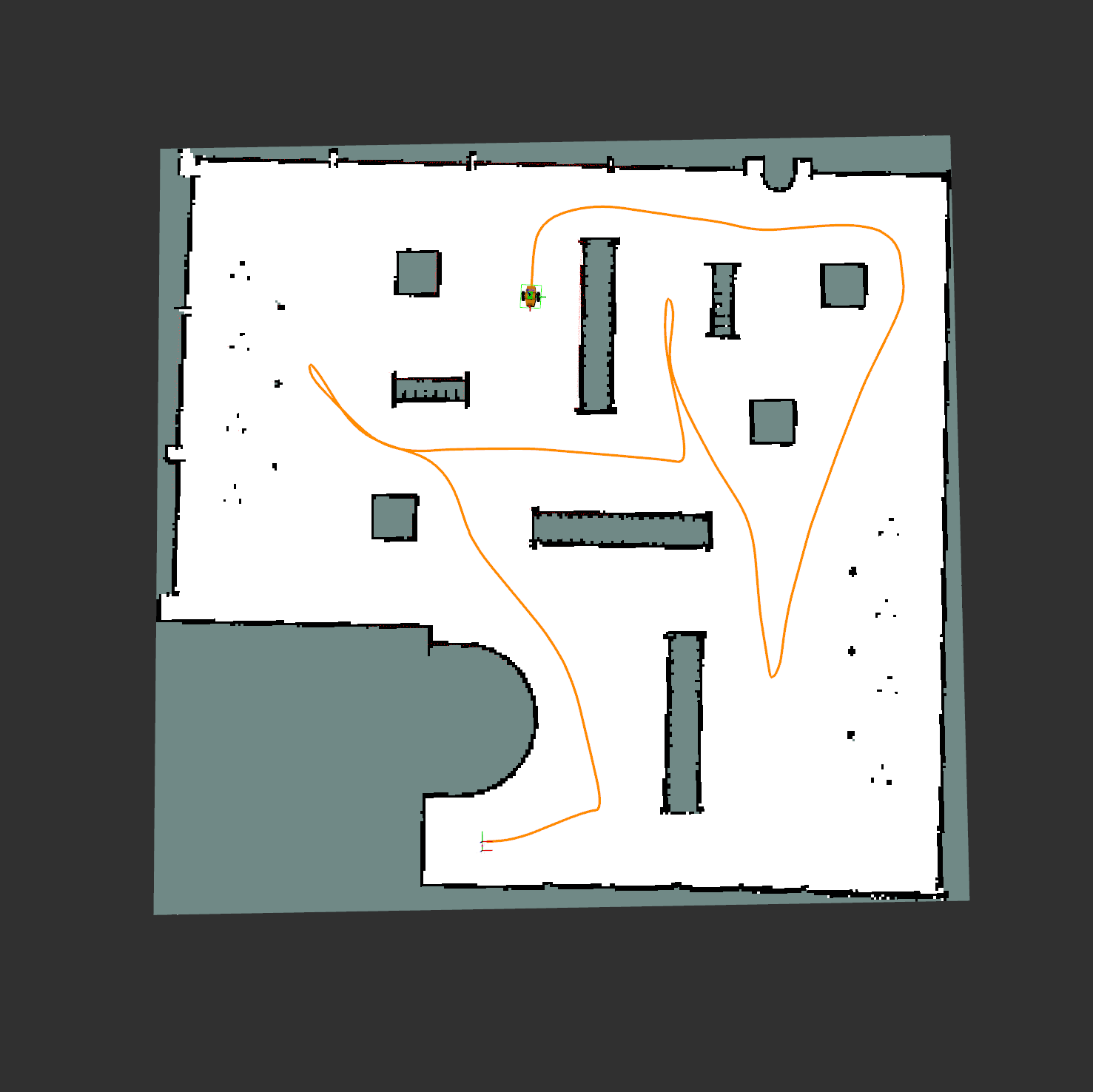
|
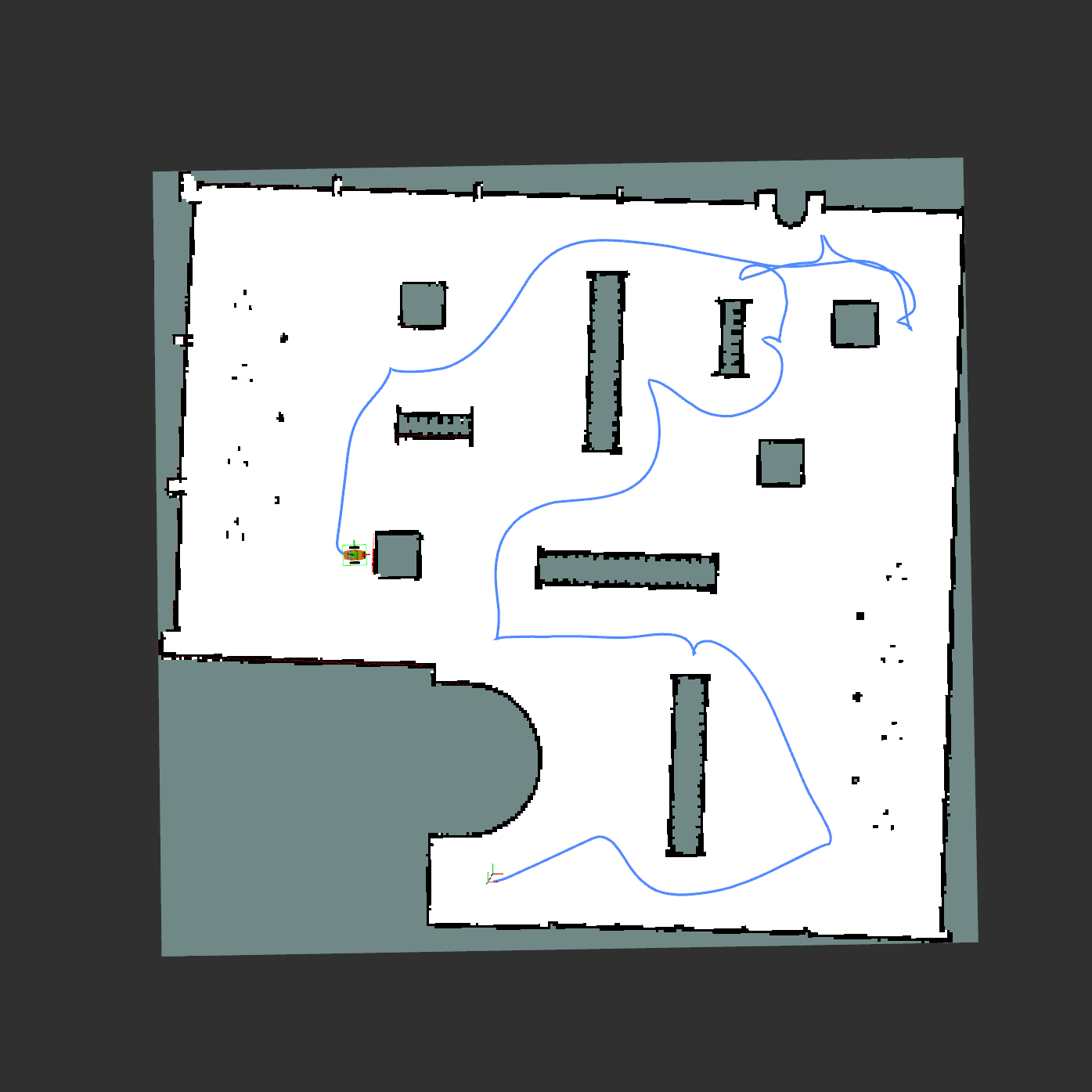
|
| m_explore_ros2 | nav2_wavefront_frontier_exploration |
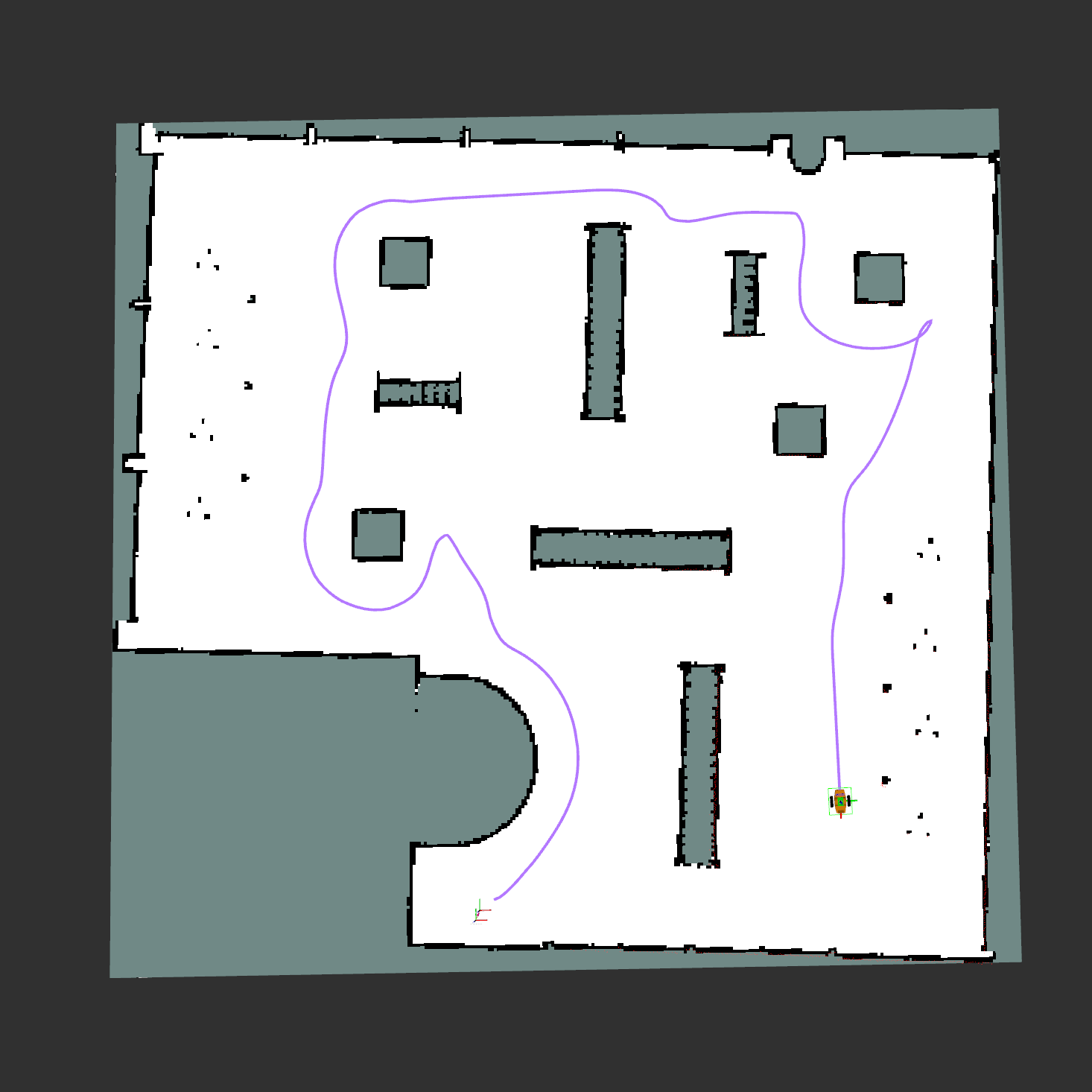
|
|
| roadmap-explorer |
|
|
Detailed results are available in the benchmark repository.
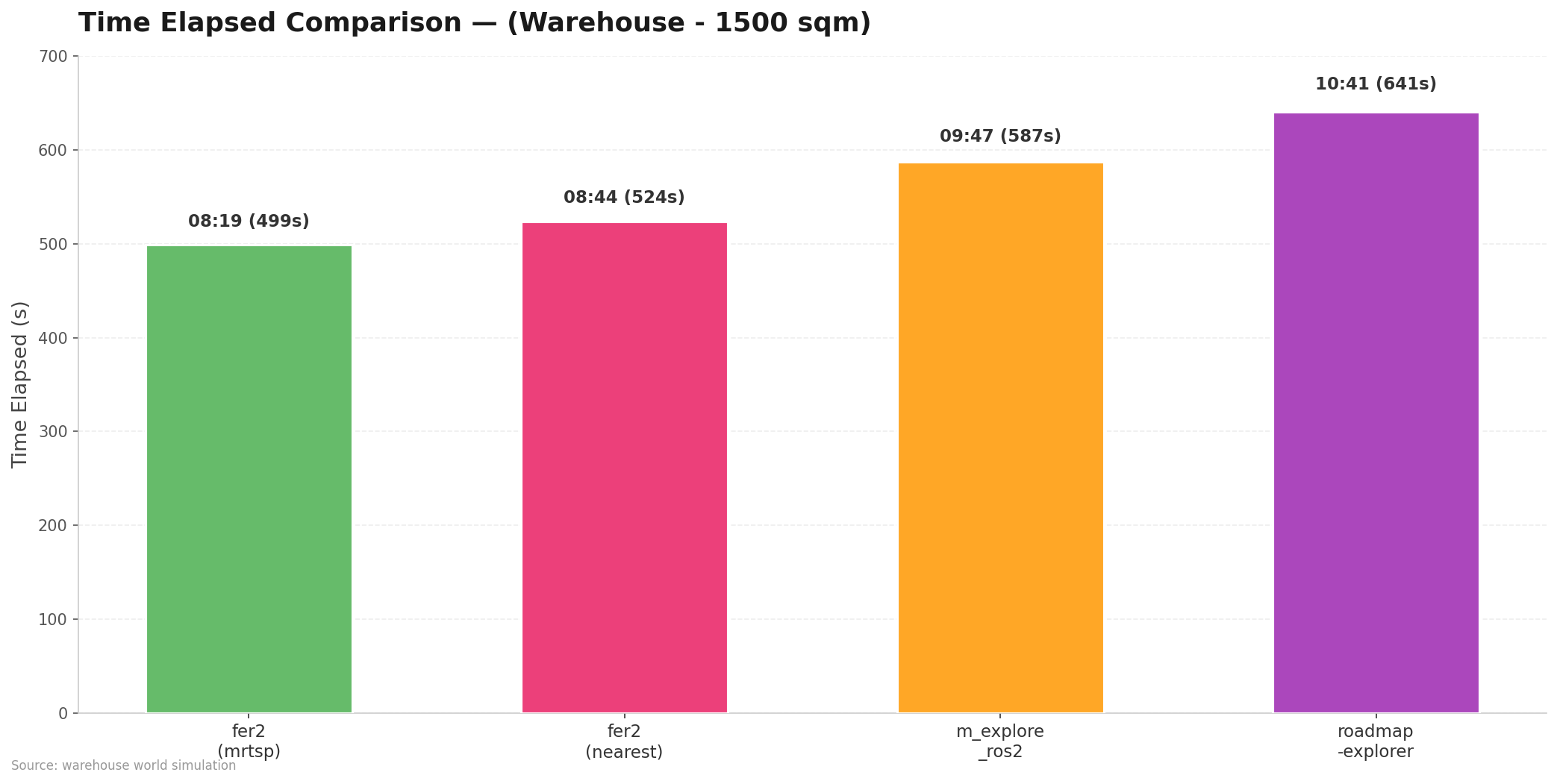
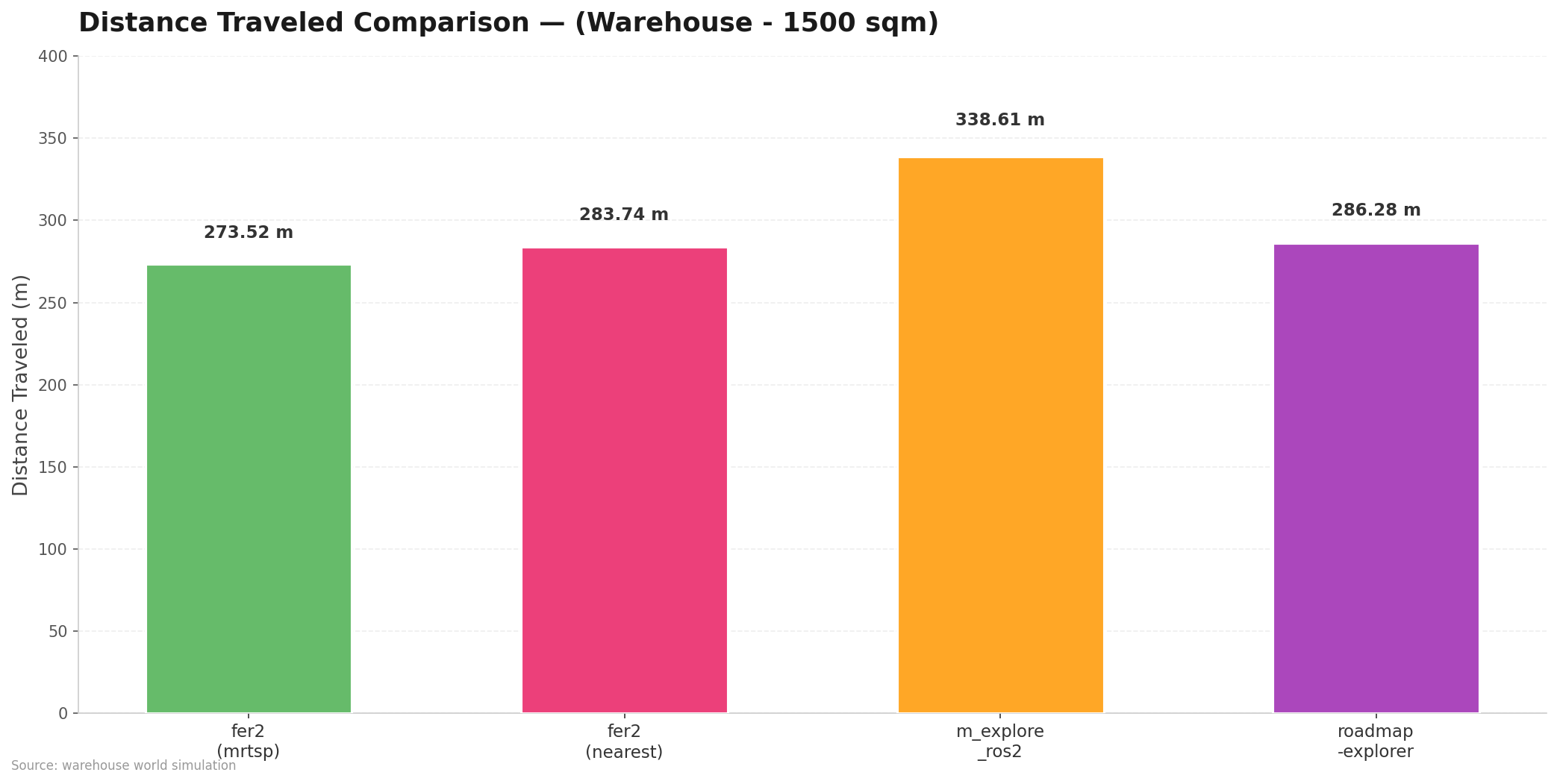
| Package | Single Core CPU Usage (%) | RAM Usage (MB) | Distance Traveled (m) | Time Elapsed (mm:ss) | Time Elapsed (s) |
|---|---|---|---|---|---|
frontier_exploration_ros2 (greedy mrtsp) |
17.6 | 85.2 | 273.52 | 08:19 | 499 |
frontier_exploration_ros2 (nearest) |
7.7 | 85.0 | 283.74 | 08:44 | 524 |
m_explore_ros2 |
4.4 | 54.0 | 338.61 | 09:47 | 587 |
roadmap-explorer |
47.8 | 142.4 | 286.28 | 10:41 | 641 |
|
|
| frontier_exploration_ros2 (Greedy MRTSP) | frontier_exploration_ros2 (nearest) |
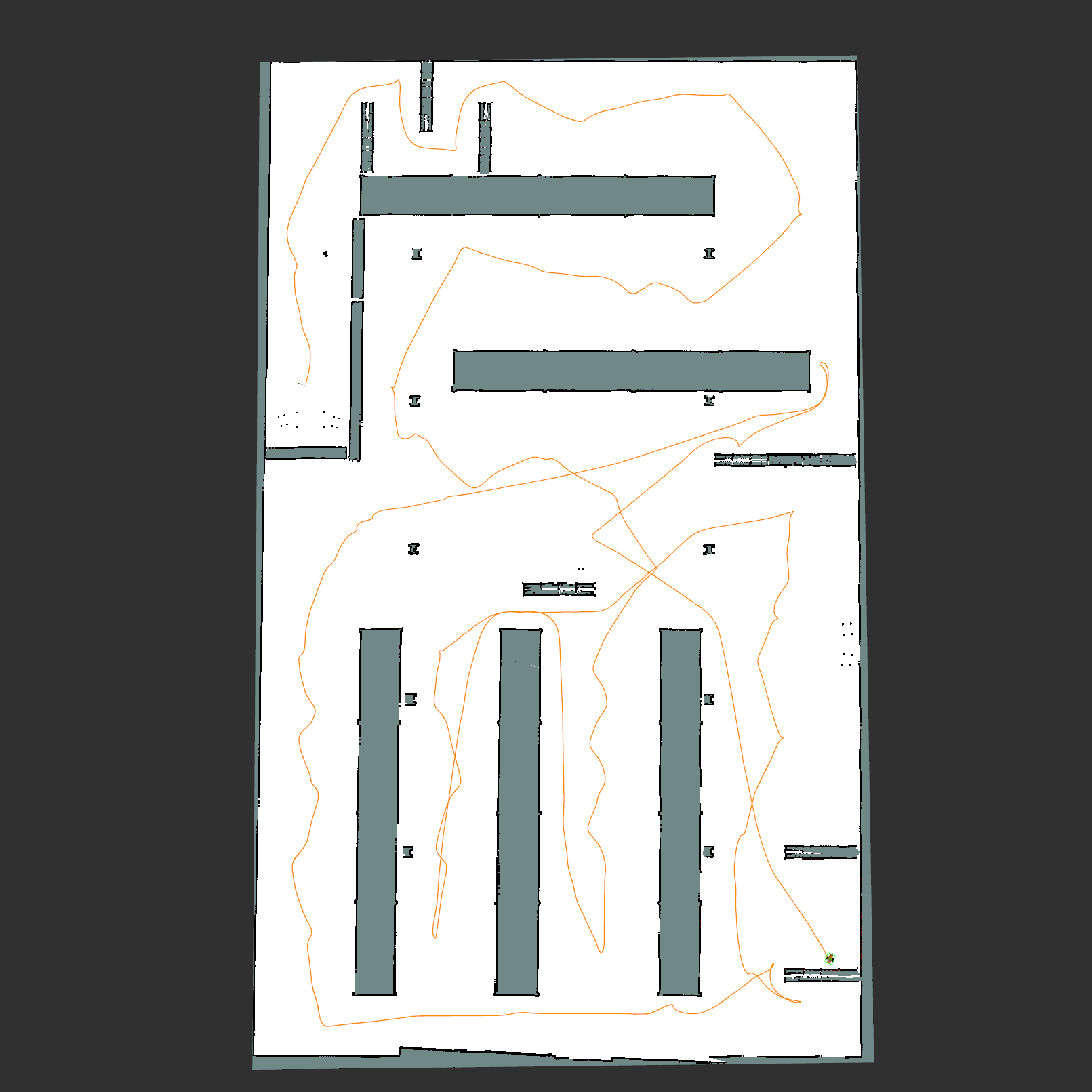
|
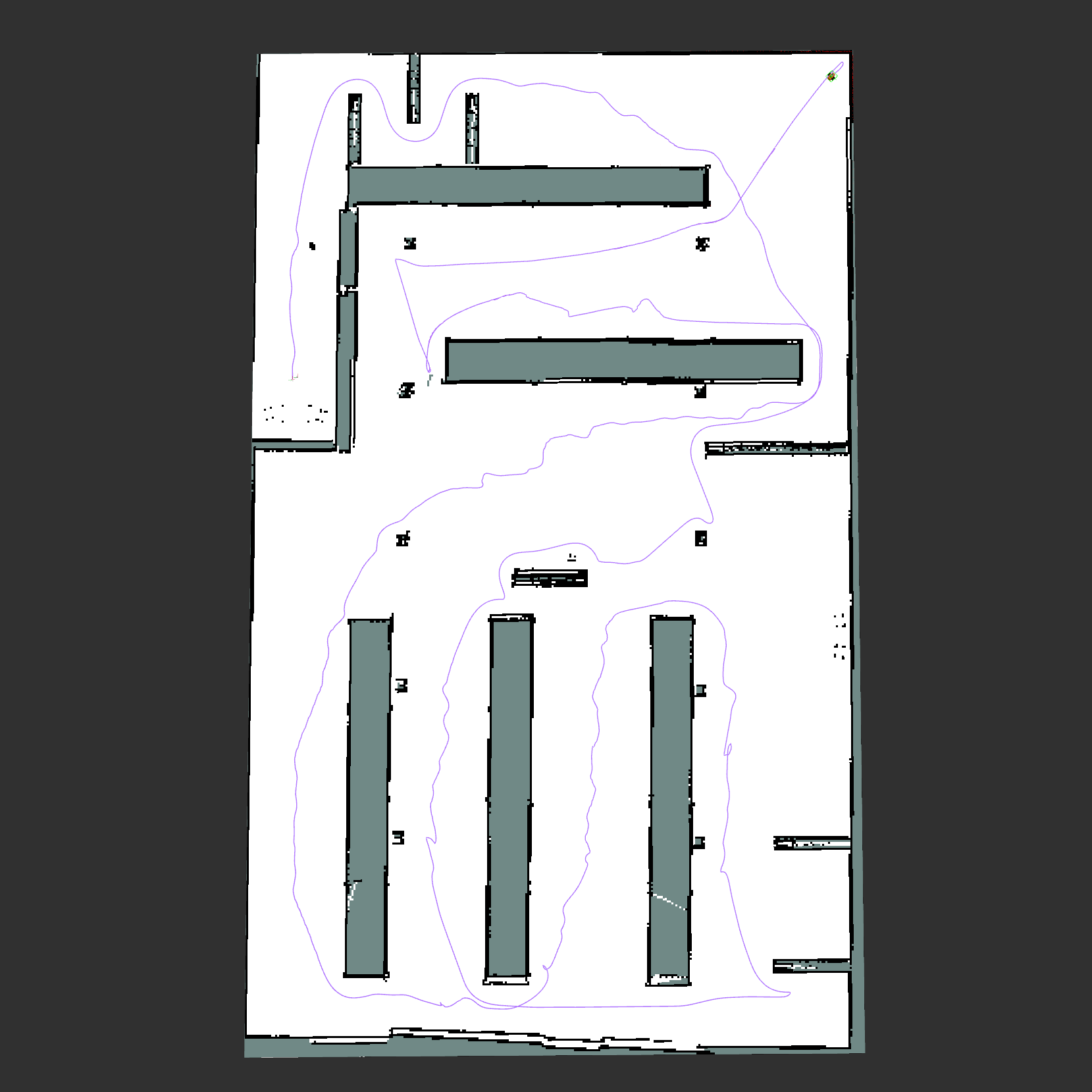
|
| m_explore_ros2 | roadmap-explorer |
|
|
Tip
Shown MRTSP setup: Greedy MRTSP + Map Optimization + Preemption
Lower-power setup: Nearest + Preemption
The following results section shows exploration outputs collected from two different test environments: House and Corridor. These comparisons are intended to inspect the behavior differences between nearest, greedy mrtsp, and preemption enabled visually.
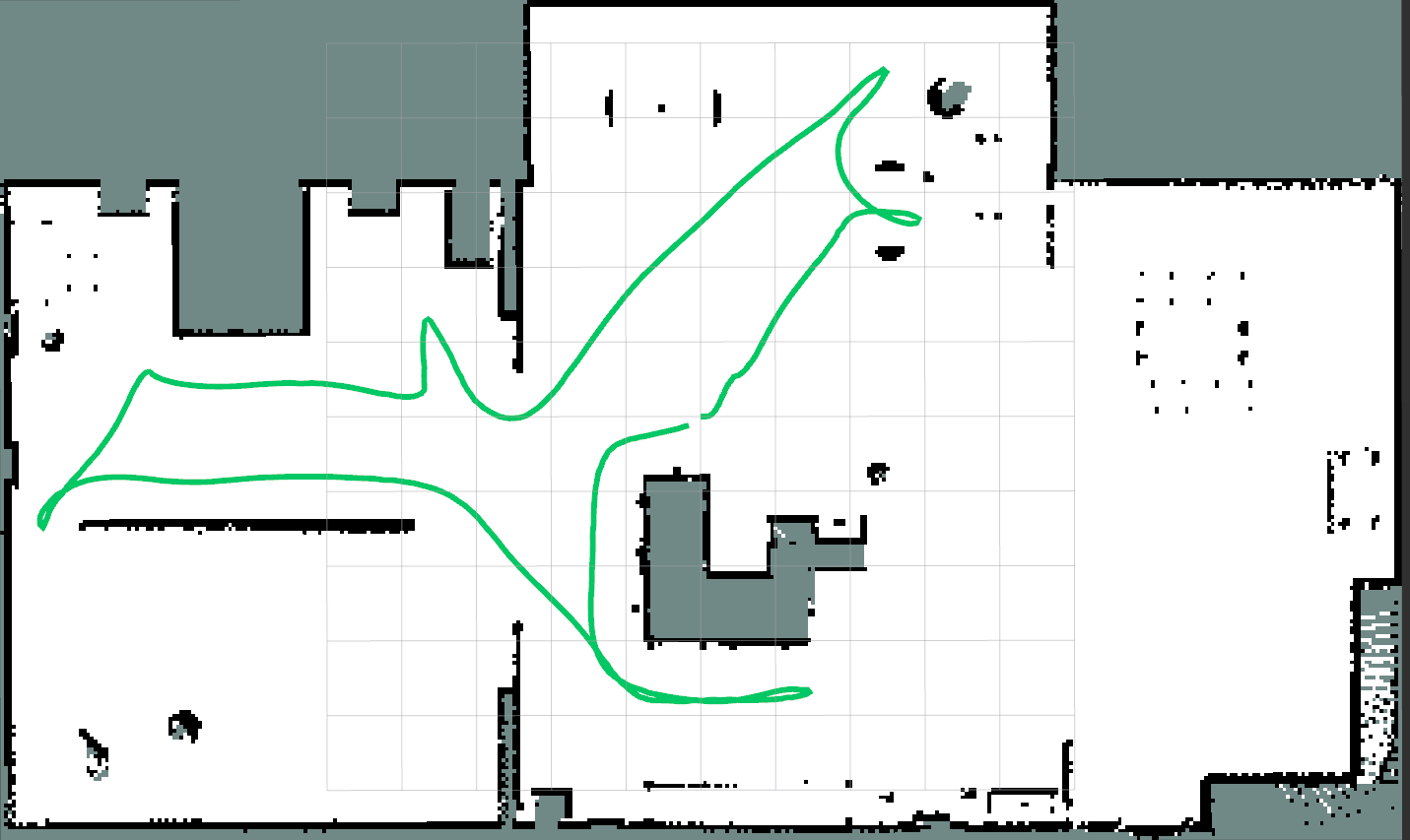
|
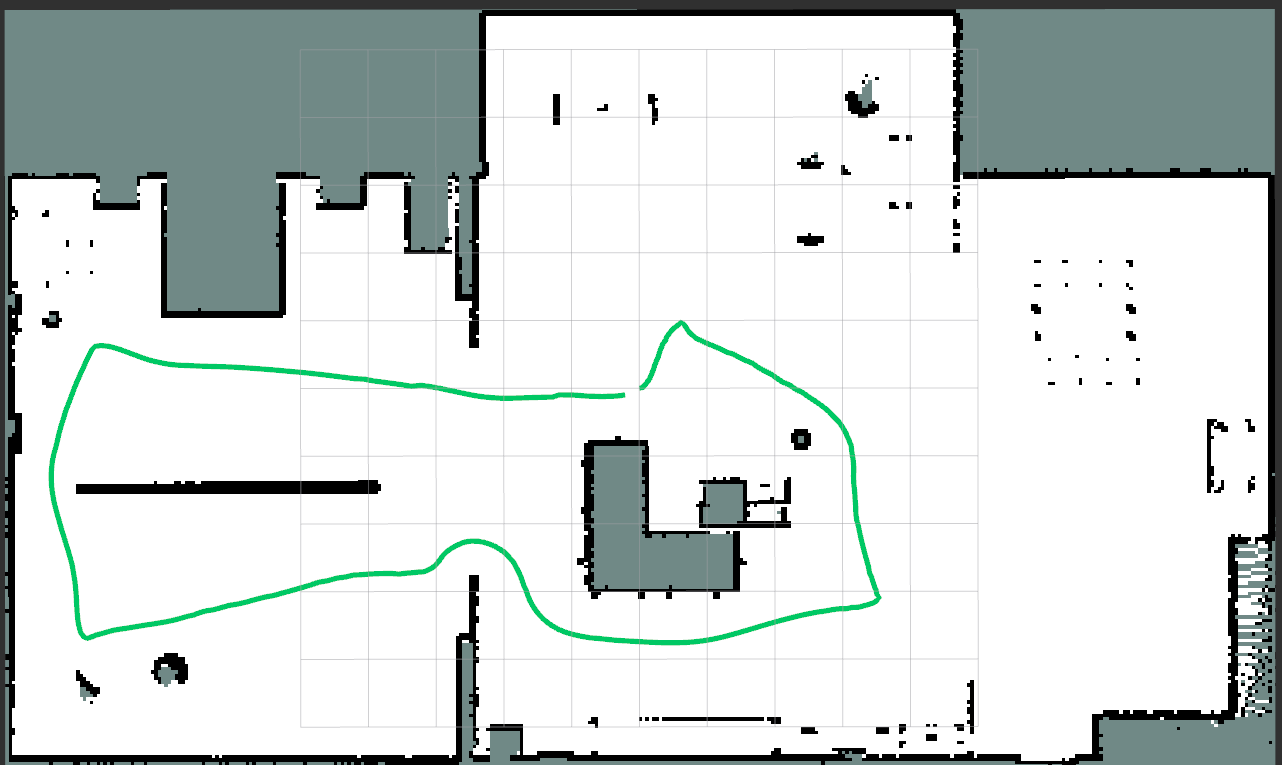
|
| House Nearest + Preemption | House Greedy MRTSP + Preemption |
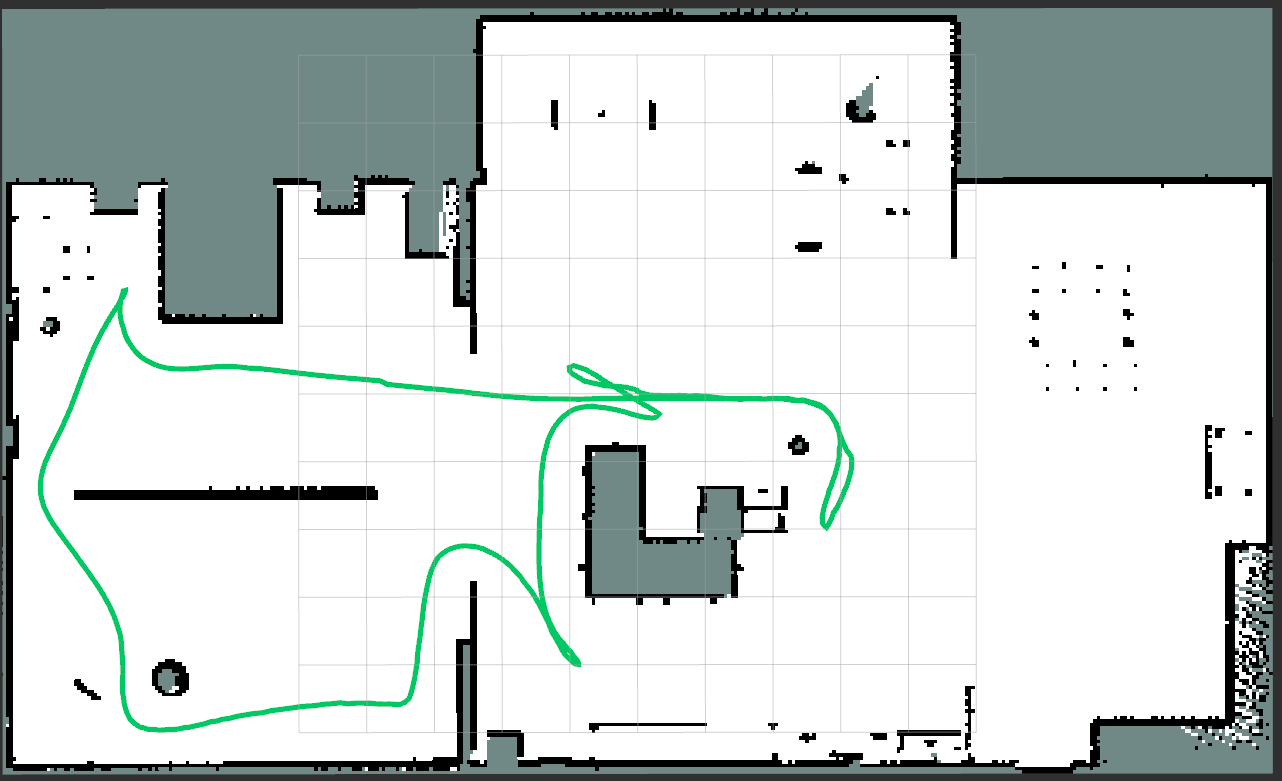
|
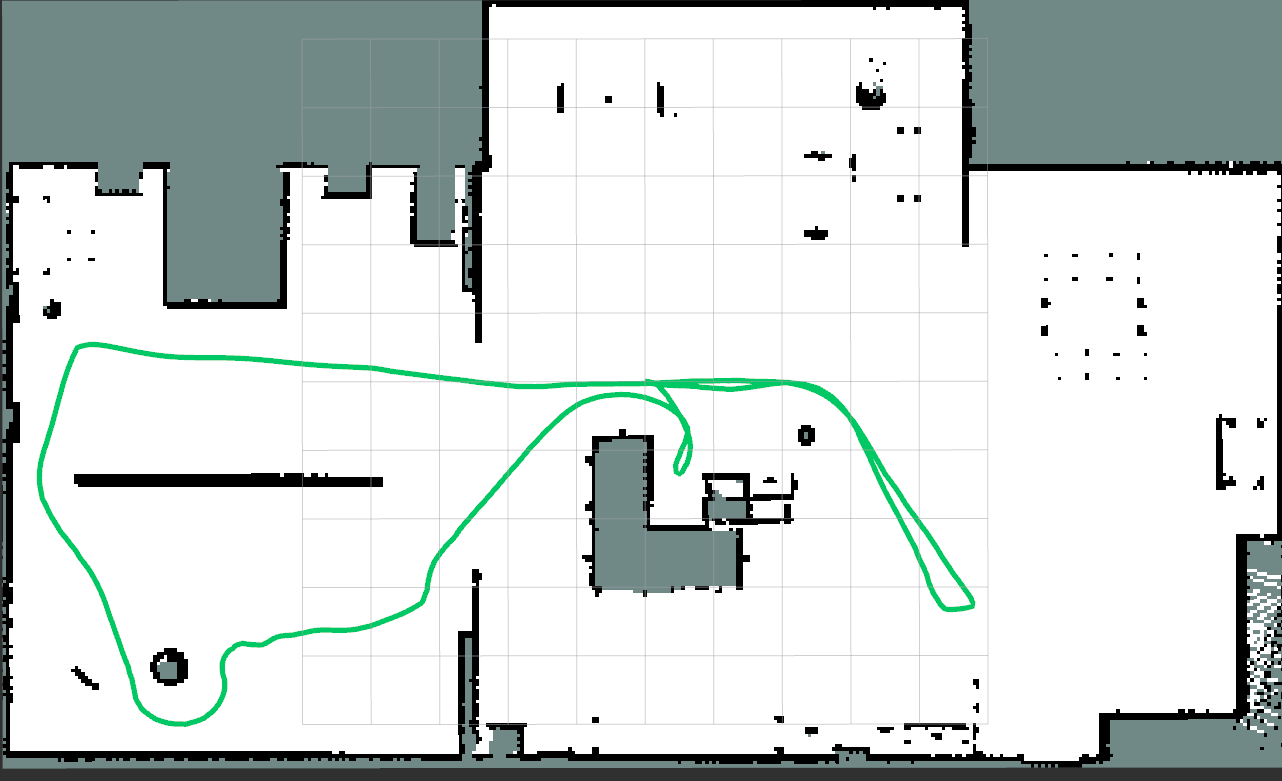
|
| House Nearest | House Greedy MRTSP |
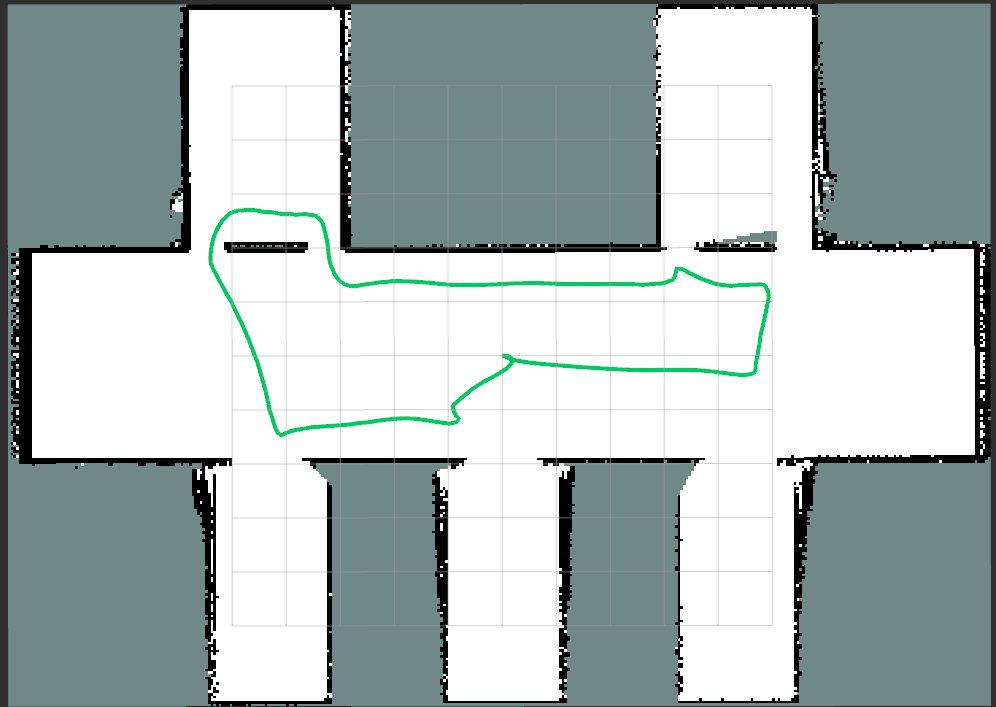
|
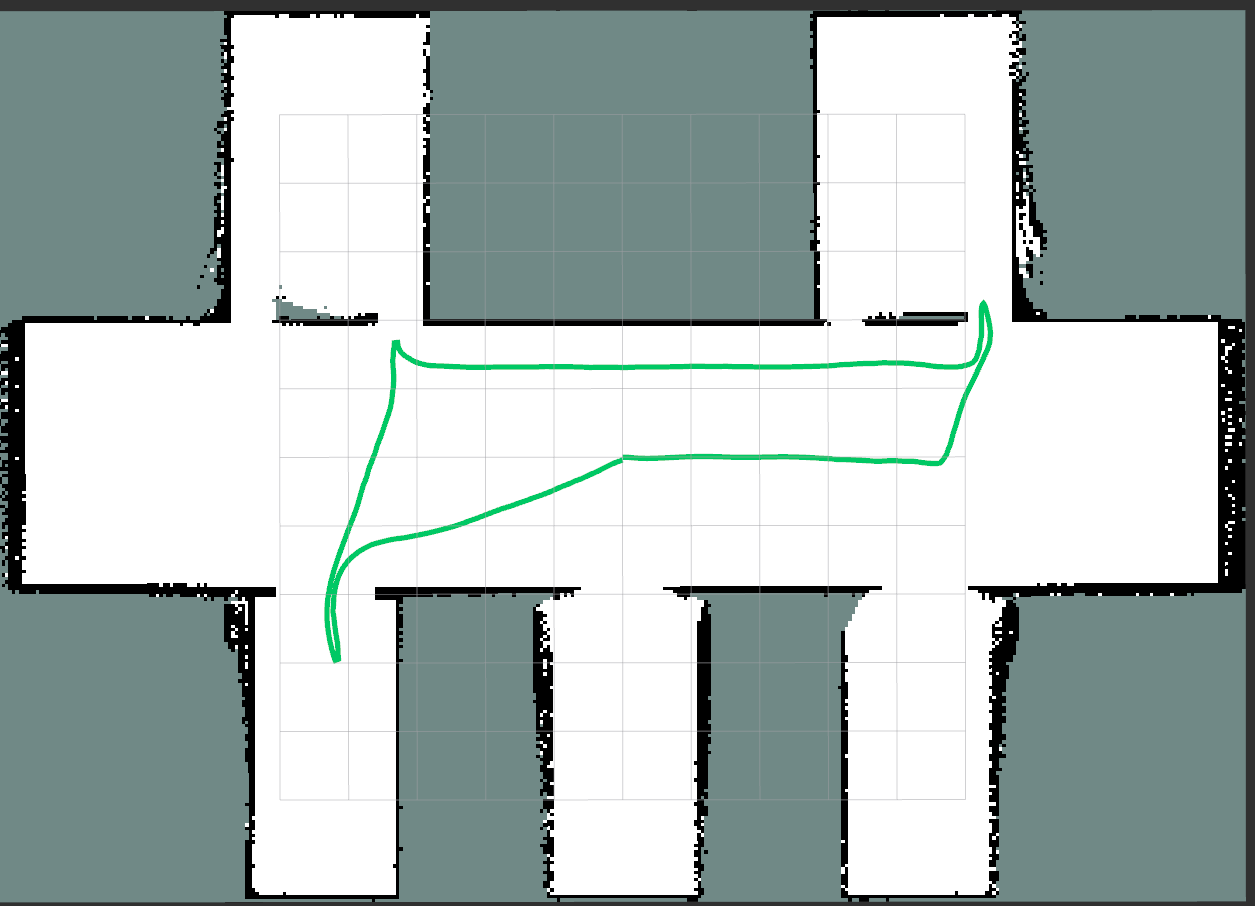
|
| Corridor Nearest + Preemption | Corridor Greedy MRTSP + Preemption |
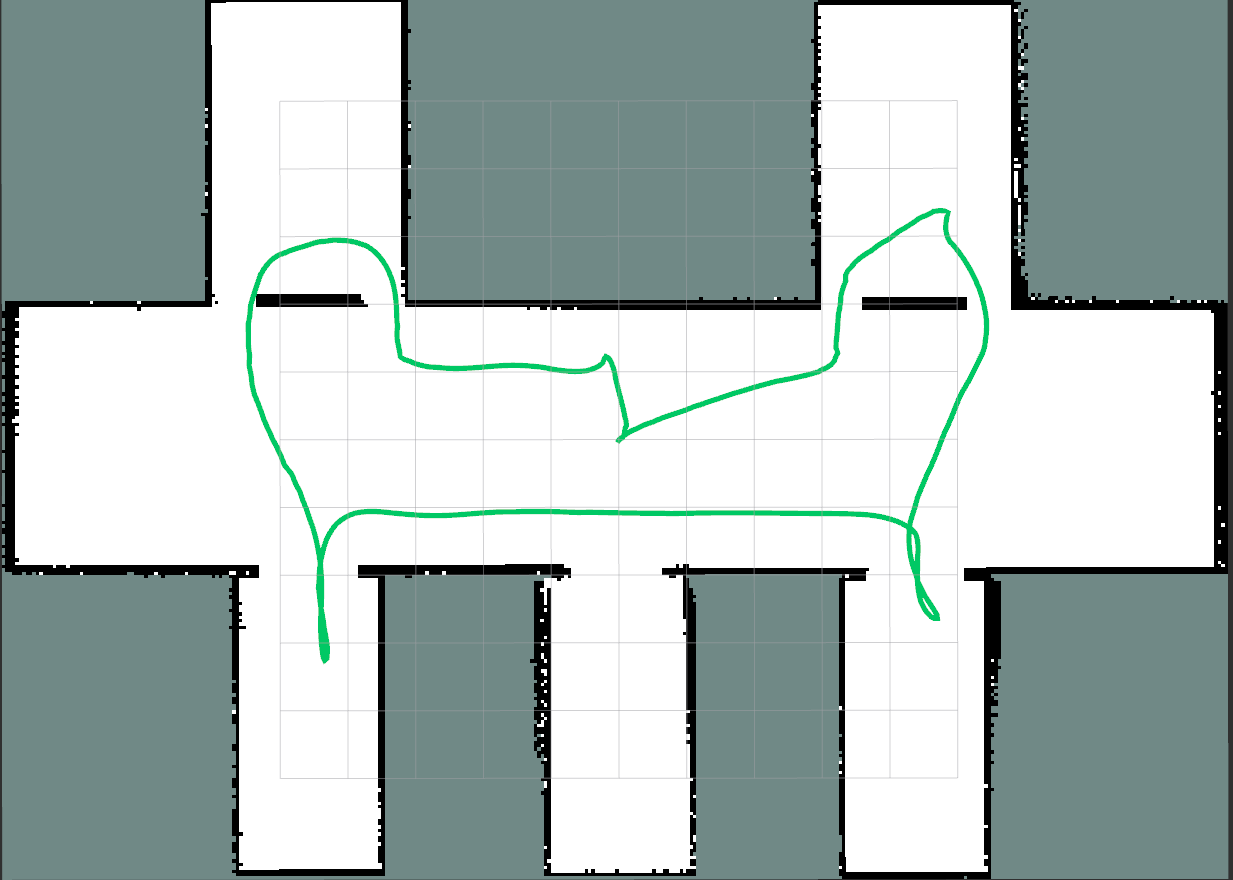
|
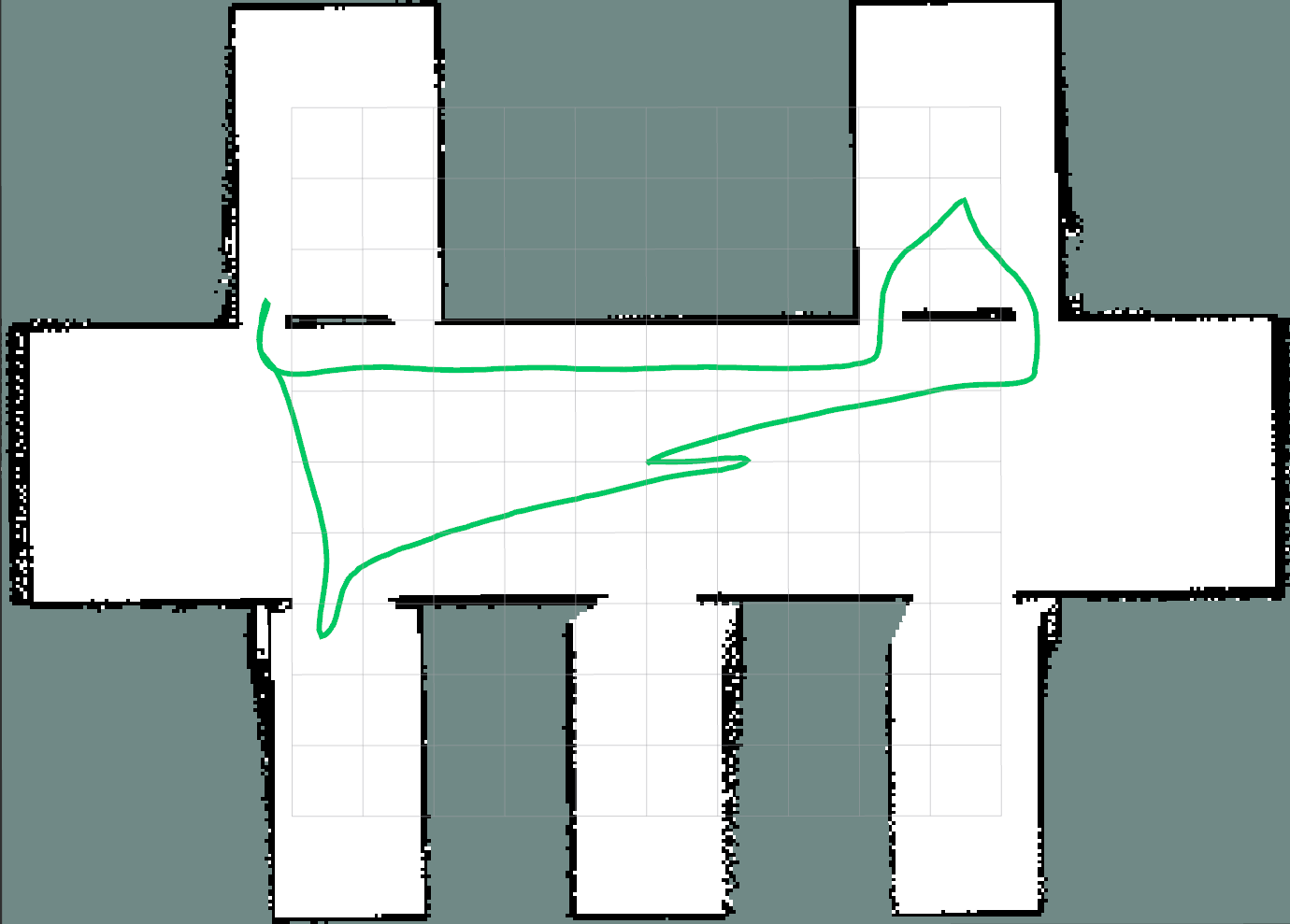
|
| Corridor Nearest | Corridor Greedy MRTSP |
In real autonomous exploration, not every tiny residual frontier is worth visiting. If very small and low-value regions are skipped, the robot can often achieve a major path reduction with only a minimal loss in total explored area.
This is especially effective in corridor-like maps, where narrow leftover fragments tend to add long detours and unnecessary turning for very little information gain.

|
| Corridor Greedy MRTSP + Lower OCC Threshold |
The package includes these main pieces:
frontier_explorer: public executable that subscribes to map and costmap topics, queries TF, and talks to Nav2NavigateToPose.frontier_exploration_ros2::frontier_exploration_ros2_core: reusable C++ core library that contains frontier search, decision-map construction, MRTSP ordering, goal-state handling, settle logic, active-goal preemption, blocked-goal handling, and suppression orchestration.frontier_debug_observer: passive RViz debug executable that observes map, costmap, TF, and parameters, then publishes analysis overlays without sending goals or changing exploration behavior.control_exploration: optional typed ROS service used to start, stop, schedule, and optionally shut down the explorer process.frontier_exploration_ctl: packaged CLI helper for sending exploration control requests from the terminal.launch/frontier_explorer.launch.py: package-owned example launch file.launch/frontier_debug.launch.py: launch file for the passive debug observer.config/params.yaml: packaged baseline parameter file.mrtsp_ordering: cost-matrix construction and greedy MRTSP traversal.mrtsp_solver: candidate pruning and bounded-horizon DP ordering.debug_analyzer: read-only reconstruction of MRTSP and DP scoring for visualization.debug_markers: RVizMarkerArrayandOccupancyGridoutput builders for debug overlays.
At runtime, the node expects:
- an occupancy map topic
- a global costmap topic
- a local costmap topic
- a TF transform from
global_frametorobot_base_frame - a Nav2
navigate_to_poseaction server, or another action server reachable under the configured action name
The decision path is structured in stages:
- map ingestion and occupancy-grid wrapping
- optional decision-map optimization with bilateral filtering and dilation
- WFD-style frontier extraction on the active decision map
- MRTSP ordering: materialize reachable goal points around frontier clusters, choose
greedyordpsolver behavior, and dispatch the first frontier from the ordered sequence - action dispatch, map/costmap monitoring, and runtime policy handling
The package can also publish a completion event through std_msgs/msg/Empty. This is intentionally optional and transport-light. The explorer only reports completion. Any map export, mission chaining, docking, or higher-level orchestration should be implemented outside the package.
The node also supports a cold-idle runtime mode. When the explorer is idle, it keeps the control service, action client, TF, and publishers available, but does not keep map or costmap subscriptions alive. This allows the package to remain available for orchestration while avoiding unnecessary map and costmap processing before exploration is started. In the packaged configuration, this mode is available when you explicitly set autostart:=false or stop the explorer at runtime. Cold-idle mode always keeps the control service enabled, even if control_service_enabled=false is requested.
Two optional debug publishers are also available:
selected_frontier_topicpublishes the selected target poseoptimized_map_topicpublishes the optimized occupancy grid used for decision making
These debug outputs are published only when debug logging is enabled for the node.
When suppression is enabled, the core can temporarily exclude repeatedly failing frontier areas and optionally wait under a temporary return-to-start goal while all detected frontiers remain suppressed. That temporary return path is separate from normal exploration completion.
The package includes a debug observer for RViz. It shows what frontier selection sees, how candidates are filtered, and how the scoring layers behave without changing exploration behavior.
Run the observer next to an explorer instance:
ros2 launch frontier_exploration_ros2 frontier_debug.launch.pyUse the same parameter file as the explorer when tuning a real run:
ros2 launch frontier_exploration_ros2 frontier_debug.launch.py \
params_file:=/path/to/params.yaml| Topic | Purpose |
|---|---|
explore/debug/raw_frontiers |
Frontiers detected on the raw occupancy map |
explore/debug/optimized_frontiers |
Frontiers detected after decision-map optimization and the active target |
explore/debug/mrtsp_scores |
MRTSP score rank, gain, path cost, and time cost |
explore/debug/mrtsp_order |
Greedy or DP MRTSP sequence shown as a route overlay |
explore/debug/dp_pruning |
DP candidate pool, prune rank, DP order rank, and pruning score |
explore/debug/decision_map |
Occupancy grid used for optimized frontier extraction |
explore/debug/chunk_cache |
Chunk-cache borders for decision-map raw diff validation |
Add the debug topics as MarkerArray displays, and add explore/debug/decision_map as a Map display. Keep the fixed frame aligned with the configured global_frame, usually map.
The chunk-cache overlay uses these colors:
- green border: raw chunk cache hit, chunk stayed unchanged
- red border: chunk was rebuilt because the incoming raw map changed there
- yellow border: full geometry reset/full rebuild, for example after map growth or origin shift
The overlay also publishes a small text summary with chunk hit/dirty/reset counts and whether the optimized output was reused.
You can check that the observer is publishing with:
ros2 topic list | grep explore/debugThe observer publishes a one-time success log after the first complete overlay set is sent:
Frontier debug overlays published successfully
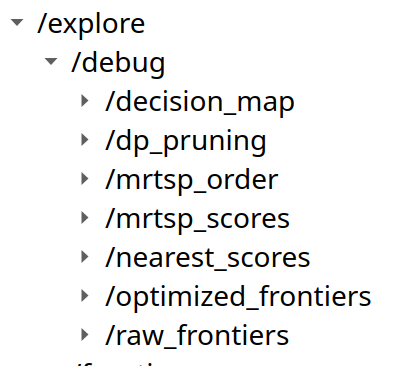
|
| RViz debug topic display list |
Topic:
explore/debug/raw_frontiers
This overlay shows frontier candidates detected directly on the input occupancy map before decision-map optimization. It is useful for understanding what the map itself contributes before filtering, smoothing, and dilation affect the decision map.
Displayed values:
- orange points: raw frontier candidates
- no score labels: this layer is meant to show detection density, not ranking
If raw frontiers are dense but optimized frontiers are sparse, decision-map optimization is reducing candidate noise. If raw frontiers are missing in an expected area, the issue is usually in the map, occupancy threshold, costmap blocking, or frontier-size filtering.
Topic:
explore/debug/optimized_frontiers
This overlay shows the frontier candidates that remain after decision-map optimization. These are the candidates used by MRTSP scoring and DP pruning analysis.
Displayed values:
- green points: optimized frontier candidates
- white sphere: first active target selected by the current ordering
This topic is the quickest way to inspect whether the robot is choosing from the expected candidate set. When this layer differs strongly from raw_frontiers, the decision-map parameters are having a visible effect.
Topic:
explore/debug/mrtsp_scores
This overlay explains the start-row MRTSP score for each candidate. It shows why a frontier is attractive or expensive before the full route order is built.
Displayed values:
rank: rank by MRTSP start-row score; lower is betterscore:M(0, j), the robot-to-frontier start-row cost used by the MRTSP matrixgain: information-gain proxy, based on frontier sizepath: initial frontier path-cost termtime: lower-bound travel-time term from robot pose to candidate- green-to-warm point color: lower score to higher score
A low score usually means the candidate has a good balance of travel cost and expected information gain. A high gain can help a farther frontier, but a large path or time can still make it less attractive.
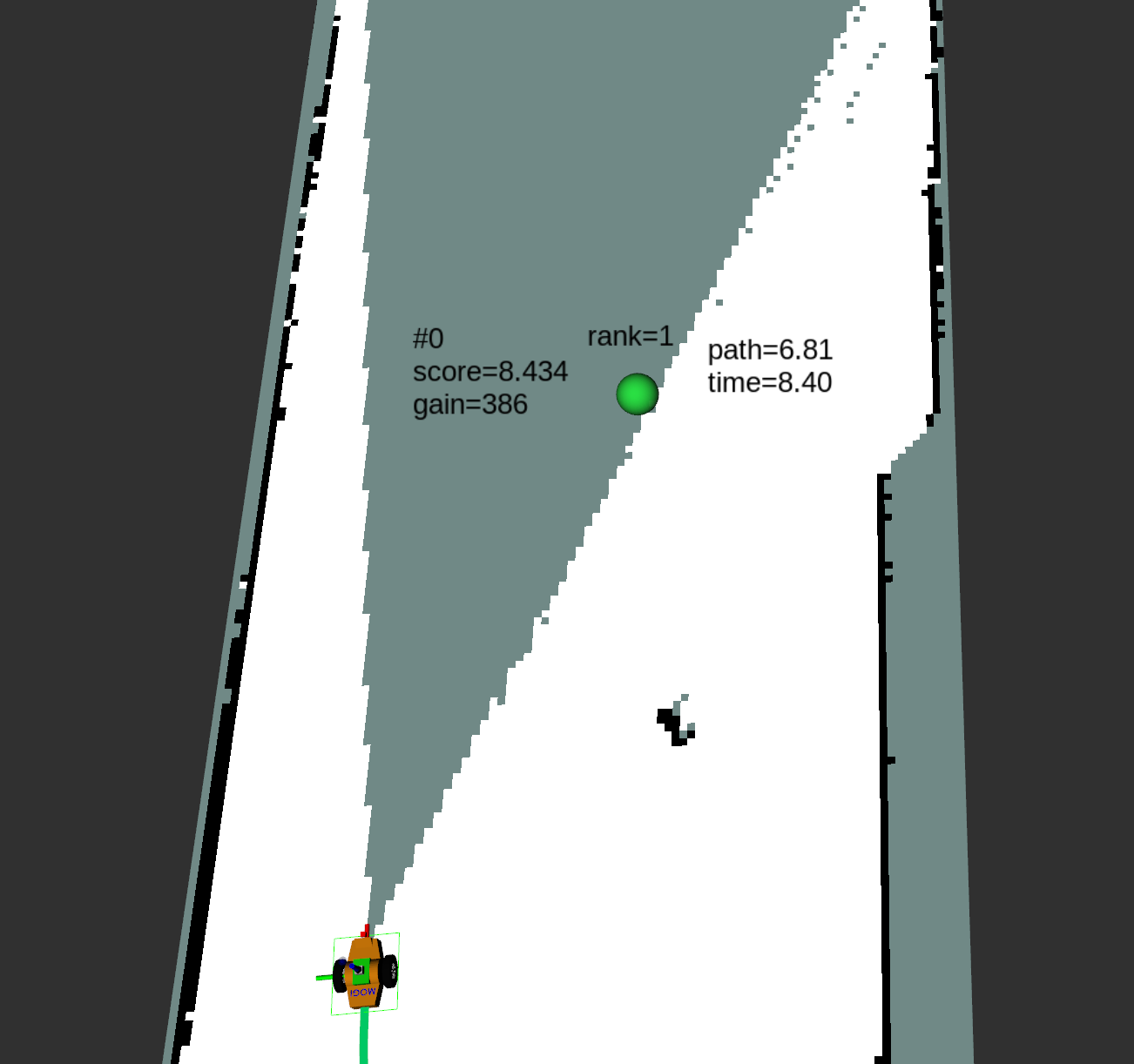
|
| MRTSP Scores |
Topic:
explore/debug/mrtsp_order
This overlay shows the analyzed MRTSP route sequence. In mrtsp_solver: greedy, it follows the greedy matrix traversal. In mrtsp_solver: dp, it follows the bounded-horizon DP sequence after pruning.
Displayed values:
- cyan route line: analyzed active order
- faint start edges: low-cost robot-to-frontier start edges
order=N: candidate position in the route sequence
Only order=1 is dispatched as the next navigation target. The remaining route is lookahead context and is recomputed after the robot moves and the map/frontiers update.
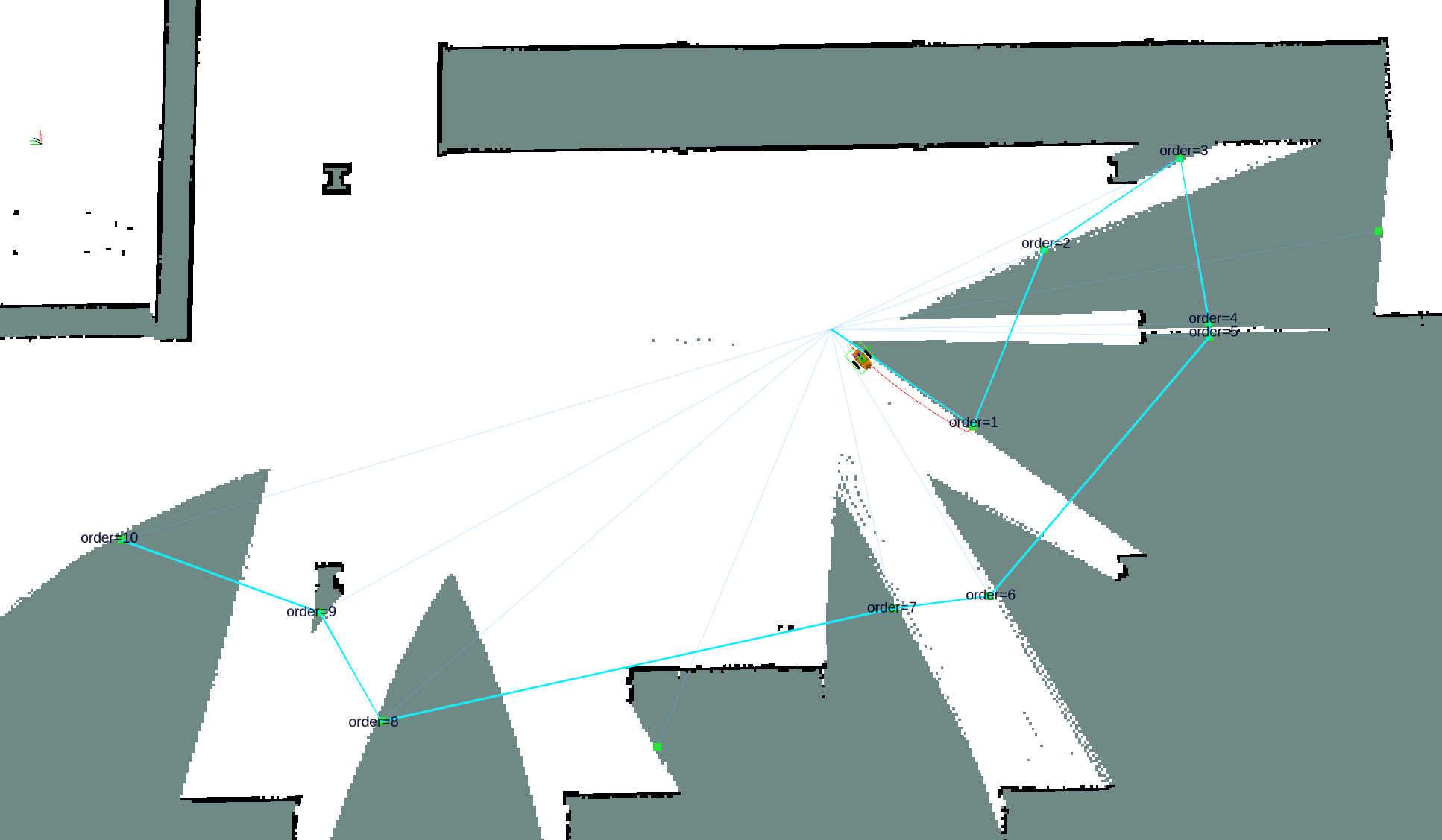
|
| MRTSP Order |
Topic:
explore/debug/dp_pruning
This overlay explains which optimized frontiers enter the bounded-horizon DP solver. It makes the difference between all available candidates and the pruned DP candidate pool visible.
Displayed values:
- orange points: candidates kept for DP
- grey points: candidates outside the pruned pool
prune: rank in the DP candidate pool, after sorting by MRTSP start-row scoredp_order: position in the DP route sequence, or-if the candidate is pruned but not used in the selected sequencescore: pruning score, equal to the MRTSP start-row scoreM(0, j)
The candidate limit controls how many orange points can appear. The planning horizon controls how many of those candidates can appear in the DP route sequence.
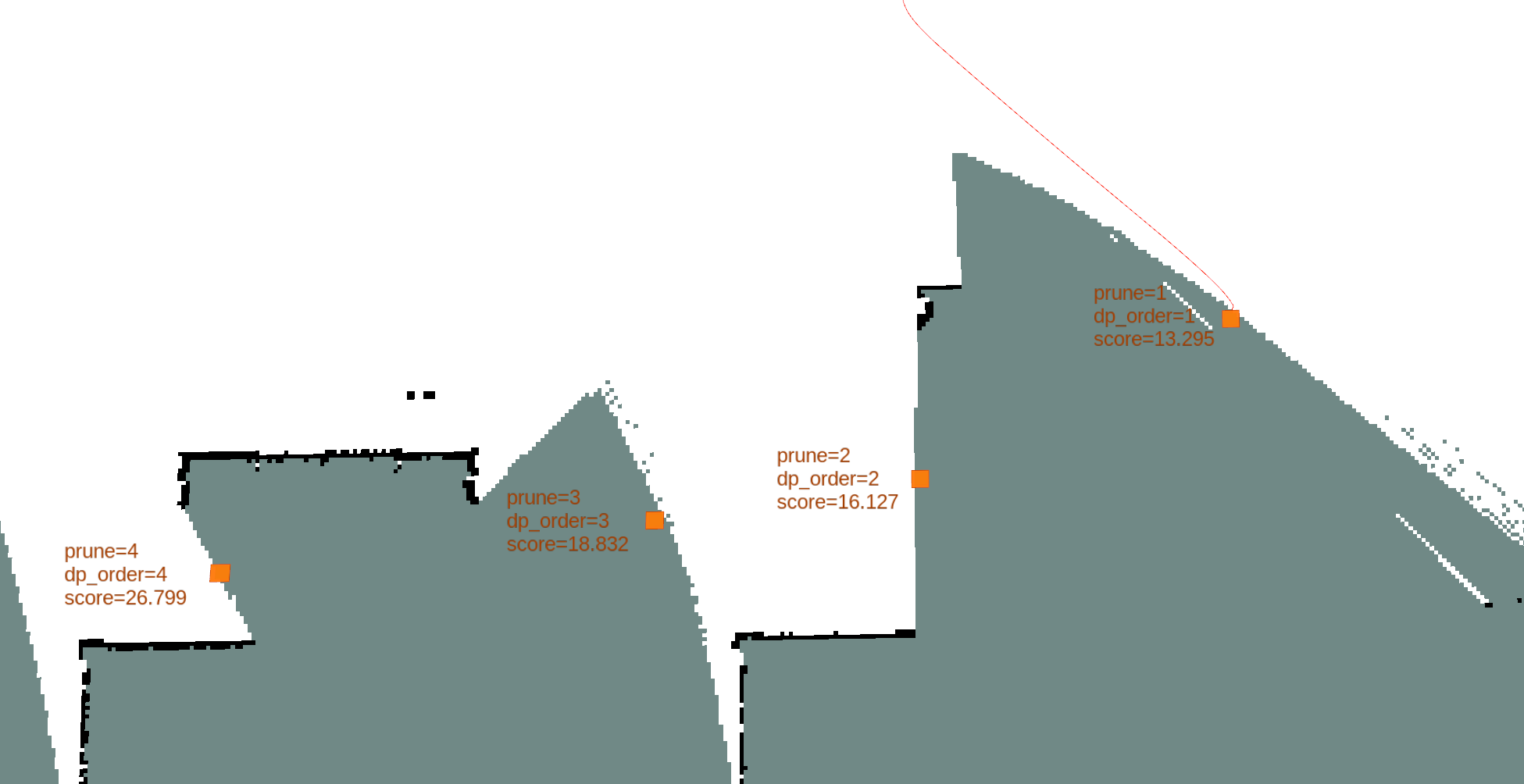
|
| DP Pruning |
Topic:
explore/debug/decision_map
This overlay publishes the occupancy grid used for optimized frontier extraction. It shows the map after the decision-map optimization step, using the same occupancy threshold and optimization parameters as the observer analysis.
Displayed values:
- free, occupied, and unknown cells as a
Mapdisplay - smoothed and dilated structure produced by decision-map optimization
- candidate changes that explain differences between raw and optimized frontier overlays
The package follows the classical frontier idea: a frontier is an unknown cell that borders free space.
The eligibility test implemented in the search layer can be summarized as:
frontier(p) is true if:
  map(p) = unknown
  and there exists q in N(p) such that map(q) = free
  and there does not exist q in N(p) blocked by the active costmap policy
N(p) is the local neighborhood around cell p. The implementation uses an 8-connected neighborhood plus the center cell for local scans.
The core search keeps the WFD idea from Frontier Based Exploration for Autonomous Robot. The code uses two BFS layers:
- A map-space BFS expands through reachable map cells.
- When a frontier cell is found, a frontier BFS grows that connected frontier cluster.
The search flow is:
1. Project the robot pose into map coordinates.
2. If the robot starts in unknown or occupied space, recover the closest free seed.
3. Expand a BFS over reachable map cells.
4. When a frontier cell is detected, grow the full connected frontier cluster.
5. Reject tiny clusters.
6. Build one frontier candidate from that cluster.
7. Repeat until the reachable map area is exhausted.
This preserves the core WFD idea while adapting it to a ROS 2 exploration stack that also reasons over global and local costmaps.
Each frontier cluster is converted into a FrontierCandidate with:
- a centroid used for ranking and equivalence checks
- a center point used as the MRTSP dispatch baseline
- a start world point used by the MRTSP path-cost calculation
- an optional reachable goal point used by navigation dispatch and preemption checks
- a cluster size used as the information-gain proxy
The centroid is computed directly from frontier cells:
c_x = (1 / N) * sum(x_i)
c_y = (1 / N) * sum(y_i)
The node searches free and unblocked neighbors around frontier cells and selects a reachable navigation point close to the centroid:
choose g that minimizes ||g - c||^2
subject to:
  g is free
  g is not blocked in the global costmap
  g is not blocked in the local costmap
  and optionally ||g - r||^2 >= d_min^2
Where:
cis the frontier centroidgis the candidate goal pointris the robot positiond_minis the active minimum-distance gate
If no goal candidate satisfies the distance constraint, the implementation falls back to the best unconstrained reachable point.
The decision-map stage is inspired by the 2025 paper and implemented directly in this package. The purpose is to reduce invalid frontiers caused by sparse sensing while preserving occupied structure.
The occupancy grid is first mapped into a paper-style image:
- occupied =
0 - unknown =
205 - free =
255
Let I(p) be the paper-image value at cell p. The bilateral filter uses a spatial-domain Gaussian and a range-domain Gaussian:
G_s(p, q) = exp(-||p - q||^2 / (2 * sigma_s^2))
G_r(p, q) = exp(-(I(p) - I(q))^2 / (2 * sigma_r^2))
The normalization term and filtered value are:
W(p) = sum_{q in S} G_s(p, q) * G_r(p, q)
I_bar(p) = (1 / W(p)) * sum_{q in S} G_s(p, q) * G_r(p, q) * I(q)
Where S is the local filter support around p.
After filtering, the package thresholds the image back into a frontier-decision image:
- cells above the free/unknown midpoint become free
- cells below that threshold become unknown
- occupied cells from the raw image remain occupied
Finally, the package applies circular free-space dilation with radius dilation_kernel_radius_cells over the thresholded result. This expands filtered free support while keeping occupied cells fixed.
In practice, this stage:
- reduces invalid frontiers caused by sparse sensing
- preserves occupied cells
- keeps narrow traversable passages when the optimization parameters are tuned conservatively
The package uses frontier size as the information-gain proxy:
P(V_i, V_j) = size(V_j)
The path-cost term follows the candidate geometry used in the implementation:
d(V_i, V_j) = max(d_m + d_u, d_n + d_v) - r_s
Where:
d_mis the distance from the source frontier center point to the target frontier center pointd_nis the distance from the source frontier center point to the target frontier centroidd_uis the distance from the target frontier center point to the target start world pointd_vis the distance from the target frontier centroid to the target start world pointr_sissensor_effective_range_m
The implementation uses frontier cluster size as the gain term. The path-cost term can become negative when a candidate frontier is effectively already within sensing range. That behavior is intentional because it biases ordering toward frontiers that can expose area efficiently with less added travel.
Once frontier path cost and information gain are available, the package builds a directed MRTSP-style cost matrix over the robot start node and all frontier candidates.
For frontier-to-frontier transitions, the heuristic is:
M(i, j) = (weight_distance_wd * d(V_i, V_j)) / (weight_gain_ws * P(V_i, V_j))
For start-to-frontier transitions, the package adds a lower-bound start term derived from robot translation and heading limits:
M(0, j) =
  (weight_distance_wd * d(V_0, V_j)) / (weight_gain_ws * P(V_0, V_j))
  + t_lb(j)
With:
t_lb(j) = min(
  L(robot, V_j) / max_linear_speed_vmax,
  |delta_yaw(robot, V_j)| / max_angular_speed_wmax
)
Matrix node 0 is the robot start node. Matrix nodes 1..M are frontier candidates.
Three implementation details matter in practice:
- frontier dispatch uses
center_pointwhen no reachable navigationgoal_pointis materialized frontier_map_optimization_enablednow directly controls whether decision-map optimization is applied- reachable
goal_pointmaterialization stays active because dispatch, completion-distance, suppression, and visible-gain logic all use it
With mrtsp_solver: greedy, the package traverses the full MRTSP cost matrix one frontier at a time:
current = robot_start
unvisited = all frontier candidates

while unvisited is not empty:
  choose j in unvisited with minimum M(current, j)
  append j to order
  current = j
  remove j from unvisited
This mode is simple, deterministic, and fast. It only optimizes the next selected edge, so it can miss a better route when a slightly more expensive first choice leads to a much better sequence afterward.
With mrtsp_solver: dp, the package applies score-based pruning before solving the route. The pruning score is the same start-row MRTSP cost used in the matrix:
score(j) = M(0, j)
Candidates are sorted by:
1. lower score
2. larger frontier size
3. lower original candidate index
Only the first dp_solver_candidate_limit candidates are passed into the DP solver. The cost matrix is then built for that pruned pool, not for the full frontier list.
The DP horizon controls route depth, not the candidate pool size:
candidate pool size = min(dp_solver_candidate_limit, number of candidates)
route depth         = min(dp_planning_horizon, candidate pool size)
The default DP profile is:
dp_solver_candidate_limit: 15
dp_planning_horizon: 10
Warning
Bounded-horizon DP cost depends on the processor, the frontier count, and how much CPU budget should be reserved for exploration. On lower-power CPUs, keep dp_solver_candidate_limit and dp_planning_horizon smaller, or use mrtsp_solver: greedy for the lightest behavior. On stronger CPUs, values above the default can be tested, but dp_solver_candidate_limit is capped at 60.
dp_solver_candidate_limit controls how many scored candidates enter the DP route search:
dp_solver_candidate_limit = 3

score(A) = 1
score(B) = 2
score(C) = 3
score(D) = 4

candidate pool = A, B, C
dp_planning_horizon controls how deep the route search goes inside that candidate pool:
K = 1

Robot -> A = 1
Robot -> B = 2
Robot -> C = 3

best route = Robot -> A
dispatch   = A
K = 2

Robot -> A -> B
Robot -> B -> C
Robot -> C -> D
...

dispatch = first frontier of the best 2-frontier route
K = 10

Robot -> v1 -> v2 -> v3 -> ... -> v10

dispatch = v1
For a pruned pool with M candidates and an effective horizon K, the solver searches:
Robot -> v1 -> v2 -> ... -> vK
The DP state is:
dp[mask][j]
Meaning:
minimum route cost from the robot,
after visiting the candidate set represented by mask,
and ending at candidate j
Initialization:
dp[1 << j][j] = M(0, j + 1)
Transition:
dp[mask | (1 << k)][k] =
  min(
    dp[mask | (1 << k)][k],
    dp[mask][j] + M(j + 1, k + 1)
  )
Final selection:
best = min(dp[mask][j])
where popcount(mask) = K
Parent pointers reconstruct the selected sequence. Only sequence[0] is dispatched, then the map and frontier set are refreshed before the next decision. If the DP solver cannot build a finite route, the core falls back to greedy ordering on the same pruned matrix.
The implementation keeps only the active DP depth layer and the parent states needed for reconstruction. This keeps memory bounded by the selected candidate limit and planning horizon instead of building a full global TSP solver.
The package uses both global and local costmaps during search and during active-goal monitoring.
The blocking rule is intentionally strict:
blocked(world_point) is true if any active costmap reports cost > OCC_THRESHOLD
This affects two stages:
- frontier eligibility: unknown cells next to blocked neighbors are not treated as valid frontiers
- goal-point materialization: free neighbors that are blocked in either costmap are rejected
This is one of the key extensions beyond a plain frontier-only implementation. It improves robustness in cluttered environments and reduces the number of goals that are technically frontier-adjacent but not operationally navigable.
The implementation quantizes frontier reference points and goal points into a stable signature:
q = max(frontier_visit_tolerance, 0.1)
signature(F) = sort(round(ref_x / q), round(ref_y / q), round(goal_x / q), round(goal_y / q))
This signature is used for:
- snapshot cache validation
- stable publish suppression for RViz markers
- post-goal settle checks
- MRTSP order-cache validation, together with solver mode and DP bounds
It reduces noise from small floating-point jitter and helps keep runtime behavior deterministic.
After a normal frontier goal result, the node does not immediately send the next goal when post_goal_settle_enabled=true. Instead it waits for a fixed cooldown.
The readiness rule is:
ready if:
  elapsed >= post_goal_min_settle
This reduces rapid re-goaling after a terminal frontier result without waiting for extra map-update counters or signature stability checks.
Two parameters are deliberately exposed as policy controls:
goal_preemption_enabledgoal_skip_on_blocked_goal
They are design choices, not incidental flags.
goal_preemption_enabled allows the active frontier goal to be reconsidered when target-pose visible reveal gain is exhausted.
goal_skip_on_blocked_goal allows the active frontier goal to be skipped when the target becomes blocked in the local or global costmap. If another frontier is available, the explorer moves on to it. If not, the blocked goal can be canceled explicitly.
Visible-reveal-gain preemption evaluates the target pose with an occlusion-aware visible reveal estimate. As long as that estimate says the active goal still offers useful reveal on arrival, the current goal is kept. When that gain no longer justifies staying on the active target, the explorer can switch using the refreshed frontier set.
The implementation also applies:
- a minimum time gap between visible-reveal-gain preemption attempts
- an optional completion distance that can treat a near-arrived frontier as finished, even when visible-reveal-gain preemption is disabled
- a stability requirement so replacement candidates must be observed repeatedly before a switch is made
Together, these controls help the explorer stay responsive without turning preemption into unstable goal switching.
goal_preemption_complete_if_within_m lets the system accept "close enough" as effectively complete and move on cleanly. This guard is independent from visible-reveal-gain preemption, so it can also recover when Nav2 does not report success even though the robot is already inside the configured frontier completion distance from the dispatched target pose. When the guard triggers, the active goal is canceled and the next normal scheduling pass uses the configured completion distance as a temporary minimum candidate distance near that completed target. This avoids immediate redispatch without doing an extra frontier-list filter in the arrival callback. It should still be used carefully on robots that prioritize conservative obstacle avoidance: if this threshold is set too large, the robot can mark a frontier complete before the intended sensing pose is meaningfully reached, which can in turn produce wrong exploration transitions.
Suppression is an optional policy layer that temporarily removes repeatedly failing frontier goal areas from consideration without marking exploration as complete.
The implementation is reason-agnostic at the policy level. It does not try to infer whether a failure came from Nav2, another action backend, a planner limitation, or a temporary bring-up condition. Instead it tracks repeated failed attempts at the frontier goal point and promotes those failures into temporary square suppression regions.
The attempt key is quantized with the same tolerance family used elsewhere in the core:
q = max(frontier_visit_tolerance, 0.1)
attempt_key(g) = (round(g_x / q), round(g_y / q))
Where g is the actual navigation goal point, not the frontier centroid.
After a configurable number of failed attempts, the implementation creates a square suppression region:
center = g
side_length = frontier_suppression_base_size_m
If another matured failed goal lands in the outer expansion band of an existing region, the region grows instead of creating a second nearby fragment:
inner square  = C x C
outer square  = (C + B) x (C + B)
if g is in outer - inner:
  new_center = midpoint(old_center, g)
  new_side_length = 2 * C
Where:
Cis the current region side lengthBisfrontier_suppression_expansion_size_m
Membership is evaluated with the selected goal point. The suppression policy does not use the centroid for region filtering.
The suppression state is also bounded by design:
- failed attempt records are stored in a capped hash map
- suppression regions are stored in a capped vector
- both use TTL-based cleanup
- both use oldest-entry eviction if the configured hard cap is reached
That keeps the feature operationally safe for long-running deployments.
Suppression also includes a no-progress watchdog for accepted frontier goals.
The watchdog reads distance_remaining from the action feedback stream and tracks the best observed value. A goal is considered to have made meaningful progress only when the best distance improves by at least frontier_suppression_progress_epsilon_m since the last meaningful progress point.
The rule can be summarized as:
meaningful_progress if:
  distance_at_last_progress - best_distance_remaining >= progress_epsilon
The timeout rule is:
no_progress if:
  now - last_meaningful_progress_time >= no_progress_timeout
There is no separate time window attached to frontier_suppression_progress_epsilon_m. The expected interpretation is:
- achieve at least that much meaningful improvement
- before
frontier_suppression_no_progress_timeout_sexpires
If that does not happen, the active frontier goal is canceled and counted as a failed attempt.
Suppression is intentionally delayed during startup when frontier_suppression_startup_grace_period_s is greater than zero.
During that grace period, suppression filtering, failed-attempt recording, and no-progress cancelation stay disabled. This helps avoid poisoning suppression memory while Nav2, TF, or costmaps are still stabilizing.
All detected frontiers are temporarily suppressed is not the same condition as No more frontiers found.
The first means frontier candidates still exist but are temporarily excluded by suppression. The second means frontier search found no candidates at all.
When all current candidates are suppressed, all_frontiers_suppressed_behavior controls the response:
stay: wait in place for map or costmap changesreturn_to_start: temporarily navigate back to the recorded start pose
This temporary return behavior is separate from return_to_start_on_complete. It does not mark exploration complete, and it is canceled automatically if usable frontier candidates appear again.
The node expects the following interfaces to exist in the running system:
| Interface | Default | Purpose |
|---|---|---|
| Occupancy grid topic | map |
Frontier extraction and decision-map input |
| Global costmap topic | global_costmap/costmap |
Reachability and blocked-goal filtering |
| Local costmap topic | local_costmap/costmap |
Near-field blocked-goal filtering |
| Nav2 action | navigate_to_pose |
Goal execution |
| TF transform | map -> base_footprint |
Robot pose lookup |
| Frontier marker topic | explore/frontiers |
Visualization |
| Control service | control_exploration |
Optional runtime start, stop, schedule, and quit control when enabled |
For most integrations, only these fields need to be remapped:
map_topiccostmap_topiclocal_costmap_topicnavigate_to_pose_action_nameglobal_framerobot_base_framefrontier_marker_topicselected_frontier_topicoptimized_map_topic
All defaults are relative topic names inside the package-owned baseline config. That keeps the package namespace-friendly in multi-robot deployments. If your system uses absolute topic names, provide them explicitly in your parameter file.
The public node is designed around nav2_msgs/action/NavigateToPose.
The explorer:
- waits for the action server with a bounded timeout
- dispatches one frontier goal at a time
- receives feedback and result callbacks
- can request cancelation during preemption flows
If your stack wraps Nav2 behind a namespace or a remapped action name, update navigate_to_pose_action_name accordingly.
If suppression is enabled, repeated rejected goals, aborted goals, or no-progress timeout cancelations can temporarily remove a frontier area from selection.
The launch file accepts a namespace argument and all packaged topic defaults are relative. That makes the package suitable for:
- one explorer per robot namespace
- one Nav2 stack per robot namespace
- one map and costmap graph per robot namespace
Example:
ros2 launch frontier_exploration_ros2 frontier_explorer.launch.py \
  namespace:=robot1 \
params_file:=/absolute/path/to/robot1_frontier.yamlWhen completion_event_enabled is true, the explorer publishes one std_msgs/msg/Empty message when frontier exhaustion is observed.
Completion event QoS:
- durability:
transient_local - reliability:
reliable - depth:
1
Design intent:
- the explorer reports completion
- external systems decide what to do next
- late-joining subscribers can still see the latest completion event while the explorer node remains alive
Typical consumers include:
- map export services
- docking or return-home supervisors
- mission sequencers
- test automation scripts
Suppressed return-to-start is different. If all_frontiers_suppressed_behavior=return_to_start, the robot may temporarily go back to the start pose while waiting for new frontier opportunities, but that does not publish a completion event and does not mean exploration has finished.
The package exports a reusable C++ target:
find_package(frontier_exploration_ros2 REQUIRED)

add_executable(my_explorer src/my_explorer.cpp)
target_link_libraries(my_explorer
  frontier_exploration_ros2::frontier_exploration_ros2_core
)
The core separates the exploration logic from the public node for custom ROS 2 integrations.
Suppression is most useful in systems where the same frontier can fail repeatedly for operational reasons that are not visible in the occupancy map alone. Common examples include:
- a navigation stack that comes up later than the explorer
- a planner that keeps rejecting a narrow or unstable goal area
- a controller that stalls near clutter without making meaningful progress
- a temporary map or costmap inconsistency during bring-up
In those cases, suppression adds three controls:
- startup grace delays suppression until the initial system bring-up window has passed
- failure memory temporarily removes repeatedly failing goal areas from reselection
- optional temporary return-to-start behavior avoids treating the situation as exploration complete
If the frontier set changes and a usable candidate appears again, the temporary return-to-start goal is canceled and frontier exploration resumes automatically.
Accepted durability values:
transient_localvolatilesystem_default
Accepted reliability values:
reliablebest_effortsystem_default
| Channel | Default durability | Default reliability | Default depth |
|---|---|---|---|
| Map | transient_local |
reliable |
1 |
| Global costmap | volatile |
reliable |
10 |
| Local costmap | volatile |
inherit from global costmap |
inherit from global costmap |
| Completion event | transient_local |
reliable |
1 |
The local costmap subscriber always uses volatile durability. Reliability and depth can either inherit the global costmap settings or be overridden explicitly.
If the correct map durability is not known during first integration, the package can probe it at startup.
Behavior:
- Start with the configured map durability.
- Wait for
map_qos_autodetect_timeout_s. - If no map is received and the configured durability is
transient_localorvolatile, switch once to the opposite durability. - If a map arrives, lock that choice and stop autodetect.
- If neither attempt succeeds, stop autodetect and report failure.
This process is strictly startup-only. It does not keep switching at runtime.
The node emits machine-parsable logs with a fixed prefix:
[qos-autodetect] START selected=<durability> timeout=<seconds>
[qos-autodetect] SWITCH selected=<durability> elapsed=<seconds>
[qos-autodetect] COMPLETE result=<initial|fallback|failed> selected=<durability> elapsed=<seconds>
Interpretation:
result=initial: the first configured durability workedresult=fallback: the fallback durability workedresult=failed: neither attempt received a map within the startup window
Recommended integration sequence:
- Enable autodetect once during bring-up.
- Read the
COMPLETElog. - Copy the working durability into your permanent parameter file.
- Disable autodetect for regular deployments.
Suppression does not define its own QoS policy, but it is still relevant during first integration. If map QoS is wrong or the navigation stack comes up late, the explorer can observe unstable early behavior. The recommended pattern is:
- fix map QoS first
- use startup grace while validating navigation bring-up timing
- then tune suppression thresholds only after the transport layer is stable
Launch file: launch/frontier_explorer.launch.py
| Argument | Default | Effect | Overrides YAML |
|---|---|---|---|
namespace |
"" |
Runs the node inside a ROS namespace | No |
params_file |
packaged config/params.yaml |
Selects the parameter file | Replaces the file |
use_sim_time |
false |
Passes standard ROS simulation time parameter | Yes |
autostart |
"" |
Overrides the YAML autostart value when set |
Yes |
control_service_enabled |
"" |
Overrides the YAML control-service setting when set | Yes |
log_level |
info |
Sets node log severity | No |
map_qos_durability |
transient_local |
Overrides map durability | Yes |
map_qos_autodetect_on_startup |
false |
Enables startup autodetect | Yes |
map_qos_autodetect_timeout_s |
2.0 |
Sets timeout per autodetect attempt | Yes |
costmap_qos_reliability |
reliable |
Overrides global costmap reliability | Yes |
Notes:
params_filecontrols the full YAML source for the node.- the launch file only overrides
autostart,control_service_enabled, the QoS-related parameters listed above, anduse_sim_time - all other node behavior is defined by the selected parameter file
- MRTSP solver selection, decision-map tuning, suppression behavior, startup grace, and suppressed-frontier waiting policy are configured in YAML, not through dedicated launch arguments
Parameters are declared in frontier_explorer_node.cpp.
The packaged launch path uses config/params.yaml as its baseline parameter file, so launched behavior may differ from the declared defaults where that YAML intentionally overrides them. Notable examples are occ_threshold and goal_preemption_enabled: the node declares 50 and false, while the packaged YAML sets 60 and true.
| Parameter | Type | Default | Description | Notes |
|---|---|---|---|---|
map_topic |
string |
map |
Occupancy grid topic used for frontier extraction | Relative by default for namespace-friendly deployment |
costmap_topic |
string |
global_costmap/costmap |
Global costmap topic | Used during search and blocked-goal checks |
local_costmap_topic |
string |
local_costmap/costmap |
Local costmap topic | Used for near-field blocked-goal checks |
navigate_to_pose_action_name |
string |
navigate_to_pose |
Action name used for navigation goals | Must resolve to a NavigateToPose action server |
global_frame |
string |
map |
Global frame used for goals and TF lookups | Must exist in TF |
robot_base_frame |
string |
base_footprint |
Robot body frame used for TF lookups | Must exist in TF |
frontier_marker_topic |
string |
explore/frontiers |
Marker topic for frontier visualization | Publishes frontier markers |
selected_frontier_topic |
string |
explore/selected_frontier |
Debug topic for the selected target pose | Published only when debug logging is enabled |
optimized_map_topic |
string |
explore/optimized_map |
Debug topic for the optimized occupancy grid used for search | Published only when debug logging is enabled |
| Parameter | Type | Default | Description | Notes |
|---|---|---|---|---|
autostart |
bool |
true |
Starts exploration automatically when the node comes up | Set false to keep the node in cold idle until a control request |
control_service_enabled |
bool |
true |
Enables the control_exploration service |
If autostart=false, the node keeps the service enabled even when this is set false; packaged configs override this to false |
frontier_marker_scale |
double |
0.15 |
Point marker size for frontier visualization | Used by the RViz marker publisher |
frontier_map_optimization_enabled |
bool |
true |
Enables decision-map optimization before frontier extraction | Applies directly to the MRTSP-only runtime |
| Parameter | Type | Default | Description | Notes |
|---|---|---|---|---|
map_qos_durability |
string |
transient_local |
Map durability policy | Allowed: transient_local, volatile, system_default |
map_qos_reliability |
string |
reliable |
Map reliability policy | Allowed: reliable, best_effort, system_default |
map_qos_depth |
int |
1 |
Map subscription queue depth | Must be >= 1 |
map_qos_autodetect_on_startup |
bool |
false |
Enables startup-only map durability autodetect | Switches at most once, then stops |
map_qos_autodetect_timeout_s |
double |
2.0 |
Timeout per autodetect attempt in seconds | Internally clamped to at least 0.2 |
costmap_qos_reliability |
string |
reliable |
Global costmap reliability policy | Allowed: reliable, best_effort, system_default |
costmap_qos_depth |
int |
10 |
Global costmap queue depth | Must be >= 1 |
local_costmap_qos_reliability |
string |
inherit |
Local costmap reliability policy | inherit copies the global costmap reliability |
local_costmap_qos_depth |
int |
-1 |
Local costmap queue depth | Negative values mean inherit from global costmap |
| Parameter | Type | Default | Description | Notes |
|---|---|---|---|---|
sigma_s |
double |
2.0 |
Spatial sigma used by the bilateral filter | Larger values smooth over a wider map neighborhood |
sigma_r |
double |
30.0 |
Range sigma used by the bilateral filter over paper-image intensity values | Controls how strongly occupancy-state differences preserve edges |
dilation_kernel_radius_cells |
int |
1 |
Radius of the circular dilation applied after thresholding | Measured in map cells |
sensor_effective_range_m |
double |
1.5 |
Effective sensor range subtracted inside the MRTSP path-cost term | Used only by the MRTSP ordering model |
weight_distance_wd |
double |
1.0 |
Weight applied to the MRTSP path-cost term | Larger values make path length dominate more strongly |
weight_gain_ws |
double |
1.0 |
Weight applied to the MRTSP information-gain term | Larger values make frontier size dominate more strongly |
max_linear_speed_vmax |
double |
0.5 |
Maximum linear speed used in the MRTSP start-node lower-bound term | Used only while estimating the initial robot-to-frontier transition |
max_angular_speed_wmax |
double |
1.0 |
Maximum angular speed used in the MRTSP start-node lower-bound term | Used only while estimating the initial robot-to-frontier transition |
mrtsp_solver |
string |
dp |
Solver used for frontier ordering | Accepted values are dp and greedy; unknown values fall back to greedy |
dp_solver_candidate_limit |
int |
15 |
Maximum scored frontier candidates passed into bounded-horizon DP | Clamped to 1..60; this is candidate pool size, not route depth |
dp_planning_horizon |
int |
10 |
Number of distinct frontier visits searched inside the candidate pool | Clamped to at least 1; this is route depth, not candidate count |
occ_threshold |
int |
50 |
Occupancy threshold used by frontier filtering and decision-map conversion | Packaged config/params.yaml overrides this to 60 |
min_frontier_size_cells |
int |
5 |
Minimum connected frontier size accepted during candidate construction | Affects frontier candidate formation |
| Parameter | Type | Default | Description | Notes |
|---|---|---|---|---|
frontier_candidate_min_goal_distance_m |
double |
0.0 |
Minimum robot-to-candidate distance applied during frontier candidate construction | Early search/materialization control used while building reachable dispatch goals; packaged configs override this to 0.5 |
frontier_selection_min_distance |
double |
0.5 |
Minimum robot-to-goal distance preferred during final dispatch generation | If the chosen dispatch point is too close, the code searches for the closest free replacement point that still satisfies this distance when possible |
escape_enabled |
bool |
false |
Retries frontier search and dispatch without minimum-distance gates when the normal search finds nothing | Intended to break startup lockups when short LiDAR range or SLAM motion thresholds prevent enough initial map opening; packaged example configs enable it explicitly |
frontier_visit_tolerance |
double |
0.30 |
Tolerance used for frontier equivalence and already-visited checks | Also drives quantized frontier signatures and suppression attempt bucketing |
goal_preemption_enabled |
bool |
false |
Enables target-pose visible-reveal-gain-based frontier preemption while a frontier goal is active | Packaged config/params.yaml overrides this to true, so the default launch path runs with preemption enabled |
goal_skip_on_blocked_goal |
bool |
false |
Skips the active goal when it becomes blocked | Switches to another frontier when available; otherwise the blocked goal can be canceled |
goal_preemption_min_interval_s |
double |
2.0 |
Minimum time between visible-reveal-gain preemption attempts | Helps prevent unstable re-goaling; packaged configs override this to 1.0 |
goal_preemption_complete_if_within_m |
double |
0.0 |
Treat a near-arrived active frontier as complete | 0.0 disables this shortcut; works even when visible-reveal-gain preemption is disabled, cancels the active goal when the robot is close enough to the dispatched target, and temporarily raises candidate minimum distance near that completed goal to avoid immediate redispatch; packaged configs override this to 0.5 |
goal_preemption_lidar_range_m |
double |
12.0 |
LiDAR range used by the target-pose visible reveal estimate | Sensor-model parameter for the map-based ray-cast |
goal_preemption_lidar_fov_deg |
double |
360.0 |
LiDAR field of view used by the target-pose visible reveal estimate | Use values below 360 for directional sensors |
goal_preemption_lidar_ray_step_deg |
double |
1.0 |
Angular sampling step used by the target-pose LiDAR ray-cast estimate | Smaller steps cost more CPU but resolve narrow structure better |
goal_preemption_lidar_min_reveal_length_m |
double |
0.5 |
Minimum visible reveal length required to keep the active goal in visible-reveal-gain mode | Below this threshold, the active goal no longer qualifies to stay in visible-reveal-gain mode |
goal_preemption_lidar_yaw_offset_deg |
double |
0.0 |
Additional yaw offset applied to the target-pose LiDAR heading model | Useful when the effective sensing direction differs from the goal heading model |
post_goal_settle_enabled |
bool |
true |
Enables a fixed post-goal cooldown before sending the next normal frontier goal | Immediate reselection/preemption replacements bypass this cooldown; packaged configs override this to false |
post_goal_min_settle |
double |
0.80 |
Minimum time to wait after a normal frontier goal result | Used only when post_goal_settle_enabled=true |
map_processing_rate_hz |
double |
1.0 |
Maximum /map processing rate for decision-map refresh and normal frontier scheduling |
Set <= 0.0 to process every map immediately; on first launch the node samples startup /map timing and caps the effective rate so it does not exceed the observed source rate; active-goal urgent preemption/completion checks can still react immediately without eagerly refreshing the decision map |
return_to_start_on_complete |
bool |
true |
Returns to the recorded start pose after frontier exhaustion | Sends a regular navigation goal back to the saved start pose; packaged configs override this to false |
all_frontiers_suppressed_behavior |
string |
stay |
Behavior used when frontiers exist but all detected candidates are temporarily suppressed | Supported values: stay, return_to_start; other values are normalized to stay; packaged configs override this to return_to_start |
| Parameter | Type | Default | Description | Notes |
|---|---|---|---|---|
frontier_suppression_enabled |
bool |
false |
Enables temporary frontier suppression | When disabled, suppression state is not allocated |
frontier_suppression_attempt_threshold |
int |
3 |
Failed attempts required before a frontier area is suppressed | Applied to quantized goal-point attempt records; packaged configs override this to 1 |
frontier_suppression_base_size_m |
double |
1.0 |
Initial side length of a new square suppression region | Used when a matured failed attempt is first promoted into a region |
frontier_suppression_expansion_size_m |
double |
0.5 |
Outer ring width used to detect nearby repeated failures and grow a region | A matured failure in this band doubles the current square size |
frontier_suppression_timeout_s |
double |
90.0 |
Lifetime of suppression records in seconds | Shared TTL for both attempt records and active suppression regions |
frontier_suppression_no_progress_timeout_s |
double |
20.0 |
Maximum allowed time without meaningful progress for an active frontier goal | If exceeded, the goal is canceled and counted as a failed attempt |
frontier_suppression_progress_epsilon_m |
double |
0.05 |
Minimum distance_remaining improvement required to count as progress |
There is no separate epsilon time window; this improvement must happen before the no-progress timeout expires |
frontier_suppression_startup_grace_period_s |
double |
15.0 |
Startup delay before suppression becomes active | During grace, suppression filtering, failed-attempt recording, and no-progress timeout are disabled |
frontier_suppression_max_attempt_records |
int |
256 |
Maximum number of live failed-attempt records kept in memory | Hard cap for bounded-memory attempt tracking |
frontier_suppression_max_regions |
int |
64 |
Maximum number of active suppression regions kept in memory | Hard cap for bounded-memory region tracking |
| Parameter | Type | Default | Description | Notes |
|---|---|---|---|---|
completion_event_enabled |
bool |
false |
Enables completion-event publishing | Publishes once per node lifetime after frontier exhaustion; packaged configs override this to true |
completion_event_topic |
string |
exploration_complete |
Topic used for the completion event | Must be non-empty if completion events are enabled |
The following example is a clean TurtleBot3 Waffle Pi exploration profile derived from a real Nav2 integration. It enables MRTSP ordering with bounded-horizon DP, decision-map optimization, and visible-reveal-gain-based active-goal preemption.
Note
Please use correct parameters for your specific environment and robot specifications.
Make sure topics are correct, LiDAR or Depth sensor range is correct, min_distance values are correct for your robot's radius. You can tweak MRTSP scoring values to find best combination for your environment.
frontier_explorer:
  ros__parameters:
    # --------------- TOPICS --------------- #

    # Occupancy grid topic used to compute frontiers.
    map_topic: /map

    # Global costmap topic used to filter candidate frontiers.
    costmap_topic: /global_costmap/costmap

    # Local costmap topic used to invalidate nearby blocked frontier goals.
    local_costmap_topic: /local_costmap/costmap

    # Nav2 NavigateToPose action name.
    navigate_to_pose_action_name: navigate_to_pose

    # Global frame used for frontier goals and TF lookups.
    global_frame: map

    # Robot base frame used for TF lookups.
    robot_base_frame: base_footprint

    # MarkerArray topic used for frontier visualization in RViz.
    frontier_marker_topic: /explore/frontiers

    # Pose topic used to publish the currently selected frontier target for debugging.
    selected_frontier_topic: /explore/selected_frontier

    # OccupancyGrid topic used to publish the optimized decision map for debugging.
    optimized_map_topic: /explore/optimized_map

    # Requires `completion_event_enabled: true`
    completion_event_topic: exploration_complete

    # Marker size for frontier visualization.
    frontier_marker_scale: 0.15

    # --------------- QoS --------------- #

    # Map QoS profile selection.
    map_qos_durability: transient_local
    map_qos_reliability: reliable
    map_qos_depth: 1

    # Optional startup-only map durability autodetect helper.
    map_qos_autodetect_on_startup: false
    map_qos_autodetect_timeout_s: 5.0

    # Costmap QoS profile selection (durability is fixed volatile in code).
    costmap_qos_reliability: reliable
    costmap_qos_depth: 10
    local_costmap_qos_reliability: inherit
    local_costmap_qos_depth: -1

    # --------------- GENERAL --------------- #

    # Refresh Rate of the package.
    # `1.0` is recommended. Use `2.0` if your robot is very fast.
    # Use `0.50` if your mapping is slow and you want lowest CPU usage.
    map_processing_rate_hz: 1.0

    # Start exploration immediately at launch.
    autostart: true

    # Keep the optional runtime control service available for manual stop/start flows.
    control_service_enabled: false

    # Publish a completion event so product-specific integrations can react outside the package.
    completion_event_enabled: true

    # Allow a farther frontier fallback until the first successful frontier.
    # Useful if you have a very low range LiDAR or Depth sensor.
    escape_enabled: true

    # Return to the recorded start pose once no frontiers remain.
    return_to_start_on_complete: false

    # "dp" optimizes traveling distance by comparing posibilities with limited depth. Increasing efficiency but adds extra CPU overhead.
    # "greedy" traverses the full MRTSP matrix one step at a time. Cost free.
    mrtsp_solver: dp
    # Maximum number of scored frontier candidates passed into the bounded-horizon dp solver.
    dp_solver_candidate_limit: 12
    # Number of distinct frontier visits evaluated in the candidate pool.
    dp_planning_horizon: 8

    # Enable decision-map preprocessing for frontier extraction.
    # Disable only if you are having performance issues. Not a problem for most CPUs.
    frontier_map_optimization_enabled: true

    # Replan while navigating if target-pose visible reveal gain for active goal is exhausted.
    # Disable if you are having performance issues.
    goal_preemption_enabled:
      true

      # Minimum seconds between consecutive goal preemption attempts.
    # Also effects performance.
    goal_preemption_min_interval_s: 2.0

    # Skip the active frontier goal if it becomes blocked.
    goal_skip_on_blocked_goal: true

    # Enable the post-goal settle delay after a successful frontier goal.
    # Useful if you want stability over speed. Use if you have slow SLAM & LiDAR configuration.
    post_goal_settle_enabled: false

    # Minimum seconds to wait before selecting the next frontier after a successful goal.
    post_goal_min_settle: 1.50

    # Enable temporary suppression for frontiers that repeatedly fail or stall.
    # Use if you are having issues with SLAM or Nav2.
    frontier_suppression_enabled: false

    # Behavior when frontiers exist but all of them are temporarily suppressed: stay or return_to_start.
    # Requires `frontier_suppression_enabled: true`
    all_frontiers_suppressed_behavior: return_to_start

    # --------------- Algorithm Configuration - Advanced Users --------------- #

    # --------------- MRTSP Scoring --------------- #

    # Weight applied to the path-cost term in the frontier cost matrix.
    # Increasing this makes the explorer more distance-sensitive and conservative.
    # Decreasing it makes information gain dominate more often.
    # Example: 2.0 prefers closer frontiers, 0.5 allows farther high-gain picks.
    weight_distance_wd: 1.0

    # Weight applied to the frontier information-gain term.
    # Larger values favor large frontier clusters that promise more map expansion.
    # Smaller values make the robot clean up nearby small frontiers first.
    # Example: 2.0 may skip small room corners, 0.5 tends to clear them sooner.
    weight_gain_ws: 1.0

    # Max linear speed used only in the lower-bound time term.
    # It does not command the robot directly; it estimates how fast a frontier
    # can be reached when building the first row of the cost matrix.
    # Larger values reduce the time penalty of distant frontiers.
    max_linear_speed_vmax: 0.50

    # Max angular speed used in the heading-change part of time lower bound.
    # This matters most when candidate frontiers require large initial turns.
    # Larger values reduce the penalty of reorientation-heavy options.
    # Example: low values prefer frontiers already near the current heading.
    max_angular_speed_wmax: 1.0

    # Effective sensor range subtracted inside the paper's path-cost term.
    # Larger values reduce the effective traversal penalty between frontiers.
    # This favors frontiers that can reveal more space from farther away.
    # Example: 0.5 makes costs distance-heavy, 2.0 rewards sensing reach more.
    # Doesn't have to be a real sensor value. Used for distance scoring.
    sensor_effective_range_m: 1.5

    # --------------- Navigation Safety --------------- #

    # Minimum distance before a frontier is considered a valid target.
    # Used for dispatch not filterization.
    # Recommended value: 2.5x size of robot's radius
    frontier_selection_min_distance: 0.8

    # Distance used to treat a frontier region as recently visited.
    # Use if you are having navigation loops.
    frontier_visit_tolerance: 0.40

    # --------------- Map Optimization --------------- #

    # Minimum allowed distance from robot to a consider a frontier point as valid.
    # This prevents selecting trivially close frontiers that do not move exploration.
    # Higher values reduce local dithering but can skip useful nearby openings.
    # Example: 0.25 allows immediate local cleanup, 0.5 forces a small commit distance.
    # Recommended value: 2.5x size of robot's radius
    frontier_candidate_min_goal_distance_m: 0.8

    # Occupancy threshold applied to the global costmap during frontier validation.
    # Neighbor cells at or above this cost are treated as blocked for frontier tests.
    # Lower values make the explorer avoid inflated-cost regions more aggressively.
    # Higher values allow frontiers closer to obstacles and inflation bands.
    # Value between 0-100. Use higher values if exploration skips very small areas.
    occ_threshold: 65

    # Minimum connected frontier size accepted by WFD, measured in cells.
    # This removes tiny fragments caused by noise or partial unknown boundaries.
    # Lower values increase responsiveness but can create jittery micro-goals.
    # Higher values stabilize behavior but may ignore narrow real openings.
    min_frontier_size_cells: 5

    # Spatial sigma of the bilateral filter in map cells.
    # Larger values smooth over wider neighborhoods before frontier extraction.
    # Too low preserves noise; too high can merge narrow openings unrealistically.
    # Example: 1.0 keeps details sharp, 3.0 makes corridors look cleaner but broader.
    sigma_s: 2.0

    # Range sigma of the bilateral filter in occupancy-image intensity space.
    # Larger values let dissimilar neighboring cells influence each other more.
    # Small values preserve occupancy edges; large values can blur free/unknown borders.
    # Example: 10.0 is edge-preserving, 50.0 is much more permissive.
    sigma_r: 30.0

    # Free-space dilation radius after bilateral filtering, measured in cells.
    # This expands filtered free regions before running WFD on the optimized map.
    # Higher values help bridge tiny gaps, but can also over-open door thresholds.
    # Example: 0 keeps the map literal, 2 can merge thin fragmented frontiers.
    dilation_kernel_radius_cells: 1

    # --------------- Preemption --------------- #

    # Treat the current frontier as complete once the robot is this close to it; 0.0 disables this shortcut.
    # This close-enough guard also works when visible-gain preemption is disabled, but obstacle-avoidance-heavy robots should use it carefully because large values can end a frontier too early and trigger wrong exploration choices.
    goal_preemption_complete_if_within_m: 0.50

    # LiDAR range in meters used by the map-based visible reveal gate above.
    goal_preemption_lidar_range_m: 12.0

    # LiDAR field of view in degrees used by the visible reveal gate above.
    goal_preemption_lidar_fov_deg: 360.0

    # Angular spacing in degrees between LiDAR ray-cast samples for visible reveal estimation above.
    goal_preemption_lidar_ray_step_deg: 1.0

    # Minimum visible reveal length in meters required to keep the current goal instead of preempting.
    goal_preemption_lidar_min_reveal_length_m: 0.5

    # Additional yaw offset in degrees applied to the target-pose LiDAR heading model above.
    goal_preemption_lidar_yaw_offset_deg: 0.0

    # --------------- Suppression --------------- #

    # Number of failed attempts before a frontier area is temporarily suppressed.
    frontier_suppression_attempt_threshold: 2

    # Initial side length in meters for a newly suppressed square area.
    frontier_suppression_base_size_m: 1.0

    # Additional outer ring width in meters used to detect nearby repeated failures and expand suppression.
    frontier_suppression_expansion_size_m: 0.5

    # Suppression entry lifetime in seconds before old regions and attempts are removed.
    frontier_suppression_timeout_s: 90.0

    # Maximum allowed time in seconds without meaningful progress before a frontier goal is canceled.
    frontier_suppression_no_progress_timeout_s: 20.0

    # Minimum distance_remaining improvement in meters required to count as progress.
    frontier_suppression_progress_epsilon_m: 0.25

    # Delay suppression activation during startup so late navigation bring-up does not poison frontier memory.
    frontier_suppression_startup_grace_period_s: 15.0

    # Maximum number of tracked failed frontier attempt records kept in memory.
    frontier_suppression_max_attempt_records: 256

    # Maximum number of active suppressed regions kept in memory.
frontier_suppression_max_regions: 64Assuming TurtleBot3, SLAM, and Nav2 are already running:
ros2 launch frontier_exploration_ros2 frontier_explorer.launch.py \
  params_file:=/absolute/path/to/tb3_waffle_pi_frontier.yaml \
  use_sim_time:=true
For a namespaced robot:
ros2 launch frontier_exploration_ros2 frontier_explorer.launch.py \
  namespace:=tb3 \
  params_file:=/absolute/path/to/tb3_waffle_pi_frontier.yaml \
use_sim_time:=true/mapis available and uses the expected QoS profile/global_costmap/costmapis available/local_costmap/costmapis availablemap -> base_footprintexists in TFnavigate_to_poseis reachable- the LiDAR scan quality is stable enough for SLAM, decision-map optimization, and costmap updates
- the robot can receive and complete Nav2 goals before exploration is started
- if you use debug inspection, the selected frontier and optimized map topics are visible while debug logging is enabled
- the completion event topic is subscribed by an external consumer if post-processing is needed
Run package tests with:
cd <your_workspace>
source /opt/ros/jazzy/setup.bash
colcon test --packages-select frontier_exploration_ros2
colcon test-result --verbose
Current test coverage includes:
- frontier extraction behavior
- snapshot cache behavior
- deterministic frontier results
- marker publish deduplication
- preemption and cancelation flow
- runtime control service behavior
- cold-idle subscription gating
- CLI parsing for delayed start, stop, and stop quit
- frontier suppression, no-progress timeout, startup grace, and temporary return-to-start behavior
- QoS parsing and startup autodetect behavior
- decision-map optimization math
- occupied-cell preservation under map optimization
- doorway preservation under map optimization
- incremental dirty-region recomputation for the decision map
- MRTSP ordering determinism
- MRTSP candidate pruning and bounded-horizon DP route selection
- greedy MRTSP compatibility
- MRTSP candidate distance filtering
- dispatch-point behavior and goal-point fallback semantics
This package is maintained by a single developer. Contributions are welcome and useful, especially in areas that improve portability, performance, test coverage, documentation quality, and integration breadth.
- bug reports with reproducible logs and parameter files
- integration reports from different robots, maps, and Nav2 setups
- performance measurements with clear test conditions
- tests for edge cases in frontier extraction, decision-map behavior, QoS handling, and preemption flow
- documentation improvements that make the package easier to adopt
Please include:
- ROS 2 distribution
- operating system version
- robot model or simulation stack
- LiDAR model
- scan topic name
- LiDAR configured min/max range
- approximate practical usable range in your environment if it differs from the configured range
- scan rate or angular resolution if you changed the default sensor setup
- any scan filtering, cropping, downsampling, or obstacle-layer preprocessing applied before navigation
- relevant topic names
- TF frame names
- QoS settings if they differ from defaults
- the parameter file you used
- logs that show the problem
If the issue is QoS-related, include the output of:
ros2 topic info -v /map
ros2 topic info -v /global_costmap/costmap
ros2 topic info -v /local_costmap/costmapPlease make sure the change:
- is focused and reviewable
- keeps the package universal and free of project-specific assumptions
- includes tests when behavior changes
- updates the README when the public integration surface changes
- keeps parameter names and examples aligned with the code
git checkout -b feature/my-change
source /opt/ros/jazzy/setup.bash
colcon build --packages-select frontier_exploration_ros2
colcon test --packages-select frontier_exploration_ros2
Then open a pull request with:
- a short problem statement
- the technical approach
- any parameter or QoS changes
- test evidence
- migration notes if existing users must update configs
- code builds on ROS 2 Jazzy
- tests pass
- parameter defaults remain intentional
- public docs are updated when needed
- no project-specific references were introduced
- QoS and integration behavior are clearly documented
This project is released under the Apache-2.0 License. See LICENSE.
Maintainer: mertgulerx
Support Email: support.mertgulerx@gmail.com