Added a new FAQ and updated an existing doc #887
Conversation


WalkthroughThis pull request adds a new FAQ documentation page addressing Chrome 139+ "Try again" errors in the Testsigma Desktop App and expands Docker setup documentation with regional configuration variants (US, IN, EU) including region-specific images and environment variables. Changes
Estimated code review effort🎯 2 (Simple) | ⏱️ ~10-15 minutes
Possibly related PRs
Suggested reviewers
Poem
Pre-merge checks and finishing touches✅ Passed checks (3 passed)
✨ Finishing touches🧪 Generate unit tests (beta)
Thanks for using CodeRabbit! It's free for OSS, and your support helps us grow. If you like it, consider giving us a shout-out. Comment |
![coderabbitai[bot]](https://avatars.githubusercontent.com/in/347564?s=60&v=4)

There was a problem hiding this comment.
Actionable comments posted: 1
Caution
Some comments are outside the diff and can’t be posted inline due to platform limitations.
⚠️ Outside diff range comments (1)
src/pages/docs/testsigma-tunnel/setup-installation-docker.md (1)
35-78: Clarify architecture placeholder in docker-compose image tags.The placeholder
<arm64/amd64>in lines 40, 55, and 70 is ambiguous. Users won't know whether to replace it with both architectures or choose one. Typical Docker tags use a single architecture (e.g.,testsigmainc/testsigma-tunnel:arm64-latestortestsigmainc/testsigma-tunnel:amd64-latest).Revise the placeholder to explicitly indicate selection:
<arm64-OR-amd64>(choose one based on your system), or<ARCHITECTURE>with clarification in the placeholder descriptions (line 79).This prevents user confusion when replacing the placeholder.
🧹 Nitpick comments (2)
src/pages/docs/testsigma-tunnel/setup-installation-docker.md (2)
79-84: Standardize placeholder formatting in descriptions.Line 84 uses
***true***and***false***(bold italic), while other placeholders use angle brackets (e.g.,<API_KEY>,<NAME_OF_TUNNEL>). For consistency, update line 84 to:- **true/false:** Set to `true` for verbose logging or `false` to disable it.This aligns with inline code formatting conventions for boolean values.
8-16: Consider adding contextual links for new regional sections.The front matter contextual links include only "Prerequisites" and "Setup Testsigma Tunnel Using Docker" (lines 8–16). The regional blocks (US, IN, EU) are now primary navigation points but are not listed.
If these regions are meant to be navigable via the table of contents, add links:
- type: link
  name: "US Region"
  url: "#us-region"
- type: link
  name: "IN Region"
  url: "#in-region"
- type: link
  name: "EU Region"
  url: "#eu-region"
This improves discoverability, especially for users looking for region-specific setup instructions.
📜 Review details
Configuration used: defaults
Review profile: CHILL
Plan: Pro
📒 Files selected for processing (2)
src/pages/docs/FAQs/web-apps/how-do-i-fix-the-try-again-error-when-opening-the-testsigma-desktop-app.md(1 hunks)src/pages/docs/testsigma-tunnel/setup-installation-docker.md(2 hunks)
⏰ Context from checks skipped due to timeout of 90000ms. You can increase the timeout in your CodeRabbit configuration to a maximum of 15 minutes (900000ms). (1)
- GitHub Check: CI
🔇 Additional comments (2)
src/pages/docs/FAQs/web-apps/how-do-i-fix-the-try-again-error-when-opening-the-testsigma-desktop-app.md (1)
27-42: Clear and actionable step-by-step instructions.The resolution steps are well-organized, easy to follow, and directly address the issue. Good use of formatting to highlight UI elements and button names.
src/pages/docs/testsigma-tunnel/setup-installation-docker.md (1)
35-92: Excellent regional expansion of Docker setup documentation.The addition of US, IN, and EU regional variants with region-specific container images and environment variables significantly improves the documentation's usability for a global audience. The placeholder descriptions (lines 79–84) clearly explain what each variable means, and the new operational commands (
docker compose up -danddocker compose down) provide practical guidance for managing the tunnel service.
|
|
||
| This issue can occur due to Chrome browser permission restrictions. After a browser version update, the permissions required to open the desktop application (such as pop-ups or local network access) may be blocked, causing Chrome to prevent the request. | ||
|
|
||
| 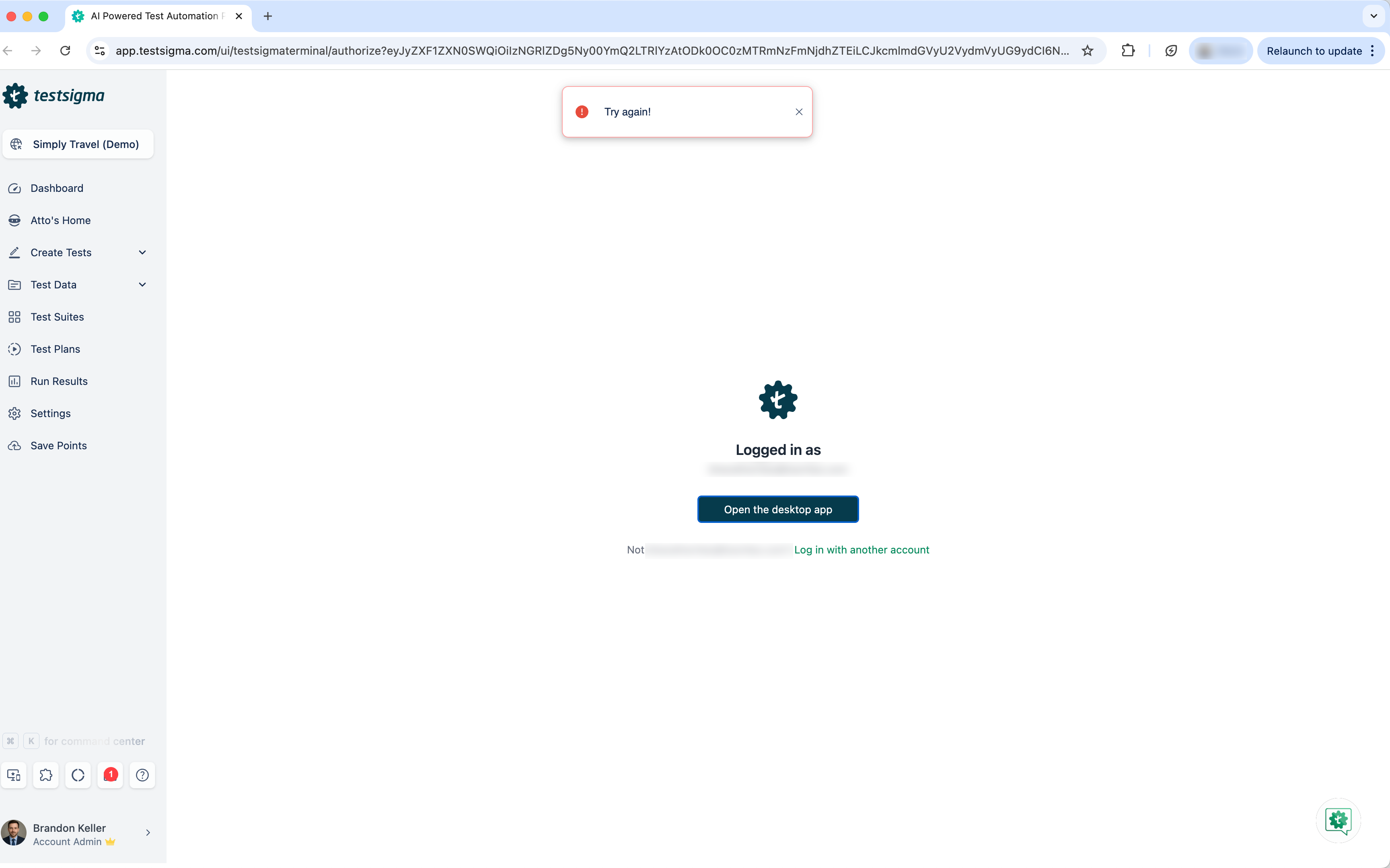 |
There was a problem hiding this comment.
Update image filenames to match Chrome 139+ documentation context.
The document discusses Chrome 139+ (lines 17–19), but both image filenames reference Chrome 138:
- Line 21:
chrome_138.1.png - Line 34:
chrome_138.png
If these screenshots were taken from an older browser version, consider renaming them to chrome_139.1.png and chrome_139.png for consistency. If the filenames are intentional (e.g., due to S3 bucket constraints), update the surrounding text to clarify which browser version the screenshots represent.
Also applies to: 34-34
🤖 Prompt for AI Agents
In
src/pages/docs/FAQs/web-apps/how-do-i-fix-the-try-again-error-when-opening-the-testsigma-desktop-app.md
around lines 21 and 34, the embedded screenshot filenames reference Chrome 138
while the text refers to Chrome 139+; update the assets and references so they
match: either rename the image files in S3 to chrome_139.1.png and
chrome_139.png and update the markdown links accordingly, or keep the existing
filenames but change the surrounding copy to explicitly state that the
screenshots are from Chrome 138 to avoid confusion.


Added a new FAQ as per the ticket: https://testsigma.atlassian.net/browse/DOC-764
Updated an existing doc as per the ticket: https://testsigma.atlassian.net/browse/DOC-767
Summary by CodeRabbit
Release Notes
✏️ Tip: You can customize this high-level summary in your review settings.