


Webman AOT Builder compiles PHP projects, including Webman / SaiAdmin, into fully static Linux amd64 executables.
Build on a macOS Apple Silicon or Windows x64 development machine, then deploy the entire generated dist-aot/ directory to Linux. The target machine does not need PHP installed.
The builder enumerates readable PHP sources and passes an unchanged, isolated copy of each PHP file to TypePHP, then generates an executable using Clang and the PHPx static SDK. It returns the artifact on success or preserves TypePHP's original compilation errors on failure. Your original source code stays unchanged. Configuration, templates, and static assets remain external files as needed.
Toolchain materials and input/output integrity remain checked. See the latest release for the compilation boundary and release status, and the test and verification records for the actual scope of past checks.
The current public packages are intended for development validation. Examples below record installation, builds, and artifact verification; full Linux business flows, including databases and login, still need acceptance checks in your own target environment.
To build your own PHP project, use the native setup or Composer entry point. You do not need to download this repository. GitHub's Code → Download ZIP and Source code archives are for developers building the tool's installation packages themselves.
This repository and its source archives retain the files needed to build installation packages. Development tests, acceptance scripts, and release automation are maintained separately.
You can install the tool without choosing a project yet. To build, select the readable PHP source root. Existing TypePHP project.yml sources and build options are accepted. Compilation has only four prerequisites:
- The PHP source to compile is readable.
- TypePHP and the target platform toolchain are available.
- The output directory is writable.
- Executable builds have an explicit entrypoint; individual files and libraries follow their corresponding compilation modes.
The tool's current public build entry produces executables; file and library modes belong to TypePHP's corresponding modes. The input source supplies the executable entrypoint, such as a global main(): void. TypePHP decides whether the entrypoint and language features meet its requirements. The builder does not identify frameworks, check dependency versions, review business code, generate or rewrite PHP source, or impose project, framework, plugin, directory layout, or business startup requirements.
Your development machine needs system PHP and Composer. The package declares PHP 8.0 as its minimum; the entry point also checks the PHP syntax and public Composer interface capabilities actually used. See compatibility requirements for platform and environment requirements.
Run in a macOS terminal or Windows PowerShell:
composer global require "supdger/webman-aot-builder:*"When Composer first asks whether to trust the plugin, enter y; the guide then opens automatically. Select the start option or import a full package. Once resources are ready, select the build-project option and enter or drag in the backend root directory. Interrupted downloads retain progress. If network access is blocked, obtain the matching full package using the filename and link shown by the entry point, then select the import option.
For subsequent use:
macOS terminal:
php "$(composer global config bin-dir --absolute)/webman-aot" guideWindows PowerShell:
$aotBin = (composer global config bin-dir --absolute).Trim()
if ($LASTEXITCODE -ne 0) { throw '无法读取 Composer 命令目录。' }
php (Join-Path $aotBin 'webman-aot') guide
Use the same command to upgrade or repair a missing Composer entry point; no uninstall is needed first:
composer global require "supdger/webman-aot-builder:*" --no-scriptsThis restores the global dependency record, removes this package's old fixed-version constraint, and resolves a compatible version using the current environment and global stability settings (stable by default). It does not automatically open the project menu or download the runtime. Do not use global update alone to repair a missing dependency record: Composer may remove an old entry point that is no longer recorded in the global configuration. Composer still asks for plugin trust on first use.
After the entry point updates successfully, query the entry-point and target-runtime versions, then open the existing-resource menu:
composer global exec -- webman-aot --versionmacOS terminal:
php "$(composer global config bin-dir --absolute)/webman-aot" guideWindows PowerShell:
$aotBin = (composer global config bin-dir --absolute).Trim()
if ($LASTEXITCODE -ne 0) { throw '无法读取 Composer 命令目录。' }
php (Join-Path $aotBin 'webman-aot') guide
Select the start option to prepare the runtime corresponding to that entry point; a ready runtime is reused. During upgrades, cached full packages and completed .part downloads are verified first and used directly when valid. If no usable full package exists and the release supports lightweight upgrades, old components are checked and files meeting the new version's requirements are reused; only the application and necessary replacement files are downloaded. Missing or invalid components produce an explanation before a full package is obtained. The switch completes only after the new environment passes its self-check. Failure restores the old environment; if restoration itself fails, the process stops and reports the retained backup location. Updating only the entry point does not upgrade the runtime environment. Select the exit option to defer the runtime upgrade. Upgrades do not rebuild project artifacts. See upgrading and uninstalling for details.
The direct PHP entry point avoids the default 300-second child-process timeout of composer global exec, making it suitable for full-package downloads and long interactive sessions. No global Composer timeout change is needed.
Download the setup matching your development machine from the latest stable release:
- macOS Apple Silicon: download the package ending in
macos-arm64-setup.zip, extract it, and run the.commandfile. - Windows x64: download the entry point ending in
windows-x86_64-setup.cmdand run the.cmdfile.
Select a lightweight or full package in the menu, review the installation location and PATH changes, and confirm installation. Lightweight packages need network access to prepare components on the first build. Full packages include compiler components; project dependencies still need separate preparation. After installation, select a project to build, or exit and run webman-aot build from your project root.
See the installation guide for both platforms' launch commands, entry-point checks, and complete installation steps. If macOS blocks the first launch, follow that page to verify the source and checksums, then complete the system confirmation.
Download Source code (zip) from the latest stable release, extract the entire archive, and enter the tool source root containing build.command and build.cmd. On Mac, run sh ./build.command; in Windows PowerShell, run .\build.cmd.
The entry point prepares and verifies materials, then builds and verifies installation packages. After confirming installation, you can select a project. Source package creation and project build success are reported separately. See the source build guide for requirements and steps.
Run from your own project root:
webman-aot build
webman-aot verify
The legacy --profile=webman and --profile=saiadmin options remain accepted for command compatibility and do not select source adaptations. See compatibility requirements for tool environment and compiler requirements.
Builds show the current stage and actual compilation counts. When no new output arrives, they show process status and elapsed waiting time. Failures retain the original cause, local log location, and recovery advice. By default, retries reuse completed units whose inputs and integrity checks pass; other units are recompiled. Every run still links and verifies artifacts again. webman-aot build --fresh recompiles everything without clearing the old cache. See the build guide for detailed rules.
Use the upgrade and uninstall guide for upgrades and cleanup. The current entry point can query older installations and remove items individually once ownership is confirmed. Residue of unknown ownership is retained; complete cleanup of every old version is not guaranteed. Project source, artifacts, and PATH are preserved. Shared toolchains and logs under standalone installation roots are retained; toolchains, logs, and caches inside Composer's private runtime are removed with that runtime.
For an ordinary PHP project, a minimal main.php is:
<?php
function main(): void
{
    echo "Hello from PHP\n";
}
Run the build commands above from that directory. A successful build produces dist-aot/server; a TypePHP error retains its original diagnostic and fails the build. Source safety, compiler/SDK integrity, and complete business PHP coverage remain checked. Environment values and upload data are not copied into the distribution.
dist-aot/
├── server          # Fully static Linux amd64 executable
├── start.sh        # Startup script
├── stop.sh         # Shutdown script
├── config/         # External configuration
├── …               # Templates, static assets, and other project resources
└── manifest.json   # Distribution manifest
Copy the entire dist-aot/ directory to your Linux amd64 target machine. Configure .env, databases, and other requirements for your project, then run from the output directory:
./start.shUse ./start.sh --daemon to run in the background and ./stop.sh to stop it. Follow Linux deployment and acceptance checks to check startup and business flows; local build verification does not replace target-machine acceptance.
In the PowerShell record provided by the user, the first build failed; continuing compilation then completed 216 files and artifact verification. The following excerpt contains actual output from the successful stage, omitting repeated progress lines, machine paths, and long compiler commands. The artifact location is anonymized to a project-relative path.
Successfully compiled 216 files
[成功] 构建项目(自动恢复已完成单元),耗时 119.0 秒,退出码 0
[成功] 校验本次项目产物,耗时 0.9 秒,退出码 0
实际校验范围:本机构建产物结构和完整性
项目构建与校验成功。
产物位置:dist-aot/
This successful record establishes the Windows build and local artifact verification; it does not establish Linux deployment or business acceptance.
The user's real-machine record shows build completion, artifact verification, and the dist-aot/ location. The image below preserves the operation's result and represents local verification of that project.
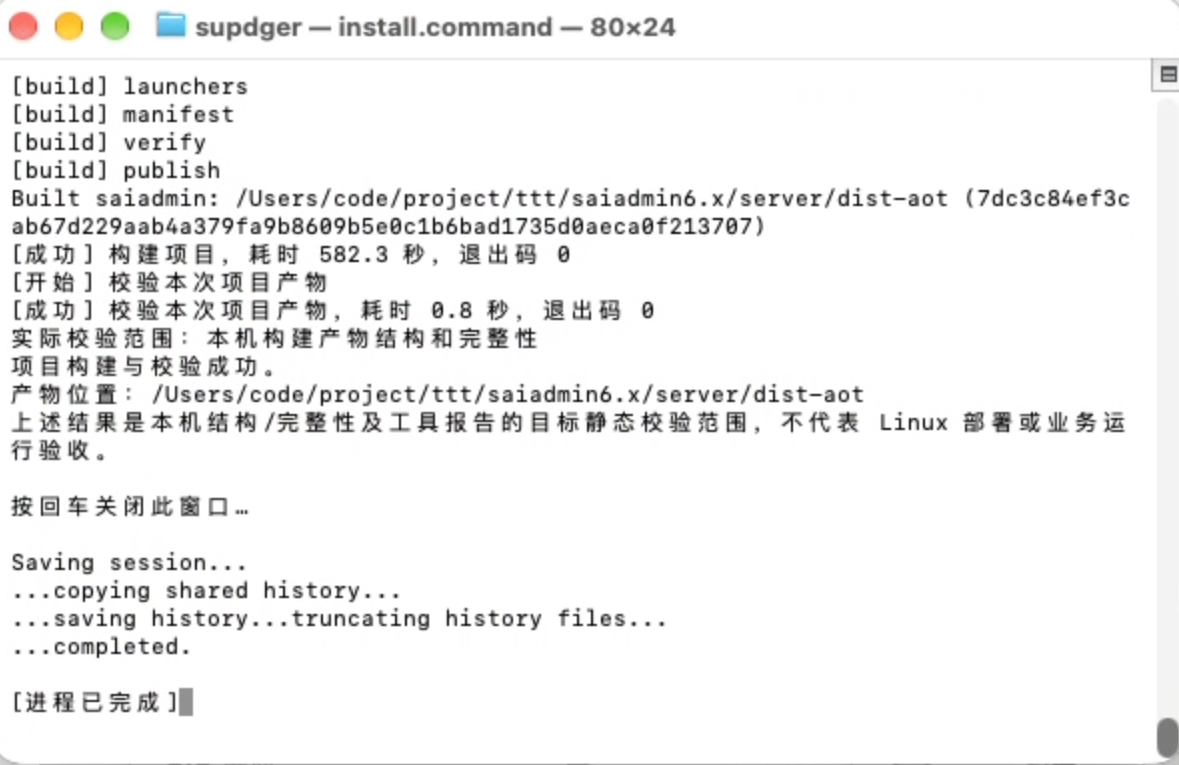
Existing user records also report successful artifact startup on Linux, but HTTP, database, and business API acceptance checks remain incomplete. See the test and verification records for Linux startup records and the scope of other platform and resumed-build checks.
- Wiki: installation, building, maintenance, and deployment guides
- Changelog: historical features, fixes, and upgrade implications
- Issues: problems and suggestions
Original code is licensed under the MIT License. See NOTICE for third-party component licenses and attribution.