





This repository contains the official implementation of the paper GPU-Accelerated A* Search with Deep Neural Network Heuristics, accepted to The 19th International Symposium on Combinatorial Search (SoCS 2026).
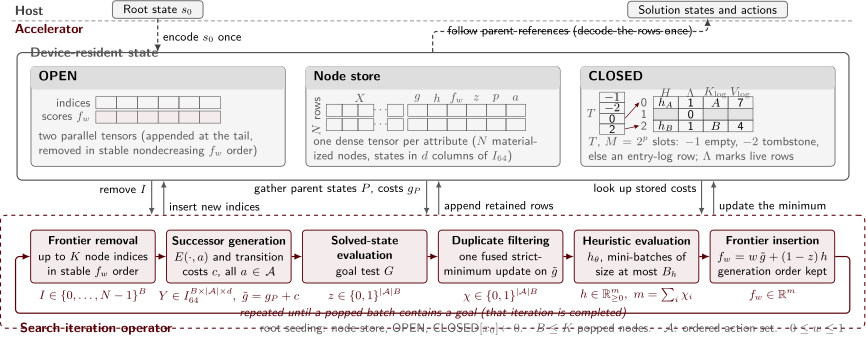
Fig 1. GPU-Resident Batch Weighted A* Search (BWASGPU)
In this paper, we introduce accelerator-resident Batch Weighted A* Search (BWAS), and across 100 test instances of Rubik's Cube, we show that GPU-A* search achieves over a 12× speedup compared to the host/CPU-resident batched weighted A* search (whose neural network heuristics run inference on the GPU) when running the Python implementation of our approach on a single NVIDIA H200 GPU.
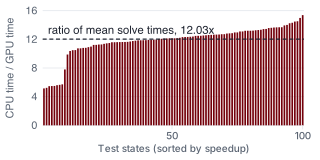
Fig 2. Per-state speedup (sorted) over 100 test states.
This 12× speedup is achieved while preserving the exact same search order as the baseline, expanding the same number of nodes, and without relying on JIT compilation or lower-precision arithmetic (either of which is available in the implementation and provides additional speedups).
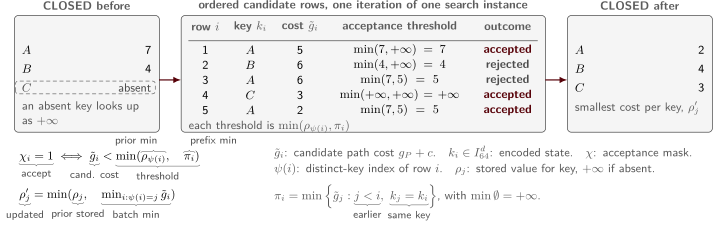
Fig 3. Fused CLOSED update. One pass filters duplicates and updates CLOSED.
- Quick Start
- Running other Backends
- Solver Backends
- Search Domains
- Building the Compiled Extensions
- Documentation
- Citation
- License
We use Pixi for package and environment management. You can install GPUAStar with pixi using the following commands:
git clone https://github.com/misaghsoltani/GPUAStar.git
cd GPUAStar
pixi install  # This only installs the Python backend, which is enough for reproducing the results reported in the paper
pixi run gpuastar --help
The package can also be installed with pip. Optional components are selected through extras.
pip install "gpuastar"               # installs the core package, the default Python backends, and CLI
pip install "gpuastar[cpp]"          # adds the compiled C++ backend (gpuastar-cpp)
pip install "gpuastar[cu]"           # adds the CUDA backend (gpuastar-cu)
pip install "gpuastar[experiments]"  # adds example domains, datasets, models, and the experiment suite
pip install "gpuastar[cpp-experiments]"     # adds the C++ backend and compiled example domains
pip install "gpuastar[cu-experiments]"      # adds the CUDA backend and example domains
pip install "gpuastar[cpp-cu-experiments]"  # adds every backend and compiled example domain
Supported platforms follow the PyTorch wheel availability declared in pyproject.toml. Upstream PyTorch published no macOS x86_64 wheel after version 2.2.2, so on macOS Intel with CPython 3.13 or newer the package installs without Torch, and the solver backends report themselves unavailable through BackendUnavailableError. The C++ backend supports glibc-based Linux on x86_64 and aarch64, macOS arm64, macOS x86_64 through CPython 3.12, and Windows AMD64. The CUDA backend supports glibc-based Linux on x86_64 and aarch64. Official PyPI Torch wheels for Windows AMD64 are CPU-only, so the CUDA extras do not select gpuastar-cu on Windows or macOS. CPython 3.10 through 3.14 is supported, and the compiled backends also publish free-threaded CPython 3.14t (cp314t) wheels. Build prerequisites and LibTorch compatibility lines are listed in docs/installation.md.
To reproduce the results reported in the paper, you can use the following command after installing GPUAStar (either with pixi or from PyPI):
git clone https://github.com/misaghsoltani/GPUAStar.git  # if you haven't already cloned it!
cd GPUAStar
. ./reproduce_paper_results/run_all.shTo compile a heuristic checkpoint into an AOTInductor package for the C++ CPU solver:
pixi run -e dev gpuastar-aoti-export export.model_dir=experiments/src/gpuastar_experiments/saved_models/cube3/current export.env=cube3Each search run writes a search_metrics.json file with per-state records (solved flag, solution cost, move count, nodes generated, solve time, iteration count, and per-operation timings). The output format is described in docs/usage.md.
All configuration groups and their default values are documented in docs/cli.md.
The backend.language option selects the solver implementation. Backend discovery uses the gpuastar.backends entry-point group and is implemented in backends.py, so additional solver packages can register themselves in the same way.
python(python.py): the reference implementation used for generating the results presented in the paper. Withbackend.gpu_only=falseit runs the CPU solver in cpu.py, which uses binary heaps for the open list and dictionaries for the closed set, with heuristic evaluation batched on the configured device. Withbackend.gpu_only=trueit runs the GPU-resident search implemented in solvers/torch.py through backends/torch.py, which keeps the open list, the closed set, and all state data in PyTorch tensors on the device. The closed set usesTorchDict(core.py), an open-addressing hash table stored in tensors.cpp(cpp.py): loads thegpuastar_cppnanobind extension module. Withbackend.gpu_only=falseit runs parallel_weighted_astar.cpp, a CPU solver parallelized with OpenMP that evaluates the heuristic through an AOTInductor-compiled model package. Withbackend.gpu_only=trueit runs torch_gpu_astar.cpp, a solver written against the LibTorch C++ API that keeps the search state in device tensors (GPU-resident search).cu(cuda.py): loads thegpuastar-cupackage, which provides custom kernels implementing the same GPU-resident search algorithm in the CUDA programming language. The search loop in search.py launches the kernels compiled from bwas_kernel.cu, which expand states cooperatively within warps and resolve hash table collisions with atomic operations.auto: selects the first available backend.
A search domain is defined by subclassing Environment and State from environment_abstract.py and registering the class with register_environment or register_lazy from registry.py. For the C++ solver, states provide their payload either through colors or tiles sequences, or through a cpp_payload() method (the CppPayloadState protocol in protocols.py). An environment can set suggested_compile_max_nodes to size compiled GPU search artifacts.
Compiled C++ environments are provided by separate packages through the gpuastar_cpp.environments entry-point group. The registry interface is declared in environment_registry.h, and experiments/cpp/ contains an example plugin package.
The example domains shipped with gpuastar[experiments] are described in docs/environments.md.
# Build the C++ solver extension from a clean state
pixi run -e dev cpp-build-from-scratch

# Build the CUDA solver extension
pixi run -e dev cu-build

# Verify that the CUDA extension imports and the backend is available
pixi run -e dev cu-smoke-import
After editing the shared C++ headers in cpp/cxx/ or the plugin sources in experiments/cpp/, remove experiments/cpp/build and re-run pixi install -e dev so the compiled environment plugin matches the current headers. Details are in docs/installation.md.
- docs/installation.md: environment setup and extension builds.
- docs/usage.md: running searches, AOTInductor export, CUDA graphs, profiling, output metrics.
- docs/cli.md: commands and all configuration groups.
- docs/api_reference.md: public Python interfaces.
- docs/python_api.md: calling the solvers from Python code.
- docs/environments.md: environment abstraction and example domains.
- docs/distributed.md: multi-GPU execution with FSDP2, tensor parallelism, and DTensor.
- docs/benchmarks.md: benchmark runners in the experiments package.
If you use GPU-A* in your research, please cite it using:
@inproceedings{soltani2026gpu,
  title     = {GPU-Accelerated A* Search with Deep Neural Network Heuristics},
  author    = {Soltani, Misagh and Agostinelli, Forest},
  booktitle = {Proceedings of the International Symposium on Combinatorial Search},
  volume    = {19},
  number    = {1},
  pages     = {148--156},
  year      = {2026}
}GPUAStar is released under the MIT License.