Conversation


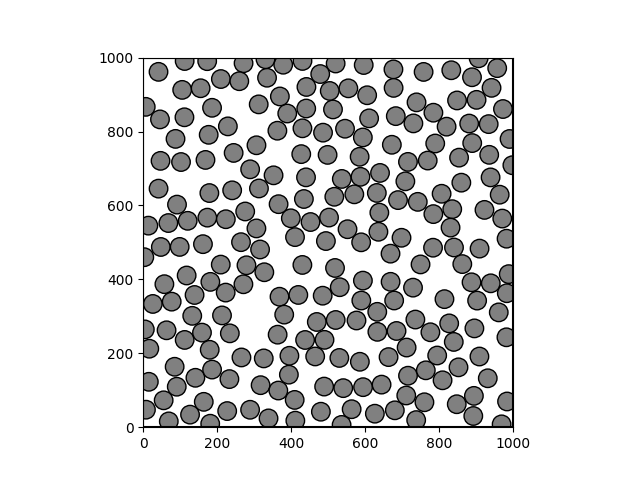
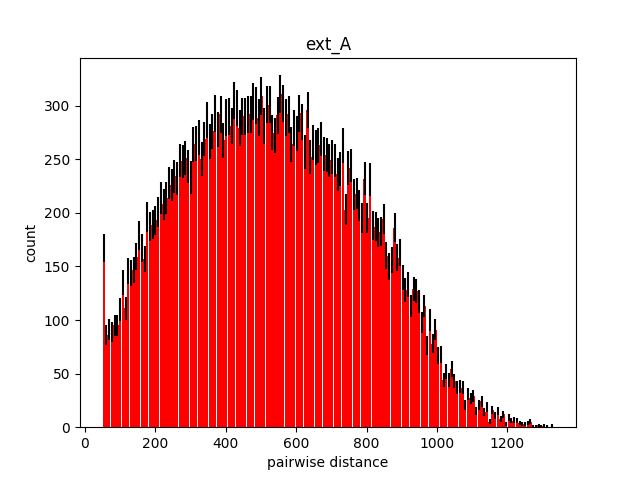
Packing analysis reportAnalysis for packing results located at cellpack/tests/outputs/test_spheres/spheresSST
Packing imageDistance analysisExpected minimum distance: 50.00
|

There was a problem hiding this comment.
Pull Request Overview
This PR adds functionality to upload cellPACK recipes to the client site by introducing an upload script and supporting documentation. The main goal is to enable uploading recipes with their metadata to Firebase for display on the cellpack-client site.
- Added documentation explaining how to publish recipes to the client site
- Created example editable fields JSON schema for client-side recipe configuration
- Updated upload methods to return IDs for tracking uploaded resources
Reviewed Changes
Copilot reviewed 3 out of 4 changed files in this pull request and generated 3 comments.
| File | Description |
|---|---|
| examples/client-data/example_editable_fields.json | Added example schema demonstrating editable field configuration for client site |
| docs/CLIENT_SITE.md | Added documentation on publishing recipes to the client site |
| cellpack/autopack/DBRecipeHandler.py | Modified upload methods to return resource IDs |
Tip: Customize your code reviews with copilot-instructions.md. Create the file or learn how to get started.

There was a problem hiding this comment.
Love it! The structure makes much more sense now, just two quick thoughts here:
- do we want to add
step_sizeto settings at all? - for gradient strength, we could wait for the decision on
decay_lengthdisplay
There was a problem hiding this comment.
We could definitely add step_size and change the terminology to decay_length! But those changes also need to happen on the cellpack-client site side of things, currently the client wouldn't read either of those two fields, so I would be hesitant to update this example documentation until those changes are actually in effect on the client side.
cellpack/bin/upload_to_client.py
Outdated
| :param name: string argument | ||
| display name for recipe in client selection menu | ||
| """ | ||
| db_handler = FirebaseHandler() |
There was a problem hiding this comment.
This works great as is! just a nit for consistency: we have a shared handler for database initiation in cellpack/autopack/interface_objects/database_ids.py. we could reuse the pattern here instead of importing firebase directly, similar to how upload.py selects the database via db_id:
def upload(
    recipe_path=None,
    config_path=None,
    db_id=DATABASE_IDS.FIREBASE,
):
    """
    Uploads a recipe to the database

    :return: void
    """
    if db_id == DATABASE_IDS.FIREBASE:
        # fetch the service key json file
        db_handler = FirebaseHandler()
        if FirebaseHandler._initialized:
            db_handler = DBUploader(db_handler)
            if recipe_path:
                recipe_loader = RecipeLoader(recipe_path)
                recipe_full_data = recipe_loader._read(resolve_inheritance=False)
                recipe_meta_data = get_recipe_metadata(recipe_loader)
                db_handler.upload_recipe(recipe_meta_data, recipe_full_data)
            if config_path:
                config_data = ConfigLoader(config_path).config
                db_handler.upload_config(config_data, config_path)
There was a problem hiding this comment.
I'm not sure if I understand. Are you suggesting that I add the if db_id == DATABASE_IDS.FIREBASE: line?
There was a problem hiding this comment.
yeah, this follows the pattern we use so there's no need to import any handlers directly. In this file, we can remove line4 from cellpack.autopack.FirebaseHandler import FirebaseHandler

cellpack/bin/upload_to_client.py
Outdated
| editable_fields_ids.append(id) | ||
| recipe_metadata = { | ||
| "name": name, | ||
| "recipe": recipe_id, |

There was a problem hiding this comment.
can these be changed to either display_name and id (are these nested in an object called 'recipe_metadata'?) or recipe_display_name and recipe_id without causing too many problems? or should this be a separate PR?
cellpack/bin/upload_to_client.py
Outdated
There was a problem hiding this comment.
@ascibisz I tried the script to upload a recipe to my testing database, it mostly worked well! I ran into a few bugs and have some questions we can go over in our next meeting.
 rugeli
left a comment
rugeli
left a comment
rugeli
left a comment
There was a problem hiding this comment.
I tested the new changes and they worked well! Just have a few ideas for non-critical refinements. I agree we can move forward with this pr and follow up with improvements after the submission.
- when params like
config,db_id,namearen't set, the metadata ends up with null values, which may affect frontend display. add warning/error handing, making these options required or add some frontend checks? - Ruge's todo: FirebaseHandler shouldn't be imported here, this is a missed spot from the previous handler refactor. we can do an overall cleanup later

| :param name: string argument | ||
| display name for recipe in studio selection menu | ||
| :param output_file: string argument | ||
| path to local simularium output file to upload |
There was a problem hiding this comment.
the doc strings are very clear and helpful!
cellpack/bin/upload.py
Outdated
| if studio and (not name or not recipe_path or not config_path or not fields): | ||
| sys.exit( | ||
| "To upload a recipe for cellPACK studio, please provide --name, --recipe_path, --config_path, and --fields arguments." |
There was a problem hiding this comment.
I’m debating between making config optional here and updating the frontend to still show the recipe when config is null, or adding a default config file with all the values in backend. I’m leaning toward making it optional, since the backend already runs packings with default configs when no config file is specified. we can discuss about it later
docs/STUDIO_SITE.md
Outdated
| 1. Set up access to the staging Firebase account, following [these instructions](https://github.com/mesoscope/cellpack/blob/main/docs/REMOTE_DATABASES.md#firebase-firestore) | ||
| 2. Determine which recipe fields should be editable in the client, and create a JSON file specifying these editable fields following the schema outlined in [this example](https://github.com/mesoscope/cellpack/blob/0f140859824086d73edab008ff381b5e5717db8b/examples/client-data/example_editable_fields.json) | ||
| 3. Follow cellPACK installation requirements [in README](https://github.com/mesoscope/cellpack?tab=readme-ov-file#installation) | ||
| 4. Run the following script to upload necessary files to Firebase: `upload -s -r <path_to_recipe_file> -c <path_to_config_file> -f <path_to_editable_fields_file> -n "Name of Recipe" -o <path_to_simularium_result_file>` |
There was a problem hiding this comment.
nit: It might help to update the parameter description to something like <local_path_to_simularium_result_file> to make it clearer that it expects a path such as out/one_sphere/spheresSST/results_one_sphere_debug_1.0.0_seed_0.simularium
Packing analysis reportAnalysis for packing results located at cellpack/tests/outputs/test_spheres/spheresSST
Packing imageDistance analysisExpected minimum distance: 50.00
|
3 participants


Problem
Add upload script for uploading recipes that we want to show up on the cellpack client site
Link to story or ticket
Solution
I decided it makes more sense to have this upload script in this repo rather than the cellpack-client repo so we could reuse the
uploadpython code rather than re-implementing it in typescript.Also added some documentation to explain how to use this code to upload the necessary metadata for the cellpack client.