Initial cut on MATEKF722 target #2611
Conversation


|
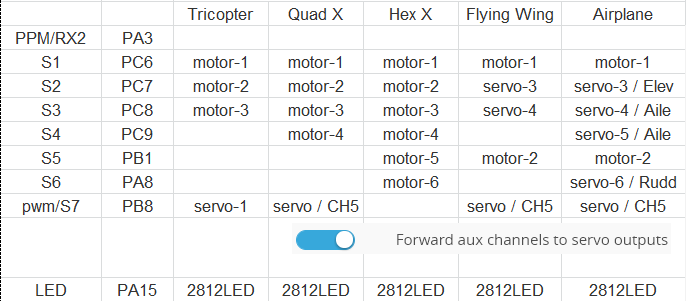
Looks good - will test this weekend. Any reason for putting motor 2 to signal 5? Also smart move bringing in the added compass from the newest BF revision. |

|
@saliimam S5 is on TIM3, same as S1, no confliction with other servo outputs |
|
Following firmware tested. http://www.mateksys.com/Downloads/FW/inav_1.8.1_MATEKF722.hex
|
|
Frsky smartport(inverted) can't work on TX pin. |

|
Flashed this firmware to test. Unable to connect to configurator after flashing. Tried flashing via inav, cleanflight, and betaflight |

|
@KnuckleUpFPV try flashing with full erase |
|
I've tried it with every setting. It doesn't work. Board isnt even recognized after flashing. Its only seen in dry mode. I even went to the matek site and downloaded it from there. Same deal. Fc is not seen. Blue led flashes rapidly. On first plug in red and blue that are side by side flash like police lights alternate of each other very fast. |
|
Did mode not dry mode. Can't edit from my phone |
|
DFU* |
|
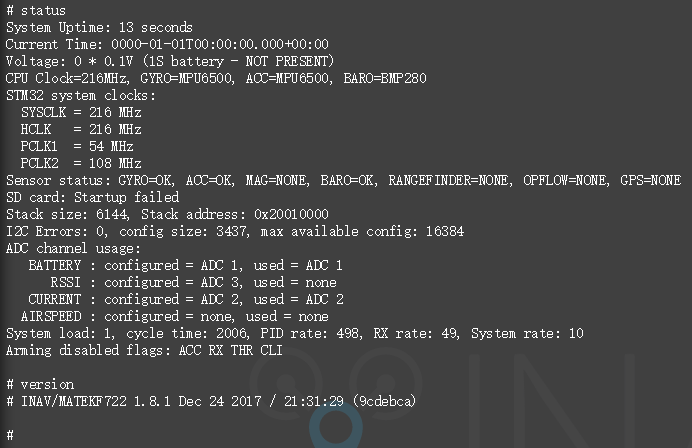
I got the same status after flashing this inav firmware. wrong com port detected by computer(win10 x64). show " FS mode" , I tried BF firmware, F722 com port works normal with BF GUI. |

|
Its not wrong com port issue. It doesnt recognize the fc. Tried the impulserc driver fixer and it didn't find it either because the pc doesnt see it after flashing. I get no detection beeps or anything unless in dfu mode. |
|
@KnuckleUpFPV , I got the same issue as yours, fixed with new COM driver. |
|
I do not see that. Computer doesn't see anything when its flashed with this hex.....i can use any other hex and it finds the fc just fine. Had betaflight on it prior to this. I was hoping inac fixed the i2c errors. Why is there a continuous chain of hoops to jump through with matek flight controllers? I can flash it with a completely wrong target and the pc will see it. Just something about this firmware. |
|
Let me dig out the windows 7 pc and see if that works. |
|
|
|
Can you post a close up of the board?
…On Dec 25, 2017 12:57, "KnuckleUpFPV" ***@***.***> wrote:
I do not see that. Computer doesn't see anything when its flashed with
this hex.....i can use any other hex and it finds the fc just fine. Had
betaflight on it prior to this. I was hoping inac fixed the i2c errors. Why
is there a continuous chain of hoops to jump through with matek flight
controllers? I can flash it with a completely wrong target and the pc will
see it. Just something about this firmware.
—
You are receiving this because you authored the thread.
Reply to this email directly, view it on GitHub
<#2611 (comment)>, or mute
the thread
<https://github.com/notifications/unsubscribe-auth/AKi_mywpvL9cdaxhajVqZy_ZjYhSXWhOks5tDw8FgaJpZM4RKsJg>
.
|
|
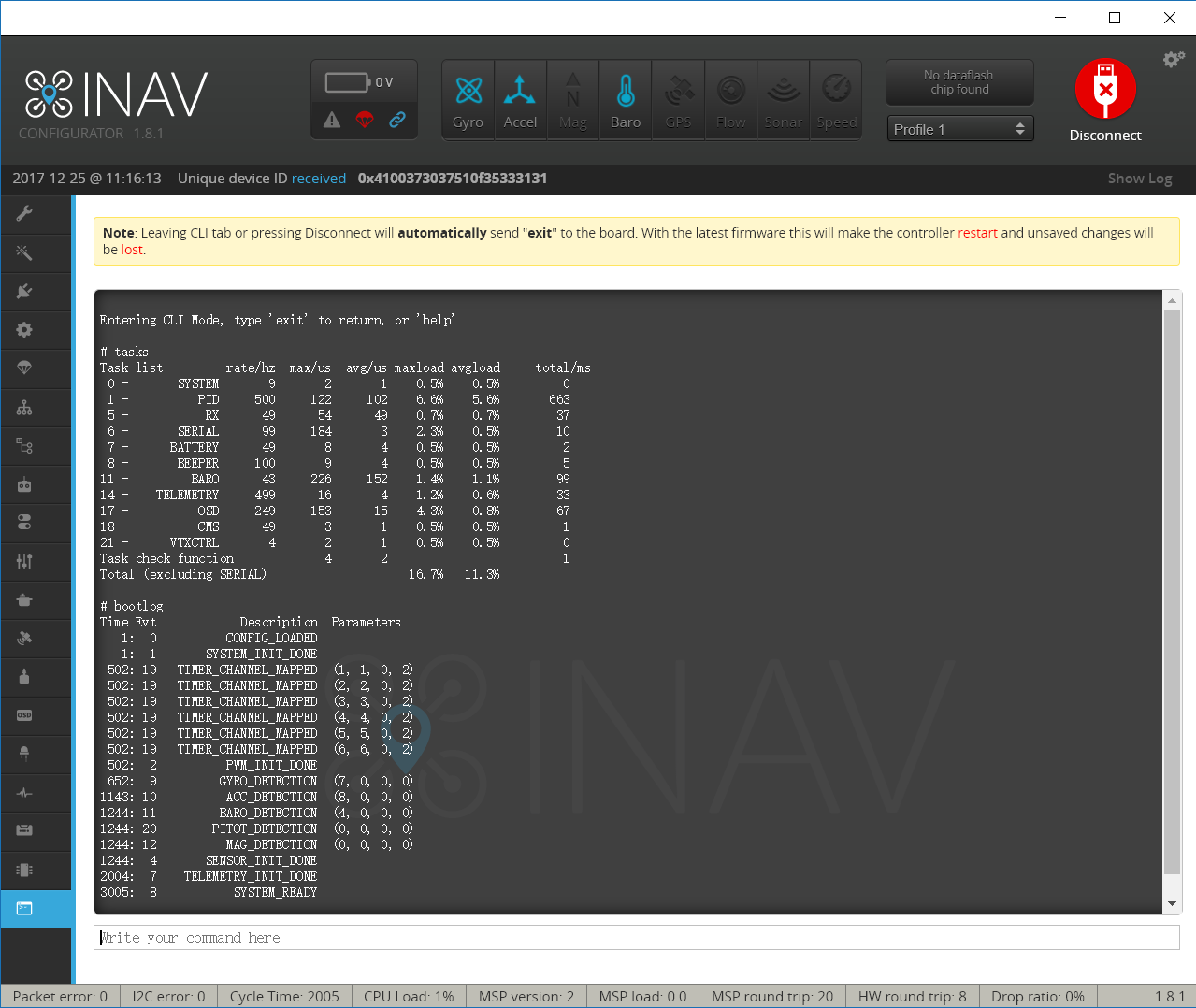
That's awesome there are no starting i2c errors. Maybe I can use an external mag and gps now. |
|
I flashed this firmware again just now. unable to connect to GUI after flashing. I am curious they worked normal yesterday everning. |
|
|
|
Might want to post that on the site for those that it might work for. No luck here. Its getting late and Christmas is in a few hours. Im going to call it a night soon. |
|
windows 7 pc worked after reinstalling virtual comport. windows 10 pc still isnt seeing it. I will configure it from windows 7 pc for now. Thank you for your time. I will test this in flight asap. Probably day after christmas. |

|
For those of you with Win10, if you received an auto update, you will probably have to reinstall com port drivers, etc. Cheers!! |
|
Ok, so this is a driver issue. I believe this can be merged then. @MATEKSYS ? |
|
@digitalentity Pls merge it. thanks |

|
i have uninstalled and reinstalled every driver imaginable including the win10 driver from matek's site, no luck. is a fix planned? i can flash betaflight target and its fine. |
|
@HipoxiK this is usual if you have something connected to I2C and it's not powered along with the board. If you have external GPS/Compass connected you must power them. |

|
Ah ok thanks. This is where I was going wrong. I'm new to drone builds coming from quads and betaflight. Thanks for keeping this thread running, I'm getting lots of good info from you guys. |
|
To clear my issues up then the latest Matek F722 iNav 24 Jan candidate is working fine on my laptop with the latest STM32 drivers. It was just that I needed battery power connected. I'll start setting the gps, compass, bluetooth, camera switcher, pay load release servo and the TBS Micro RX V2 up and see how we go. |

|
@digitalentity |

|
Before I embark on building this FC, has anyone actually flown with this firmware and how's the AUTO POS HOLD and RTH working? |
|
@digitalentity |
|
I have now set up the GPS and Compass which have calibrated and work although the compass keeps drifting back to 8 degrees when I turn the drone to north. I believe this is due to a clone Mag (QMC5983) which radiolink have been using in their SE100 GPS/Compass even though iNav reads mine as HMC5883. From another thread it sounds like its an issue with the mag gains and by removing the magGain code it can fix this issue, eg. You guys encounter this? |
|
@HipoxiK |
|
@flyfisher2 Could I get a copy of your .hex if you have already modded it and removed the magGain? I don't have time to learn how to mod .hex files right now and would really like to get this drone in the air. At this stage the magGain issue is all that's stopping me. Cheers |
|
Never done this before hope it works: |
|
@flyfisher2 I'll test it today and see if it works for me. Edit: Seems to be working @flyfisher2, thanks for editing that .hex. My magnetometer now sits on a heading without slowly drifting back to a set heading. I'm still running it at 200khz though. I need to finish the setup and test fly still but looking good so far. |
|
@HipoxiK |
|
@flyfisher2 I need these to be channel forwarded to servo's but can't seem to edit these resources using what I thought was the correct commands in the CLI. |
|
@HipoxiK |
|
@flyfisher2 |

|
@HipoxiK 6 and 7 can already be used for servos but for 5 (PB1) you need to edit line 35 of |
|
@shellixyz |
|
Finally installed the board into our 650mm Quad last night. |
|
@HipoxiK You don't need to they will be used for servo outputs if they are defined in the mixer. |
|
@flyfisher2 |
|
Yes, my initial calibration a couple of weeks ago was fine but something seems to have gone drastically wrong with the board since then. |
|
@shellixyz |
|
Test flew the drone today. All Nav functions are working correctly. Alt Hold is good, GPS Hold and RTH work great. @shellixyz Or will I need to use a custom mix and define the motors using pads 1-5? Then smix servo pads 6,7? |
|
@HipoxiK |
|
@flyfisher2 |
|
|

|
Thanks @MATEKSYS I'll try that tomorrow. Is there a way to get a 2nd servo out of S6? Just tried CH5 as the camera switcher which is connected to S7 and it works perfect. Thanks for the help as I tried it with other AUX channels but not 5. I wonder if there isn't a solution to get S6 to control a 2nd servo using another Aux channel on the transmitter maybe I could wire the signal from the servo to the 3rd camera switcher signal out and see if that activates the servo as the 3rd position on CH5. |
|
@HipoxiK Seams S6 can't be used for AUX channel. |
|
@MATEKSYS |

|
Hi all, Please help me and tell me what is the best place on the board to connect everything including servos and please attach the besd hex I should flash. Also I am willing to test flight any future builds/releases for this board! |


Matek F722 board initial support - per #2552