Git Notes
book推荐:https://git-scm.com/book/zh/v2
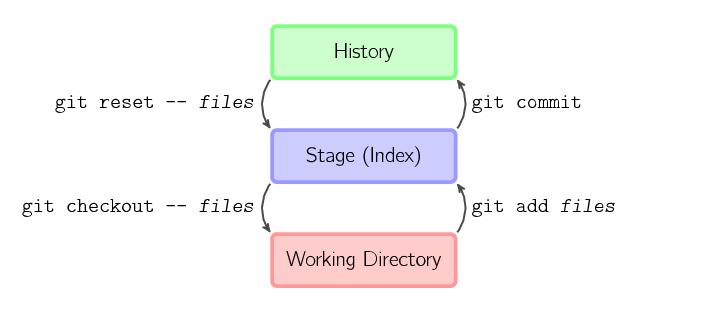
Stage 赋予 Git 更多灵活性。stage 就是这么精彩的玩意,以下看起来比较束手无策的场景,只要理解 stage,用好相应命令,都能轻易解决:
- 修改了4个文件,在不放弃任何修改的情况下,其中一个文件不想提交,如何操作?(没add : git add 已经add: git reset –soft )
- 修改到一半的文件,突然间不需要或者放弃修改了,怎么恢复未修改前文件? (git checkout)
- 代码写一半,被打断去做其他功能开发,未完成代码保存?(git stash)
- 代码写一半,发现忘记切换分支了?(git stash & git checkout)
- 代码需要回滚了?(git reset)
- 等等
- git add和git stage
作者:彭勇 链接:https://www.zhihu.com/question/19946553/answer/13759819 来源:知乎
- git 的 add ,是一个容易引起疑问的命令。在 subversion 中的 svn add 动作是将某个文件加入版本控制,而 git add的意义完全不同。同时, git diff --cached 是比较 stage 的文件的差异的,也是一个不直观的命令。 github 2008年的blog中,也提到,容易引起混淆:https://github.com/blog/196-gittogether-2008http://learn.github.com/p/normal.htmlthings like making use of the term ‘stage’ for things that happen in the index (such as using ‘git diff —staged’ instead of ‘git diff —cached’) is being worked on. I’m excited that staging files may soon be done via ‘git stage’ rather-than/in-addition-to ‘git add’. This is nice for new users who often have a hard time seeing why you have to keep ‘git add’ing to stage your changes.事实上,在 git 的后续版本中,就做了两个修改:git stage 作为 git add 的一个同义词git diff --staged 作为 git diff --cached 的相同命令为了容易理解,推荐大家使用 git stage 和 git diff --staged 这两个命令,而git add 和 git diff --cached 这两个命令,仅仅为了保持和以前的兼容做保留。
- 增加 stage 的带来的好处是什么?主要有两个好处,一个是分批、分阶段递交,一个是进行快照,便于回退 2.1 分批递交,降低commit的颗粒度比如,你修改了 a.py, b.py, c.py, d.py,其中 a.py 和 c.py 是一个功能相关修改,b.py,d.py属于另外一个功能相关修改。那么你就可以采用:git stage a.py c.pygit commit -m "function 1"git stage b.py d.pygit commit -m "function 2" 2.2 分阶段递交比如,你修改了文件 hello.py,修改了一些以后,做了 git stage heello.py动作,相当于对当前的hello.py 做了一个快照, 然后又做了一些修改,这时候,如果直接采用 git commit 递交,则只会对第一次的快照进行递交,当前内容还保存在 working 工作区。当前的最新修改,则需要再做一次 git stage ,才能递交。这中间细微的差别,请参见:http://learn.github.com/p/normal.html由于git这个特性,需要注意到是,每次递交之前,需要确认是否已经将相关的修改都stage 了,否则可能仅仅递交了部分不完整的修改。比如你修改了部分内容,进行了 stage,后来你又做了一些修改,然后就递交,这时,后面的修改,并没有递交。 2.3 文件快照,便于回退做了部分修改以后,进行 git stage,然后任何时刻,都可以回退到stage时的状态:git checkout -- hello.py
- git diff , git diff --staged 和 git diff HEAD的差别当一个文件做了stage,然后又做了一些修改,则:git diff 显示当前工作区的文件和stage区文件的差异git diff --staged 显示stage区和HEAD的文件的差异git diff HEAD 显示工作区和上次递交文件的差异具体参见 git help diff 的EXAMPLES部分。使用 git status 可以看到,一个文件可能同时存在两种差异。具体参见:http://learn.github.com/p/normal.html
- reset 和 checkout的区别当文件加入了 stage 区以后,如果要从stage删除,则使用 reset,此时工作区的文件不做任何修改,比如:git reset hello.py这个命令就是 git stage hello.py 的反操作。当文件加入了 stage 区以后,后来又做了一些修改,这时发现后面的修改有问题,想回退到stage的状态,使用 checkout 命令:git checkout hello.py
- 可以使用 git commit -a 命令,跳过 git stage 这个命令,直接递交
- 最佳实践:做了阶段性修改,但是还不能做一次递交,这时先 git stage 一下如果有问题,可以随时 checkout 回退递交之前,使用 git status,git diff HEAD 仔细查看是否需要的递交git commit -a ,保证递交了所有内容