Implement indent and outdent across multiple item types #980
Conversation


 AmandaRiu
left a comment
AmandaRiu
left a comment
AmandaRiu
left a comment
There was a problem hiding this comment.
@planarvoid Testing with the Example text prepopulated seems to work fine, but when starting with an empty editor I ran into a bunch of issues:
Odd behavior after indenting list items where the indent/outdent buttons will randomly not be available. See video:
issue-indent-disabled.mov
Crash just trying to type into the editor outside of a block. I can also add a list and type just fine and then add some space after the list and attempt to type or indent/outdent and get the same type of crash:
issue-text-block.mov
Here’s the stacktrace:
2022-04-15 14:07:19.488 18426-18426/? E/AndroidRuntime: FATAL EXCEPTION: main
    Process: org.wordpress.aztec, PID: 18426
    java.lang.IndexOutOfBoundsException: charAt: 25 >= length 25
        at android.text.SpannableStringBuilder.charAt(SpannableStringBuilder.java:125)
        at org.wordpress.aztec.formatting.IndentFormatter.selectionCanBeOutdented(IndentFormatter.kt:139)
        at org.wordpress.aztec.formatting.IndentFormatter.isOutdentAvailable(IndentFormatter.kt:177)
        at org.wordpress.aztec.formatting.BlockFormatter.isOutdentAvailable(BlockFormatter.kt:85)
        at org.wordpress.aztec.AztecText.isOutdentAvailable(AztecText.kt:977)
        at org.wordpress.aztec.toolbar.AztecToolbar.setIndentState(AztecToolbar.kt:549)
        at org.wordpress.aztec.toolbar.AztecToolbar.highlightAppliedStyles(AztecToolbar.kt:541)
        at org.wordpress.aztec.toolbar.AztecToolbar.access$highlightAppliedStyles(AztecToolbar.kt:46)
        at org.wordpress.aztec.toolbar.AztecToolbar$setEditor$1.onSelectionChanged(AztecToolbar.kt:410)
        at org.wordpress.aztec.AztecText.onSelectionChanged(AztecText.kt:1081)
        at android.widget.TextView.spanChange(TextView.java:10963)
        at android.widget.TextView$ChangeWatcher.onSpanChanged(TextView.java:13832)
        at android.text.SpannableStringBuilder.sendSpanChanged(SpannableStringBuilder.java:1308)
        at android.text.SpannableStringBuilder.sendToSpanWatchers(SpannableStringBuilder.java:652)
        at android.text.SpannableStringBuilder.replace(SpannableStringBuilder.java:581)
        at android.text.SpannableStringBuilder.replace(SpannableStringBuilder.java:508)
        at android.text.SpannableStringBuilder.replace(SpannableStringBuilder.java:38)
        at org.wordpress.aztec.formatting.IndentFormatter.outdent(IndentFormatter.kt:104)
        at org.wordpress.aztec.formatting.BlockFormatter.outdent(BlockFormatter.kt:75)
        at org.wordpress.aztec.AztecText.outdent(AztecText.kt:968)
        at org.wordpress.aztec.toolbar.AztecToolbar.onToolbarAction(AztecToolbar.kt:642)
        at org.wordpress.aztec.toolbar.AztecToolbar.access$onToolbarAction(AztecToolbar.kt:46)
        at org.wordpress.aztec.toolbar.AztecToolbar$setupToolbarItems$$inlined$let$lambda$1.onClick(AztecToolbar.kt:783)
        at android.view.View.performClick(View.java:7441)
        at android.widget.CompoundButton.performClick(CompoundButton.java:146)
        at android.view.View.performClickInternal(View.java:7418)
        at android.view.View.access$3700(View.java:835)
        at android.view.View$PerformClick.run(View.java:28676)
        at android.os.Handler.handleCallback(Handler.java:938)
        at android.os.Handler.dispatchMessage(Handler.java:99)
        at android.os.Looper.loopOnce(Looper.java:201)
        at android.os.Looper.loop(Looper.java:288)
        at android.app.ActivityThread.main(ActivityThread.java:7839)
        at java.lang.reflect.Method.invoke(Native Method)
        at com.android.internal.os.RuntimeInit$MethodAndArgsCaller.run(RuntimeInit.java:548)
        at com.android.internal.os.ZygoteInit.main(ZygoteInit.java:1003)
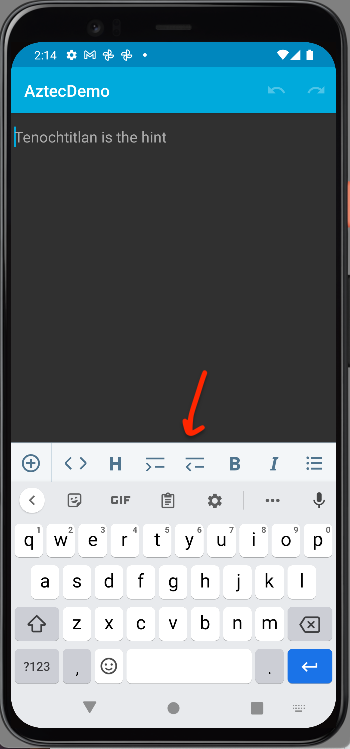
The outdent option is available even if there is nothing indented:
aztec/src/main/kotlin/org/wordpress/aztec/formatting/IndentFormatter.kt
Outdated
Show resolved
Hide resolved

…matter.kt

Co-authored-by: AmandaRiu <5810477+AmandaRiu@users.noreply.github.com>
Co-authored-by: AmandaRiu <5810477+AmandaRiu@users.noreply.github.com>

|
thanks for the review @AmandaRiu ! Good catches!
this was fixed in another PR so I've pointed this PR to the feature/enable-combined-lists branch and it works now
This should be fixed now. I've added checks around empty strings for indent and outdent and added tests around this behaviour |
AmandaRiu
left a comment
AmandaRiu
left a comment
There was a problem hiding this comment.
Works beautifully @planarvoid ! The same issue I found in the other PR with the ANR happens in this one as well but that's to be expected and can be fixed in that parent branch. LGTM!! 


Fix
In this PR I've added support for indent and outdent for headings, preformat, quotes and paragraphs (as well as text without any spans). The logic adds a
\telement at the beginning of each selected line on indent and removes the\tif present on outdent.Test
indentandoutdenttoolbar actions inMainActivityReview
@AmandaRiu
Make sure strings will be translated:
strings.xmlas a part of the integration PR.