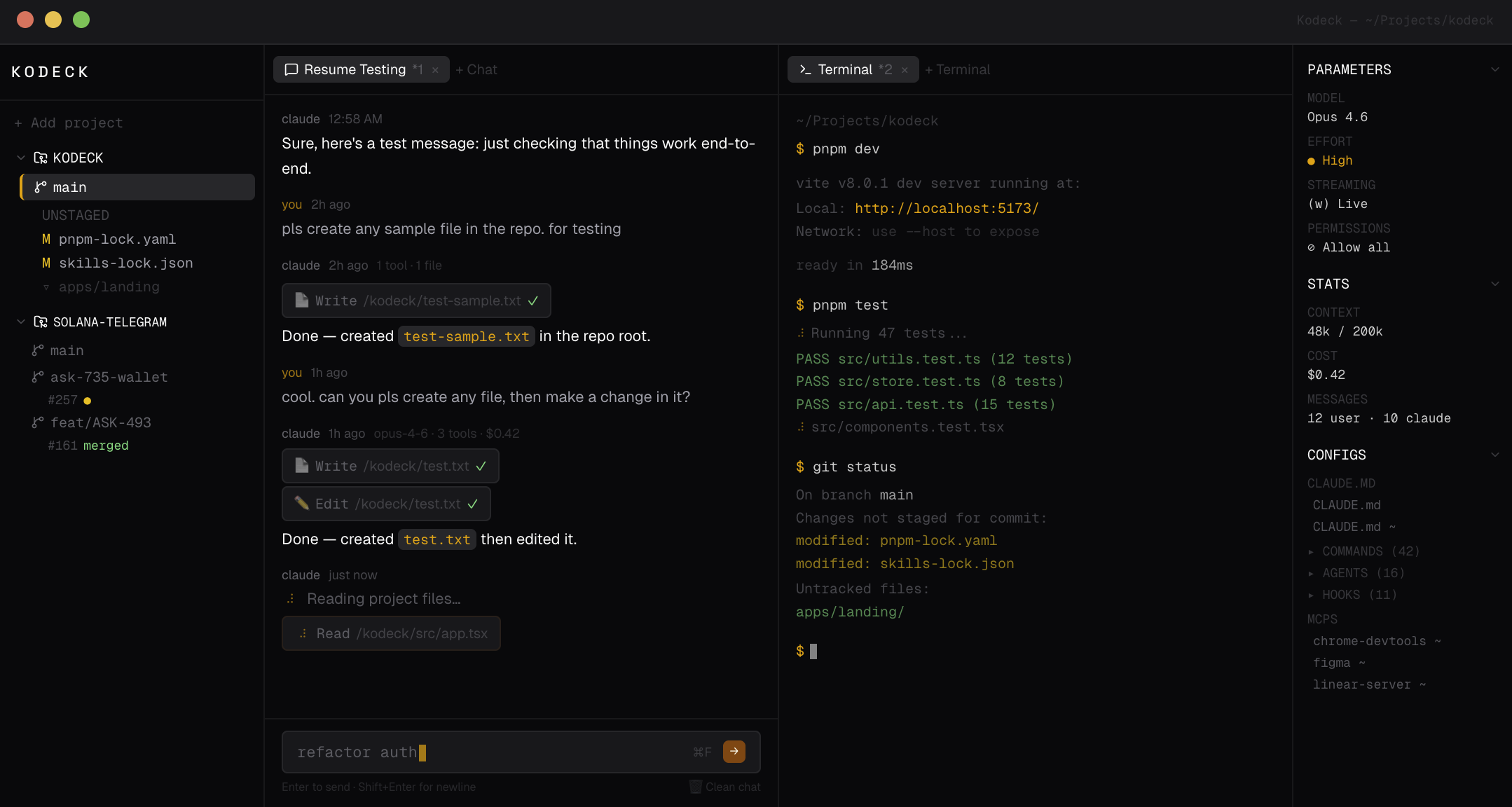
Open-source IDE for Claude Code. Multi-project workspace with chat, terminals, and git worktree management — all in your browser.
npx kodeck-appRequires Node.js 22+ and an active Claude Code authentication (OAuth). Opens at https://kodeck.localhost:1355.
- Multi-project workspace — manage multiple repos and worktrees in a single UI
- Chat sessions — streaming responses, tool call visualization, permission prompts, thinking indicators
- Terminal sessions — full PTY terminals powered by xterm.js alongside your chats
- Git worktree management — create, switch, pull, push worktrees; browse branches and PRs
- Config browser — inspect CLAUDE.md, skills, hooks, MCP servers, and agents across projects
- Session persistence — chat history and sessions survive restarts
- Search — find across all sessions and tool outputs
- Desktop app — native macOS app via Tauri (optional)
Clone the repo and install dependencies:
git clone https://github.com/vladzima/kodeck.git
cd kodeck
pnpm install
Start the dev server (client + server concurrently):
pnpm devThis starts the server on port 3001 and the client on port 5173. Open http://localhost:5173.
For a nicer https://kodeck.localhost URL during development:
npm install -g portless
portless proxy start --https
pnpm dev:localapps/
client/ React + Tailwind frontend (Vite)
server/ Node.js WebSocket backend (node-pty)
desktop/ Tauri macOS app wrapper
landing/ kodeck.dev landing page
packages/
shared/ Shared TypeScript types
kodeck/ Publishable npm CLI package
| Command | Description |
|---|---|
pnpm dev |
Start client + server for development |
pnpm dev:local |
Same, with portless for https://kodeck.localhost |
pnpm ready |
Format, lint, test, and build everything |
pnpm build:npm |
Build the kodeck npm package |
pnpm tauri:dev |
Run the native desktop app in dev mode |
pnpm tauri:build |
Build the native macOS desktop app |
This project uses Vite+ (vp) as the unified toolchain. Use vp lint, vp fmt, and vp test — do not run oxlint, vitest, or formatters directly.