Repository navigation
Very bad performance on NVME SSD #136
Description

Hi,
Please don't take that as a complain, I only wish to help improve the software so I can use it.
I achieve very bad performance on Windows 10 LTSB 2016 with a Samsung EVO 960 250Gb and Veracrypt AES encryption:
Before :

After :

My hardware :
I7 7700k @ stock
16Gb Corsair DDR4
Samsung 960 Evo 250Gb with up to date Samsung NVME driver
Windows 10 LTSB 2016 up to date
Veracrypt 1.19 64 bits
Veracrypt Benchmark :

How can I manage to get close performance to non encrypted drive ? Is this even possible ?
Thanks and best regards,
Nicolas
Activity
RcTomcat commentedon Jan 23, 2018
Is there any news on this matter?
It seems the iops still decrease drasticly.
stylersnico commentedon Jan 24, 2018
@RcTomcat Unfortunatly I think it's not gonna change.
If you want strong encryption it's the price to pay :/
InSys commentedon Apr 13, 2018
No news on this task? I have the same problem:
Without encryption (Windows 10, samsung ssd 960 evo m2 500gb):

With encryption (AES, mounted file container)

As you can see in the screenshots - the speed is less than 10-20 times. read more
Are there ways to solve this problem?
304NotModified commentedon Apr 14, 2018
@InSys I'm curious how DiskCryptor performs on your system.
tomasz1986 commentedon Apr 15, 2018
I have the exact same issue, just on regular SATA SSDs.
DiskCryptor and BitLocker both perform very well (maybe ~5-10% decrease in the disk I/O), but performance with VeraCrypt is just abysmal. And yes, it is noticeable in normal workload, especially when operating on many small files at once. For this reason I have been using BitLocker for now (because DiskCryptor seems abandoned and does not support GPT).
I do not have top-notch hardware here but still... (AMD A10-7860K, 16GB RAM, 2 x SanDisk x110 256GB, Windows 10 LTSB 2016).
InSys commentedon Apr 16, 2018
@304NotModified
Comparison of VeraCrypt and DiskCryptor on SSD:
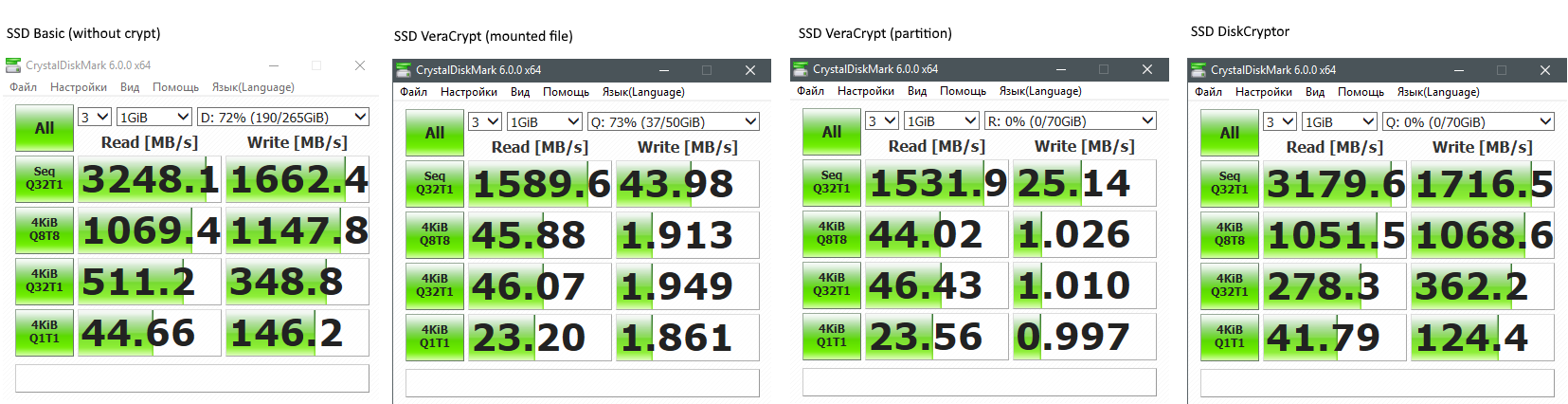
As you can see, the performance is practically not degraded by DiskCryptor, but on VeraCrypt the performance drops in many times.
Click to view comparison of VeraCrypt and DiskCryptor on HDD
In order not to create a real HDD partition, I used a standard windows virtual disk real placed on single HDD:nshtg commentedon Aug 6, 2018
Is there any effort to fix those ridiculous performance penaltys? Affect normal SSDs aswell not only NVMe ones.
valnar1 commentedon Aug 26, 2018
I noticed the same thing on a new laptop I planned to encrypt. I've loved TrueCrypt and VeraCrypt for a while now, but due to time constraints had to buy BestCrypt. I hope the devs get this figured out.
dartraiden commentedon Nov 6, 2018
GPT is required for disabling CSM, And disabled CSM is required for SecureBoot.
NameTheJew commentedon Nov 23, 2018
BUMP.
Is this still an issue?
Will using VeraCrypt FDE seriously drop write speeds down to 1MB/s?
Is there a Fix?
Also how is Trim and Provisioning effected when software FDE is implemented?
CrownVic2 commentedon Nov 27, 2018
I just encrypted my system drive with VeraCrypt (ver 1.23) on the almost identical HW configuration as listed in the first post. I see the same slow read speed in Samsung Magician and in CrystalDiskMark. Sequential read is down to 20% . Bitlocker compared to no-encryption is almost identical.
Now the good news. When I measured the real-time for programs to open, there wasn't much of a difference. Lightroom and Photoshop both take approx 2 seconds to be ready, just like with no encryption. Starting another windows 10 from Oracle VM VirtualBox takes 21.5 seconds with no encryption and 23 seconds with Veracrypt.
All programs are installed on my Samsung EVO 960 500GB and the startup time for each program is measured after a fresh system reboot.
valnar1 commentedon Nov 27, 2018
I know it costs money, but I'm very happy with BestCrypt. Also, the older DiskCryptor works great for a MBR SSD if you don't mind disabling UEFI and all the modern settings.
171 remaining items
tokariu commentedon Apr 25, 2026
this issue seems to be becoming more and more urgent as raw ssd speeds improve drastically over time.
while one would barely notice any difference on first generation SSDs with about 500mb/s sequential r/w speeds, it makes a huge impact today whether it is 5000 MB/s r/w speed or just 2500 MB/s. The difference is quite noticable in every day tasks as simple as just starting apps.
I understand that many don't want to sacrifice the immense speed of nvme-ssds especially when they are getting so expensive in the hardware market crisis and therefor switch to other solutions for now.
inliquid commentedon Apr 25, 2026
It's been 9 years. Nobody gonna fix this. Stick to other solutions, or live with what it is.
43v204ug commentedon Apr 25, 2026
The first thing @idrassi said was that it would be addressed soon, the second was to ask for money, then there was silence. Communication here is terrible.
If they can’t or won’t do it, they should close it as unplanned and warn new users about the notorious problem.
Fireballcz commentedon Apr 25, 2026
OK, when the maintainer needs money and is able to fix this (I understood, that he is not), then why not to use some kind of Patreon or so. We will see, how many people want to fundrise the project... Such start wil cost nothing.
sylv256 commentedon May 18, 2026
Anyone here could also donate their time via PR which will be far more effective.
gregtwallace commentedon May 19, 2026
@sylv256 he mentioned doing some work on this but it was unstable. Unfortunately, he hasn't posted that as at least a starting point for potential community help. Would love to dig into it.
PowerCoder commentedon May 29, 2026
Been using Bitlocker on my NVMe WIndows setups for my system/boot drives, but it terrifies me. I'm relatively sure it is safe enough (they'll get our data one way or another in the end), but it tends to lock you in or ask for recovery with the tiniest of changes while VeraCrypt was always so portable. And if you accidentally ever answer "yes" to linking your account to work those recovery keys go straight to your work admins.
For Linux I've been using native solutions, even tried some Opal. But for Windows, I really wish VeraCrypt had remained an option. Not that anybody can afford NVMe or any form of storage nowadays...
Since DiskCryptor appears to be an option and is still being updated, do they suffer from the same issue? And if not, can we not learn from their source code?
Vinylrider commentedon May 29, 2026
Actually it is a super easy task : Ask Claude/chatgpt for the needed changes and reference to Diskcryptor (where it obviously works). You can find Opus 4.8 opinion about it attached. I am happy with DiskCryptor so I have no intention to do it but as this thread still seems to have a lot of interest there might be someone available who would do the job. I guess testing eats up most of the needed time.
veracrypt_nvme_implementation.md
b1scu1t commentedon May 30, 2026
@PowerCoder
I really wouldn't use any encryption software by Microsoft after a potential backdoor was discovered through the YellowKey exploit by DeadEclipse666. BestCrypt Volume Encryption is also good, and the "source" (read: SDK) is available to everyone w/o an account, but its proprietery.
DiskCryptor does not suffer the same I/O performance bottleneck as VeraCrypt, it is way faster...see the comments above. DiskCryptor's only flaw is that setting-up Secure Boot is a more involved process, because the bootloader needs to be signed (I think the documentation guides you there.). It really isn't DiskCryptor's fault here, blame Microsoft.
Outside of VeraCrypt, there are no solutions on Windows that are both open source and platform agnostic. DiskCryptor is open source but as far as I know, there is no tool in Linux-land that supports its encryption. Ironically enough, Linux's
dm-cryptsupports Bitlocker...a closed source encryption solution, which is wild to me.In an ideal world you would have DiskCryptor and VeraCrypt join efforts under one umbrella, DiskCryptor has superior performance, VeraCrypt is multiplatform and has a signed bootloader OOTB....but software development does not work like that. Both projects have vastly different architectures, one can dream...
On the plus side: The DiskCryptor author did offer his advice over at VeraCrypt's SourceForge in the forum for NVME performance, so who knows.
inliquid commentedon May 30, 2026
@b1scu1t
Actually this exploit is about very specific case when keys are stored in TPM and automatic unencryption is enabled. Which is weak config by default and which I wouldn't recommend to anyone as well as storing keys in Microsoft cloud account. It's not about backdoor in algo or smth. And it's all configurable.
Encryption is complicated. You can't just take tool A or B and have automatically magically protect from any vector in the world.
0x1337F00D commentedon Jul 29, 2026
After almost ten years, there is now a concrete implementation addressing the mounted raw-volume side of this bottleneck: PR #1839.
The PR adds new direct read and write paths for mounted raw partitions and drives, while keeping VeraCrypt’s existing encrypted I/O queue as the fallback. The new read and write paths are controlled independently and are disabled by default, so the current behavior remains unchanged unless they are explicitly enabled.
Using the same 4 GiB test file and identical DiskSpd profiles, I compared the existing path with both new paths enabled:
I also tested an instrumented build with counters to verify that eligible I/O was actually going through the new paths rather than accidentally measuring some unrelated effect. The counters confirmed that it was. Those diagnostic counters and their IOCTL interface are intentionally not part of the actual PR.
There are some important limitations to these numbers:
Before considering either new path for enablement by default, the implementation would especially benefit from x64 testing, bare-metal NVMe benchmarks, and code review on real hardware.
Still, this issue now has an actual implementation and reproducible measurements attached to the proposed approach, rather than only another round of benchmark discussion. 🙌
MaliFire commentedon Jul 29, 2026
bro discovered AI
garypdev commentedon Jul 29, 2026
@0x1337F00D Thank you for looking into this and providing an initial solution to this long-standing problem. 👏
VictorVonFrankenstein commentedon Sep 24, 2026
Any update on this?
0x1337F00D commentedon Sep 24, 2026
Not from my side, happy to receive feedback from @idrassi on #1839 so we can get this merged ASAP ;)