Swara — Sanskrit/Malay for "sound" — is a macOS menu-bar app (no Dock icon) that gives you a Windows-style volume mixer: an independent volume slider + mute for each app currently playing audio, plus a master volume control and an output-device picker.
Built from scratch in Swift/SwiftUI for macOS 14.4+ (developed on macOS 26 / Xcode 26). Per-app control uses the modern Core Audio process-tap API — no kernel extension, no installed audio driver.
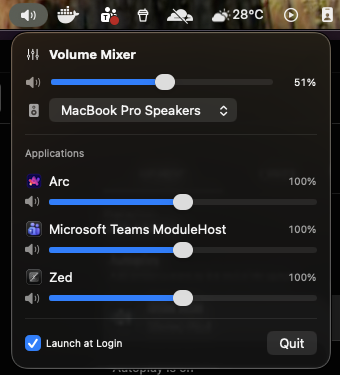
- 🎚️ Per-app volume — an independent slider for every app currently playing audio, from 0 % up to 200 % (boost).
- 🔇 Per-app mute, a one-click reset to 100 %, and a magnetic snap to 100 % while dragging.
- ⏯️ Media controls — play/pause/next/previous for the current music/video source (YouTube, Spotify, Apple Music…). Meeting apps (Teams, Meet) correctly show no transport, since they publish no Now Playing session.
- 🔊 Master volume & mute for the current output device, kept in sync with the hardware/media keys.
- 🎧 Output-device picker — switch speakers/headphones right from the menu.
- 🔎 Automatic app detection — a live list that resolves browser/Electron audio helpers to the real app name and icon (Arc, Chrome, …).
- 🎛️ Multichannel loudness compensation so levels stay correct on multi-output devices.
- 💾 Remembers your settings per app (by bundle ID) across launches.
- 🚀 Launch at login, menu-bar only — no Dock icon.
- 🛠️ No driver or kernel extension — uses the modern Core Audio process-tap API (macOS 14.4+).
⬇︎ Download the latest release — universal (Apple Silicon + Intel), requires macOS 14.4+.
It isn't notarized, so after unzipping and moving Swara.app to /Applications, clear the quarantine flag once:
xattr -dr com.apple.quarantine /Applications/Swara.app(or right-click the app → Open → Open). Then click the menu-bar speaker icon and grant the audio-capture prompt on first per-app adjustment. All releases are on the Releases page.
- Master volume / mute / device picker — plain Core Audio device properties
(
kAudioHardwarePropertyDefaultOutputDevice,…VolumeScalar,…Mute), with property listeners so the UI tracks media keys and device hot-plugs live. - Per-app volume — for each app you adjust, a process tap
(
AudioHardwareCreateProcessTap,.mutedWhenTapped) removes the app's audio from its normal path and hands us a copy; a private aggregate device (AudioHardwareCreateAggregateDevice) fronts the real output device, and an IOProc multiplies the tapped samples by your chosen gain and plays them back. Apps left at 100 % and unmuted are never tapped (zero added latency). - Permission — process taps require the system audio-capture permission
(
kTCCServiceAudioCapture). The app requests it on first use. - Reset — each adjusted app shows a reset button that clears its gain/mute and releases its tap, returning it to the untouched direct path.
- Loudness compensation — tapped audio is scaled by
max(1, channels/2)to counteract the reported multichannel tap-attenuation quirk. This is a no-op for ordinary 2-channel devices and only boosts on multichannel hardware.
brew install xcodegen          # one-time
xcodegen generate              # regenerates Swara.xcodeproj from project.yml
open Swara.xcodeproj      # then Build & Run (⌘R) in Xcode
In Xcode, select your team under Signing & Capabilities (or "Sign to Run Locally") — a stable signature keeps the audio-capture permission grant across rebuilds. On first per-app adjustment macOS will prompt for audio-capture access; grant it (or later enable it under System Settings → Privacy & Security → System Audio Recording).
The .xcodeproj is generated and git-ignored — edit project.yml and re-run
xcodegen generate to change build settings or add files.
There's no paid Apple Developer ID here, so the app is ad-hoc signed. Build a universal (Intel + Apple Silicon) zip:
./scripts/package.sh # → dist/Swara.zipSend that zip. Because it isn't notarized, the recipient does this once:
- Unzip and move Swara.app to
/Applications. - Clear the quarantine flag (otherwise Gatekeeper says it's "damaged"):
(Or: right-click the app → Open → Open in the dialog.)
xattr -dr com.apple.quarantine /Applications/Swara.app
- Launch it, click the menu-bar speaker icon, and grant the audio-capture prompt on first per-app adjustment.
Requirements on their Mac: macOS 14.4 or later. For a no-warning experience you'd need to join the Apple Developer Program and notarize the app.
Now-playing detection and media control use ungive/mediaremote-adapter
(BSD-3-Clause) — bundled prebuilt in Vendor/MediaRemoteAdapter/. It restores access to
Apple's MediaRemote framework, which macOS 15.4+ otherwise limits to Apple's own apps.
- Same-format assumption: the mixing IOProc assumes the tap and output device share a stream format (the common stereo-float32 case). Genuinely mismatched sample rates/channel counts aren't resampled yet.
- Tap persists until the app quits: once an app is tapped, lowering it back to 100 % keeps a (pass-through) tap alive to avoid audible create/destroy churn; it's released when the app stops playing, you switch output devices, or you hit reset.
- Level accuracy: the loudness-compensation heuristic (
max(1, channels/2)) is a no-op on stereo devices; on multichannel hardware validate that levels match the plain system path, as the exact attenuation factor may differ. - Not for the App Store: relies on the private TCC SPI for the permission request and unrestricted aggregate-device/tap creation (intended for personal / direct use).