fork from vscode-tailwindcss v0.2.0
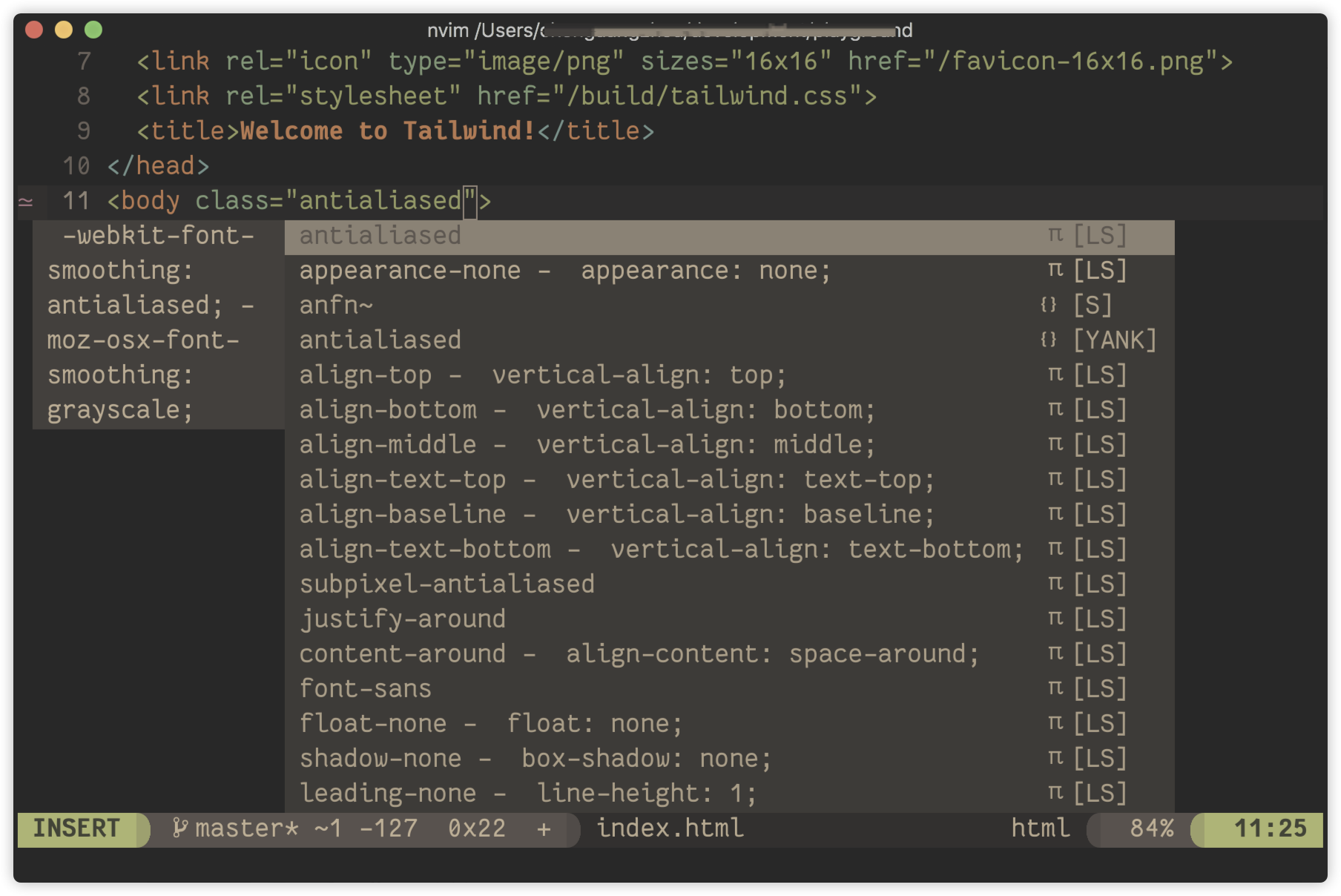
Tailwind CSS class name completion for coc.nvim
CocInstall coc-tailwindcssor with vim-plug,
in your .vimrc/init.vim inside the plug#begin/end block:
Plug 'iamcco/coc-tailwindcss', {'do': 'yarn install --frozen-lockfile && yarn run build'}Create tailwindCSS configuration in your project
this extension need the configuration exists in your project
tailwind inittailwindCSS.trace.server: Trace level of tailwindCSS language server, default:offtailwindCSS.custom.serverPath: Custom path to server module. If there is no setting, the built-in module will be used, default:""tailwindCSS.emmetCompletions: Enable class name completions when using Emmet-style syntax, for examplediv.bg-red-500.uppercase, default:falsetailwindCSS.includeLanguages: Enable features in languages that are not supported by default. Add a mapping here between the new language and an already supported language. E.g.:{"plaintext": "html"}, default:{ "eelixir": "html", "elixir": "html", "eruby": "html", "htmldjango": "html", "html.twig": "html" }tailwindCSS.files.exclude: Configure glob patterns to exclude from all IntelliSense features. Inherits all glob patterns from the#files.exclude#setting, default: ["/.git/", "/node_modules/", "/.hg/"]tailwindCSS.classAttributes: The HTML attributes for which to provide class completions, hover previews, linting etc, default:["class", "className", "ngClass"]tailwindCSS.validate: Enable linting. Rules can be configured individually using thetailwindcss.lint.*settings, default:truetailwindCSS.lint.cssConflict: Class names on the same HTML element which apply the same CSS property or properties, valid option ["ignore", "warning", "error"], default:warningtailwindCSS.lint.invalidApply: Unsupported use of the@applydirective, valid option ["ignore", "warning", "error"], default:errortailwindCSS.lint.invalidScreen: Unknown screen name used with the@screendirective, valid option ["ignore", "warning", "error"], default:errortailwindCSS.lint.invalidVariant: Unknown variant name used with the@variantsdirective, valid option ["ignore", "warning", "error"], default:errortailwindCSS.lint.invalidConfigPath: Unknown or invalid path used with thethemehelper, valid option ["ignore", "warning", "error"], default:errortailwindCSS.lint.invalidTailwindDirective: Unknown value used with the@tailwinddirective, valid option ["ignore", "warning", "error"], default:errortailwindCSS.lint.recommendedVariantOrder: Class variants not in the recommended order (applies in JIT mode only), valid option ["ignore", "warning", "error"], default:errortailwindCSS.inspectPort: Enable the Node.js inspector agent for the language server and listen on the specified port, default:null
Tailwind CSS IntelliSense uses your projects Tailwind installation and configuration to provide suggestions as you type.
- Class name suggestions
- Suggestions include color previews where applicable, for example for text and background colors
- They also include a preview of the actual CSS for that class name
- CSS preview when hovering over class names
- Suggestions when using
@applyandconfig() - Suggestions when using the
@screendirective - Improves syntax highlighting when using
@applyandconfig()
fork from headwind
Headwind is an opinionated Tailwind CSS class sorter for coc.nvim. It enforces consistent ordering of classes by parsing your code and reprinting class tags to follow a given order.
Headwind runs on save, will remove duplicate classes and can even sort entire workspaces.
You can trigger Headwind by:
Commands
tailwindCSS.headwind.sortTailwindClassesSort Tailwind CSS ClassestailwindCSS.headwind.sortTailwindClassesOnWorkspaceSort Tailwind CSS Classes on Entire Workspace
Headwind can sort individual files by running tailwindCSS.headwind.sortTailwindClasses via the Command Palette.
Workspaces can also be sorted by running tailwindCSS.headwind.sortTailwindClassesOnWorkspace.
Any breakpoints or unknown classes will be moved to the end of the class list, whilst duplicate classes will be removed.
Headwind ships with a default class order (located in package.json). You can edit this (and other settings) to your liking on the extension settings page.
An object with language IDs as keys and their values determining the regex to search for Tailwind CSS classes. The default is located in package.json but this can be customized to suit your needs.
There can be multiple capturing groups, that should only contain a string with Tailwind CSS
classes (without any apostrophies etc.). If a new group, which doesn't contain the class string,
is created, ensure that it is non-capturing by using (?:).
Example from package.json:
"tailwindCSS.headwind.classRegex": {
		"html": "\\bclass\\s*=\\s*[\\\"\\']([_a-zA-Z0-9\\s\\-\\:\\/]+)[\\\"\\']",
		"javascriptreact": "(?:\\bclassName\\s*=\\s*[\\\"\\']([_a-zA-Z0-9\\s\\-\\:\\/]+)[\\\"\\'])|(?:\\btw\\s*`([_a-zA-Z0-9\\s\\-\\:\\/]*)`)"
}An array that determines Headwind's default sort order.
Headwind will remove duplicate class names by default. This can be toggled on or off.
"tailwindCSS.headwind.removeDuplicates": false
Headwind will run on save by default (if a tailwind.config.js file is present within your working directory). This can be toggled on or off.
"tailwindCSS.headwind.runOnSave": false