




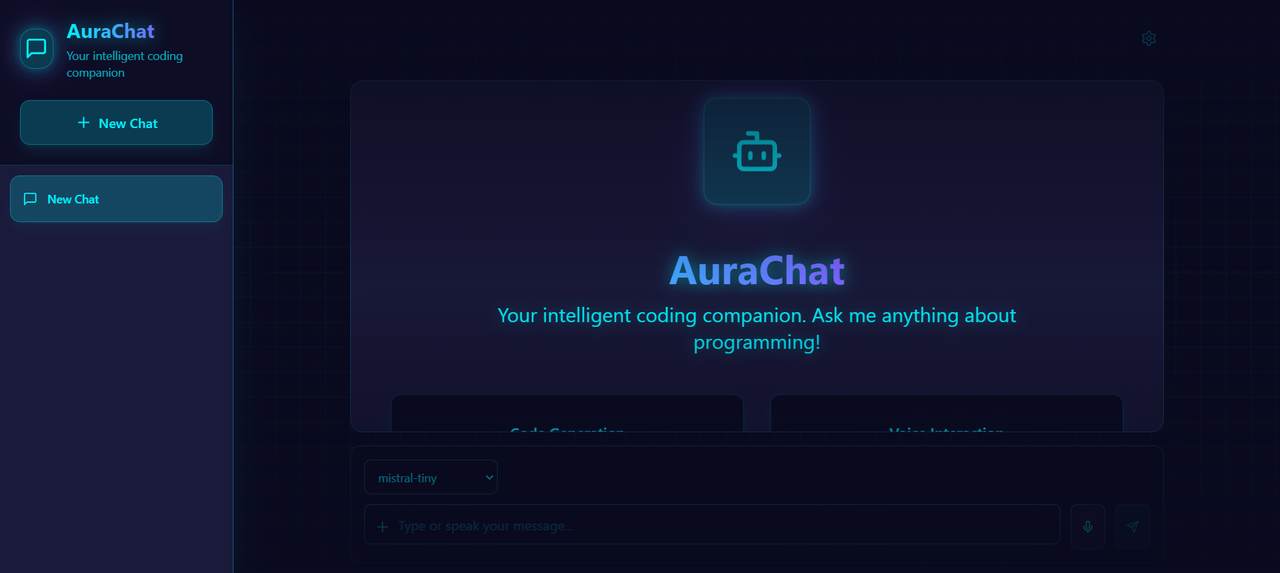
AuraChat transcends traditional AI chat applications, delivering a cyberpunk-inspired coding companion designed to revolutionize developer workflows. With its neon-infused UI and powerful capabilities, AuraChat stands at the intersection of cutting-edge AI and immersive user experience.
Leveraging Mistral AI's powerful language models:
- Specialized Models: Choose between Mistral Large for general tasks and Codestral for programming
- Context-Aware Responses: AI remembers conversation history for coherent assistance
- Alternative Solutions: Generate and navigate between multiple solutions
- Web-Enhanced Knowledge: Optional web search integration for up-to-date information
Write, edit, and run code directly in your chat:
- Monaco Editor Integration: VS Code's editor engine for familiar coding experience
- Syntax Highlighting: Support for 30+ programming languages
- Real-time Execution: Run JavaScript code and see results instantly
- Error Handling: Clear error messages and debugging assistance

Hands-free coding assistance:
- Speech Recognition: Natural voice input for queries
- Text-to-Speech: Listen to AI responses while multitasking
- Voice Customization: Adjust pitch, rate, and volume
- 25+ Languages: Voice interaction across multiple languages
Break down language barriers:
- Auto-Detection: Identifies your language automatically
- Native Display: Shows both English and native language names
- 25+ Languages: From Spanish and French to Japanese and Arabic
- Seamless Switching: Change languages mid-conversation
 English |
 Español |
 日本語 |
Enhance AI responses with real-time web data:
- Live Search: Access current information from the internet
- Result Integration: Seamlessly incorporate web data into responses
- Source Attribution: Clear citations for web-sourced information
- Toggle Control: Enable/disable web search as needed
Extract and analyze text from various formats:
- OCR Technology: Extract text from images using Tesseract.js
- PDF Support: Parse and analyze PDF documents
- Text Files: Import and process plain text files
- Context Preservation: Maintain document structure in analysis
AuraChat
├── AI Integration
│   ├── Mistral AI API (@mistralai/mistralai)
│   ├── LangChain Framework (@langchain/core)
│   └── RAG Implementation
├── Frontend
│   ├── React 18.3 with TypeScript 5.5
│   ├── Tailwind CSS 3.4
│   ├── Vite 5.4
│   └── Lucide React Icons
├── Core Features
│   ├── Monaco Editor
│   ├── Web Speech API
│   ├── Tesseract.js
│   ├── Language Detection
│   └── Markdown Rendering
└── Cross-Platform
    ├── Responsive Design
    ├── Mobile Optimization
    └── Touch Interface
src/
├── components/
│   ├── ChatContainer/     # Message display
│   ├── ChatInput/        # User input interface
│   ├── ChatMessage/      # Message rendering
│   ├── ChatSessions/     # Session management
│   ├── CodeBlock/        # Code execution
│   ├── Layout/           # Main layout
│   ├── SearchModal/      # Search interface
│   └── WebSearchModal/   # Web search
├── hooks/
│   ├── useChatState/     # State management
│   ├── useCodeExecution/ # Code execution
│   ├── useMessageHandler/# Message processing
│   ├── useMistralClient/ # AI client
│   └── useVoice/        # Voice interaction
└── utils/
    ├── codeUtils/       # Code handling
    ├── documentParser/  # File processing
    ├── languageUtils/   # Language support
    ├── ragUtils/        # RAG functionality
    └── webSearchUtils/  # Web search
# Clone the repository
git clone https://github.com/tarunerror/AuraChat

# Navigate to project directory
cd aurachat

# Install dependencies
npm install

# Add your Mistral AI API key
echo "VITE_MISTRAL_API_KEY=your_key_here" > .env

# Start the development server
npm run dev| Model | Best For | Token Limit |
|---|---|---|
| Mistral Large | Complex reasoning, detailed explanations | 32,768 |
| Codestral | Code generation, debugging, refactoring | 16,384 |
- Session Management: Create, rename, and switch between chat sessions
- Message History: Persistent storage of conversations
- Alternative Responses: Store and navigate between AI responses
- Model Selection: Change AI models per session
- Language Detection: Automatic language handling
- Adaptive Layout: Automatically adjusts to any screen size
- Touch-Optimized: Large touch targets for easy interaction
- Responsive Typography: Text scales appropriately
- Efficient Space Usage: Compact layout on small screens
- Gesture Support: Swipe and touch gestures
- Safe Area Support: Respects device notches and home indicators
We welcome contributions from developers of all skill levels:
- Fork the repository
- Create a feature branch (
git checkout -b feature/AmazingFeature) - Commit your changes (
git commit -m 'Add AmazingFeature') - Push to the branch (
git push origin feature/AmazingFeature) - Open a Pull Request
Check out our Contributing Guide for more details.
Distributed under the MIT License. See LICENSE for more information.
Made with dedication by Tarun Gautam
