- python wrapper for abuseipdb API (https://docs.abuseipdb.com/#introduction)
- gives you informations about abuse level of specified IP addresses
- focuses on caching results in local db
stable version from pypi
pip install abuseipdb-wrapperor newest version from github
pip install git+https://github.com/streanger/abuseipdb-wrapper.gitabuseor as module
python -m abuseipdb_wrapperinit `AbuseIPDB` object
Init
AbuseIPDBobject using API KEY created on https://www.abuseipdb.com/. Optionally you can provide db_file for your local database. It is recommended because this project focuses on storing data for further quick access without need of another requests.from abuseipdb_wrapper import AbuseIPDB API_KEY = 'YOUR_API_KEY' abuse = AbuseIPDB(api_key=API_KEY, db_file='abuseipdb.json') abuse.colors_legend()
check list of IPs
Specify list of IPs to be checked using
add_ip_listmethod. Then callcheckmethod and wait for results.ips = ['1.2.3.4', '5.6.7.8', '9.10.11.12', '13.14.15.16'] abuse.add_ip_list(ips) abuse.check()
no db caching approach
If you are not interested in caching data in local database and only want to request for IP addresses one by one use the following code. Have in mind that .check_ip method enriches results and removes reports section. If using wrapper is like overkill in your project, go to: https://docs.abuseipdb.com/?python#check-endpoint
from abuseipdb_wrapper import AbuseIPDB
API_KEY = 'YOUR_API_KEY'
abuse = AbuseIPDB(api_key=API_KEY)
ips = ['1.2.3.4', '2.3.4.5', '3.4.5.6']
for IP in ips:
    result = abuse.check_ip()  # enriched with url and request time
    result = abuse.check_ip_orig()  # results in original form
    print(result)
show local db
To display collected informations use
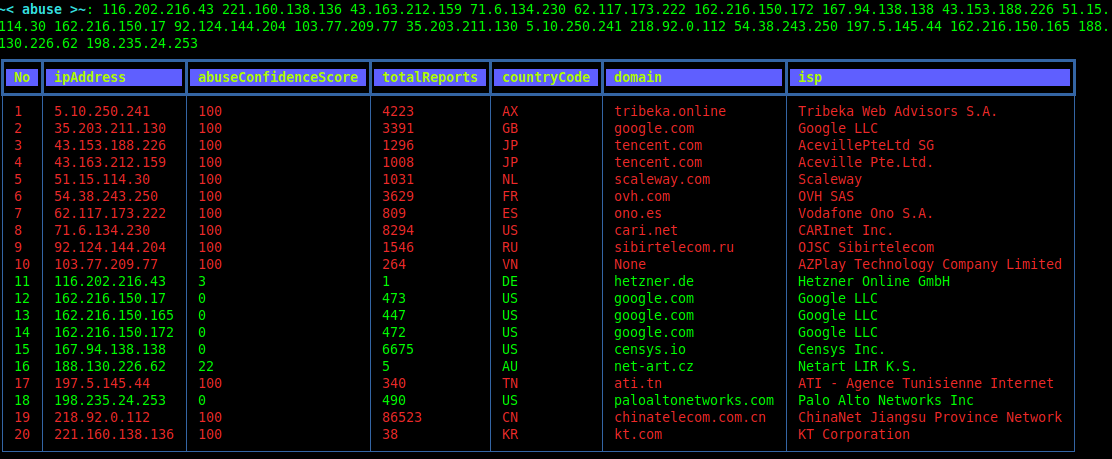
showmethod. Alternatively callprinton yourAbuseIPDBobject. You can specify columns to be displayed usingapply_columns_ordermethod. It affects both vertical and table view.columns = ['ipAddress', 'abuseConfidenceScore', 'totalReports', 'countryCode', 'domain', 'isp'] abuse.apply_columns_order(columns) # show db by print or using .show method print(abuse) abuse.show(matched_only=False, table_view=True)
viewer
For interactive IP check use
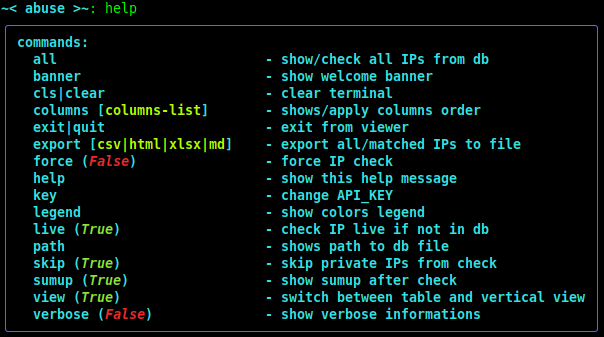
.viewermethod. It let you to provide multiple IPs at once. Use help for more information.abuse.viewer() ~< abuse >~: columns [columns list] # shows or apply columns order ~< abuse >~: export [csv, html, xlsx, md] # export to file ~< abuse >~: all # check/show all database
exports
abuse.export_csv('out.csv', matched_only=False)
abuse.export_html_styled('out.html', matched_only=False)
abuse.export_xlsx_styled('out.xlsx', matched_only=False)
abuse.export_md('out.md', matched_only=False)
convert to dataframe object
import pandas as pd
matched = abuse.get_db(matched_only=False)
df = pd.DataFrame(matched.values())
json columns
abuseConfidenceScorecountryCodedate# additionaldomainhostnamesipAddressipVersionisPublicisWhitelistedisplastReportedAtnumDistinctUserstotalReportsurl# additionalusageTypeisTor
- banner
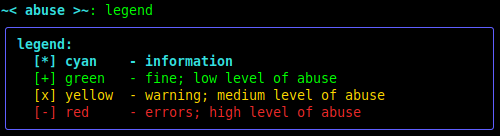
- colors legend
- help
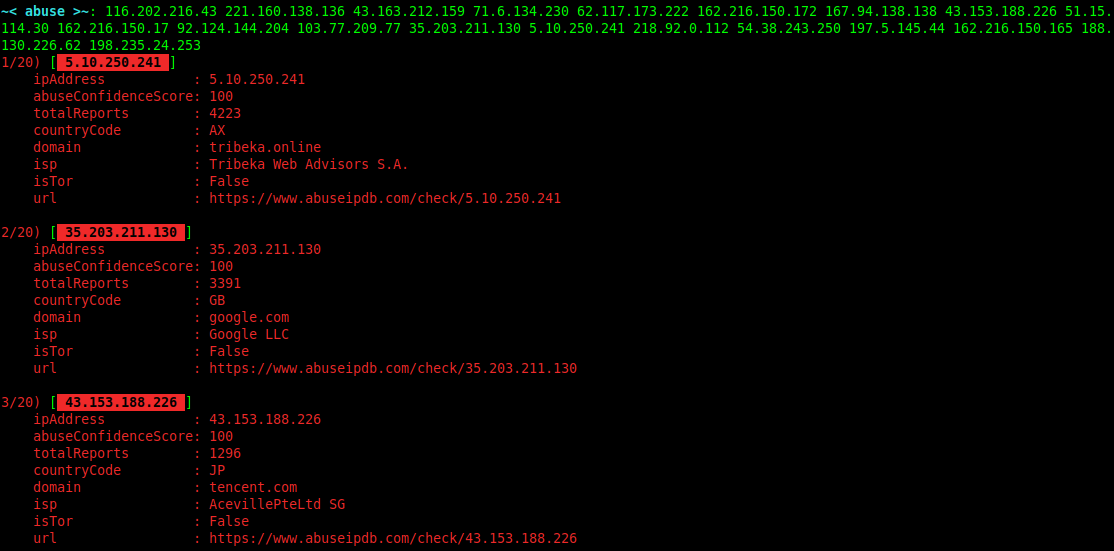
- vertical view
- table view
- v.0.2.0:
- removed pandas and Jinja2 dependencies
- custom export functions
dateas isoformat with timezone
- v.0.1.9:
- additional
isTorNodefield replaced withisTorsupported by api
- additional
- v.0.1.8:
- more flexible exports
- passing
api_keytoAbuseIPDBis now optional - keep order for passing IPs
- viewer:
- skip private IPs flag
- sumup flag
- force new check flag
- more verbose logs
- asterisks for api key using pwinput
- colors support for: windows-cmd, windows-terminal, windows-powershell, vscode, linux-terminal
- tests coverage for most features
- export to markdown
- and few smaller changes
- v.0.1.7:
- abuse entrypoint
- columns command in interactive view
- export command in interactive view (to .csv, .html, .xlsx)
- tor exit nodes enrichment
- storing db file in user home directory
- original API request using .check_ip_orig
- getpass and keyring for API_KEY read & store
- v.0.1.6 and before:
- black background for better view in powershell
- export to csv, html, xlsx (from pandas df)
- wrap text in table cells - made using rich table
- return dataframe object
- enrich results with date of last check