컬렉션 타입 #39

Description

Swift는 Array, Set, Dictionary 세 가지 핵심 컬렉션 타입을 제공한다
- Array는 순서가 있는 값들의 집합
- Set은 순서가 없는 값들의 집합
- Dictionary는 순서가 없는 key-value 쌍의 집합
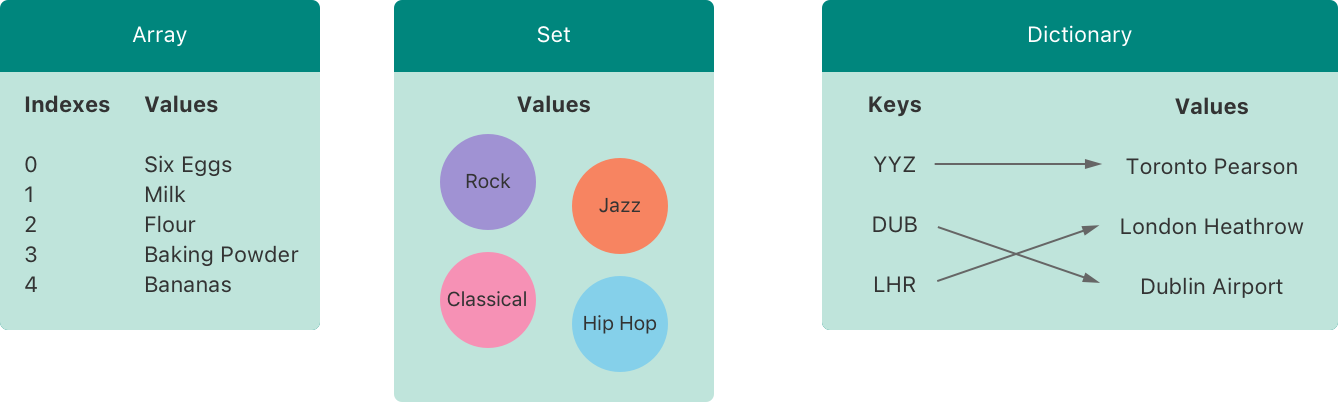
Swift의 배열, 집합 및 딕셔너리는 저장할 수 있는 key 및 value의 타입을 항상 명확하게 구성
즉, 잘못된 타입의 값을 실수로 컬렉션에 삽입할 수 없다. 또한 컬렉션에서 검색할 값의 타입에 대해 확신을 가질 수 있다
제네릭 컬렉션으로 구현되기에 명시, 초기화에 따라서 동적으로 구성
컬렉션의 수정(Mutability of Collections)
변수로서 var 키워드를 사용하여 할당하면 생성된 컬렉션은 변경 가능
즉, 컬렉션에 항목을 추가, 제거 또는 변경하여 컬렉션을 만든 후에도 해당 컬렉션을 변경하거나 변경할 수 있다
상수로서 let 키워드를 사용하여 할당하면 해당 컬렉션은 불변이며 컬렉션의 크기와 내용은 변경 불가
컬렉션을 변경할 필요가 없는 경우 불변 컬렉션을 만드는 것이 좋다
이렇게 하면 코드를 쉽게 추론할 수 있으며, Swift 컴파일러가 사용자가 만든 컬렉션의 성능을 최적화한다
배열(Array)
배열은 같은 타입의 값들을 저장하며, 순서가 존재
같은 값이라도 배열의 다른 위치에서 나타날 수 있다
Swift의 Array 유형은 Foundation의 NSArray 클래스와 브리징
Array 대신 NSArray 인스턴스의 데이터가 필요한 API에 액세스해야 하는 경우 type-cast 연산자(as)를 사용하여 인스턴스를 브리지 가능
브리징을 사용하려면 배열의 요소 타입이 class, @objc 프로토콜(Objective-C에서 가져오거나 @objc 속성으로 표시된 프로토콜) 또는 Foundation 유형에 브리징되는 유형이어야 가능
배열의 요소 타입을 명시한 경우 에러 발생
Bridging Between Array and NSArray
1) 배열의 축약형 문법(Array Type Shorthand Syntax)
배열의 타입은 전체 문법으로 Array로 작성되며, 여기서 Element는 배열이 저장할 수 있는 값의 유형을 나타냄
[Element]와 같은 형태로 축약 가능. 두 형태는 기능적으로 같지만, 축약형이 더 선호
2) 빈 배열 생성(Creating an Empty Array)
타입을 명시하고 빈 배열을 할당 하거나, 이니셜라이저를 통해서 구성 가능
만약 문맥적으로 타입 정보를 이미 제공했다면(함수의 인자 또는 상수/변수 선언 등), 빈 배열 리터럴 []으로 새로운 빈 배열을 만들 수 있다
var someInts = [Int]()
print("someInts is of type [Int] with \(someInts.count) items.")
// Prints "someInts is of type [Int] with 0 items."
// someInts 변수의 타입은 initializer의 타입으로부터 [Int]로 추론

someInts.append(3)
// someInts now contains 1 value of type Int
someInts = []
// someInts is now an empty array, but is still of type [Int]
3) 기본 값과 함께 빈 배열 생성(Creating an Array with a Default Value)
배열 타입은 같은 기본값으로 채워진 특정 크기의 배열을 생성하는 initializer를 제공
var threeDoubles = Array(repeating: 0.0, count: 3)
// threeDoubles is of type [Double], and equals [0.0, 0.0, 0.0]
4) 두 배열의 병합(Creating an Array by Adding Two Arrays Together)
기존의 두 배열을 (+) 연산자를 통해 합쳐서 새로운 배열을 만들 수 있다
합쳐지는 두 배열의 타입이 호환 되어야만 가능
var anotherThreeDoubles = Array(repeating: 2.5, count: 3)
// anotherThreeDoubles is of type [Double], and equals [2.5, 2.5, 2.5]

var sixDoubles = threeDoubles + anotherThreeDoubles
// sixDoubles is inferred as [Double], and equals [0.0, 0.0, 0.0, 2.5, 2.5, 2.5]
5) 배열 리터럴을 이용한 배열 생성(Creating an Array with an Array Literal)
[value 1, value 2, value 3]과 같은 형태로 배열을 생성 가능
var shoppingList: [String] = ["Eggs", "Milk"]
// shoppingList has been initialized with two initial items
// shoppingList의 원소가 String 타입이기 때문에 [String] 타입으로 선언
// 때문에 오직 문자열 값만을 저장 가능
// var로 선언한 이유는 추가적인 변동 가능성이 있기에

var shoppingList = ["Eggs", "Milk"]
// 타입 추론을 통하여 명시를 생략하는 것도 가능
6) 배열 접근과 수정(Accessing and Modifying an Array)
배열의 메서드와 프로퍼티, 또는 subscript 문법을 이용하여 배열에 접근하거나 배열을 수정 가능
- count: 배열의 원소 개수
- isEmpty: 빈 배열 확인
- append: 배열에 새로운 원소 추가, 덧셈 할당 연산자도 이용 가능
- subscript syntax: 배열의 특정 인덱스에 있는 원소를 검색 / 새로운 값으로 수정(할당) 가능, 범위를 지정하여 교체하는 것도 가능
- insert(_:at:) : 특정 인덱스에 원소를 삽입
- remove(at:) : 특정 인덱스의 원소를 삭제하며 해당 값 반환
- removeLast() : 배열의 마지막 원소 삭제하며 해당 값 반환. remove(at:) 사용 시 count 프로퍼티를 사용해야 하기 때문에 권장하지 않는다
var shoppingList = ["Eggs", "Milk"]

print("The shopping list contains \(shoppingList.count) items.")
// Prints "The shopping list contains 2 items."

if shoppingList.isEmpty {
    print("The shopping list is empty.")
} else {
    print("The shopping list is not empty.")
}
// Prints "The shopping list is not empty."

shoppingList.append("Flour")
// shoppingList now contains 3 items, and someone is making pancakes

shoppingList += ["Baking Powder"]
// shoppingList now contains 4 items
shoppingList += ["Chocolate Spread", "Cheese", "Butter"]
// shoppingList now contains 7 items

var firstItem = shoppingList[0]
// firstItem is equal to "Eggs"

shoppingList[0] = "Six eggs"
// the first item in the list is now equal to "Six eggs" rather than "Eggs"

shoppingList[4...6] = ["Bananas", "Apples"]
// shoppingList now contains 6 items

shoppingList.insert("Maple Syrup", at: 0)
// shoppingList now contains 7 items
// "Maple Syrup" is now the first item in the list

let mapleSyrup = shoppingList.remove(at: 0)
// the item that was at index 0 has just been removed
// shoppingList now contains 6 items, and no Maple Syrup
// the mapleSyrup constant is now equal to the removed "Maple Syrup" string

firstItem = shoppingList[0]
// firstItem is now equal to "Six eggs"
// 원소 삭제 시 빈 공간(갭)은 자동으로 정리

let apples = shoppingList.removeLast()
// the last item in the array has just been removed
// shoppingList now contains 5 items, and no apples
// the apples constant is now equal to the removed "Apples" string
subscript 이용 시 반드시 유효한 인덱스 번호를 사용해야 하며, 범위를 넘어설 경우 런타임 에러가 발생
배열의 범위를 넘어서는 인덱스에 삽입, 삭제 메소드를 실행할 경우 런타임 에러가 발생
7) 배열의 순회
for-in 반복문을 통해 전체 배열을 순회 가능
만약 값과 인덱스가 모두 필요하다면, enumerated() 메소드를 사용: 각각의 원소에 대해 인덱스와 값을 튜플 형태로 반환
실제로 인덱스가 반환되는 것은 아니며, 0부터 시작해 1씩 증가해 나가는 정수 값을 반환
for item in shoppingList {
    print(item)
}
// Six eggs
// Milk
// Flour
// Baking Powder
// Bananas

for (index, value) in shoppingList.enumerated() {
    print("Item \(index + 1): \(value)")
}
// Item 1: Six eggs
// Item 2: Milk
// Item 3: Flour
// Item 4: Baking Powder
// Item 5: Bananas
집합
집합(Set)은 같은 타입의 중복되지 않는 값을 순서가 없이 저장
순서가 중요하지 않거나, 각 원소가 오직 하나만 있을 것이라 확신할 수 있는 경우, 배열 대신 집합을 사용
Swift의 셋 타입은 Foundation의 NSSet 클래스와 연결
1) 집합 타입의 hashable 값(Hash Values for Set Types)
hashable을 준수한 타입만 집합의 원소로 저장 가능, 즉, 해당 타입은 자신을 검색하기 위한 해시 값을 가지게 된다
해시 값은 동일하게 비교되는 모든 오브젝트에 대해 동일한 Int 값
ex. a == b라면 a.hashValue == b.hashValue
Swift의 모든 기본 유형(예: String, Int, Double, Boool)은 기본적으로 hashable하며 집합의 원소 또는 딕셔너리 키로 사용 가능
열거형(enum)의 경우, 관련된 모든 값은 Hashable을 준수해야 한다
관련 값이 없는 열거형은 선언이 없어도 Hashable을 준수
// Enums with associated values are not equatable...
enum MyEnum {
    case a(number: Int)
    case b
    case c(text: String)
}

// We can define a hash based on the case or the case plus associated value.
extension MyEnum: Hashable {
    func hash(into hasher: inout Hasher) {
        switch self {
        case .a(let intValue):
            hasher.combine(intValue)
        case .b:
            break
        case .c(let strValue):
            hasher.combine(strValue)
        }
    }

    public static func ==(lhs: MyEnum, rhs: MyEnum) -> Bool {
        return lhs.hashValue == rhs.hashValue
    }
}

let h1 = MyEnum.a(number: 1971).hashValue
let h2 = MyEnum.a(number: 13).hashValue
let h3 = MyEnum.b.hashValue
let h4 = MyEnum.c(text: "bibble").hashValue

var dict: [MyEnum: String] = [
    MyEnum.a(number: 1971): "nineteenseventyone",
    MyEnum.a(number: 13): "thirteen",
    MyEnum.b: "b",
    MyEnum.c(text: "bibble"): "wibble"
]

let equals1 = MyEnum.a(number: 13) == MyEnum.a(number: 13)
let equals2 = MyEnum.a(number: 13) == MyEnum.a(number: 007)
let equals3 = MyEnum.a(number: 13) == MyEnum.b
커스텀 타입을 Hashable 프로토콜을 준수하여 집합의 원소 또는 딕셔너리 키로 사용 가능
extension을 통한 Hashable 준수와 필요한 hash(into:) 메서드를 구현하고, Hashable 프로토콜은 Equatable 프로토콜을 상속하기 때문에 동일 연산자(==)도 반드시 구현
동일 연산자의 구현은 다음 세 가지 조건을 만족해야 한다.
- a == a (Reflexivity)
- a == b이면 b == a이다. (Symmetry)
- a == b && b == c이면 a == c이다. (Transitivity)
/// A point in an x-y coordinate system.
// struct경우 모든 저장된 프로퍼티가 Hashable를 준수
struct GridPoint {
    var x: Int
    var y: Int
}

extension GridPoint: Hashable {
    static func == (lhs: GridPoint, rhs: GridPoint) -> Bool {
        return lhs.x == rhs.x && lhs.y == rhs.y
    }

    func hash(into hasher: inout Hasher) {
        hasher.combine(x)
        hasher.combine(y)
    }
}

var tappedPoints: Set = [GridPoint(x: 2, y: 3), GridPoint(x: 4, y: 1)]
let nextTap = GridPoint(x: 0, y: 1)
if tappedPoints.contains(nextTap) {
    print("Already tapped at (\(nextTap.x), \(nextTap.y)).")
} else {
    tappedPoints.insert(nextTap)
    print("New tap detected at (\(nextTap.x), \(nextTap.y)).")
}
// Prints "New tap detected at (0, 1).")
2) 집합 타입 문법
Swift의 집합은 Set와 같이 작성
Element는 집합에 저장되는 것이 허용된 타입
배열과 달리 축약형이 존재하지 않는다
3) 빈 집합 생성과 초기화
이니셜라이저 구문을 사용하여 특정 타입의 빈 집합을 생성
문맥적으로 타입 정보를 이미 제공했다면(함수의 인자 또는 상수/변수 선언 등) 빈 배열 리터럴을 사용하여 빈 집합 초기화 가능
var letters = Set<Character>()
print("letters is of type Set<Character> with \(letters.count) items.")
// Prints "letters is of type Set<Character> with 0 items."
// letter 변수의 타입은 이니셜라이저 유형에서 Set<Character>로 추론

letters.insert("a")
// letters now contains 1 value of type Character
letters = []
// letters is now an empty set, but is still of type Set<Character>
4) 배열 리터럴을 이용한 집합 생성(Creating a Set with an Array Literal)
하나 또는 그 이상의 원소를 배열 리터럴에 작성함으로써 집합을 초기화
집합 타입은 배열 리터럴만으로는 추론되지 않는다. 따라서 Set 타입을 반드시 명시적으로 선언해 줘야 한다
하지만 타입 추론 덕분에 배열 리터럴로 초기화 할 때 집합에 들어갈 원소의 타입은 작성할 필요가 없다
var favoriteGenres: Set<String> = ["Rock", "Classical", "Hip hop"]
// favoriteGenres has been initialized with three initial items
// favoriteGenres의 원소가 String 타입이기 때문에 Set<String> 타입으로 선언. 오직 문자열 값만을 저장 가능
// let을 사용해 상수로 선언한다면 집합에 원소를 추가하거나 제거할 수 없음

var favoriteGenres: Set = ["Rock", "Classical", "Hip hop"]
// favoriteGenres의 초기화는 다음과 같이 축약
// 모든 원소가 같은 타입이고 Set 명시
5) 집합 접근 및 수정(Accessing and Modifying a Set)
- count : 집합의 원소 개수를 확인
- isEmpty : 집합이 비어 있는지 확인
- insert(_:) : 새로운 원소를 집합에 삽입
- remove(_:) : 만약 원소가 집합에 있다면 삭제하고 그 원소를 반환
- removeAll() : 집합의 모든 원소를 삭제
- contains(_:) : 집합에 특정 원소가 있는지 확인
print("I have \(favoriteGenres.count) favorite music genres.")
// Prints "I have 3 favorite music genres."

if favoriteGenres.isEmpty {
    print("As far as music goes, I'm not picky.")
} else {
    print("I have particular music preferences.")
}
// Prints "I have particular music preferences."


favoriteGenres.insert("Jazz")
// favoriteGenres now contains 4 items

if let removedGenre = favoriteGenres.remove("Rock") {
    print("\(removedGenre)? I'm over it.")
} else {
    print("I never much cared for that.")
}
// Prints "Rock? I'm over it."

if favoriteGenres.contains("Funk") {
    print("I get up on the good foot.")
} else {
    print("It's too funky in here.")
}
// Prints "It's too funky in here."
6) 집합의 순회(Iterating Over a Set)
for-in 반복문을 사용해 집합을 순회
Swift의 집합은 정의된 순서를 갖지 않는다
특정한 순서로 집합을 순회하기 위해선 sorted() 메소드를 사용
sorted() 메소드는 < 연산자를 사용하여 정렬한 배열(오름차순)과 같이 집합의 원소들을 반환
for genre in favoriteGenres {
    print("\(genre)")
}
// Classical
// Jazz
// Hip hop

for genre in favoriteGenres.sorted() {
    print("\(genre)")
}
// Classical
// Hip hop
// Jazz
집합의 연산(Performing Set Operations)
두 집합을 합치거나, 공통된 원소를 빼내거나 하는 등의 집합의 연산을 효율적으로 사용 가능
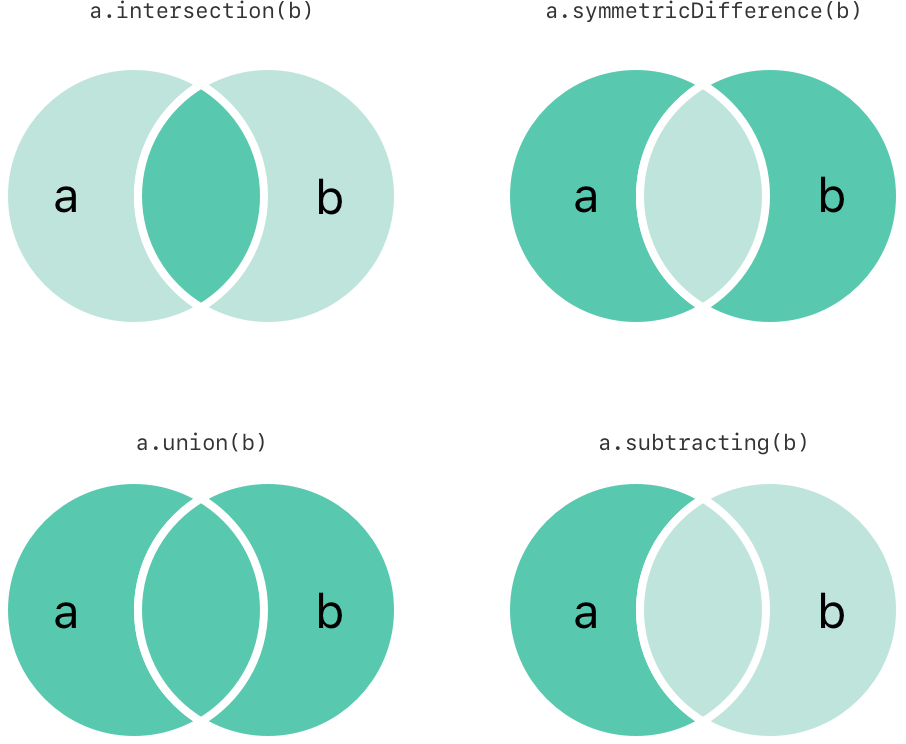
7) 집합의 기본 연산(Fundamental Set Operations)
- intersection(_:) : 두 셋의 공통된 값들을 반환.
- symmetricDifference(_:) : 두 셋의 공통되지 않은 값들을 반환.
- union(_:) : 두 셋의 모든 값들을 반환.
- subtracting(_:) : a에만 존재하는 값들을 반환.
let oddDigits: Set = [1, 3, 5, 7, 9]
let evenDigits: Set = [0, 2, 4, 6, 8]
let singleDigitPrimeNumbers: Set = [2, 3, 5, 7]

oddDigits.union(evenDigits).sorted()
// [0, 1, 2, 3, 4, 5, 6, 7, 8, 9]
oddDigits.intersection(evenDigits).sorted()
// []
oddDigits.subtracting(singleDigitPrimeNumbers).sorted()
// [1, 9]
oddDigits.symmetricDifference(singleDigitPrimeNumbers).sorted()
// [1, 2, 9]
8) 집합 간의 관계와 동등 비교(Set Membership and Equality)
아래 그림은 a, b, c의 세 집합을 묘사하고 있으며, 집합 간에 공유되는 요소를 나타내는 교집합이 있다
a의 모든 원소는 b에 포함하기 때문에 집합 a는 집합 b의 초월집합이다. 반대로, 집합 b는 집합 a의 부분 집합
집합 b와 집합 c는 공통 요소를 공유하지 않기 때문에 서로소 상태
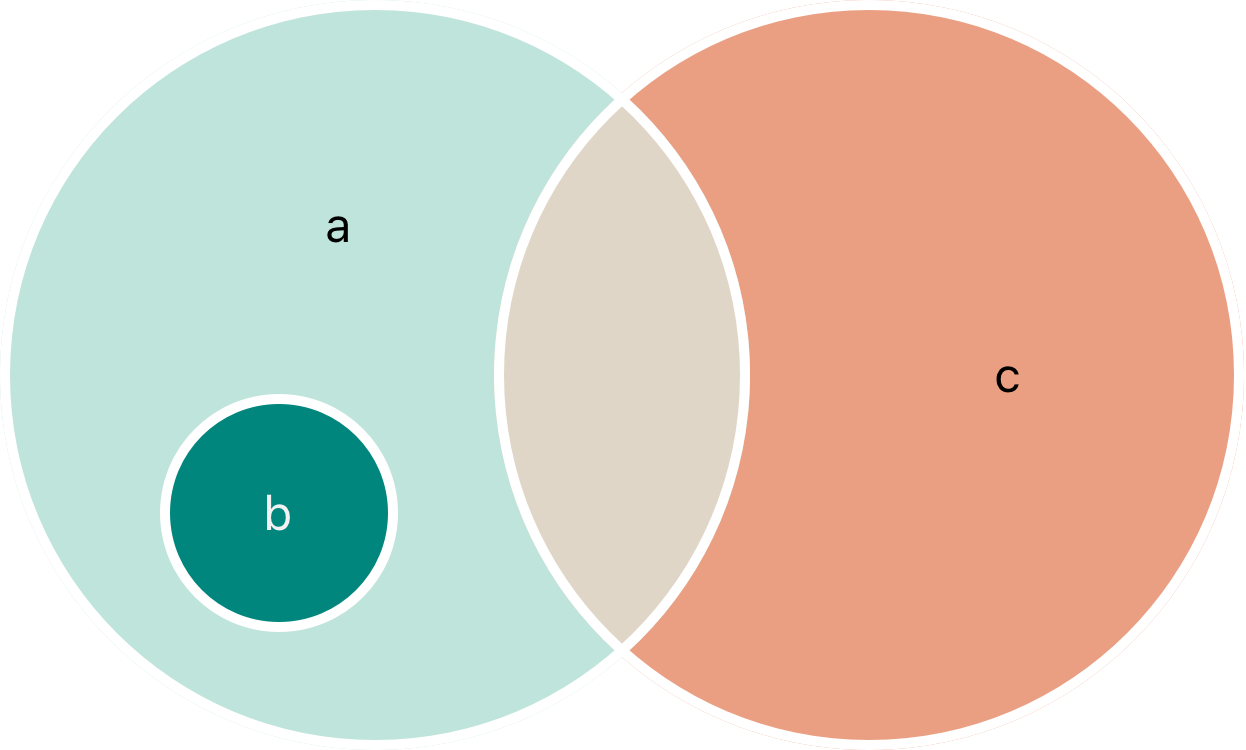
- 동등 연산자(==) : 두 셋이 포함하고 있는 값이 모두 같은지 검사하는 연산자
- isSubset(of:) : 셋의 모든 값이 다른 셋에 포함되어 있는지 확인하는 메서드
- isSuperset(of:) : 셋이 다른 셋의 모든 값을 포함하고 있는지 확인하는 메서드
- isStrictSubset(of:), isStrictSuperset(of:) : 셋이 다른 셋의 부분집합 혹은 초월집합이지만 동일하지는 않은 경우인지를 판단하고자 할 때 사용하는 메서드
- isDisjoint(with:) : 두 셋이 공통적으로 가지는 값이 하나도 없는지 확인하는 메서드
let houseAnimals: Set = ["🐶", "🐱"]
let farmAnimals: Set = ["🐮", "🐔", "🐑", "🐶", "🐱"]
let cityAnimals: Set = ["🐦", "🐭"]

houseAnimals.isSubset(of: farmAnimals)
// true
farmAnimals.isSuperset(of: houseAnimals)
// true
farmAnimals.isDisjoint(with: cityAnimals)
// true
딕셔너리(Dictionary)
딕셔너리(Dictionary)는 키(key)와 값(value)의 쌍으로 이루어진 집합을 순서 없이 저장
각각의 키는 고유하며, 식별자로서 딕셔너리에서 사용
배열과 다르게 순서가 존재하지 않는다.
식별자에 기반한 값을 찾아야 할 필요가 있을 때 사용
Swift의 딕셔너리 타입은 Foundation의 NSDictionary 클래스와 연결
1) 딕셔너리 타입 축약 문법(Dictionary Type Shorthand Syntax)
Swift의 딕셔너리는 Dictionary<Key, Value> 형태로 작성
[Key: Value]와 같은 형태로 축약하여 사용하며 보다 선호
딕셔너리의 키는 반드시 Hashable 프로토콜을 준수
2) 빈 딕셔너리 초기화(Creating an Empty Dictionary)
배열과 같이, initializer를 사용하여 특정 타입의 빈 딕셔너리를 생성
만약 문맥적으로 타입 정보를 이미 제공했다면(함수의 인자 또는 상수/변수 선언 등)
빈 딕셔너리 리터럴인 [:]으로 새로운 빈 딕셔너리를 초기화 가능
var namesOfIntegers: [Int: String] = [:]
// namesOfIntegers is an empty [Int: String] dictionary

namesOfIntegers[16] = "sixteen"
// namesOfIntegers now contains 1 key-value pair
namesOfIntegers = [:]
// namesOfIntegers is once again an empty dictionary of type [Int: String]
3) 딕셔너리 리터럴를 이용한 생성(Creating a Dictionary with a Dictionary Literal)
배열과 비슷한 방법으로, 하나 또는 그 이상의 키-값 쌍을 딕셔너리 리터럴에 작성함으로써 초기화
[key 1: value 1, key 2: value 2, key 3: value 3]과 같은 형태로 딕셔너리를 생성
var airports: [String: String] = ["YYZ": "Toronto Pearson", "DUB": "Dublin"]
// airports의 원소가 String-String 타입이기 때문에 [String: String] 타입으로 명시
// 오직 문자열 값을 기반으로 한 Key-Value만 저장

var airports = ["YYZ": "Toronto Pearson", "DUB": "Dublin"]
// Key-Value의 타입이 일관된 딕셔너리 리터럴로 초기화
// 타입 추론으로 알아서 [String: String] 타입으로 인지
let을 사용해 상수로 선언한다면 딕셔너리에 원소를 추가하거나 제거 불가
4) 딕셔너리 접근 및 수정(Accessing and Modifying a Dictionary)
딕셔너리의 메서드와 프로퍼티, 또는 subscript 문법을 이용하여 딕셔너리에 접근하거나 배열을 수정 가능
- count : 딕셔너리의 원소 개수를 확인
- isEmpty : 딕셔너리가 비어 있는지 확인
- subscript syntax를 사용하여 새로운 Key-Value 쌍을 추가하거나 수정
- updateValue(_:forKey:) : 해당 메서드로도 특정 키의 값을 수정가능
키가 존재하지 않을 경우 값을 할당하고, 반대의 경우에는 값을 수정
subscript와는 달리 업데이트 하기 이전의 값(기존 값)을 반환, 키가 없었다면 nil을 반환(updateValue()가 반환하는 값은 옵셔널) - subscript syntax 역시 딕셔너리에 특정 키가 있는지 검색하는 데 사용 가능
키가 존재한다면 값 타입의 옵셔널 값을 반환, 키가 딕셔너리에 없다면 nil을 반환 - 키를 제거하기 위해선 nil을 할당
- removeValue(forKey:) : Key-Value 쌍을 삭제하고 반환, 존재하지 않았다면 nil을 반환
var airports = ["YYZ": "Toronto Pearson", "DUB": "Dublin"]

print("The airports dictionary contains \(airports.count) items.")
// Prints "The airports dictionary contains 2 items."

if airports.isEmpty {
    print("The airports dictionary is empty.")
} else {
    print("The airports dictionary isn't empty.")
}
// Prints "The airports dictionary isn't empty."

airports["LHR"] = "London"
// the airports dictionary now contains 3 items

airports["LHR"] = "London Heathrow"
// the value for "LHR" has been changed to "London Heathrow"

if let oldValue = airports.updateValue("Dublin Airport", forKey: "DUB") {
    print("The old value for DUB was \(oldValue).")
}
// Prints "The old value for DUB was Dublin."

if let airportName = airports["DUB"] {
    print("The name of the airport is \(airportName).")
} else {
    print("That airport isn't in the airports dictionary.")
}
// Prints "The name of the airport is Dublin Airport."

airports["APL"] = "Apple International"
// "Apple International" isn't the real airport for APL, so delete it
airports["APL"] = nil
// APL has now been removed from the dictionary

if let removedValue = airports.removeValue(forKey: "DUB") {
    print("The removed airport's name is \(removedValue).")
} else {
    print("The airports dictionary doesn't contain a value for DUB.")
}
// Prints "The removed airport's name is Dublin Airport."
5) 딕셔너리의 순회(Iterating Over a Dictionary)
for-in 반복문을 사용해 딕셔너리를 순회
각각의 원소는 (key, value)의 튜플 형태로 반환
keys와 values 프로퍼티를 통해 키 또는 값에만 접근도 가능
만약 딕셔너리의 키나 값을 배열 인스턴스로 만들고 싶다면, keys 또는 values 프로퍼티와 함께 새로운 배열을 초기화
var aitports = ["LHR": "London Heathrow", "YYZ": "Toronto Pearson"]

for (airportCode, airportName) in airports {
    print("\(airportCode): \(airportName)")
}
// LHR: London Heathrow
// YYZ: Toronto Pearson

for airportCode in airports.keys {
    print("Airport code: \(airportCode)")
}
// Airport code: LHR
// Airport code: YYZ

for airportName in airports.values {
    print("Airport name: \(airportName)")
}
// Airport name: London Heathrow
// Airport name: Toronto Pearson

let airportCodes = [String](airports.keys)
// airportCodes is ["LHR", "YYZ"]

let airportNames = [String](airports.values)
// airportNames is ["London Heathrow", "Toronto Pearson"]