In an age where mental health challenges are on the rise and people are constantly navigating stress, anxiety, and burnout, self-reflection has become more essential than ever. Yet journaling — one of the most effective tools for emotional clarity — often lacks structure, feedback, and personalization.
That’s where MoodMirror comes in.
MoodMirror is an AI-powered, multimodal journaling assistant that listens, reads, and sees. Whether you write down your thoughts, record a voice note, or upload a selfie, MoodMirror analyzes your entries and reflects back structured insights — emotional patterns, suggestions, affirmations, and visualizations that guide your self-awareness journey.
This was developed as part of the 5-day Gen AI Intensive Course with Google and is my capstone project for the program.
The Problem: Journaling is widely known to improve mental health, but most people struggle with consistency, reflection, or even knowing what to write. Traditional apps offer digital notebooks, but little insight — and none adapt to how you choose to express yourself: through words, voice, or images.
The Idea: What if your journaling app could do more than store thoughts? What if it could understand them? MoodMirror was born from this question — a journaling assistant that listens to your voice, analyzes your writing, or reads your face — and then reflects something back: insight, encouragement, patterns, and care.
The Solution: MoodMirror uses Generative AI to turn raw emotion into actionable reflection. With Gemini 2.0 Flash, we analyze text and voice entries using:
- Structured output (JSON mode) for consistent insights
- Few-shot prompting to teach the model how to respond empathetically
- Retrieval-Augmented Generation (RAG) to ground suggestions in real, curated wellness strategies
Combined with image understanding (via FER) and speech-to-text pipelines, the tool brings together multiple Gen AI capabilities into a unified emotional assistant.
Journaling becomes more than expressive.> It becomes interactive — and even healing.
A demo video is here.
Want to experiment with it yourself?👉 Run the Notebook on Kaggle (link will be updated with final submission)
At the core of MoodMirror is Gemini 2.0 Flash, which processes text entries using few-shot prompting and structured output (JSON mode). Each journal is grounded in context via RAG, selecting the most relevant mental wellness documents.
config = types.GenerateContentConfig(
    temperature=0.9,  # Increased to encourage more randomness
    top_k=5,         # Number of top tokens to consider at each step
    response_mime_type="application/json",
    response_schema=JournalAnalysis
)
response = client.models.generate_content(
    model="gemini-2.0-flash",
    contents=[prompt],
    config=config
)
It returns:
- Primary Emotion (e.g., anxious, relieved)
- Themes (e.g., burnout, productivity)
- CBT-Style Suggestion
- Affirmation
 Example of a journal entry and its processed structured insights.
MoodMirror uses Google Speech Recognition to transcribe .m4a or .wav voice notes.
The transcript is passed through the same analysis pipeline.
 Example of a voice note being transcribed and analyzed for insights.
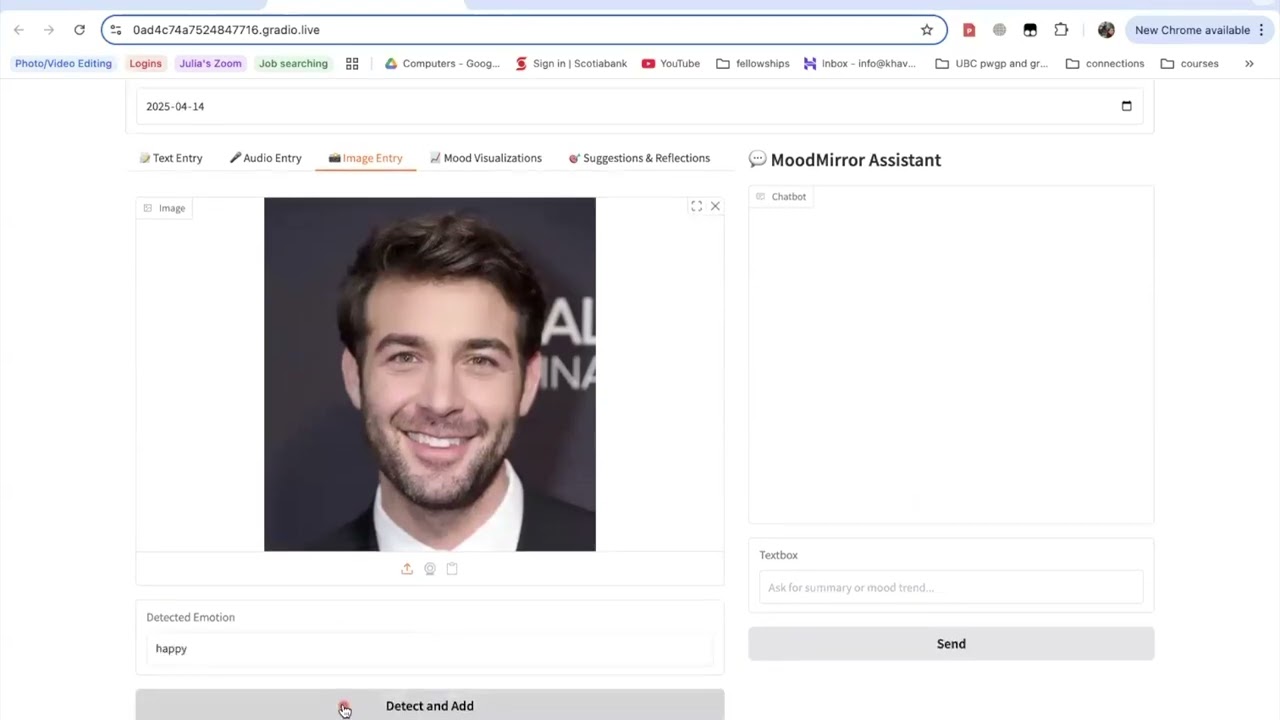
Upload a selfie, and MoodMirror uses FER (Facial Emotion Recognition) with facenet-pytorch to analyze expressions like happy, sad, neutral, or angry.
 Example of an image being processed and emotion analysis displayed.
Your data doesn’t disappear. MoodMirror visualizes:
- 🪄 Mood Trend Line over time.
- 📊 Emotion Distribution across entries.
- ☁️ Word Cloud of recurring thoughts.
 Example of a mood trend visualization over time based on user entries.
At the end of each week, MoodMirror generates a summary of your emotional journey, highlighting the primary emotions and themes that emerged, as well as any actionable suggestions for improvement.
 Example of the weekly summary showing insights and suggestions based on entries.
In addition to visual insights, MoodMirror also features a chatbot that engages with you to provide real-time support, answer questions, and offer encouragement based on the emotions and themes detected in your entries.
 Example of a chatbot conversation providing personalized feedback and support.
MoodMirror reimagines journaling as a deeply interactive, multi-sensory experience. By integrating Gen AI and multimodal inputs, it creates space for reflection, growth, and emotional clarity — all with the click of a button.
It's not just about writing your feelings down. It’s about having them understood.
Thanks to the Gen AI team at Google for the opportunity to build this project.