Windows Batch Deployment (you can simply call it as "WBD") is a programmable and rootkit-like remote access tool, it supports from Windows XP to Windows 10 (32-bit and 64-bit). Compared with other remote access software, WBD does not have a server program in the traditional sense. WBD provides a server DLL, and users need to write server programs according to their needs. Therefore, WBD maximally meets the individual needs of users. WBD client is a kernel-mode driver, it hides its traces as much as possible, and the goal is to keep the user's attention as little as possible. WBD client can run user-defined programs when system starts, user-defined programs do not store on the disk in the form of files, and there are no startup entries in the registry. As WBD may be used illegally, when WBD client starts, it outputs a text file to the desktop or the root of system drive to inform its existence and how to uninstall it manually. Disclaimer: You can only use WBD on your computers or computers which you are allowed to access, I will not be responsible for any consequences and losses caused by the abuse of it. Until you fully understand how to use WBD, please test it in virtual machines only.
- File management (upload, download, copy, delete, rename, etc.).
- Run program, driver and system shell (CMD).
- Shut down or reboot the system.
- The client protects itself against unauthorized uninstallation. The self-protection feature takes effect after rebooting (when the installation is complete, all features except the self-protection will work; and then reboot, all features will work). If debug mode is enabled, the self-protection feature will be disabled. If you are interested in this feature, please check this page.
- Edit “InstallClient.bat”, fill in the IP address or domain name (including port) of your server. Note: If you use WBD on the wide area network (WAN), you must have a server. If you only use WBD on the local area network (LAN, such as at home), you can use your own PC as a server.
- Run “InstallClient.bat” on the computers that you need access remotely.
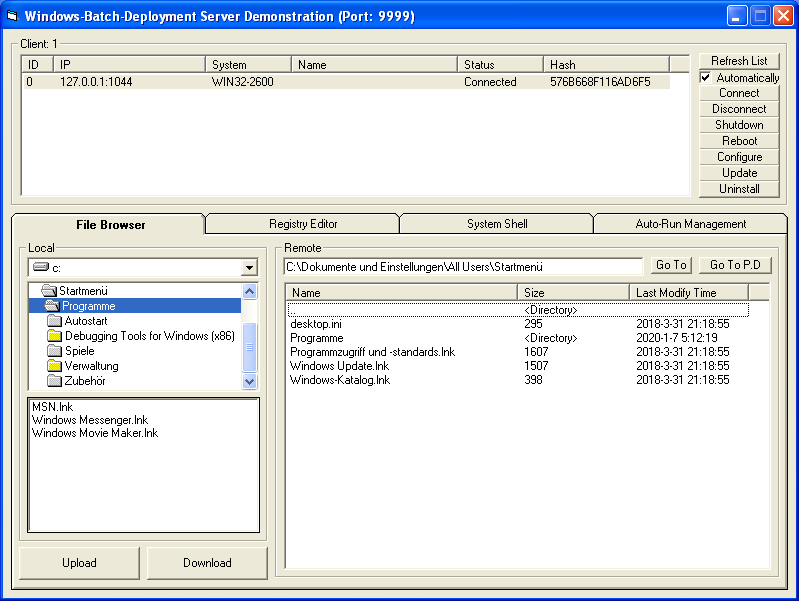
- WBD comes with a demonstration server program, you can use it without programming.
- WBD provides DLL (both 32-bit and 64-bit) for advanced users, you can write your server program based on the sample source code.
- Call the related function from WBD server DLL (read sample source code for details).
- Enable system debug mode, then reboot, and then delete the service of WBD client.
Because I don't have a digital certificate, I have to use the leaked digital certificate from HT SRL to sign WBD client drivers. As for negative comment, any program of this type is considered a virus by Anti-Virus software, so who cares.
If you want to share your server programs or user-defined programs, please commit your programs and / or source code to "Issues" with brief description. I will add programs to the "Third-Party Programs" directory if I think they are useful.
- You are an administrator of IT department. You need to perform repetitive tasks on hundreds of computers (such as updating firewall rules, pushing notifications). I used to work in this post, this is my original purpose of making this software.
- You are a developer. Your software does not run properly on a few users' systems, but it cannot be replicated in your test environment, so you need to get some data or perform some debugging tests secretly (such as issuing a debug version software to specific users).
- You are a person with a lot of secrets. You need to erase the data on your computer when you find that your computer is stolen.
- You are a voyeur and you want to take a screenshot every 10 seconds to monitor what your spouse is doing on his / her computer (just kidding, this is illegal).
In order to optimize the page load speed in low quality network environments, I only placed one picture on this page.
- If you find bugs, have constructive suggestions or would like to purchase a paid service, please let me know.
- You'd better write E-MAIL in English or German, I only reply to E-MAILs that I am interested in.
- In order to disclose as little personal information as possible (IP address, online time, etc.), I do not use instant messaging. Just write what you want in the E-MAIL.
- In order to reduce the impact of the Internet on real life, I also do not use Facebook, Twitter, etc. Please don't ask me for such information via E-MAIL.
- Binary customization I: Remove or modify all obvious characteristics of public WBD client.
- Binary customization II: More powerful self-protection for WBD client.
- Source code: All source code of WBD, including client and server.
- Source code customization: Add features to WBD according to your needs. This service is only available to customers who have purchased the WBD source code.
Bug fix: Enhanced stability.
This is the first public version.