
BitBar is a handy tool for MacOS status bar, whose functionality is based on plugins.
This repo has the source code for a plugin that integrates UptimeRobot into BitBar.
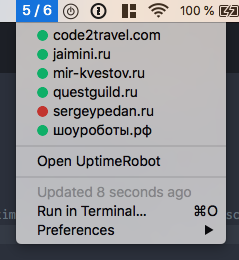
This assumes you have BitBar already installed. Otherwise you can install it from the website or as Brew cask (better):
brew cask install bitbar-
Add a monitor to UptimeRobot.
-
Get a read-only API key from your UptimeRobot Settings page.
-
Put that API key into file
~/.config/bitbar.conf. You can do it from Terminal as follows:echo 'UPTIME_ROBOT_API_KEY = "12345-asdf-7890"' > ~/.config/bitbar.conf
-
Find your BitBar plugin folder location from BitBar menu.
-
Save the plugin source code as a text file in your BitBar plugin folder. Any file name will work, but better name it
uptime_robot.rbfor clarity. -
Assign file permissions for that file:
cd <plugin directory>
chmod +x "uptime_robot.rb"
-
Refresh BitBar from menu — the new plugin should be up and running
Not submitted yet
- Ruby 2.0+ must be installed. Usually MacOS comes with Ruby 2.3 pre-installed. Otherwise you can install it with ruby-install.
- Ruby must be available to
/usr/bin/env. Usually it is.