Alternative Source Generator is built on the Unity native functions.
- ✅ Unity Package Manager Support
- ✅ No Complicated IDE Environment Setup
- ✅ No Additional Package Installation
As you already know, Roslyn's source generator is too sophisticated. This framework provides more simple, ease of use and good enough functions for source code generation.
日本語 / JA
超簡単に使える Unity 向けソースジェネレーターです。
Table of Contents
Minimal implementation of source generator here.
日本語 / JA
最小限のソースジェネレーターの構成はこちら。StringBuilder が渡されるので書き込んで true を返せば context.OutputPath に内容を書き込みます。false を返せば書き込みを中止できます。
using System.Text;
using SatorImaging.UnitySourceGenerator;

[UnitySourceGenerator(OverwriteIfFileExists = false)]
class MinimalGenerator
{
    static string OutputFileName() => "Test.cs";  // USG automatically update to -> Test.<ClassName>.g.cs

    static bool Emit(USGContext context, StringBuilder sb)
    {
        // write content into passed StringBuilder.
        sb.AppendLine($"Asset Path: {context.AssetPath}");
        sb.AppendLine($"Hello World from {typeof(MinimalGenerator)}");

        // you can modify output path. initial file name is that USG updated.
        // NOTE: USG doesn't care the modified path is valid or not.
        context.OutputPath += "_MyFirstTest.txt";

        // return true to tell USG to write content into OutputPath. false to do nothing.
        return true;
    }
}USG automatically adds document tag at the beginning of generated file. You can remove this document tag by sb.Clear() in Emit() method.
日本語 / JA
書き出される内容は以下の通り。渡される StringBuilder の冒頭にはドキュメントタグが入ってます。
// <auto-generated>MinimalGenerator</auto-generated>
Asset Path: Assets/Scripts/MinimalGenerator.cs
Hello World from Sample.MinimalGeneratorUSG creates USG.g folder next to generator script file. Resulting file path will be:
- Assets/Scripts/USG.g/Test.MinimalGenerator.g.cs
NOTE: In above example, output path is modified so that resulting file name is
Test.MinimalGenerator.g.cs_MyFirstTest.txt
日本語 / JA
書き出し先は上記の通り。フォルダーとジェネレータークラス名が付与されます。
There are utility functions to perform source code generation on build event.
日本語 / JA
IPostprocessBuildWithReport も実装しようかと思ったものの、ビルドイベントに勝手に処理追加するのはなんか訳わからんが動かんの原因だし、BuildReport として渡される全てのファイル名を走査する処理は効率も良くない。ということで。
// perform by known asset path.
USGEngine.IgnoreOverwriteSettingByAttribute = true;  // force overwrite
USGEngine.ProcessFile(pathToGeneratorScriptFile);

// search by class name.
USGUtility.ForceGenerate(nameof(MinimalGenerator));As of C# 9.0, it doesn't allow to define abstract static methods in interface, USG reports error when source generator class doesn't implement required static methods.
日本語 / JA
理想はアトリビュートとインターフェイスによるフィルタリングですが、Unity 2021 は C# 9.0 で abstract static を含んだインターフェイスが使えません。
しょうがないのでメソッドのシグネチャを確認して存在しなければエラーをコンソールに出します。

- Generator class name and filename must be matched.
- Class name must be unique in whole project.
- Classes are ignored if defined in assembly which name starts with:
Unity(no trailing dot)System.Mono.
日本語 / JA
- ジェネレータークラスの名前はファイル名と一致
- ジェネレータクラスの名前はプロジェクト内で一意
- クラスが以下で始まる名前のアセンブリで宣言されている場合は対象としない
Unity(末尾ドット無し)System.Mono.
Use the following git URL in Unity Package Manager (UPM).
- Latest: https://github.com/sator-imaging/Unity-AltSourceGenerator.git
- v1.0.0: https://github.com/sator-imaging/Unity-AltSourceGenerator.git#v1.0.0
日本語 / JA
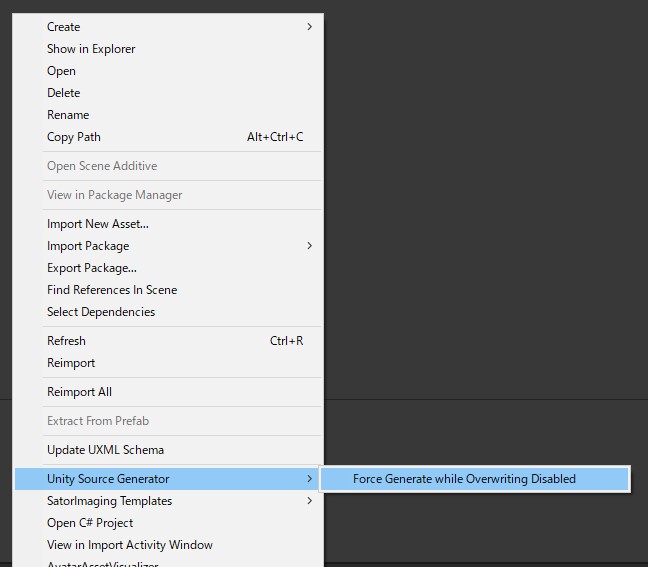
手動でソースコード生成イベントの発火も可能です。「ジェネレーターのスクリプトファイル」か「生成されたファイル」を選択して、Project ウインドウで Reimport か Unity Source Generator 以下のメニューを実行します。
Force Generate... はクラスアトリビュートの設定に関わらず強制的に上書き生成します。
There is an ability to invoke source code generation by hand. With generator script file or generated file selected in Project window:
-
Reimport- This command respects
OverwriteIfFileExistssetting by generator class attribute.
- This command respects
-
Unity Source Generator > Force Generate- This command will force re-generate source code even if overwrite setting is disabled.
Copyright © 2023 Sator Imaging, all rights reserved.
The above copyright notice and this permission notice shall be included in all copies or substantial portions of the Software.
MIT License

Copyright (c) 2023 Sator Imaging

Permission is hereby granted, free of charge, to any person obtaining a copy
of this software and associated documentation files (the "Software"), to deal
in the Software without restriction, including without limitation the rights
to use, copy, modify, merge, publish, distribute, sublicense, and/or sell
copies of the Software, and to permit persons to whom the Software is
furnished to do so, subject to the following conditions:

The above copyright notice and this permission notice shall be included in all
copies or substantial portions of the Software.

THE SOFTWARE IS PROVIDED "AS IS", WITHOUT WARRANTY OF ANY KIND, EXPRESS OR
IMPLIED, INCLUDING BUT NOT LIMITED TO THE WARRANTIES OF MERCHANTABILITY,
FITNESS FOR A PARTICULAR PURPOSE AND NONINFRINGEMENT. IN NO EVENT SHALL THE
AUTHORS OR COPYRIGHT HOLDERS BE LIABLE FOR ANY CLAIM, DAMAGES OR OTHER
LIABILITY, WHETHER IN AN ACTION OF CONTRACT, TORT OR OTHERWISE, ARISING FROM,
OUT OF OR IN CONNECTION WITH THE SOFTWARE OR THE USE OR OTHER DEALINGS IN THE
SOFTWARE.
Unity doesn't invoke import event if Visual Studio is not launch by current session of Unity...?