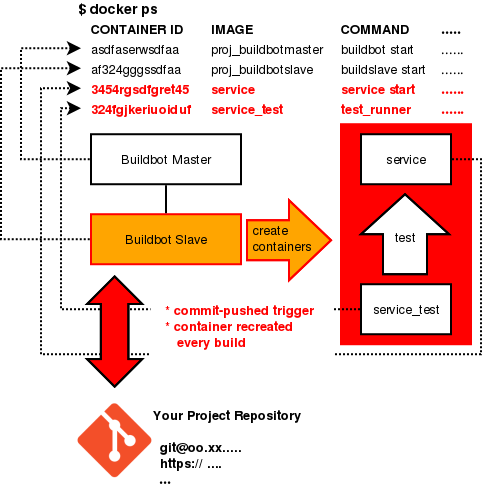
An buildbot CI environment, its goal is helping developer working with a tiny but powerful CI system. With every commits pushed, buildbot is triggered new build and records the test result on master portal.
Using prepared docker-composed.yml script to deploy a very simple CI environment.
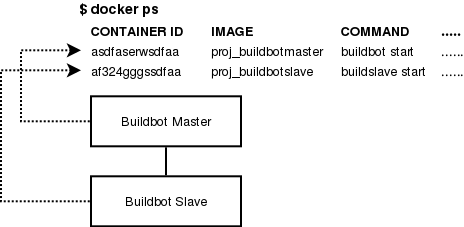
Buildbot Slave has ability to create containers(on host) as well, so users could execute their custom dockerized test plan.
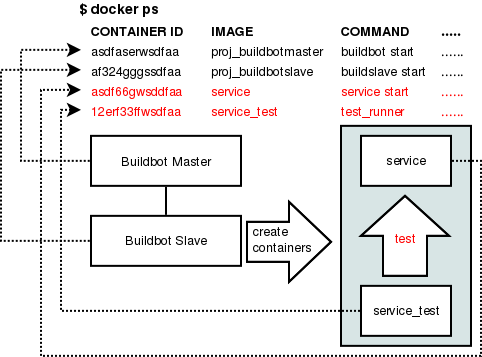
Recreate containers for test every build.
- Docker
- Docker-compose
- ssh-keys(optional if you're using private repository)
- Platform: Linux (only tested on Linux)
The prepared docker-compose.yml uses pre-built docker image and mounts host docker.sock to enable creating container from container.
- Dockfiles: master, slave
- Docker images: samuelololol/ubuntu-buildbot-base
- Docker-compose scritps: docker-compose.yml
- Buildbot config: master.cfg, buildbotdocker.py
Download, edit and run.
- master.cfg
- buildbotdocker.py
These 2 files are main core settings for buildbot. The complicated settings are separately extracted from original master.cfg into master.cfg and buildbotdocker.py. To edit the settings, it is necessary for you to consider some aspects:
- Deploy scenario: Add deployment steps into builder. After git-pushed triggered, buildbot will pull latest source code and build. It is recommanded to create a clean docker environment and setup the project in it.
- Test scenario: Add test runner scripts into builder. You may launch test runner either on buildbot slave or on clean Docker container(s) created by buildbot slave.
