| Note | Description |
|---|---|
| #1 | Clicking wellsrPRO.xlam to load the add-in may cause macros to become disabled! Follow the installation instructions below for proper installation! |
Jump to Installation Instructions
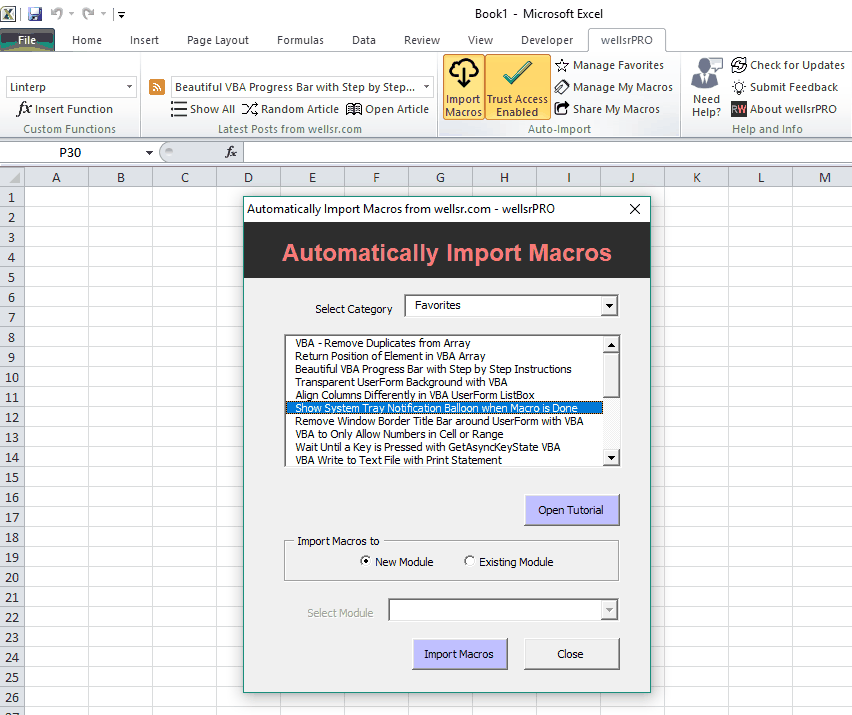
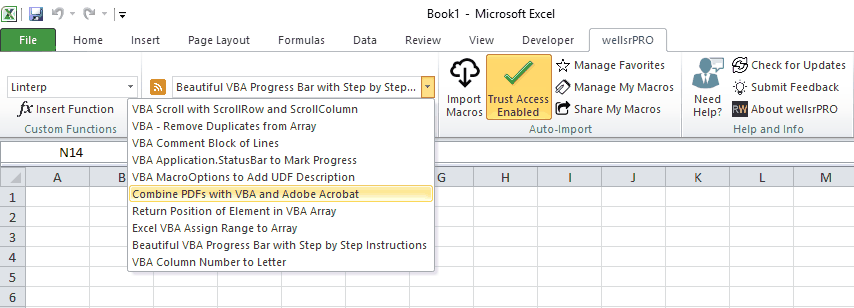
wellsrPRO is an Excel Add-in designed to help you write macros faster by connecting Excel with 200 VBA tutorials and hundreds of pre-built macros from the growing list on wellsr.com. Each new tutorial posted on wellsr.com will automatically appear in wellsrPRO and you can immediately import the macros and incorporate them into your own spreadsheet.
In addition to accessing hundreds tutorials and importing fully functional macros from wellsr.com, you can organize your own macros and even share your creations with others in the wellsrPRO community. Each macro you add will be available via the Automatic Macro Generator whenever you need them. Macros in your Favorites are prioritized for even quicker importing and are far more portable than using a Personal.xlsb file.
I built wellsrPRO in 2017 and kept the source code locked behind a premium obfuscator for 3 years. In those 3 years, wellsrPRO has been downloaded by 12000 users. In December 2020, I decided to upload the entire source code to GitHub and here's why. Right now, wellsrPRO pulls tutorials & macros from my site, but its infrastructure can do so much more. I'm hoping others in the GitHub community will fork this project and expand it to pull tutorials and macros from other Excel websites and even add brand new functions. Once you've improved it, submit a pull request and I'll push the new release to our active users.
- Download wellsrPRO.xlam
- Close Excel
- Right-click the wellsrPRO.xlam file in Windows Explorer
- Click Properties
- On the General tab, you may see a message that states: "This file came from another computer
and might be blocked to help protect this computer."
- If you see this message, click Unblock
- Click OK
- Proceed to installation instructions
If this still doesn't work, try navigating to %APPDATA%\Microsoft\Excel\XLSTART and placing
the wellsrPRO.xlam file here.
If this still doesn't work, Launch Excel, Open your VBA Editor, create a New Module, then run the following macro:
    Sub OpenXLSTART()
        Shell "explorer.exe " & Application.StartupPath, vbNormalFocus
    End Sub
Place your wellsrPRO file in the folder that opens (Debug.Print Application.StartupPath)
wellsrPRO is not supported on Excel 2007 or earlier. Here are the steps to install wellsrPRO on Excel 2010 and newer:
- If you haven't done so already, download wellsrPRO.xlam
- Open Excel
- Click the File tab
- Click Options
- Click the Add-Ins category on the left bar of the Excel Options Dialog Box
- In the Manage box near the bottom, click Excel Add-ins, and then click Go. The Add-Ins dialog box appears.
- Click Browse
- Navigate to the directory where you downloaded wellsrPRO.xlam
- Select wellsrPRO.xlam, and then click OK. You may be asked to copy the add-in to your local Microsoft AddIns directory. This is optional.
- Make sure the checkbox next to "wellsrPRO" is checked, then click OK.
- If the add-in keeps disappearing when you restart Excel, follow the tips at the top of the installation instructions
You cannot run update.vbs manually. Attempting to do so will generate an error. This script is an internal script used by wellsrPRO to check for updates. You can ignore it. :-)
Visit wellsr.com for more information and navigate the "Help and Info" section on the top ribbon for assistance with the add-in.
Meet the developer: @ryanwellsr