A Web-Based Hospital Management System using PHP, MySQL, and Bootstrap
- Doctors should have the ability to accept or reject appointments, notifying patients accordingly.
- Prevent duplicate registrations by checking for existing email addresses.
- Encrypt user passwords and hide them from the admin panel view.
- Add pagination across all list views for better usability.
- Fix bug in billing: prevent duplicate entries for patients visiting the same doctor multiple times.
- Expand prescription details to include more specific medical data.
- Enhance payment records with fields like payment date, amount paid, etc.
- Implement data export (Excel) functionality in the admin panel.
- XAMPP Web Server
- Code Editor (VS Code, Sublime Text, etc.)
- Modern Web Browser (Google Chrome, Firefox, etc.)
- Frontend: HTML5, CSS3, Bootstrap
- Backend: PHP
- Database: MySQL
- Server: Apache via XAMPP
- PDF Generation: TCPDF
- Scripts: JavaScript
- Install XAMPP and start Apache & MySQL via the XAMPP Control Panel.
- Clone or download this repository.
- Move the extracted folder to
htdocsinside your XAMPP installation directory. - Launch
phpMyAdmin(go tolocalhost/phpmyadminin browser). - Create a new database named
myhmsdb. - Import the
myhmsdb.sqlfile into this database. - Open your browser and go to
localhost/foldername. - 🎉 You're all set!
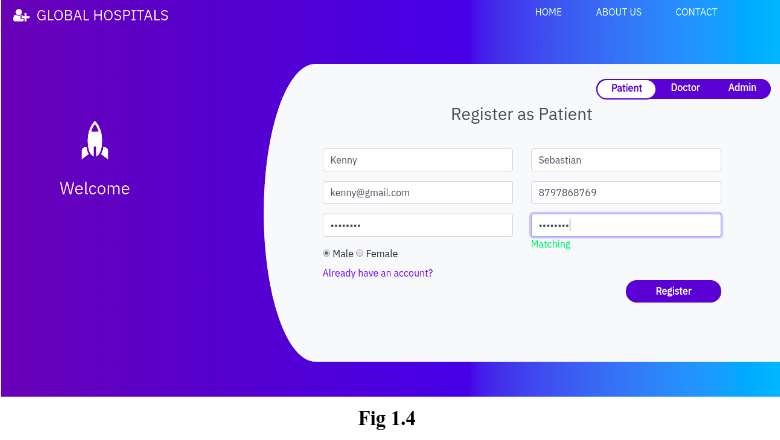
- Register/Login as a patient.
- Book appointments with doctors.
- View appointment history.
- Cancel appointments (status gets updated for both patient & doctor).
- Login access provided by admin.
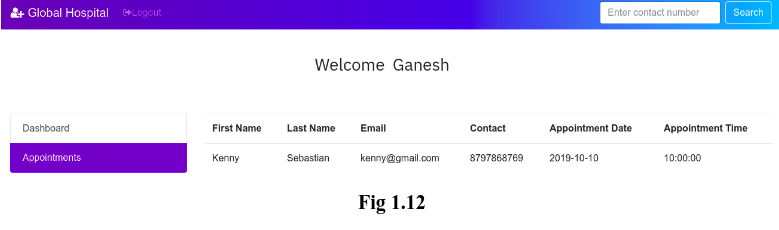
- View upcoming appointments.
- Search appointments by patient contact number.
- Cancel appointments (status reflected in patient view).
- Admin login:
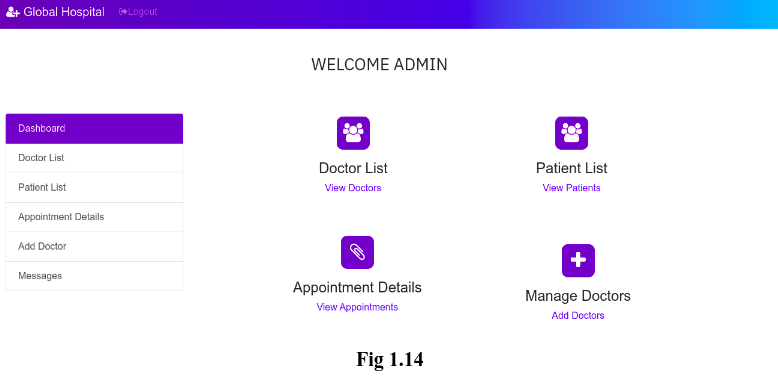
admin/admin123 - View & manage patient and doctor records.
- Add/remove doctors.
- View and manage appointments.
- View feedback from users (Contact page).
- Export data (To be implemented).
- Passwords (To be encrypted and hidden from UI).
- Patients and doctors can cancel appointments.
- Status like “Deleted by you” is shown in the dashboard accordingly.
- Admin can now remove doctor profiles directly from the system.
Admin Dashboard
Patient Registration Form
Doctor's Appointment Dashboard
- OS: Ubuntu 19.04
- Server: XAMPP with Apache2 and MySQL
- Browser: Google Chrome 77.0+