

🚀 Flow Timer Fork This is a fork of ayoisaiah/focus that emphasizes flow timer mode - a flexible count-up timer that lets you work without the pressure of fixed time boxes. While retaining all the original Pomodoro features, this fork defaults to flow mode and includes enhanced task tracking, milestone notifications, and improved visual feedback.
Focus is a cross-platform productivity timer for the command line. Originally based on the Pomodoro Technique, this fork primarily uses flow timer mode for a more flexible approach to time tracking.
- Pick a task you need to accomplish.
- Set a timer for 25 minutes and start working without interruptions.
- When the timer rings, take a short break for 5 minutes.
- Once you've completed four work sessions, you can take a longer 15 minute break.
- Work and break session lengths are customisable.
- You can pause and resume work sessions.
- You can skip break sessions.
- Flow timer mode: Count-up timer with task tracking and milestone notifications.
- Pre-defined tags: Configure categories for quick task organization (supports spaces and special characters).
- You can customise the number of sessions before a long break.
- You can set a maximum number of sessions.
- Desktop notifications are supported on all platforms.
- You can customise the notification messages.
- Detailed statistics for your work history are provided including charts.
- Focus provides six built-in ambient sounds that you can play during a session, and you can add your own custom sounds.


Focus is written in Go, so you can install it through go install (requires Go
1.16 or later):
go install github.com/ronilaukkarinen/focus/cmd/focus@latestTo install this specific version from source:
-
Ensure you have Go 1.23 or later installed (this version requires Go 1.23+):
go version
If you need to upgrade Go:
# Download and install Go 1.23+ from https://golang.org/dl/
# Or use your package manager:

# Ubuntu/Debian (snap)
sudo snap install go --classic

# Or download directly:
wget https://go.dev/dl/go1.23.4.linux-amd64.tar.gz
sudo rm -rf /usr/local/go && sudo tar -C /usr/local -xzf go1.23.4.linux-amd64.tar.gz
export PATH=/usr/local/go/bin:$PATH

# Make it permanent:
echo 'export PATH=/usr/local/go/bin:$PATH' >> ~/.bashrc
source ~/.bashrc
-
Clone and install locally:
git clone https://github.com/ronilaukkarinen/focus.git
cd focus
go install ./cmd/focus
Or install directly from git:
go install github.com/ronilaukkarinen/focus/cmd/focus@latest
-
Ensure Go's bin directory is in your PATH:
# Add Go bin to PATH
export PATH=$PATH:$(go env GOPATH)/bin

# Make it permanent:
echo 'export PATH=$PATH:$(go env GOPATH)/bin' >> ~/.bashrc
source ~/.bashrc
On Linux, the libasound2-dev package is required to compile Focus. Ubuntu or
Debian users can install it through the command below:
sudo apt install libasound2-devYou can also install Focus through its prebuilt binaries from the releases page.
Once released, this fork will be available through various package managers. For now, use the installation from source method above.
Other installation methods for the original version are available here.
Once Focus is installed, run it using the command below:
focus
Note: Only one instance of focus can be active at a time.
When you run Focus for the first time, it will prompt you to set your preferred
timer lengths, and how many sessions before a long break. Afterwards, you may
change these values by using command-line options or editing the config.yml
file which will be located in ~/.config/focus/ on Linux,
%LOCALAPPDATA%\focus on Windows, and ~/Library/Application Support/focus on
macOS.
This fork defaults to flow timer mode with enhanced features including task
tracking, milestone bells, and flexible session timing. You can switch back to
traditional Pomodoro mode by setting flow_default: false in your config.
Here's the default configuration settings:
# Work session settings
work_duration: 25m # work session length
work_msg: Focus on your task # work session message (shown in terminal and notification)
work_sound: loud_bell # sound to play when work session ends
work_color: '#B0DB43' # color for work session display

# Short break settings
short_break_duration: 5m # short break session length
short_break_msg: Take a breather # short break session message (shown in terminal and notification)
break_sound: bell # sound to play when break session ends
short_break_color: '#12EAEA' # color for short break display

# Long break settings
long_break_duration: 15m # long break session length
long_break_msg: Take a long break # long break session message (shown in terminal and notification)
long_break_color: '#C492B1' # color for long break display
long_break_interval: 4 # number of sessions before long break

# Notification settings
notify: true # show desktop notifications

# Automation settings
auto_start_work: false # Automatically start the next work session
auto_start_break: true # Automatically start the next break session

# Display settings
24hr_clock: false # Show time in 24 hour format
dark_theme: true # use colours befitting a dark background

# Sound settings
sound: '' # name of ambient sound to play during sessions
sound_on_break: false # play ambient sound during break sessions

# Flow timer settings
flow_default: true # use flow timer mode by default (set to false for traditional pomodoro)
flow_bell: true # play bell sounds at flow timer milestones (50% and 100%)
flow_bell_sound: 'tibetan_bell' # sound file for flow timer bells (bell, loud_bell, tibetan_bell)

# Pre-defined tags for categorizing work sessions
pre_defined_tags: [] # optional list of tags for quick selection
# Example:
# pre_defined_tags:
#   - "Sales"
#   - "Company Finances"
#   - "Product Development"
#   - "Customer Support"

# Other settings
session_cmd: '' # execute an arbitrary command after each session
strict: false # when enabled, you can't resume a paused session
If you specify a command-line argument while running focus, it will override the corresponding value in the config file.
Focus has 3 types of sessions: work, short break, and long break.
- Set to 25 minutes length by default. Use the
--workor-woption to change the length, or changework_minsin theconfig.ymlfile. - Message displayed in the terminal and desktop notification can be changed
using
work_msg. - You can pause a work session by pressing
Ctrl-C. Usefocus resumeto continue from where you stopped. - The
focus resumecommand supports the--sound,--sound-on-break, and--disable-notificationflags. - If
auto_start_workisfalse, you will be prompted to start each work session manually. Otherwise if set totrue, it will start without your intervention. - The maximum number of work sessions can be set using the
--max-sessionsor-maxoption. After that number is reached, focus will exit. - Use the
--long-break-intervalor-intoption to set the number of work sessions before a long break, or changelong_break_intervalin yourconfig.yml.
- Short break is 5 minutes by default. Use the
--short-breakor-soption to change the length, or setshort_break_minsin theconfig.ymlfile. - Long break is 15 minutes by default. Use the
--long-breakor-loption to change the length, or setlong_break_minsin theconfig.ymlfile. - Message displayed in the terminal and desktop notification can be changed
using
short_break_msgandlong_break_msg. - Pressing
Ctrl-Cduring a break session will interrupt it. Runfocus resumeto skip to the next work session. - If
auto_start_breakisfalse, you will be prompted to start each break session manually. Otherwise if set totrue, it will start without your intervention.
Flow timer mode is an alternative to the traditional Pomodoro technique that counts up instead of down, allowing for more flexible work sessions. Use the --flow or -f option to enable flow mode:
focus --flowWhen you start flow mode, you'll be prompted to:
- Enter a task name - What you're working on (e.g., "Writing blog post")
- Set estimated time - How long you expect to work (e.g., "25m", "1h30m")
- Count-up timer: Shows elapsed time instead of counting down
- Visual progress: Displays elapsed vs estimated time with a progress bar
- Overtime indicator: Time turns red when you exceed your estimated time
- Milestone notifications: Desktop notifications and optional bell sounds at 50% and 100% of estimated time
- Flexible duration: Continue working past your estimate or stop early as needed
- Task tracking: Your task name is included in the session record
Flow timer bells are enabled by default and can be configured in your config.yml:
flow_bell: true               # Enable/disable flow timer bells
flow_bell_sound: 'tibetan_bell'  # Which sound to use (bell, loud_bell, tibetan_bell)
Available flow bell sounds:
bell- Standard bell soundloud_bell- Louder bell soundtibetan_bell- Peaceful Tibetan singing bowl (default)
You can disable flow bells by setting flow_bell: false in your config.
Focus provides visual feedback for control states:
- Play/pause button: The active state (
playorpause) is highlighted in neon green - Sound button: Highlighted in neon green when ambient sound is active
- Controls: Use
pfor play/pause,sfor sound selection, andqto quit
You can use the --tag or -t flag to apply a tag to a new session:
focus --tag 'side-project'Multiple tags are supported (use commas to separate each):
focus --tag 'side-project,focus'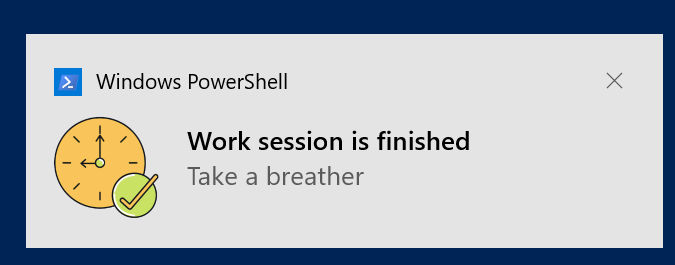
Notifications are turned on by default. Set notify to false in your config
file, or use the --disable-notification flag if you don't want notifications
once a session ends.
Focus provides six ambient sounds by default: coffee_shop, playground,
wind, rain, summer_night, and fireplace. You can play a sound using the
--sound option, or set a default sound in your config file through the sound
key.
focus --sound 'coffee_shop'If you want to play a custom sound instead, copy the file (supports MP3, FLAC, OGG, and WAV) to the appropriate directory for your operating system:
- Linux:
~/.local/share/focus/static - Windows:
%LOCALAPPDATA\focus\static - macOS:
~/Library/Application Support/focus/static
Afterwards, specify the name of the file in the sound key or --sound option.
Note that custom sounds must include the file extension.
focus --sound 'university.mp3'
focus --sound 'subway.ogg'
focus --sound 'airplane.wav'
focus --sound 'stadium_noise.flac'
By default, ambient sounds are played only during work sessions. They are paused
during break sessions, and resumed again in the next work session. If you'd like
to retain the ambient sound during a break session, set the sound_on_break
config option to true, or use the --sound-on-break or -sob flag.
You can also disable sounds when starting or resuming a session by setting
--sound to off:
focus --sound 'off'
focus resume --sound 'off'focus statsThe above command will display your work history for the last 7 days by default. You'll see how many work sessions you completed, how many you abandoned, and how long you focused for overall. It also displays a break down by week, and hour to let you know what times you tend to be productive.
You can change the reporting period through the --period or -p option. It
accepts the following values: today, yesterday, 7days, 14days, 30days,
90days, 180days, 365days, all-time.
focus stats -p 'today'
focus stats -p 'all-time'
You can also set a specific time period using the --start and --end options.
The latter defaults to the current day if not specified. See the list of
acceptable formats in the
original project wiki.
focus stats --start '2021-08-06'
focus stats --start '2021-08-06' --end '2021-08-07'
focus stats --start '2021-07-23 12:00:05 PM' --end '2021-07-29 03:25:00 AM'Use the list command to display a table of your work sessions instead of
aggregated statistics. Use the --period or --start and --end option to
change the reporting period (defaults to the last 7 days).
focus list┌──────────────────────────────────────────────────────────────────────────────┐
| # | START DATE | END DATE | TAGGED | STATUS |
| 1 | Feb 21, 2023 09:09 PM | Feb 21, 2023 09:09 PM | | abandoned |
| 2 | Feb 21, 2023 09:11 PM | Feb 21, 2023 09:11 PM | | abandoned |
| 3 | Feb 21, 2023 09:15 PM | Feb 21, 2023 09:15 PM | reading | abandoned |
| 4 | Feb 21, 2023 09:15 PM | Feb 21, 2023 09:16 PM | side-project | completed |
| 5 | Feb 21, 2023 09:16 PM | Feb 21, 2023 09:17 PM | writing | completed |
| 6 | Feb 21, 2023 09:21 PM | Feb 21, 2023 09:22 PM | writing | completed |
| 7 | Feb 21, 2023 09:22 PM | Feb 21, 2023 09:23 PM | writing | completed |
└──────────────────────────────────────────────────────────────────────────────┘
You can filter the list by tag:
focus list --tag 'client,piano'┌──────────────────────────────────────────────────────────────────────────────┐
| # | START DATE | END DATE | TAGGED | STATUS |
| 1 | Feb 21, 2023 09:15 PM | Feb 21, 2023 09:15 PM | reading | abandoned |
| 2 | Feb 21, 2023 09:15 PM | Feb 21, 2023 09:16 PM | side-project | completed |
└──────────────────────────────────────────────────────────────────────────────┘
Note:
- Sessions that cross over to a new day will count towards that day's sessions.
- A session with an empty end date indicates that the process was ended such a way that a graceful shutdown was not possible.
You can edit the tags of one or more sessions through the edit-tag command. It
accepts the same options as the list command to select the sessions to be
edited. The tags are command-line arguments. You will be prompted before the
update is carried out.
The command below edits the tags of all sessions recorded today and tagged
with writing. It updates the tags for each session to writing, novel, and
once-upon-a-time.
focus edit-tag --tag 'writing' -p 'today' 'writing' 'novel' 'once-upon-a-time'┌────────────────────────────────────────────────────────────────────────────────────────────────────┐
| # | START DATE | END DATE | TAGGED | STATUS |
| 1 | Feb 21, 2023 09:16 PM | Feb 21, 2023 09:17 PM | writing · novel · once-upon-a-time | completed |
| 2 | Feb 21, 2023 09:21 PM | Feb 21, 2023 09:22 PM | writing · novel · once-upon-a-time | completed |
| 3 | Feb 21, 2023 09:22 PM | Feb 21, 2023 09:23 PM | writing · novel · once-upon-a-time | completed |
└────────────────────────────────────────────────────────────────────────────────────────────────────┘
WARNING The sessions above will be updated. Press ENTER to proceed
Deleting sessions is done in the same way as list except that delete is used
instead. You will be prompted to confirm the deletion before it is carried out.
focus delete --start '2023-02-21 21:21:00'┌─────────────────────────────────────────────────────────────────────────┐
| # | START DATE | END DATE | TAGGED | STATUS |
| 1 | Feb 21, 2023 09:22 PM | Feb 21, 2023 09:23 PM | writing | completed |
| 2 | Feb 21, 2023 09:33 PM | Feb 21, 2023 09:33 PM | | abandoned |
└─────────────────────────────────────────────────────────────────────────┘
WARNING The above sessions will be deleted permanently. Press ENTER to proceed
Bug reports and feature requests are much welcome! Please open an issue before creating a pull request.
This project includes comprehensive development tooling:
- Linting: Run
just lintto check code quality with golangci-lint - Testing: Run
just testfor comprehensive test suite - Pre-commit hooks: Automatic linting and formatting on commit
- Build tools: Run
just buildto compile binaries
The stats web interface uses embedded files that need to be rebuilt when changed:
-
Install dependencies (if not already installed):
npm install
-
Make changes to files in
stats/web/:- JavaScript:
stats/web/js/script.js - CSS:
stats/web/css/styles.css - HTML:
stats/web/index.html
- JavaScript:
-
Bundle JavaScript (if JS was modified):
npx esbuild --bundle --minify --outfile=stats/web/dist/script.js --sourcemap stats/web/js/script.js
-
Rebuild the Go binary (required for all web changes):
go build -o focus ./cmd/focus
-
Restart the stats server:
./focus stats
Note: The web files are embedded into the Go binary using //go:embed, so the binary must be rebuilt after any changes to see them take effect.
To create a new release:
-
Update version numbers:
- Update version in
package.json - Update version badge in
README.md - Update
CHANGELOG.mdwith release notes
- Update version in
-
Commit changes:
git add .
git commit -m "Release version X.Y.Z"
-
Create and push tag:
git tag -a vX.Y.Z -m "Release version X.Y.Z" git push origin master git push origin vX.Y.Z -
GitHub Actions will automatically:
- Build binaries for multiple platforms
- Create a GitHub release with the binaries attached
- Publish to npm registry
The release workflow is defined in .github/workflows/release.yml and triggers on version tags.
The project uses:
- just for task running
- golangci-lint v2 for code quality
- pre-commit for git hooks
- tools.mod for development dependency management
- esbuild for JavaScript bundling
- Go embed for static file embedding
Created by Ayooluwa Isaiah, and released under the terms of the MIT Licence.