A PyQt5 GUI front-end for wget specialized for downloading open directory listings. This tool provides a user-friendly interface to configure and execute wget commands for downloading entire directory structures from web servers.
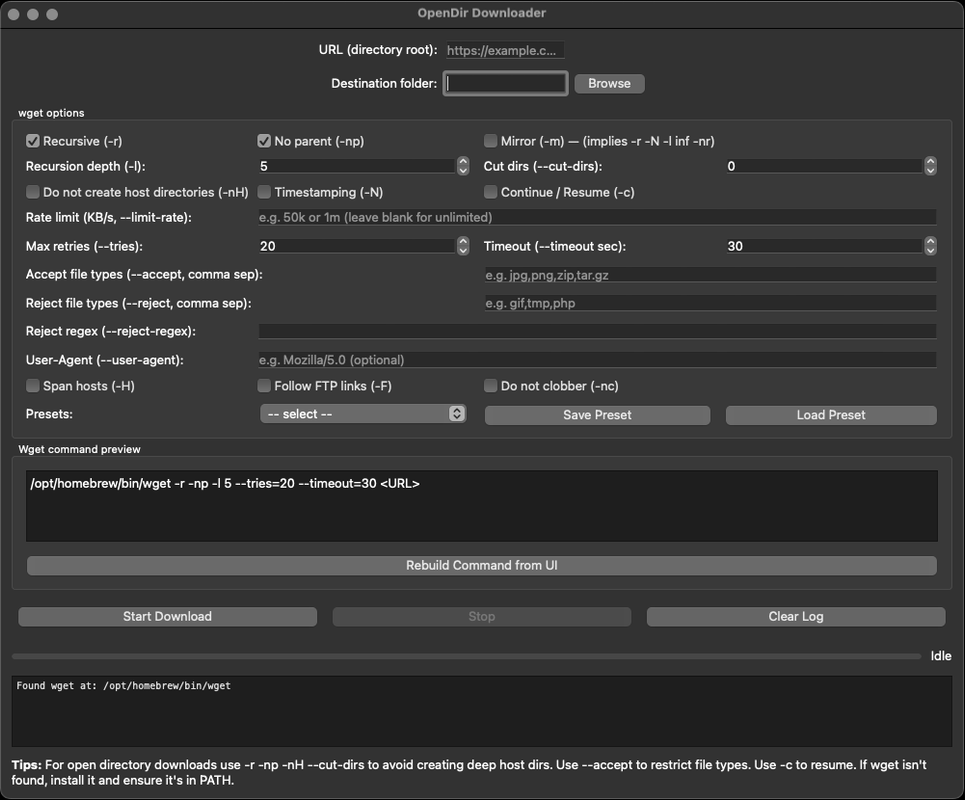
- GUI Interface: Easy-to-use graphical interface for configuring wget options
- Progress Tracking: Real-time progress monitoring with percentage, speed, and ETA
- Recursive Downloads: Support for recursive directory downloads with depth control
- File Type Filtering: Accept or reject specific file types using wildcards
- Resume Support: Continue interrupted downloads
- Preset Management: Save and load download configurations
- Command Preview: See the generated wget command before execution
- Directory Control: Options to customize directory structure and naming
- Python 3.6 or higher
- wget (system utility)
-
Clone or download the repository:
git clone <repository-url>
cd wgetGUI
-
Create a virtual environment (recommended):
python -m venv venv
source venv/bin/activate  # On Windows: venv\Scripts\activate
-
Install the required Python packages:
pip install -r requirements.txt
-
Ensure
wgetis installed on your system:- Linux/macOS: Usually pre-installed; otherwise install via package manager (apt, yum, brew, etc.)
- Windows: Install Git for Windows (includes wget) or use WSL, or install GNUWin32 wget
-
Run the application:
python downlaoder.py
-
Configure download options:
- Enter the URL of the directory to download
- Select destination folder
- Configure wget options as needed
-
Review the generated command in the preview panel
-
Click "Start Download" to begin the process
- URL: The directory root URL to download from
- Destination folder: Local path where files will be saved
- Recursive: Enable recursive downloading of subdirectories
- No parent: Don't ascend to parent directories (recommended)
- Mirror: Use wget's mirror option for comprehensive downloads
- Recursion depth: Limit how deep to recurse into subdirectories
- Cut dirs: Number of directory components to remove from the root
- No host directory: Don't create host-prefixed directories
- Timestamping: Only download newer files (useful for updates)
- Continue/Resume: Resume interrupted downloads
- Rate limit: Limit download speed (e.g., "50k" or "1m")
- Max retries: Number of retries for failed downloads
- Timeout: Connection timeout in seconds
- Accept/Reject file types: Include/exclude specific file extensions
- User-Agent: Custom User-Agent string for requests
- Span hosts: Follow links to different hosts
- Follow FTP links: Follow FTP links as well as HTTP
- Do not clobber: Don't overwrite existing files
- For open directory downloads, use
-r -np -nH --cut-dirsto avoid creating deep host directories - Use
--acceptto restrict file types and avoid downloading unwanted files - Use
-cto resume interrupted downloads - If wget isn't found, install it and ensure it's in your PATH
Contributions are welcome! Please feel free to submit a Pull Request. For major changes, please open an issue first to discuss what you would like to change.
This project is open source and available under the MIT License.
- "wget not found": Make sure wget is installed and in your system PATH
- Permission errors: Check that you have write permissions to the destination directory
- Connection issues: Check your network connection and URL format