Skip to content

add in groups#3

Merged
renkun-ken merged 9 commits intorenkun-ken:fix-tasksfrom
gowerc:fix-tasks
Feb 16, 2022
Merged

add in groups#3
renkun-ken merged 9 commits intorenkun-ken:fix-tasksfrom
gowerc:fix-tasks

Conversation

@gowerc
Copy link

@gowerc gowerc commented Feb 15, 2022

In this PR I added:

  • Support for multi folder workspaces
  • Added categorisation for "Build" and "Test" commands
  • Added dynamic processing to only load tasks if in a project containing a DESCRIPTION file
  • Changed the Task definition so it can be written purely in R code

For the last 2 point please see my comment below

EDIT: Just to say I'm not precious about the formatting or engineering so feel free to change completely if you don't like the way I've styled / laid it out!

@gowerc
Copy link
Author

gowerc commented Feb 15, 2022

@renkun-ken ,

Sorry one final change from me here. I've made a few significant changes.

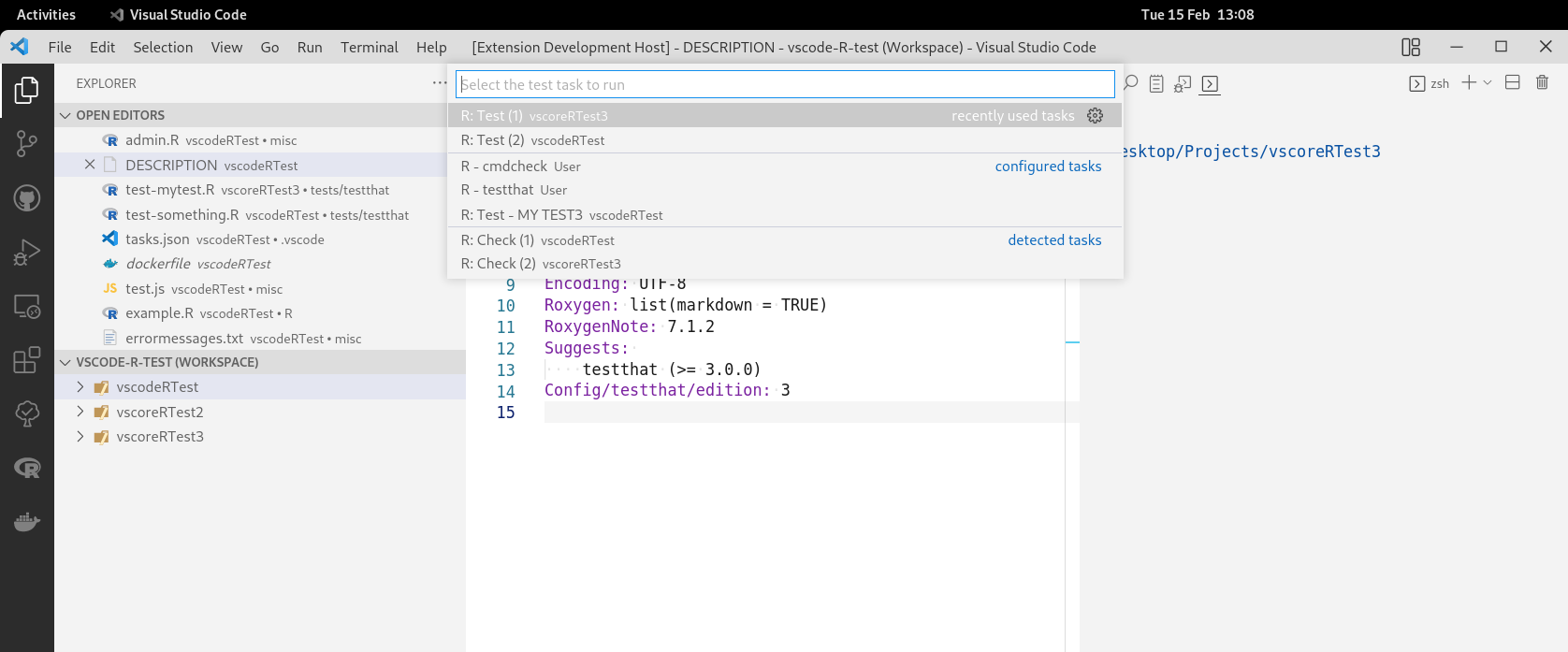
  • Enabled multi workspace support. Tasks are now evaluated per each available workspace and are added depending on if that workspace contains a DESCRIPTION file. The screenshot below shows me running the Run Test Task command in a workspace with 3 folders. For reference vscoreRTest2 does not contain a DESCRIPTION file but the other two do resulting in a Test and Check command being generated only for vscoreRTest and vscoreRTest3

image

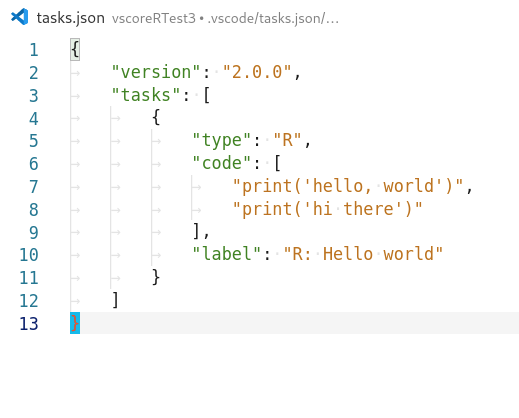
  • I changed the task that we are defining to embed the Rscript. At the moment there as nothing special/unique about our R task, it was just a generic general purpose command line execution. My understanding of exposing tasks is that it allows you to insert domain specific processing so here I essentially made our tasks wrappers around Rscript. This means as a user I can now define my own R specific tasks purely in terms of the R code I want to run i.e.:

image

@renkun-ken
Copy link
Owner

renkun-ken commented Feb 15, 2022

Thanks for working on this! The changes make very good sense.

Enabled multi workspace support.

The multi-root workspace space support is great!

At the moment there as nothing special/unique about our R task, it was just a generic general purpose command line execution. My understanding of exposing tasks is that it allows you to insert domain specific processing so here I essentially made our tasks wrappers around Rscript. This means as a user I can now define my own R specific tasks purely in terms of the R code I want to run

I was considering this too. The command and args task definition is nothing more than a general shell/process task. However, the following might be demanded:

I'm not sure if there is a natural way to allow these usages.

@gowerc
Copy link
Author

gowerc commented Feb 15, 2022

EDIT: Removed original message:

I was hitting a problem in that you are not allowed to change the definition of a user defined task. I was trying to insert default arguments if the user had left a field blank but apparently it just silently errors if you do that -.-

@gowerc
Copy link
Author

gowerc commented Feb 15, 2022

I was considering this too. The command and args task definition is nothing more than a general shell/process task. However, the following might be demanded: .....

My current thinking is that if the user wants tasks to run arbitrary commands then they can just write those tasks themselves. I don't see the value getting the extension to be a proxy for that if its not actually going to fill in any of the missing components. I quite liked the idea of having our default task be a way for users to specify R code as that's actually adding a service. I'm also thinking that if we need to support more things like R CMD we could add a second task type to be exported ?

/path/to/other/Rscript -e expr REditorSupport#948

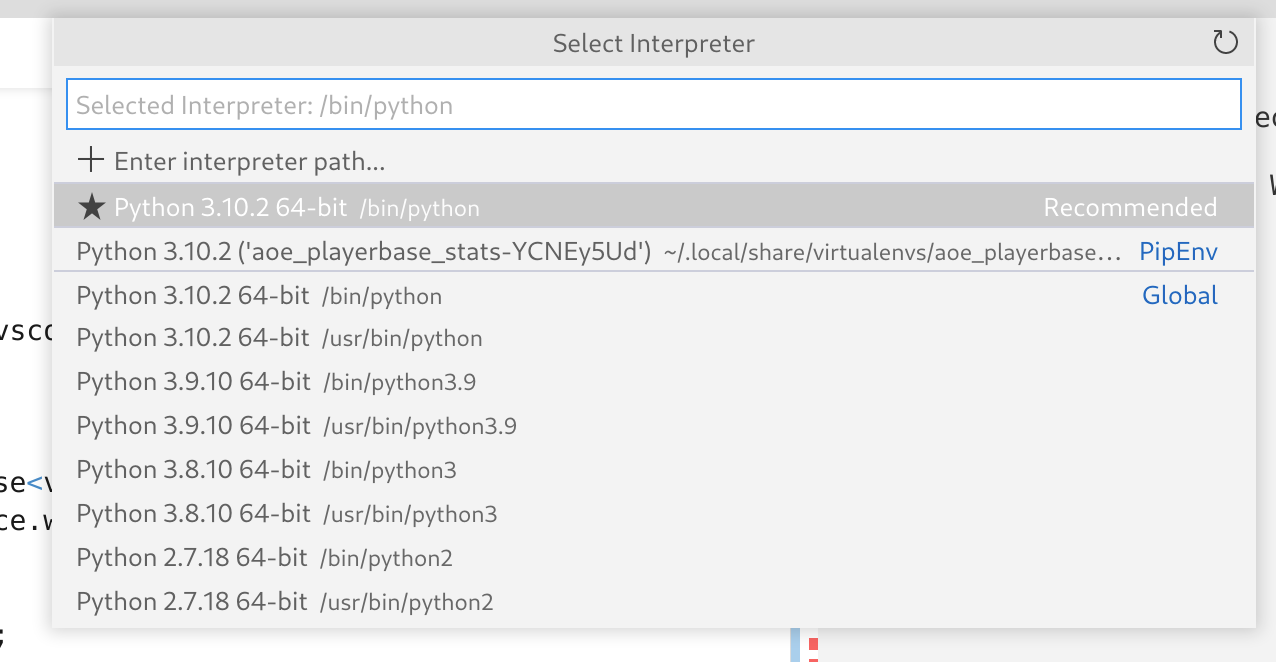
I wasn't really sure how best to handle this, I'm kindof against having a popup box ask for the R version as I'm willing to bet that >95% of R users only have 1 version of R installed so it would be a hassle for them. I was wondering instead if it would make more sense to go the same route as python where you can click the bar on the bottom left which then lauches a popup to select the desired interpreter:
image

@gowerc
Copy link
Author

gowerc commented Feb 16, 2022

Ok sorry last message and commit (pending review feedback) I have some additional changes that I want to make to the pattern matchers but I will wait until this has been merged before I work on that as I'm concious this is already becoming quite a big change.

In the above commit 316b6b2 I added the following:

  • Got tasks to use the R interpreter specified by the user settings
  • Added additional args argument which allows the user to put additional options in the call to the R interpreter (defaults are set to mirror what is used by Rscript)
  • Added default null [] patternMatcher to most tasks in order to suppress it from asking the user to select "do not scan for errors" each time (plan to add some actual pattern matching later on).
  • Tested everything to make sure it plays well in multi workspace environments

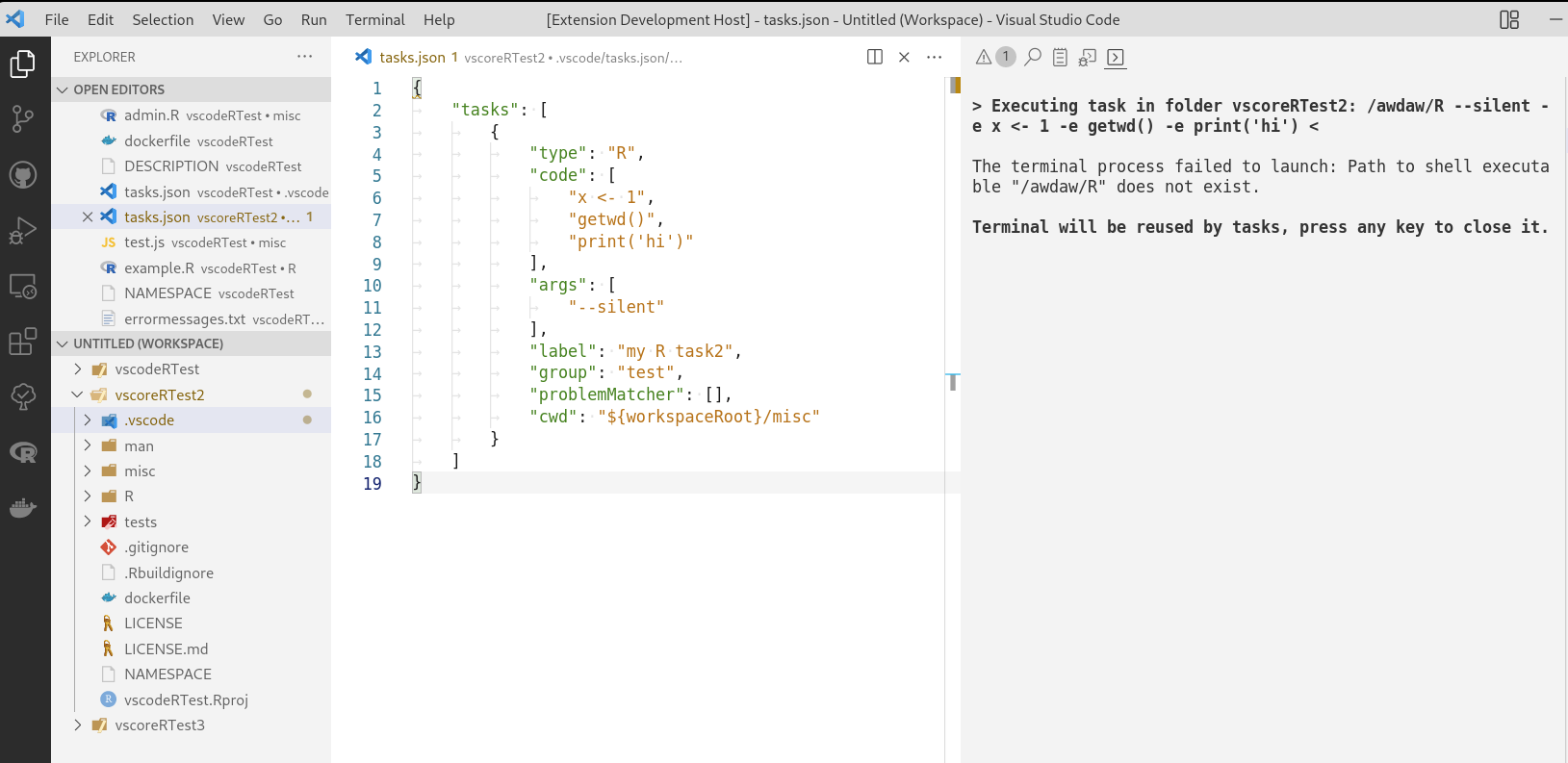
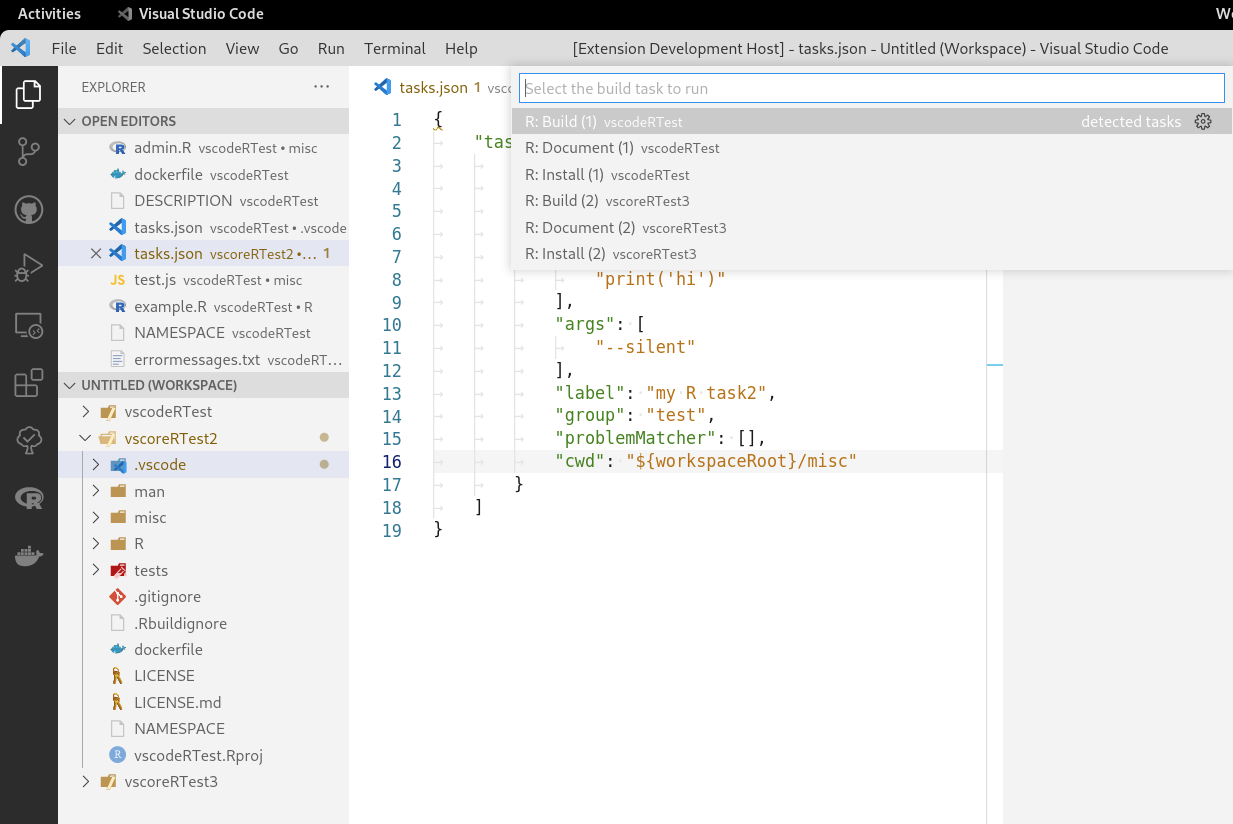
This image below shows a user defined task taking advantage of our R task definition specifying arbitrary R code. Shows that the arg options are also correctly passed on. The command fails because I purposefully set my terminal R path to a junk value to show that it will use what the user has specified. It also shows that user defined tasks aren't ignore if the folder doesn't contain a DESCRIPTION file
image

This image just shows I haven't broken any of the prior changes, i.e. this shows that when executing "run build tasks" that it correctly identifies workspace 1 & 3 as being R packages and ignores workspace 2.
image

src/tasks.ts Outdated
) {}
}
const getRterm = async function ():Promise<string> {
const termOptions = await makeTerminalOptions();
Copy link
Owner

Choose a reason for hiding this comment

The reason will be displayed to describe this comment to others. Learn more.

We should not use r.rterm.* here, it is used for interactive terminal (e.g. radian). We should only use r.rpath.* in tasks.

src/tasks.ts Outdated
for (const rtask of rtasks) {
const task = asTask(folder, rtask);
for (const rtask of RTasksMeta) {
const task = await asRTask(folder, rtask);
Copy link
Owner

Choose a reason for hiding this comment

The reason will be displayed to describe this comment to others. Learn more.

Does it make more sense to only getRPath once before the loop first? I don't see a need to await each task to get the same rpath.

Copy link
Author

Choose a reason for hiding this comment

The reason will be displayed to describe this comment to others. Learn more.

@renkun-ken , You are right. If you do make the changes just be sure to also call getRPath in the resolve function as well as the provide function. Perhaps add it as an additional argument to asRTask

@renkun-ken
Copy link
Owner

I'll directly make some changes to address these problems.

"description": "R code to be executed"
},
"args": {
"options": {
Copy link
Owner

Choose a reason for hiding this comment

The reason will be displayed to describe this comment to others. Learn more.

There are multiple terms that might look confusing: args, code args, etc.

Let's use their official terms:

$ R --help
Usage: R [options] [< infile] [> outfile]

@gowerc
Copy link
Author

gowerc commented Feb 16, 2022

LGTM

@renkun-ken renkun-ken merged commit b14e301 into renkun-ken:fix-tasks Feb 16, 2022
@gowerc gowerc deleted the fix-tasks branch September 6, 2023 13:10
Sign up for free to join this conversation on GitHub. Already have an account? Sign in to comment

Labels

None yet

Projects

None yet

Development

Successfully merging this pull request may close these issues.

2 participants