Add DonutChart component #55
Conversation


|
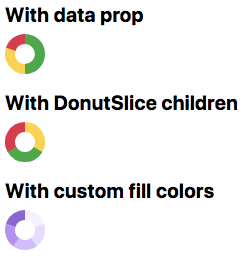
As of 8288ef1 it looks like this on Pages:
|

| const DonutChart = props => { | ||
| const { | ||
| data, | ||
| children = mapData(data), |
There was a problem hiding this comment.
If the children prop isn't passed, generate slices from the data prop.
src/DonutChart.js
Outdated
|
|
||
| const radius = size / 2 | ||
| const { | ||
| innerRadius = radius / 2 |
There was a problem hiding this comment.
Dunno if we want the inner radius of the donut (the size of the "hole") to be fixed or relative. The way it's written write now, it can be passed via the innerRadius prop, which is probably not what we want.
| } = props | ||
|
|
||
| const pie = Pie() | ||
| .value(child => child.props.value) |
There was a problem hiding this comment.
Translation: create a pie slice generator with a value accessor that gets props.value from each child.
src/DonutChart.js
Outdated
| const pie = Pie() | ||
| .value(child => child.props.value) | ||
|
|
||
| const arcData = pie(children) |
There was a problem hiding this comment.
Translation: generate the pie slice data from the children array.
| const arcData = pie(children) | ||
| const arc = Arc() | ||
| .innerRadius(innerRadius) | ||
| .outerRadius(radius) |
There was a problem hiding this comment.
We use a custom arc generator here because we need to set the inner and outer radii to fixed values.
src/DonutChart.js
Outdated
| const arcs = React.Children.map(children, (child, i) => { | ||
| const { | ||
| state, | ||
| fill = fillForState[state] |
There was a problem hiding this comment.
The fill prop can be passed as a string; if it's not passed, we get the color from the corresponding key of fillForState. We should probably have a default here, e.g. theme.colors.gray[5].
src/DonutChart.js
Outdated
| fill = fillForState[state] | ||
| } = child.props | ||
| return React.cloneElement(child, { | ||
| d: arc(arcData[i]), |
There was a problem hiding this comment.
The d attribute is the SVG path's actual shape, which arc() generates for us from the corresponding entry of the pie slice data.
|
|
||
| return ( | ||
| <svg width={size} height={size}> | ||
| <g transform={`translate(${radius},${radius})`}> |
There was a problem hiding this comment.
Pie paths are always centered on (0, 0), so we need to translate to the center.
src/DonutChart.js
Outdated
| } | ||
|
|
||
| const DonutSlice = ({children, d, fill}) => { | ||
| return <path d={d} fill={fill}>{children}</path> |
There was a problem hiding this comment.
Note that we pass through children here so that we can add an SVG <title>.
src/DonutChart.js
Outdated
| } | ||
|
|
||
| DonutChart.propTypes = { | ||
| children: PropTypes.arrayOf(DonutSlice) |
There was a problem hiding this comment.
Only allow DonutSlice elements as children.
src/DonutChart.js
Outdated
| } | ||
|
|
||
| DonutChart.propTypes = { | ||
| children: PropTypes.arrayOf(DonutSlice), |
There was a problem hiding this comment.
Only allow DonutSlice elements as children.
|
|
||
| DonutChart.propTypes = { | ||
| children: PropTypes.arrayOf(DonutSlice), | ||
| data: PropTypes.objectOf(PropTypes.number), |
There was a problem hiding this comment.
Data should have values that are numbers.
src/DonutChart.js
Outdated
| DonutSlice.propTypes = { | ||
| d: PropTypes.string, | ||
| fill: PropTypes.string, | ||
| state: PropTypes.oneOf(Object.keys(fillForState)), |
There was a problem hiding this comment.
Validate allowed values for the state prop based on the keys of our fillForState object.

 emplums
left a comment
emplums
left a comment
emplums
left a comment
There was a problem hiding this comment.
Just left a few comments, but overall this is looking great! 🎉
| const DonutChart = props => { | ||
| const { | ||
| data, | ||
| children = mapData(data), |
src/DonutChart.js
Outdated
| ) | ||
| } | ||
|
|
||
| const DonutSlice = ({children, d, fill}) => { |
There was a problem hiding this comment.
Although DonutChart and DonutSlice are fairly tied together, I still think it makes sense to put DonutSlice in a separate file and import it. Makes it easier to find in the file system if we need to make changes, simplifies this file a bit, etc. How do we feel about making that a general best practice (keep each component in a separate file)? cc @shawnbot @broccolini @jonrohan
src/DonutChart.js
Outdated
| state, | ||
| fill = fillForState[state] || DEFAULT_FILL | ||
| } = child.props | ||
| return React.cloneElement(child, { |
There was a problem hiding this comment.
This is cloning a DonutSlice correct? Wonder if it would be more declarative here to instead do:
return <DonutSlice d={arc(arcData[i]} fill={fill} key={i}/>
since we don't need access to the refs?
There was a problem hiding this comment.
Oh yeah, good call!
src/DonutChart.js
Outdated
| } | ||
|
|
||
| DonutChart.propTypes = { | ||
| children: PropTypes.arrayOf(DonutSlice), |
There was a problem hiding this comment.
General component API thoughts:
- I like using PropTypes to check types here and including it at the bottom of every component file, should we start doing this for every component?
- Should we start setting
isRequiredin our prop types declarations? I think in this component, the component would break ifdatais not passed in, correct?
|
Thanks, @emplums! I moved DonutSlice into its own file, which nicely simplified DonutChart and compartmentalized all of the color logic to DonutSlice so that DonutChart doesn't have to know anything about it. It'd be nice to be able to move all of the geometry stuff into DonutSlice eventually, but I think this is good enough for now. ✌️ |


The DonutChart renders a little chart that looks like this, from the Merge Box:
The React component takes either a
dataprop, which is an object literal in the form{[state]: value}, e.g.Or, if you need more control, you can pass the exported DonutSlice component as children with
valueand eitherstateorfillprops:Under the hood, this uses the pie generator from
d3-shape, which has a really nice API. ✨TODO