DropdownCaret vertical alignment doesn't match primer/css #532


Description

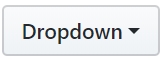
It looks like the caret in the <Dropdown /> is vertically too high compared to the same component in primer/css.
primer/components:
primer/css:
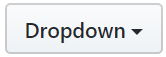
I think that this is due to the 4px transparent border that is on the bottom of the caret in the <Dropdown />, which comes from border: ${get('space.1')}px solid transparent;
If I add border-bottom-width: 0; to the <DropdownCaret />styles, the react component matches what you see in primer/css.
Let me know if this isn't by design and I can open a PR.