This repository was archived by the owner on Nov 11, 2022. It is now read-only.
This repository was archived by the owner on Nov 11, 2022. It is now read-only.
Wiki Update: get localkey with iPhone #19

Description

I can't figure out how to update your wiki, but I have a couple things to add. Perhaps you can take this and update?
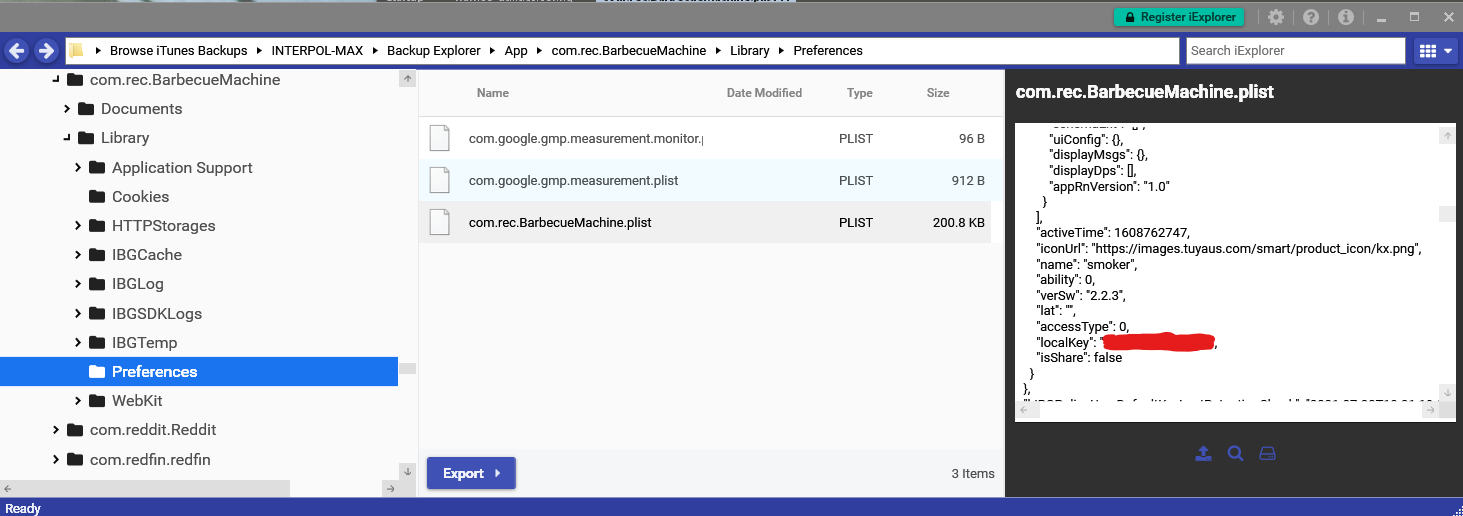
I don't have a rooted android device available to grab the local key. I was able to get the key with the free version of an application called iExplorer (https://macroplant.com/iexplorer). It isn't directly available, but here are steps that should reproduce what I did on a Windows computer. It might be different (easier) on a mac, and there is an iExplorer version for Mac. These steps assume you have an iPhone with the recteq app installed that has connected to your smoker. I did this on an iPhone 12 Pro (14.7.1) on a Windows 10 computer.
- Ensure iTunes is installed and up to date
- Plug in iPhone and use iTunes to create an encrypted backup (might be ok with non-encrypted but I didn't test that)
- Install and open iExplorer
- Scroll to the bottom in the left pane looking for "Browse iTunes Backups" and choose the name of the iPhone with the recteq app installed
- Navigate to
Backup Explorer > App > com.rec.BarbecueMachine > Library > Preferences - Select
com.rec.BarbecueMachine.plist - In the right preview pane, scroll
about a third of the way downalmost to the bottom looking forlocalKey