Midi_IO is a .Net library for Midi Input/Output based on Windows WINMM. It simplifies the calls to the C++ style functions in WINMM and handles the required buffers in unmanaged memory.
Midi_IO provides functions and raises events for
- Enumerating Input and Output ports
- Opening and closing Input and Output ports
- Sending and receiving short and long (sysx) Midi messages
- Receiving informative Midi messages
There is
- NO support for midiStreamOut
- NO support for other WINMM audio functions
Test application for the Midi_IO library. Can also be used as a simple Midi In/Out monitor in raw hexadecimal format.
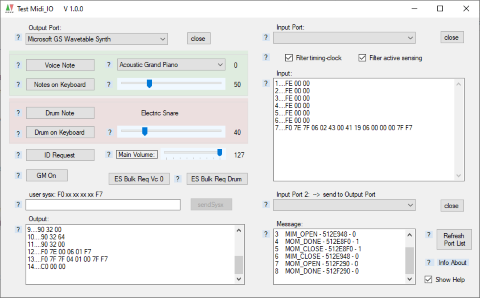
The minimum required controls and code to play a Note.
The underlying documentation for winmm can be found at:
- docs.microsoft.com/ ... /windows/win32/api/mmeapi
- docs.microsoft.com/ ... /windows/win32/multimedia/musical-instrument-digital-interface--midi
The usual way to create an instance of Midi_IO is:
Private WithEvents MIO As New Midi_IO.Midi_IO
-
_Start
- Is called from NEW
-
_End
- Should be called when the application closes, especially when MidiInPorts were used. It closes forgotten In- and Out ports and frees unmanaged memory.
-
OpenMidiInPort
-
OpenMidiOutPort
(portName As String, ByRef hndRet As UInteger, dwInstance As Integer) As Boolean
-
- in: portName is a .portName in the MidiOutPorts list
- in: dwInstance is a user defined value, can be 0
- returns TRUE if Open was successful, hndRet is set to the handle value
-
CloseMidiInPort
- MidiInPorts can be considered as recording / listening. They need more care than the MidiOutPorts. Internally midiInStop and midiInReset is called.
-
CloseMidiOutPort
-
OutShortMsg
- Sends a 3-byte message to an OutpuPort. Usually (Status, data1, data2).
- Overloaded with (Status, Channel, data1, data2) to internally merge Status and channel.
-
OutLongMsg
- Sends a SystemExclusive message to an OutputPort. The massage has variable length in a byte() buffer. It begins with &hF0 and ends with &hF7. Data bytes between are limited to 7 bit. (<= 127, &h7F)
-
RefreshPortList
- Useful when a device was connected/disconnected while the application is running. The function has to close all open ports, in case a device was disconnected / powered off.
Public Event MidiInData(hMidiIn As UInteger, dwInstance As UInteger, status As Byte, data1 As Byte, data2 As Byte, dwTimestamp As UInteger)
Handles the MIM_DATA message.
Public Event MidiInLongdata(hMidiIn As UInteger, dwInstance As UInteger, buffer As Byte(), dwTimestamp As UInteger)
Handles the MIM_LONGDATA message. Buffer() is filled with the message bytes. Buffer.Length contains the number of bytes in the message
Public Event MidiInCallbackMsg(hMidiIn As UInteger, wMsg As UInteger, dwInstance As UInteger, dwParam1 As UInteger, dwParam2 As UInteger)
Informative messages about the state of a Midi-In Port. MIM_OPEN, MIM_CLOSE,...
Public Event MidiOutCallbackMsg(hMidiOut As UInteger, wMsg As UInteger, dwInstance As UInteger, dwParam1 As UInteger, dwParam2 As UInteger)
Informative messages about the state of a Midi-Out Port. MOM_OPEN, MOM_CLOSE, MOM_DONE,..
- MidiIn_filter_ActiveSense
- MidiIn_filter_TimingClock
Set the corresponig property to FALSE to receive the message as MidiInData event.
- MidiInPorts
- MidiOutPorts
Enumeration of the Ports after NEW or RefreshPortList
Please note that the caller of the MidiInData and MidiInLongdata Events runs in another thread. So, before a UserInterface control can be accessed, 'Invoke' is required, else an
<Exception thrown: 'System.InvalidOperationException' in System.Windows.Forms.dll> appears in the output window of VS. For the user it appears that nothing happened because the Exception was catched in the MidiInProc.
I see no alternative to this behaviour:
<RaiseEvent> in MidiIn needs to be surrounded by Try.. Catch to avoid that some wrong code in the EventHandler blocks the MidiInProc callback.
The need for an 'Invoke' is not always obvious. For example, in Test Midi_IO <ShowHexBytes_Output> needs no 'Invoke' when the output message is initiated from a button on the form. But when using the second Midi Input, then the incoming message is forwarded to the midi output, and then 'Invoke' is required, because the original caller is still MidiIn.