A self-contained, single-file HTML markdown editor with a rich toolbar and smart cursor detection - designed for quick editing directly in the browser.
Existing markdown toolbars require selecting text before formatting, which slows down editing. This toolbar was built to solve that: place the cursor on a word, click a button, and the formatting is applied instantly. No selection needed for single words, fast to implement in any markdown editor (if not, ask AI to implement it ✨😊).
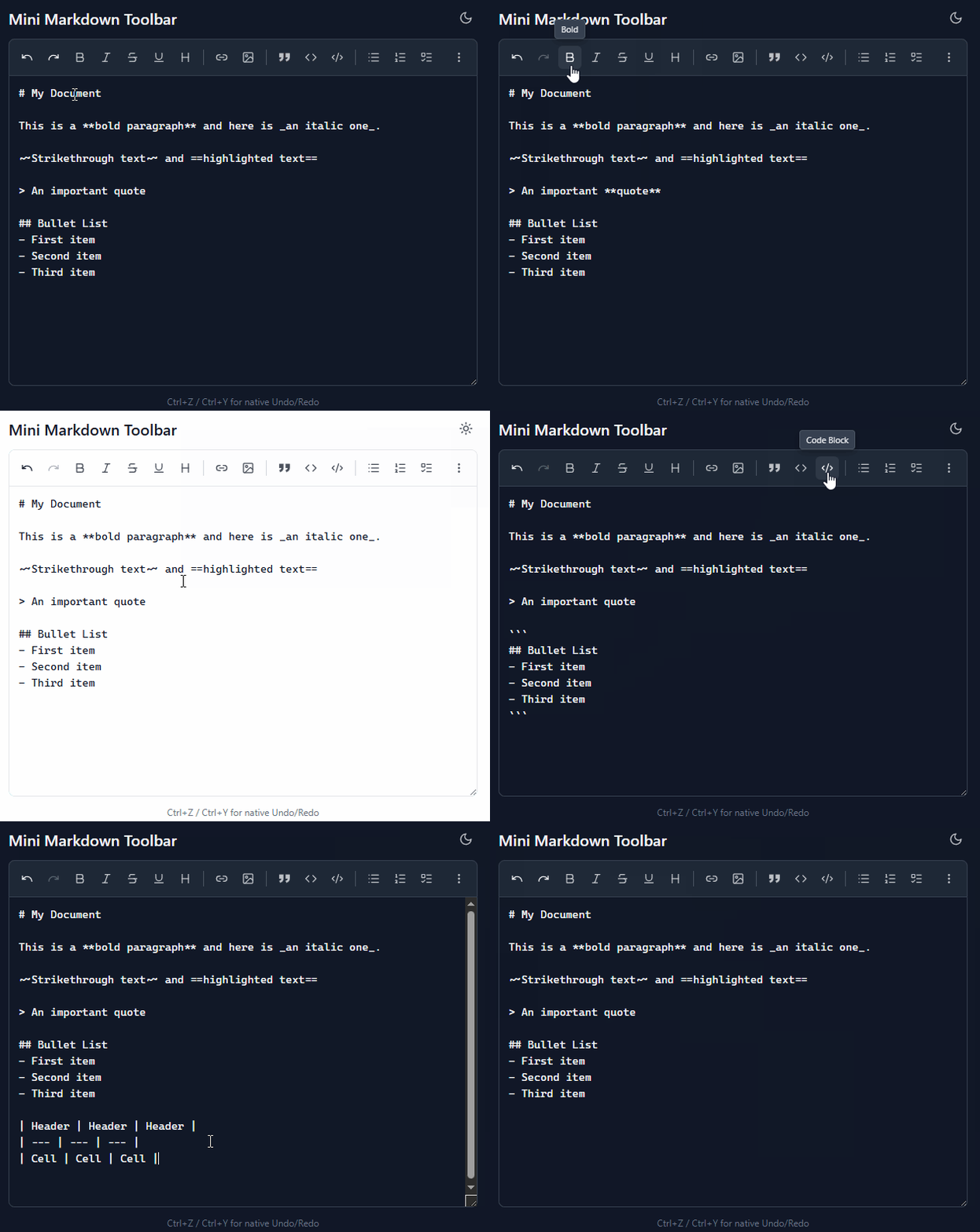
- Text formatting: Bold, Italic, Strikethrough, Underline, Heading (cycle through levels)
- Links & media: Insert Link, Image
- Blocks: Quote (toggle), Inline Code, Code Block (wrap/unwrap with ```)
- Lists: Unordered, Ordered, Task List
- Extras: Table, Highlight (==), Tag (#), Mention (@)
- Undo/Redo with configurable history
- Dark/Light theme toggle
- Responsive overflow - buttons that don't fit the toolbar slide into a "More options" dropdown
- Smart Select - place the cursor on a word and click; no need to select first
- Keyboard accessible - full keyboard navigation with arrow keys
- Single file - no dependencies, no build step
Open mini-markdown-editor-toolbar-all-in-one.html in any modern browser.
| Button | Shortcut | Description |
|---|---|---|
| B | Ctrl+B | Bold **text** |
| I | Ctrl+I | Italic _text_ |
| S | Strikethrough ~~text~~ |
|
| U | Underline <u>text</u> |
|
| H | Heading (cycles # through ######) | |
| Link | Insert [text](url) |
|
| Image | Insert  |
|
| Quote | Toggle > on current line |
|
< > |
Inline code `code` |
|
{} |
Code block ``` |
|
| UL | Unordered list - |
|
| OL | Ordered list 1. |
|
| [ ] | Task list - [ ] |
|
| Table | Insert markdown table | |
== |
Highlight ==text== |
|
| # | Tag #word |
|
| @ | Mention @word |
|
| ↩ | Ctrl+Z | Undo |
| ↪ | Ctrl+Y | Redo |
| ☀/☾ | Toggle light/dark theme |
Most buttons toggle on/off - applying the formatting if not present, removing it if already applied.
Unlike most markdown toolbars that require a text selection, this toolbar works with just a cursor position - it intelligently detects the current word boundaries and applies formatting automatically. For multi-word formatting, simply select the text as usual. This makes editing significantly faster: place the cursor on a word, click a button, and the formatting is applied instantly without needing to select first.
The toolbar uses GitHub's <markdown-toolbar> custom elements for the core formatting logic, with custom enhancements for:
- Code block cycling (wrap/unwrap selections with ```)
- Quote line toggling
- Smart # and @ insertion (expand to word boundaries)
- Undo/Redo history stack
- Responsive overflow layout using
ResizeObserver
The toolbar uses vanilla custom elements (<md-bold>, <md-italic>, etc.) - they work natively in any framework without a wrapper. Just drop the <markdown-toolbar> component into your template and import the JS logic.
To port the toolbar to a specific framework, paste the source into an AI assistant and ask it to generate a component for your framework of choice (the logic is self-contained and framework-agnostic).
The TextareaAdapter class (demo/minimarkdown.ts:14) wraps any editor that exposes standard textarea-like APIs (value, selectionStart, selectionEnd, focus, setSelectionRange). To adapt for CodeMirror:
class CodeMirrorAdapter {
  constructor(private cm: CodeMirror.Editor) {}
  get value() { return this.cm.getValue(); }
  set value(v: string) { this.cm.setValue(v); }
  get selectionStart() { return this.cm.getDoc().indexFromPos(this.cm.getDoc().getCursor('from')); }
  get selectionEnd() { return this.cm.getDoc().indexFromPos(this.cm.getDoc().getCursor('to')); }
  focus() { this.cm.focus(); }
  setSelectionRange(a: number, b: number) {
    const from = this.cm.getDoc().posFromIndex(a);
    const to = this.cm.getDoc().posFromIndex(b);
    this.cm.getDoc().setSelection(from, to);
  }
  // ... implement the other methods as needed
}
Pass the adapter instance to the toolbar:
toolbar._editor = new CodeMirrorAdapter(myCodeMirrorInstance);This pattern works for any editor with programmatic access (Monaco, Ace, ProseMirror, etc.).
A three-file variant (HTML + CSS + JavaScript) is available under demo/ (files: minimdtoolbar.html, .js, .css) for projects that prefer separate assets.
Works in all modern browsers (Chrome, Firefox, Safari, Edge). No external dependencies.