
Fork Notice: This is an active fork of runekaagaard/mcp-redmine maintained to ensure stability and availability when upstream development is limited.
This fork adds several powerful enhancements over the original:
- 🎯 Advanced Response Filtering: Intelligent filtering with preset configurations (
minimal,clean,essential_issues) - 📝 Journal Filtering: Filter code-related entries from issue journals for cleaner output
- 🔒 Enhanced Security: ReDoS protection and comprehensive input validation
- ⚡ MCP Capabilities: Dynamic capability reporting based on API paths
- 🧪 Comprehensive Testing: 106+ tests covering security and edge cases
- 🚀 Automated Publication: Complete PyPI publication workflow with pre-checks
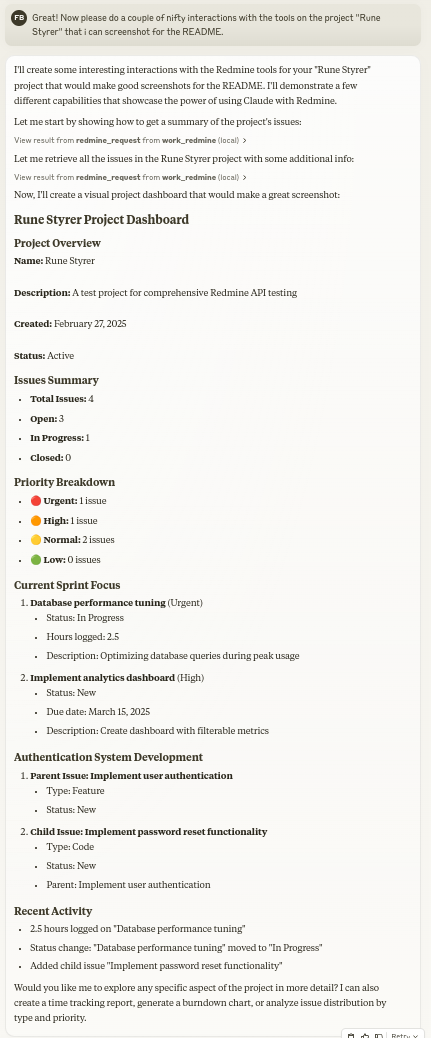
Let Claude be your Redmine assistant! MCP Redmine connects your MCP client to your Redmine instance, allowing it to:
- Search and browse projects and issues
- Create and update issues with full markdown support
- Upload and download file attachments
- Manage and track time entries
- Update issue statuses and fields
- Access comprehensive Redmine API functionality
Uses httpx for API requests and integrates with the Redmine OpenAPI specification for comprehensive API coverage.
The easiest way to install MCP Redmine Enhanced:
{
  "mcpServers": {
    "redmine": {
      "command": "uvx",
      "args": [
        "--from", "mcp-redmine-enhanced==2025.09.13.162715.post0",
        "--refresh-package", "mcp-redmine-enhanced",
        "mcp-redmine"
      ],
      "env": {
        "REDMINE_URL": "https://your-redmine-instance.example.com",
        "REDMINE_API_KEY": "your-api-key",
        "REDMINE_REQUEST_INSTRUCTIONS": "/path/to/instructions.md"
      }
    }
  }
}Prerequisites: Install uv if you don't have it:
- Linux/macOS:
curl -LsSf https://astral.sh/uv/install.sh | sh - macOS (Homebrew):
brew install uv - Windows:
powershell -ExecutionPolicy ByPass -c "irm https://astral.sh/uv/install.ps1 | iex"
If you prefer using pip, first install the package globally:
pip install mcp-redmine-enhancedThen configure Claude Desktop:
{
  "mcpServers": {
    "redmine": {
      "command": "mcp-redmine",
      "env": {
        "REDMINE_URL": "https://your-redmine-instance.example.com",
        "REDMINE_API_KEY": "your-api-key",
        "REDMINE_REQUEST_INSTRUCTIONS": "/path/to/instructions.md"
      }
    }
  }
}For the latest features and automatic updates:
{
  "mcpServers": {
    "redmine": {
      "command": "uvx",
      "args": [
        "--from", "git+https://github.com/olssonsten/mcp-redmine.git",
        "--refresh-package", "mcp-redmine-enhanced",
        "mcp-redmine"
      ],
      "env": {
        "REDMINE_URL": "https://your-redmine-instance.example.com",
        "REDMINE_API_KEY": "your-api-key",
        "REDMINE_REQUEST_INSTRUCTIONS": "/path/to/instructions.md"
      }
    }
  }
}
Package Details:
- PyPI Package:
mcp-redmine-enhanced - Console Script:
mcp-redmine(for compatibility) - Latest Version:
2025.09.13.140055.post0 - Repository: https://github.com/olssonsten/mcp-redmine
For developers who want to contribute or modify the code, clone the repository and use the local development setup described in Option 3 above.
If you prefer using Docker:
-
Build Docker Image
git clone https://github.com/olssonsten/mcp-redmine.git
cd mcp-redmine
docker build -t mcp-redmine-enhanced .
-
Configure Claude Desktop
{
  "mcpServers": {
    "redmine": {
      "command": "docker",
      "args": [
        "run", "-i", "--rm",
        "-e", "REDMINE_URL",
        "-e", "REDMINE_API_KEY",
        "-e", "REDMINE_REQUEST_INSTRUCTIONS",
        "-v", "/path/to/instructions.md:/app/INSTRUCTIONS.md",
        "mcp-redmine-enhanced"
      ],
      "env": {
        "REDMINE_URL": "https://your-redmine-instance.example.com",
        "REDMINE_API_KEY": "your-api-key",
        "REDMINE_REQUEST_INSTRUCTIONS": "/app/INSTRUCTIONS.md"
      }
    }
  }
}
Note: When using Docker, the
REDMINE_REQUEST_INSTRUCTIONSenvironment variable must point to a path inside the container. Mount your local instruction file into the container at the correct location.
REDMINE_URL: URL of your Redmine instance (required)REDMINE_API_KEY: Your Redmine API key (required, see below for how to get it)REDMINE_REQUEST_INSTRUCTIONS: Path to a file containing additional instructions for the redmine_request tool (optional). I've found it works great to have the LLM generate that file after a session. (example1 example2)
Note: When running via Docker, the
REDMINE_REQUEST_INSTRUCTIONSenvironment variable must point to a path inside the container, not a path on the host machine.
Therefore, if you want to use a local file, you need to mount it into the container at the correct location.
- Log in to your Redmine instance
- Go to "My account" (typically found in the top-right menu)
- On the right side of the page, you should see "API access key"
- Click "Show" to view your existing key or "Generate" to create a new one
- Copy this key for use in your configuration
-
redmine_paths_list
- Return a list of available API paths from OpenAPI spec
- No input required
- Returns a YAML string containing a list of path templates:
- /issues.json - /projects.json - /time_entries.json ... -
redmine_paths_info
- Get full path information for given path templates
- Input:
path_templates(list of strings) - Returns YAML string containing API specifications for the requested paths:
/issues.json:
  get:
    operationId: getIssues
    parameters:
      - $ref: '#/components/parameters/format'
    ...
-
redmine_request
- Make a request to the Redmine API
- Inputs:
path(string): API endpoint path (e.g. '/issues.json')method(string, optional): HTTP method to use (default: 'get')data(object, optional): Dictionary for request body (for POST/PUT)params(object, optional): Dictionary for query parametersmcp_filter(object, optional): MCP response filtering (use redmine_paths_info to discover options)
- Returns YAML string containing response status code, body and error message:
status_code: 200
body:
  issues:
    - id: 1
      subject: "Fix login page"
      ...
error: ""
mcp_filtered: true  # Added when filtering is applied
-
redmine_upload
- Upload a file to Redmine and get a token for attachment
- Inputs:
file_path(string): Fully qualified path to the file to uploaddescription(string, optional): Optional description for the file
- Returns YAML string with the same format as redmine_request, including upload token:
status_code: 201
body:
  upload:
    id: 7
    token: "7.ed32257a2ab0f7526c0d72c32994c58b131bb2c0775f7aa84aae01ea8397ea54"
error: ""
-
redmine_download
- Download an attachment from Redmine and save it to a local file
- Inputs:
attachment_id(integer): The ID of the attachment to downloadsave_path(string): Fully qualified path where the file should be savedfilename(string, optional): Optional filename to use (determined automatically if not provided)
- Returns YAML string with download results:
status_code: 200
body:
  saved_to: "/path/to/downloaded/file.pdf"
  filename: "file.pdf"
error: ""
Let's create a new bug report in the "Website" project:

1. Title: "Homepage not loading on mobile devices"
2. Description: "When accessing the homepage from iOS or Android devices, the loading spinner appears but the content never loads. This issue started after the last deployment."
3. Priority: High
4. Assign to: John Smith
Can you find all high priority issues in the "Website" project that are currently unassigned?
Please mark issue #123 as "In Progress" and add a comment: "I've started working on this issue. Expect it to be completed by Friday."
Log 3.5 hours against issue #456 for "Implementing user authentication" done today.
Get issues with reduced verbosity:
redmine_request("/issues.json", params={"limit": 5}, mcp_filter={"remove_empty": True, "remove_custom_fields": True})

Use preset for clean responses:
redmine_request("/issues.json", mcp_filter="clean")
Filter journals for code reviews:
redmine_request("/issues/123.json", params={"include": "journals"}, mcp_filter={"journals": {"code_review_only": True}})
MCP Redmine is listed in the following MCP directory sites and repositories:
- MCP Alchemy - Connect Claude Desktop to databases for exploring schema and running SQL.
- MCP Notmuch Sendmail - Email assistant for Claude Desktop using notmuch.
- Diffpilot - Multi-column git diff viewer with file grouping and tagging.
- Claude Local Files - Access local files in Claude Desktop artifacts.
Contributions are warmly welcomed! Whether it's bug reports, feature requests, documentation improvements, or code contributions - all input is valuable. Feel free to:
- Open an issue to report bugs or suggest features
- Submit pull requests with improvements
- Enhance documentation or share your usage examples
- Ask questions and share your experiences
The goal is to make Redmine project management with Claude even better, and your insights and contributions help achieve that.
This project builds on the excellent work of others:
- httpx - For handling HTTP requests
- Redmine OpenAPI Specification - For the comprehensive API specification
- Redmine - The flexible project management web application
Mozilla Public License Version 2.0