





A Model Context Protocol server for Microsoft Graph — 85 tools across mail, calendar, meetings (including transcripts), Teams chat, files, SharePoint, search, people, contacts, directory, tasks and OneNote, over stdio or Streamable HTTP.
Signs you in with your own Microsoft account — browser SSO, no token to paste, no client secret.
- No
msgraph-sdk, noazure-identity— the Graph client is rawhttpx, so the dependency tree stays small and the wire behaviour is inspectable. - Read/write separation is enforced, not advisory — write tools are hidden and refused unless the caller explicitly opts in.
- Auth-agnostic by default — tools receive an already-acquired Graph token via the request context. The server can also perform its own on-behalf-of exchange when you want it to act as a proper OAuth resource server.
Status: early. Extracted from a production agent platform where it has been running against a real tenant. The code is battle-tested; the packaging and public API surface are newer. Expect the config surface to move before 1.0.
Requires Python 3.12+. Two paths — pick the one that matches what you want to do.
Nothing to clone. uv runs it straight from PyPI:
uvx --from ms-graph-mcp ms-graph-mcp          # stdio, for an MCP client
uvx --from ms-graph-mcp ms-graph-mcp-http     # Streamable HTTP
or install it into an environment:
pip install ms-graph-mcpRelease candidates are published too. pip skips them unless you ask:
pip install --pre ms-graph-mcp          # newest, including candidates
pip install ms-graph-mcp==0.3.0rc1      # a specific one; no --pre needed for an exact pin
A container image is on GHCR for the HTTP transport — see docs/hosting.md.
TestPyPI is not a distribution channel. Every release is published there first, but that is a rehearsal of the publishing process: it can be wiped without notice and does not mirror PyPI, so installing from it needs
--extra-index-url https://pypi.org/simple/just to resolve ordinary dependencies. Use PyPI, or--pre.
For hacking on it, forking it, or running an unreleased change:
git clone https://github.com/nitin27may/ms-graph-mcp
cd ms-graph-mcp
uv sync                       # creates .venv and installs everything
uv run ms-graph-mcp           # check it starts
uv sync is the only setup step. See
CONTRIBUTING.md before
opening a pull request — the tool allowlists and the tier separation have invariants that are
enforced rather than advisory.
To point an MCP client at your clone, you need its absolute path — clients do not inherit your
working directory and most do not expand ~:
cd ms-graph-mcp && pwd
# /Users/you/workspace/ms-graph-mcp
Then use the source form of the config in Configure your MCP client below.
You need an Entra ID app registration — about two minutes. Do not create a client secret: this registers as a public client, which signs you in through your browser using PKCE. A secret on a program running on your own machine would be readable by anyone with the config file, which is why the flow is designed not to need one. Nothing goes into a config file except two ids, neither of which is sensitive.
In the Entra portal → App registrations → New registration:
- Name: anything, e.g.
ms-graph-mcp - Supported account types: Accounts in this organizational directory only
- Redirect URI: select Public client/native, value
http://localhost
Leave Certificates & secrets alone — you do not need anything from it.
Then, on the new app:
-
Authentication → enable Allow public client flows
-
API permissions → Add a permission → Microsoft Graph → Delegated permissions, and add what you want the agent to reach. A sensible read-only starting set:
User.Read  Mail.Read  Calendars.Read  Files.Read.All
People.Read  Chat.Read  Tasks.Read  Notes.Read  Contacts.Read
The complete copy-paste consent sets — and which permission each individual tool needs — are in docs/permissions.md.
Copy the Application (client) ID and Directory (tenant) ID from the Overview page. That is everything you need.
Every MCP client that speaks stdio takes the same three things — a command, its arguments, and an environment block:
Where that block goes, and what the surrounding key is called, differs:
| Client | Config file | Key |
|---|---|---|
| VS Code | .vscode/mcp.json (workspace), or MCP: Open User Configuration |
servers |
| Claude Code | claude mcp add … — no file to edit |
— |
| Claude Desktop | macOS ~/Library/Application Support/Claude/claude_desktop_config.json · Windows %APPDATA%\Claude\claude_desktop_config.json |
mcpServers |
| Cursor | .cursor/mcp.json (project) or ~/.cursor/mcp.json (global) |
mcpServers |
| Windsurf | ~/.codeium/windsurf/mcp_config.json |
mcpServers |
| MCP Inspector | command line, -e flags |
— |
The first sign-in opens your browser for normal Microsoft 365 SSO — including MFA and conditional
access. The result is cached in ~/.ms-graph-mcp/token_cache.json, owner-readable only, so it does
not prompt again.
{
"inputs": [
{ "id": "clientId", "type": "promptString", "description": "Entra application (client) ID" },
{ "id": "tenantId", "type": "promptString", "description": "Entra directory (tenant) ID" }
],
"servers": {
"ms-graph": {
"type": "stdio",
"command": "uvx",
"args": ["--from", "ms-graph-mcp", "ms-graph-mcp"],
"env": {
"GRAPH_MCP_CLIENT_ID": "${input:clientId}",
"GRAPH_MCP_TENANT_ID": "${input:tenantId}"
}
}
}
}Reload the window. VS Code prompts once for the two ids and remembers them, so this file is safe to
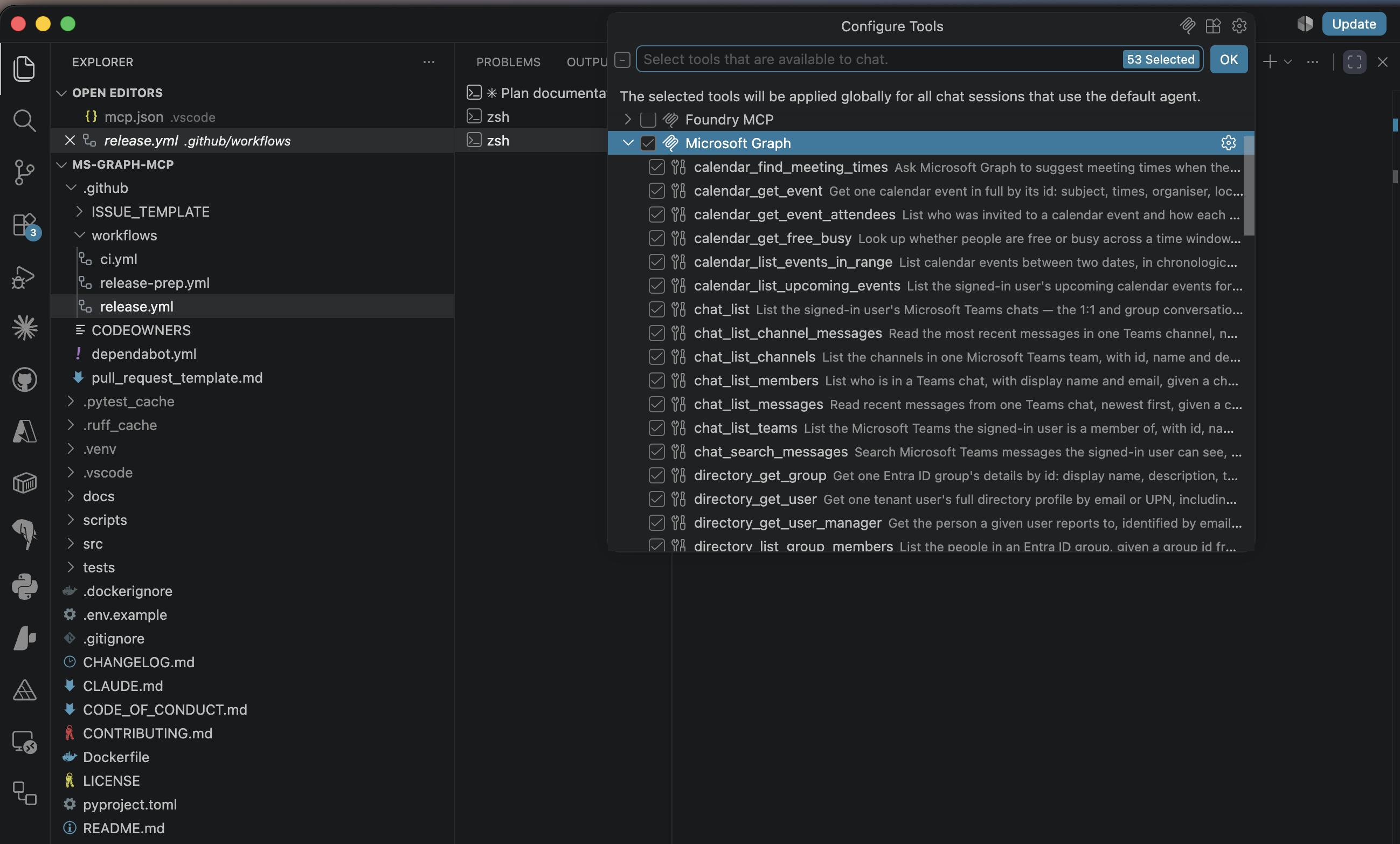
commit. Open the Chat view, switch to Agent mode, and the tools appear under the tools picker —
that is the panel in the screenshot above. Confirm with MCP: List Servers, which shows status
and output if it does not connect.
claude mcp add ms-graph \
--env GRAPH_MCP_CLIENT_ID=<application-client-id> \
--env GRAPH_MCP_TENANT_ID=<directory-tenant-id> \
-- uvx --from ms-graph-mcp ms-graph-mcpConfirm with /mcp inside Claude Code — it lists the server and its tools.
{
"mcpServers": {
"ms-graph": {
"command": "uvx",
"args": ["--from", "ms-graph-mcp", "ms-graph-mcp"],
"env": {
"GRAPH_MCP_CLIENT_ID": "<application-client-id>",
"GRAPH_MCP_TENANT_ID": "<directory-tenant-id>"
}
}
}
}Confirm by quitting Claude Desktop fully — not just closing the window — reopening it, and looking for the tools icon in the composer.
Both use the same mcpServers shape as Claude Desktop, in the file named in the table above.
The quickest way to check the server independently of any client:
npx @modelcontextprotocol/inspector \
uvx --from ms-graph-mcp ms-graph-mcp \
-e GRAPH_MCP_CLIENT_ID=<application-client-id> \
-e GRAPH_MCP_TENANT_ID=<directory-tenant-id>Needs Node 22.19+. It opens a browser UI where you can list tools and call them by hand — worth
doing before blaming your client. There is a scriptable --cli mode too; see
docs/testing.md.
Pass variables with
-e, not from your shell. Inspector does not give the server it spawns your environment, soGRAPH_MCP_CLIENT_ID=… npx @modelcontextprotocol/inspector …starts the server with no client id. The-eflags go after the server command.
Same blocks as above — swap the command and args for your clone's absolute path:
"command": "uv",
"args": ["run", "--directory", "/Users/you/workspace/ms-graph-mcp", "ms-graph-mcp"]Two things catch people out here:
uv must be on the client's PATH. GUI apps launched from Finder or the Dock do not inherit your
shell's PATH, so a client can fail to start the server with an unhelpful error. If that happens, put
the output of which uv in "command" instead of the bare name.
--directory is not optional. Without it, uv run resolves against whatever directory the
client happened to launch from, which will not be the project.
docs/troubleshooting.md covers the Entra errors, Conditional Access, corporate TLS proxies, and the "server disconnected" that is almost always a startup error your client is hiding.
Two settings get you running; everything else has a working default.
| Env var | Purpose |
|---|---|
GRAPH_MCP_CLIENT_ID |
Entra application (client) id. Enables interactive sign-in. |
GRAPH_MCP_TENANT_ID |
Entra directory (tenant) id. Defaults to common. |
GRAPH_MCP_SCOPES |
Comma-separated delegated scopes to request. Defaults to a read-only set. |
GRAPH_MCP_TOOLSETS |
Which tool profiles to expose. Defaults to core. See below. |
GRAPH_MCP_WRITE_SCOPE |
true to expose the 23 write tools. Default off. |
GRAPH_MCP_READ_ONLY |
true to remove the write tier from the deployment entirely. |
GRAPH_MCP_LOG_LEVEL |
INFO logs every Graph call to stderr. Defaults to WARNING. |
Every setting, both deployment shapes, and the hosted/OBO options are in docs/configuration.md. For running it as a service, see docs/hosting.md.
85 tools is a lot to put in front of a model. GRAPH_MCP_TOOLSETS selects named profiles, each a
group of namespaces:
| Profile | Namespaces | Read tools | Approx. tokens |
|---|---|---|---|
core (default) |
search, mail, calendar, files, people | 23 | ~4,200 |
mail |
5 | ~800 | |
calendar |
calendar | 6 | ~1,500 |
meetings |
meetings, calendar | 13 | ~2,900 |
files |
files | 6 | ~900 |
chat |
chat | 7 | ~1,000 |
people |
people | 5 | ~750 |
directory |
directory, people | 12 | ~1,900 |
tasks |
tasks | 5 | ~830 |
notes |
notes | 4 | ~570 |
search |
search | 1 | ~290 |
all |
everything | 53 | ~9,200 |
Combine them with commas:
GRAPH_MCP_TOOLSETS=mail,calendar,tasks
core is the default, so some tools are not advertised unless you ask for them. If you want
Teams chat, Planner, OneNote, meeting transcripts or directory lookups, name those profiles — or set
GRAPH_MCP_TOOLSETS=all to expose everything.
Over HTTP a caller may send X-Toolsets to narrow further for one request. It can only narrow.
The startup value is a ceiling, so a client asking for all gains nothing the deployment did not
already enable. This filters visibility, not authority — the write-scope and internal-tier gates
are what actually stop a call.
Three tiers, one auth seam.
| Tier | Count | Exposed when | Examples |
|---|---|---|---|
| Read | 53 | always | calendar_list_upcoming_events, mail_search, meetings_get_transcript, files_search, search_query |
| Write | 23 | X-Write-Scope: true |
mail_send, calendar_create_event, files_create_sharing_link, tasks_complete_todo |
| Internal | 9 | X-Internal-Scope: true, machine principal only |
graph_request passthrough, drive walk/upload, message attachments, app-only probe_graph_access |
The internal tier is not part of the agent surface. A model sees 76 agent-visible tools. By namespace: mail 11 · tasks 11 · calendar 10 · files 10 · chat 8 · directory 7 · meetings 7 · people 6 · notes 5 · search 1.
Tool names are namespaced by Graph permission family rather than by Microsoft product, because real
questions cross product boundaries — files_ covers OneDrive and SharePoint document libraries,
which are the same driveItem resource underneath.
Every tool declares MCP annotations (readOnlyHint, destructiveHint, idempotentHint) so clients
know what needs confirming, and every description names the delegated permission it requires.
Renamed in 0.2.0. Every pre-0.2.0 tool name still works as an alias, and will keep working until 0.4.0. Aliases are honoured by
tools/callbut never advertised intools/list, so they cost no context.
| docs/ | Index of everything below |
| docs/configuration.md | Every environment variable, split by deployment shape |
| docs/permissions.md | Every tool and the delegated permission it needs, plus copy-paste consent sets |
| docs/hosting.md | Streamable HTTP, headers, Docker and GHCR |
| docs/troubleshooting.md | Entra errors, Conditional Access, corporate TLS proxies |
| docs/debugging.md | Logs, error codes, and the auth failures people actually hit |
| docs/graph-coverage.md | What this covers of the Graph v1.0 surface, what it does not, and what is out of scope |
| docs/roadmap.md | What is not done yet |
| docs/testing.md | Running the suite, how it is arranged, and MCP Inspector |
| CONTRIBUTING.md | Dev setup, the add-a-tool checklist, and the invariants enforced by tests |
| SECURITY.md | Reporting vulnerabilities, and what to change before exposing this beyond localhost |
| CHANGELOG.md | Release history |
| CLAUDE.md | Architecture and the non-obvious traps, for coding agents and new contributors alike |
SharePoint sites and lists are the largest gap; directory completion, file move/delete, and mail drafts follow. Sovereign clouds (GCC High / 21Vianet) are unsupported today. The full list, and what is deliberately out of scope, is in docs/roadmap.md.
- Setup and app-registration questions → Discussions
- Bugs → Issues, with the output of running the server in a terminal
- Security vulnerabilities → never a public issue; see SECURITY.md
Never paste an access token, client secret or shared secret into any of them.
Issues and pull requests are welcome. Start with CONTRIBUTING.md; participation is governed by the Code of Conduct.
uv sync
uv run pytest -q # full suite, offline, about two seconds
uv run ruff check .
uv run ruff format .MIT — see LICENSE.
{
  "command": "uvx",
  "args": ["--from", "ms-graph-mcp", "ms-graph-mcp"],
  "env": {
    "GRAPH_MCP_CLIENT_ID": "<application-client-id>",
    "GRAPH_MCP_TENANT_ID": "<directory-tenant-id>"
  }
}