Privacy information on Settings loads wrong locale #23618

Description

Steps to reproduce
- Use different language and local in your profile than the default profile in your browser
- here: language/locale: english, default browser: french
Expected behaviour
Everything should be in your default language set on your Nextcloud profile
Actual behaviour
The privacy part of the settings page is in French!
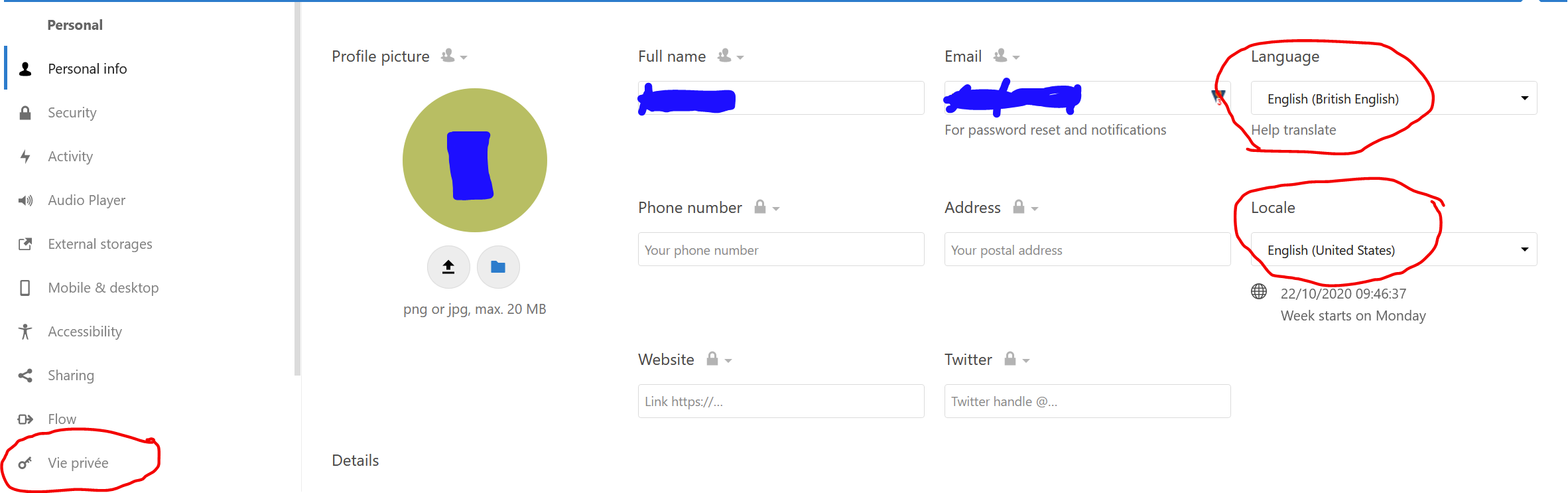
If you go on the page all information is in French.
(I just see that's the same on the admin account with the support section)
Server configuration
Operating system: FreeBSD
Web server: nginx
Database: MariaDB
PHP version: 7.3
Nextcloud version: NC 18.0.10
Updated from an older Nextcloud/ownCloud or fresh install: updated install
Where did you install Nextcloud from:
Signing status:
Signing status
Login as admin user into your Nextcloud and access
http://example.com/index.php/settings/integrity/failed
paste the results here.
List of activated apps:
App list
If you have access to your command line run e.g.:
sudo -u www-data php occ app:list
from within your Nextcloud installation folder
Nextcloud configuration:
Config report
If you have access to your command line run e.g.:
sudo -u www-data php occ config:list system
from within your Nextcloud installation folder

or

Insert your config.php content here.
Make sure to remove all sensitive content such as passwords. (e.g. database password, passwordsalt, secret, smtp password, …)
Are you using external storage, if yes which one: local/smb/sftp/...
Are you using encryption: yes/no
Are you using an external user-backend, if yes which one: LDAP/ActiveDirectory/Webdav/...
LDAP configuration (delete this part if not used)
LDAP config
With access to your command line run e.g.:
sudo -u www-data php occ ldap:show-config
from within your Nextcloud installation folder

Without access to your command line download the data/owncloud.db to your local
computer or access your SQL server remotely and run the select query:
SELECT * FROM `oc_appconfig` WHERE `appid` = 'user_ldap';


Eventually replace sensitive data as the name/IP-address of your LDAP server or groups.
Client configuration
Browser:
Operating system:
Logs
Web server error log
Web server error log
Insert your webserver log here
Nextcloud log (data/nextcloud.log)
Nextcloud log
Insert your Nextcloud log here
Browser log
Browser log
Insert your browser log here, this could for example include:

a) The javascript console log
b) The network log
c) ...