
Open source tools for every layer of government service delivery.
Strata is a gold-standard target architecture and suite of open-source tools that gives government agencies everything they need to run a modern service.


This template repository provides foundational AWS infrastructure for deploying modern web applications. It is part of the interoperable Nava Strata suite of open source tools.
This template provides everything you need to deploy a production-ready web application:
- Team Workflows – Pull request templates, architecture decision records (ADRs), and Makefiles for streamlined development
- Account Level Foundational Infrastructure – Infrastructure for terraform backends, including an S3 bucket and DynamoDB table for storing and managing terraform state files.
- Application Infrastructure – Container registry, load balancers, web services, and databases for your web app
- Continuous Integration – GitHub Actions for automated linting, validation, and security compliance checks
- Continuous Deployment – infrastructure for continuous deployment, including: AWS account access for Github actions, scripts for building and publishing release artifacts, and a Github action for automated deployments from the main branch.
- Comprehensive Documentation – Technical documentation explaining all architectural decisions and defaults
The infrastructure creates a robust, scalable system architecture:
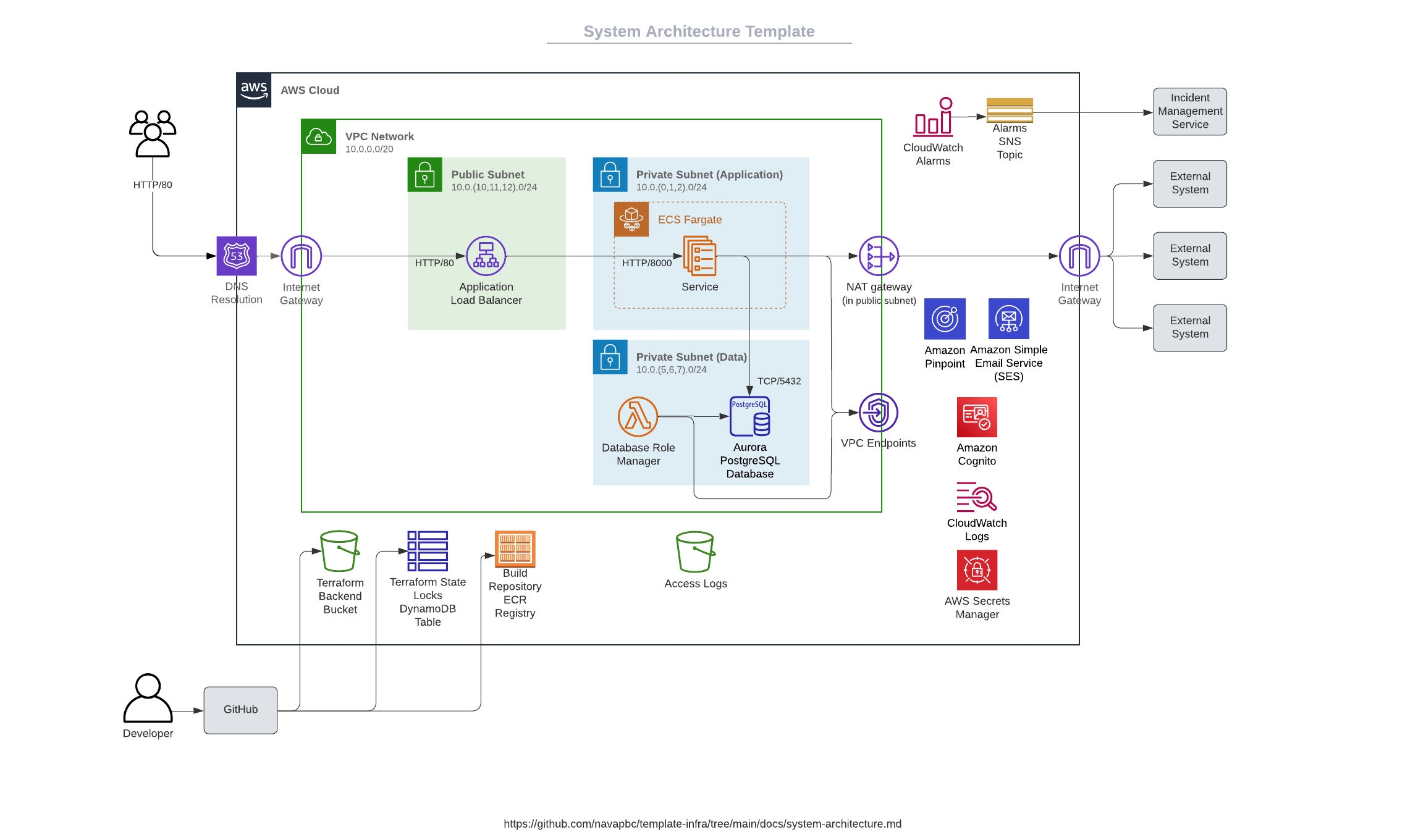
See the system architecture documentation for detailed information.
Before using this template, you need an application ready to deploy.
- Have an existing application? Review the application requirements to ensure compatibility
- Starting from scratch? Use one of the Platform application templates – they're pre-configured to work with this infrastructure template
Install the template into your project using the Nava Platform CLI:
-
Install the nava-platform tool: Follow the instructions at github.com/navapbc/platform-cli
-
Run the installation command in your project's root directory:
nava-platform infra install . -
You're ready to go! Proceed to the setup steps below.
Follow these steps in order to set up your complete infrastructure:
Follow the instructions in infra/README.md to setup the infrastructure for your application.
After setting up AWS resources, set up GitHub Actions workflows for automated testing and validation
After configuring GitHub Actions, set up continuous deployment for automated deployments from the main branch
After setting up continuous deployment, you can optionally set up pull request environments for testing changes in isolation
Set up your team workflow – this can be done at any point in the process
With the nava-platform tool installed, run the following in your project's root directory:
nava-platform infra update .If the update fails, the tool will provide some guidance, but effectively the next step will be apply the updates in smaller pieces with manual merge conflict resolution.
Important: Always read the release notes before updating to check for breaking changes that may affect your infrastructure.
- Documentation – Comprehensive guides and architectural decisions
- Contributing – How to contribute to this project
- License – Apache 2.0 License
- Security – Security policies and vulnerability reporting
- Found a bug? Submit an issue
- Want to contribute? Check out our contributing guide


![@dependabot[bot]](https://avatars.githubusercontent.com/in/29110?s=64&v=4)


