
This is a simple HSV color picker written in pure typescript (there are absolutely no dependencies).
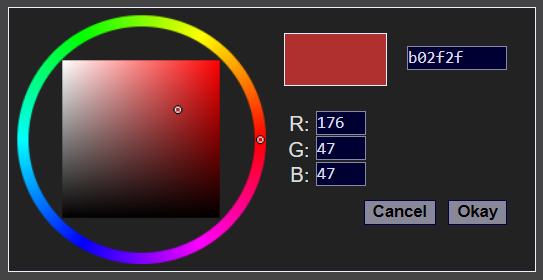
The color wheel itself is drawn directly to a canvas through direct pixel manipulation, so it shouldn't be difficult to port to any other platform as long as you can directly access an image buffer.
Its fairly simple to use. Include colorpicker.css and cs_min.js in your
html.
Then to open the color picker and wait for a color to be picked, run the following in a javascript tag:
const picker = new ColorPicker.Picker(element);
const color = await picker.pick(0xffccaa);
element is the html element used to position the color picker. Usually
this is the button that spawned the color picker. The color picker will be
positioned to cover up the element given.
0xffccaa is the hex representation of the color to begin with. The color
that is returned is either null (the user hit cancel) or a number representing
the chosen color.
I have also provided two convenience functions;
ColorPicker.toNumber(color: string): number takes a css string
like rgb(244, 11, 9) or #fce and returns the numerical representation.
ColorPicker.toString(color: number): string takes the numerical color
and returns an rgb() css string.
If you look at the example index.html, you can see I use both of these functions to convert to and from an element's background style.