
Compare PDF decks, even when slides move.
Compare PDF decks in your browser with a global slide map, separate move/edit flags, and honest uncertainty.
Try the sample decks → · Watch the browser walkthrough · 简体中文
No account. No document upload. Open the app, then click Try the sample decks.
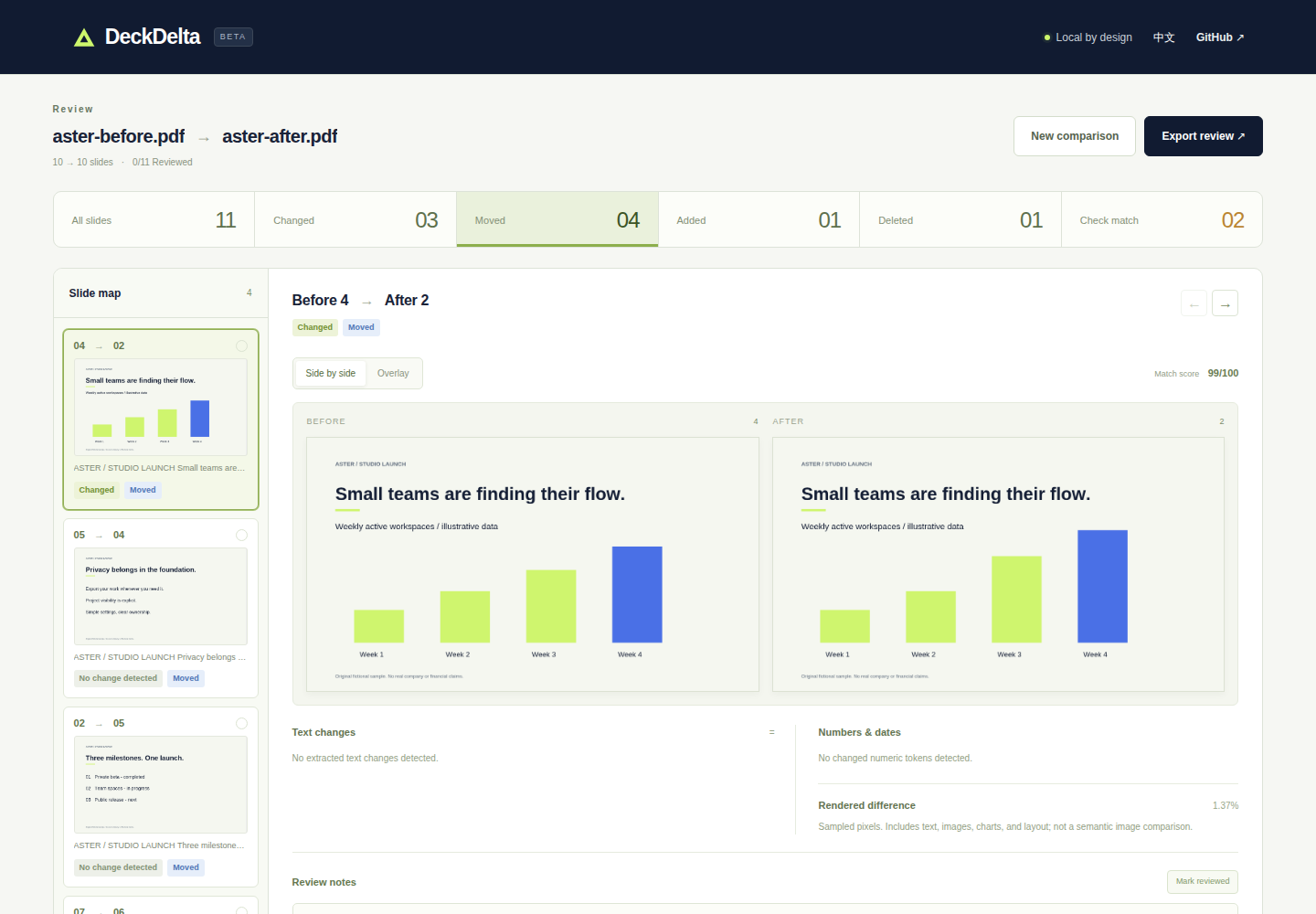
Same slide, new position, changed chart: 4 → 2. The walkthrough also shows $39 → $49 and duplicate appendix pages flagged Check match. Recorded from the real app with the included fictional PDFs.
Reordering a deck should not make every later page look like a rewrite. DeckDelta builds a global, one-to-one slide map, including equal-length decks, then checks each matched pair for text, numeric-token, and rendered changes. Ambiguous matches stay visible and can be corrected by hand.
In the sample, start with Moved → 04 → 02 to inspect the edited chart. Then try Changed → 03 → 03 for the price edit, and Check match for the identical appendix pages. No files to prepare.
Alpha review aid: born-digital PDFs only, up to 50 pages and 25 MB per file. No OCR or guarantee that every change is detected. Read the limits.
- Global slide matching: reordered slides, additions, and deletions in one map
- Moves and edits separately: a moved slide need not be labeled as edited
- Honest uncertainty: duplicate pages and weak or sparse evidence are flagged with reasons
- Manual corrections: select a different partner, swap occupied matches, or unpair a slide
- Three views of change: word-level text, numeric tokens/dates, and rendered pixels
- Visual inspection: side-by-side previews, a larger preview, and adjustable overlay
- Review state: notes and reviewed/unreviewed decisions; rematching invalidates affected decisions and labels old notes with their previous pairing
- Portable HTML review: embedded slide previews, text/number deltas, match uncertainty, notes, and decisions; no network or JavaScript needed to read it
- English and Simplified Chinese UI
- No account, document upload, analytics, or runtime CDN
Try the built-in fictional Aster Studio decks. The original 10-page pair contains a date change, a price change, a chart edit, four moved slides, one addition, one deletion, and two deliberately duplicated appendix pages. The sample source is included in scripts/generate-samples.mjs.
Download the ready-to-serve static ZIP · SHA-256 checksum
Extract it and serve the folder with any static HTTP server. If Python 3 is already installed, run python3 -m http.server 8080 --bind 127.0.0.1 from that folder, then open http://127.0.0.1:8080. The ZIP includes the app, PDF.js assets, fictional samples, and browser walkthrough. No Node.js or npm is needed to use this prebuilt version. Opening index.html directly with file:// is not supported.
Node.js 24 or newer:
npm ci
npm run dev
Open the local URL printed by Vite. PDF processing happens in your browser. To build a portable static site:
npm run build
npm run preview
Serve dist/ with any static HTTP server. Relative asset paths support a GitHub Pages project subdirectory. Opening the app itself with file:// is not supported by PDF.js workers; exported review HTML files can be opened directly.
- Choose the original and revised PDFs, or load the sample decks
- Start with Check match. Confirm duplicates and weak matches before trusting the map
- Filter changed, moved, added, or deleted slides
- Inspect text, numeric tokens, and both rendered pages. Use the overlay for chart/layout edits
- Correct a pairing if needed, leave a note, and mark the slide reviewed
- Export the review before closing the tab
Notes and decisions live only in the current tab. Exported reports contain document images, extracted text, filenames, and notes. Handle them as carefully as the source PDFs. The HTML export is a review artifact, not an editable project file or a replacement for the original PDF.
- Born-digital PDF decks, up to 50 pages and 25 MB per file
- Password-protected PDFs and wholly scanned/image-only decks are rejected
- Individual image-only pages inside a text-bearing deck can be visually compared, but always require human review
- No OCR, slide-object model, speaker notes, animations, tracked changes, or semantic interpretation
- Word extraction order, fonts, renderer differences, hidden content, and complex PDF features can affect results
- Visual comparison uses a 128 × 72 normalized sample, with a mean RGB difference threshold of 18/255 per pixel. A single changed sampled pixel can flag a difference, but very small or low-contrast edits may be missed
- “No change detected” means normalized extracted text is equal and the sampled rendering found no change. It is not proof that two slides are identical
- Match scores are heuristic affinities, not probabilities or guarantees
- Numeric tokens are additions/removals, not an assertion that every removed number corresponds to every added number
- Sparse or scanned text, similar templates, and substantially rewritten slides need manual matching
- Large edited text spans fall back to a bounded coarse diff
- Current desktop Chromium/Firefox/Safari are intended targets; large decks are memory intensive on mobile
Local files are read with the browser File API, rendered with a locally bundled PDF.js worker, and kept in memory. Bundled fonts, CMaps, and image-decoding assets are served from the same origin. The sample demo fetches only the two bundled fictional PDFs. There is no document-processing backend.
The hosting provider still receives ordinary requests for the application and its assets. Browser extensions and a compromised browser remain outside this app's control. For sensitive work, self-host a reviewed build. Do not upload confidential PDFs to an issue report.
Exports escape extracted text, filenames, and notes, contain no executable scripts, and enforce a restrictive Content Security Policy. Embedded images make them self-contained. See SECURITY.md.
- Extract normalized text and render each page locally
- Compare text token/bigram frequencies with deck-wide inverse-frequency weighting, plus whitespace-aware raster similarity
- Solve a global assignment with unmatched slots using the Hungarian algorithm
- Flag competing candidates, weak evidence, and missing text; never use page proximity as the search window
- Independently compare the assigned pair's text, numbers, geometry, and rendered sample
The pure engine is in src/compare.ts. Browser lifecycle and resource cleanup are in src/pdf.ts; remapping and the script-free report generator are separate modules.
npm test                         # pure matching, remapping, export-safety tests
npm run build                    # strict typecheck and production bundle
npx playwright install chromium  # first browser test setup
npm run test:e2e                  # production-build browser smoke tests
npm run demo:record               # real Chromium walkthrough; run after build
python3 scripts/package-static.py # package verified build + recording
npm run samples                  # regenerate the original fictional demo PDFs
Alpha release candidate: CI passed with 28 unit tests, strict typechecking, a production build, and 2 real-PDF Chromium end-to-end tests. Independent live-site QA exercised eight synthetic PDF pairs: seven supported cases produced the expected mappings and seeded-change flags; the wholly image-only deck was explicitly rejected. Cancellation, replacement during processing, review-state invalidation, and language switching were also checked. Export download and content checks passed in CI; reopening a downloaded report was not verified in live-site QA. This is a review aid, not a guarantee that every change is detected.
GitHub CI runs the unit tests, production build, and real-PDF Chromium smoke suite. Browser coverage includes local-only requests, demo loading, numeric changes, overlay, preview dismissal, manual swaps, note context, review decisions, export escaping, Chinese UI, responsive overflow, cancellation, repeat uploads, and rejected inputs.
The browser walkthrough is a native Playwright WebM recording of the real app, without mocked results, sped-up playback, or added product UI. The recorder checks the displayed matches and flags, waits for slide images, and verifies the saved video is playable and 12–20 seconds long. It also writes same-origin captions and a provenance manifest. Generated files go into dist/; no video files or new runtime dependencies are added to the source tree.
The Deploy Pages workflow is manual and repeats these checks, including the recording gate, before publishing. It also packages and integrity-checks a ready-to-serve static ZIP; the ZIP is created outside dist/ before being copied in, so it cannot include itself. In GitHub Settings → Pages, choose GitHub Actions, then run that workflow. No account credentials or third-party hosting services are required by the app.
Contributions that improve ambiguous matches, accessibility, language coverage, and reproducible adversarial fixtures are particularly useful. Please include a small, non-confidential failing PDF pair and the expected pairing when reporting a comparison issue.
PDF Diff Viewer and PDF Diff are useful open-source approaches to browser PDF comparison. DeckDelta focuses on the deck-level map, explicit uncertainty/manual corrections, and a portable review with visual context and decisions. Local processing and HTML export are not unique to this project.
DeckDelta 在浏览器本地对比两个 PDF 文稿,使用全局一对一匹配追踪移动页面,并区分“已移动”和“已修改”。支持文字、数字、渲染差异、手动更正匹配、备注、审阅状态,以及包含页面图片的独立 HTML 报告。
点击右上角切换中文界面。无需账号,不上传文稿,无分析追踪。仅支持原生 PDF,每份最多 50 页、25 MB;纯扫描件和加密文件不受支持。匹配与像素采样都可能遗漏变化,重要内容请人工核对。关闭标签页前请导出;导出报告包含原文内容,请谨慎分享。
MIT. The original fictional sample decks are included under the same license. Initial implementation was created with AI assistance. Third-party libraries retain their own licenses; PDF.js and its bundled asset notices are included in the build.