
A VS Code extension that makes the Claude Code chat panel and Markdown files render right-to-left, for people who write Persian, Arabic, Hebrew or Urdu while coding.


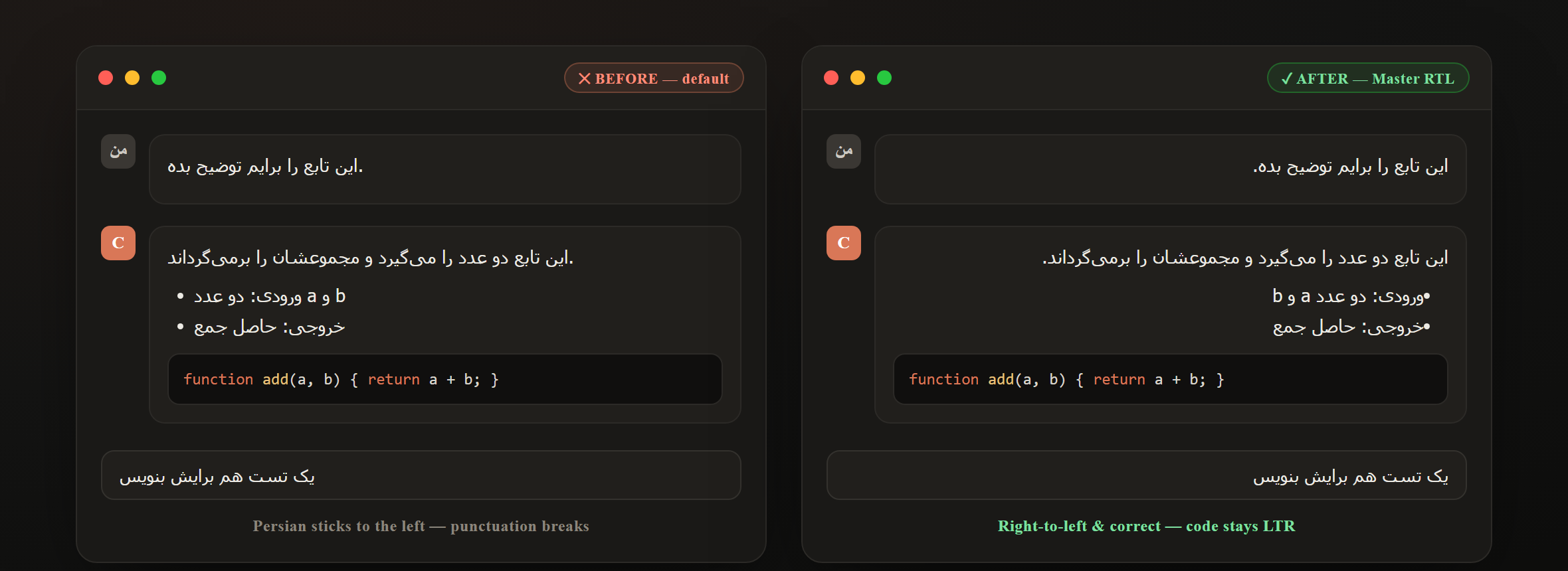
VS Code and the tools built on it assume left-to-right text. If you write Persian, Arabic, Hebrew or Urdu, AI chat and Markdown come out misaligned, with punctuation in the wrong place and text pushed against the left edge.
Master RTL addresses this in two places. It flips the Claude Code chat panel to right-to-left, and it provides a dedicated right-to-left custom editor for Markdown files with a live preview. English text and code blocks stay left-to-right in both, detected per line.
The extension is offline: it makes no network calls, and the Markdown editor works without workspace trust.
- Right-to-left Claude Code chat, with English and code kept left-to-right
- 11 colour themes for the Claude Code panel: Dracula, Nord, One Dark, Tokyo Night, Catppuccin Mocha, Gruvbox Dark, Solarized Dark, Rosé Pine, Synthwave, Sepia (Paper), GitHub Light
- A right-to-left Markdown custom editor with a fully RTL live preview and synced scrolling in Split mode
- Offline syntax highlighting for 17 or more languages, with a language badge and a copy button
- 11 reading themes for the preview: Auto, GitHub, Sepia, Nord, Dracula, One Dark, Solarized Light, Solarized Dark, Rosé Pine, Gruvbox, Monokai
- Reusable AI prompt templates for the Claude Code and GitHub Copilot chats
- A formatting toolbar for bold, italic, headings, lists and tables (
Ctrl+B,Ctrl+I,Ctrl+K) - A live outline with click-to-scroll
- A status bar showing word, character and line counts plus reading time
VS Code, and Claude Code installed if you want the chat panel features.
Install Master RTL from the Visual Studio Marketplace, then reload the window. The Claude Code chat is set to right-to-left out of the box.
git clone https://github.com/morpheusadam/RTL-.md-Files-Vs-Code-Extention.git
cd RTL-.md-Files-Vs-Code-Extention
npm install -g @vscode/vsce
npm test          # runs the RTL-patch test suite
vsce package      # creates the .vsix
Install the generated .vsix from the Extensions view, using the overflow menu and "Install from VSIX", or press F5 to launch an Extension Development Host.
After installing, reload the window and open Claude Code; the chat reads right-to-left. Toggle it from the status-bar "Claude RTL" button, or from the Command Palette with Master RTL: Right-to-Left for Claude Code. Any change needs a window reload, because VS Code only loads webview CSS at startup.
How it works
Claude Code renders its chat inside a sandboxed webview, so no extension can style it from the outside; that is a VS Code limitation. Master RTL works with it instead of around it:
- It adds a single, clearly marked, fully reversible stylesheet block to Claude Code's own webview CSS.
- Direction is decided per paragraph with
unicode-bidi: plaintext, so Persian, Arabic, Hebrew and Urdu go right-to-left and right-aligned with correct punctuation, while English text and code blocks stay left-to-right and left-aligned. - The block is re-applied automatically after Claude Code updates, which reset its files.
- Turning the feature off removes the block cleanly and restores stock Claude Code.
Is this safe? Will it break Claude Code?
- Both the RTL and colour-theme changes are CSS only. Master RTL never touches Claude Code's JavaScript, so it cannot break functionality.
- Both are idempotent and reversible: exactly one marked block is added per feature, and turning a feature off restores the original byte for byte.
- The RTL rules are scoped to chat text and the input, so toolbars, buttons and icons keep their original positions.
- Verified by an offline test suite (
npm test, 27 assertions) and headless-browser render checks of every theme. - GitHub Copilot's chat is closed-source and is not patched; use the prompt templates with it instead.
Use the status-bar "Claude Theme" button, pick a theme, then reload the window.
| Dark | Light |
|---|---|
| Dracula · Nord · One Dark · Tokyo Night · Catppuccin Mocha · Gruvbox Dark · Solarized Dark · Rosé Pine · Synthwave | Sepia (Paper) · GitHub Light |
Each theme recolours backgrounds, message text, the code-block surface, accents and links across the whole panel. Code syntax tokens keep following your active VS Code editor theme, so code stays readable. You can also set it with the command Master RTL: Claude Code Chat Theme… or the rtlMarkdown.claudeCodeTheme setting (default Tokyo Night). Pick "Default" to restore Claude Code's own colours. Like the RTL feature, it is CSS only, reversible, re-applied after Claude Code updates, and a window reload applies a change.
Open any .md, .markdown, or .mdx file and it opens in the Master RTL editor automatically.
| Edit | Split | Preview |
|---|---|---|
| Right-to-left, right-aligned writing | Editor plus live preview, synced scroll | Rendered output, fully right-to-left |
Use the toolbar to switch modes, change the reading theme, or open the live outline. To use the plain editor for a file instead, click "Open in Text Editor" in the toolbar, or right-click and choose Reopen Editor With… then Text Editor.
- AI prompt templates. Keep reusable prompts one click away, via the status-bar "Prompts" button, the toolbar, or Master RTL: Insert AI Prompt Template. The template is copied to your clipboard so you can paste it into the chat, and inserted at the cursor if a text editor is focused. Edit your set via
rtlMarkdown.promptTemplates. - Auto-RTL for AI-generated docs. Any
.md,.markdownor.mdxfile that Claude Code or Copilot generates opens right-to-left automatically.
| Setting | Default | Description |
|---|---|---|
rtlMarkdown.claudeCodeRtl |
true |
Make the Claude Code chat panel right-to-left (English and code stay LTR). Re-applies after Claude Code updates; needs a window reload |
rtlMarkdown.claudeCodeTheme |
tokyo-night |
Colour theme for the Claude Code chat (default, dracula, nord, one-dark, tokyo-night, catppuccin, gruvbox, solarized-dark, rose-pine, synthwave, sepia, github-light). Needs a window reload |
rtlMarkdown.fontFamily |
Vazirmatn, Tahoma, 'Segoe UI', sans-serif |
Font family for editor and preview |
rtlMarkdown.fontSize |
16 |
Font size in pixels |
rtlMarkdown.lineHeight |
2 |
Line height |
rtlMarkdown.defaultMode |
preview |
View on open: edit, split, or preview |
rtlMarkdown.previewTheme |
auto |
Reading theme: auto, github, sepia, nord, dracula, one-dark, solarized-light, solarized-dark, rose-pine, gruvbox, monokai |
rtlMarkdown.promptTemplates |
6 starters | Reusable AI prompt templates for the Claude Code and Copilot chats |
For Persian and Arabic typography, install the free Vazirmatn font.
| Action | How |
|---|---|
| Make Claude Code chat RTL | Status-bar "Claude RTL" button, or Master RTL: Right-to-Left for Claude Code |
| Theme the Claude Code chat | Status-bar "Claude Theme" button, or Master RTL: Claude Code Chat Theme… |
| Insert an AI prompt template | Status-bar "Prompts" button, or Master RTL: Insert AI Prompt Template |
| Toggle the RTL Markdown editor | Status-bar "RTL" button, or Master RTL: Toggle RTL Markdown Editor |
| Save | Ctrl / Cmd + S |
| Bold / Italic / Link | Ctrl / Cmd + B · I · K |
| Copy a code block | The Copy button on the block |
| Open in the plain text editor | Master RTL: Open in Text Editor |
Built for right-to-left scripts, including documents that mix RTL and LTR: Persian (فارسی), Arabic (العربية), Hebrew (עברית), Urdu (اردو), Kurdish, Pashto and Dari.
English words, code, URLs and numbers inside right-to-left text are detected and kept left-to-right automatically.
Does it really change the Claude Code chat, or just Markdown?
Both. Master RTL flips the Claude Code chat panel to right-to-left and gives you a dedicated RTL Markdown editor. The Claude Code part is on by default and fully reversible.
Will English and code look wrong now?
No. Direction is detected per line, so only right-to-left text flips. English paragraphs stay left-aligned and code blocks stay left-to-right.
What happens when Claude Code updates?
Master RTL re-applies its stylesheet automatically on the next start, so RTL keeps working across Claude Code updates. A window reload makes it visible.
How do I turn the Claude Code RTL off?
Click the "Claude RTL" status-bar button, or run Master RTL: Right-to-Left for Claude Code, then reload. Master RTL removes its block and restores the original Claude Code styling.
Does it work offline and in Restricted Mode?
Yes. Everything is local, with no network calls, and the Markdown editor works without workspace trust.
Does it support syntax highlighting?
Yes. The rendered preview colourises fenced code blocks for 17 or more languages with a built-in, fully offline highlighter, a language badge, and a copy button.
Morpheus Adam — GitHub · sam.zeonic.me · morpheusadam95@gmail.com
MIT © morpheusadam