A Multi segment node implementation using HTML5 Canvas codenamed moon-shine.
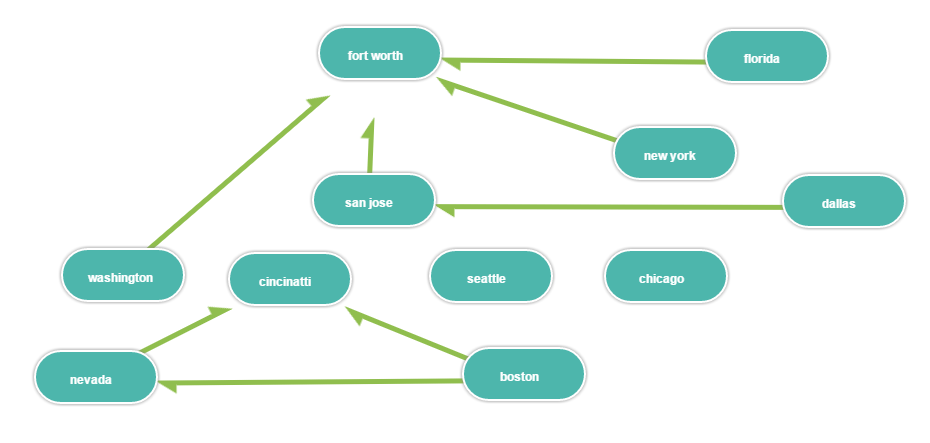
Edit the data.js file in the app directory to add the data that ypu have, then run index.html to see the changes.
Basically you create nodes and links between nodes however which way you want. This can be used to create complete tree like structures. See the above example image.
You can set an arbitrary x and y when you create the nodes, then drag them to the correct position. Once you have nodes in the expected positions, you can generate the code with corresponding positions and update the data.js with the positions.
data.js
graphDatas = [
    {
        text: "Boston", _id: "node00", xPos: 658, yPos: 348,
        links:[ {"_id": "node01"}, {"_id": "node07"} ]
    },
    {
        text: "Nevada", _id: "node01", xPos: 380, yPos: 519,
        links:[ {"_id": "node07"} ]
    },
    {
        text: "Fort Worth", _id: "node02", xPos: 509, yPos: 14,
        links:[ ]
    }
];
This app is based on work by Matt King's(https://github.com/mattking17) html5-node-diagram repo, which has been heavily edited for my need. I was looking for a Multi node graph implementation, but could find only implementations with single segments between nodes. This project met my needs and I modified the files from that repo in private a few years ago. Since the modifications were large and I was not sure if my modifications would result in a reusable project, I did not fork the below repo.
https://github.com/boundary/html5-node-diagram
Licensed under Apache License, Version 2.0 as per the above project.