IR Controllable Clock Application for Raspberry Pi.
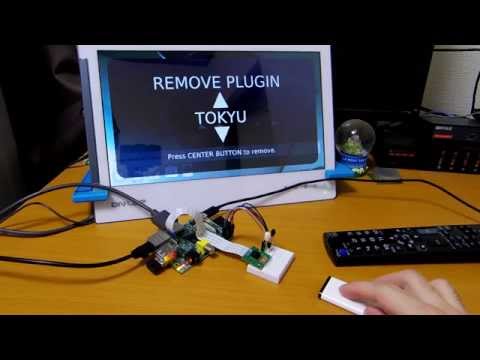
- Display date and time
- Background color animation
- Display weather forecast
- Extendable & customizable by plugins
- Camera Plugin: Taking a picture and display to background
- TodoWatch Plugin: Fetch ToDos from TodoWatch server
- Tokyu Plugin: Provides Tokyu traffic information
- Sotetsu Plugin: Provides Sotetsu traffic information
- Add plugin
- Remove plugin
- City select of the weather forecast
| Item | Tested with |
|---|---|
| Raspberry Pi | Raspberry Pi Type B |
| Camera Module | Raspberry Pi Camera Module |
| HDMI Display | GECHIC ON-LAP 1302/J |
| Infrared Sensor | PARA Light PL-IRM2121-A538 |
| GPIO Connection | Bread board + Jumper cables |
| IR Controller | Apple Remote, IODATA HVT-BRC2 |
...and Internet connection (proxy supported).
You can execute on your PC, but camera featuture and IR controller feature are disabled. IR buttons are replaced with the following keys by keyboard:
| IR Button | Keyboard |
|---|---|
| MENU | SPACE |
| CENTER | ENTER |
| TOP | ↑ |
| BOTTOM | ↓ |
| LEFT | ← |
| RIGHT | → |
# /etc/modules: kernel modules to load at boot time.
#
# This file contains the names of kernel modules that should be loaded
# at boot time, one per line. Lines beginning with "#" are ignored.
# Parameters can be specified after the module name.

snd-bcm2835
lirc_dev
lirc_rpi gpio_in_pin=17 gpio_out_pin=18
# /etc/lirc/hardware.conf
#
# Arguments which will be used when launching lircd
LIRCD_ARGS="--uinput"

#Don't start lircmd even if there seems to be a good config file
#START_LIRCMD=false

#Don't start irexec, even if a good config file seems to exist.
#START_IREXEC=false

#Try to load appropriate kernel modules
LOAD_MODULES=true

# Run "lircd --driver=help" for a list of supported drivers.
DRIVER="default"
# usually /dev/lirc0 is the correct setting for systems using udev
DEVICE="/dev/lirc0"
MODULES="lirc_rpi"

# Default configuration files for your hardware if any
LIRCD_CONF=""
LIRCMD_CONF=""
# Recorded by mikan@GitHub

# Apple Remote 1
begin remote

  name  Apple
  bits            8
  flags SPACE_ENC|CONST_LENGTH
  eps            30
  aeps          100

  header       9096  4622
  one           527  1773
  zero          527   645
  ptrail        526
  repeat       9099  2327
  pre_data_bits   16
  pre_data       0x77E1
  post_data_bits  8
  post_data      0xD0
  gap          108873
  toggle_bit_mask 0x3000

      begin codes
          MENU                     0xC0
          CENTER                   0xA0
          TOP                      0x50
          BOTTOM                   0x30
          LEFT                     0x90
          RIGHT                    0x60
      end codes

end remote

# Apple Remote 2
begin remote

  name  Apple2
  bits            8
  flags SPACE_ENC|CONST_LENGTH
  eps            30
  aeps          100

  header       9084  4605
  one           538  1758
  zero          538   632
  ptrail        538
  repeat       9088  2314
  pre_data_bits   16
  pre_data       0x77E1
  post_data_bits  8
  post_data      0xFE
  gap          108744
  toggle_bit_mask 0xF000

      begin codes
          MENU                     0xC0
          CENTER                   0xA0
          UP                       0x50
          DOWN                     0x30
          LEFT                     0x90
          RIGHT                    0x60
      end codes

end remote

# IO-DATA HVT-BRC2
begin remote

  name  IODATA
  bits           16
  flags SPACE_ENC|CONST_LENGTH
  eps            30
  aeps          100

  header       8935  4451
  one           550  1676
  zero          550   567
  ptrail        547
  pre_data_bits   24
  pre_data       0x11748
  gap          107580
  min_repeat      1
#  suppress_repeat 1
#  uncomment to suppress unwanted repeats
  toggle_bit_mask 0x84C

      begin codes
          POWER                    0x004C
          MENU                     0x0A46
          CENTER                   0x064A
          UP                       0x0549
          DOWN                     0x0D41
          LEFT                     0x0B47
          RIGHT                    0x034F
          BACK                     0x014D
      end codes

end remote
begin
	remote = Apple
	prog = irexec
	button = MENU
	config = /opt/ircex/cmd.sh MENU
end

begin
	remote = Apple
	prog = irexec
	button = TOP
	config = /opt/ircex/cmd.sh UP
end

begin
	remote = Apple
	prog = irexec
	button = BOTTOM
	config = /opt/ircex/cmd.sh DOWN
end

begin
	remote = Apple
	prog = irexec
	button = CENTER
	config = /opt/ircex/cmd.sh ENTER
end

begin
	remote = Apple
	prog = irexec
	button = LEFT
	config = /opt/ircex/cmd.sh LEFT
end

begin
	remote = Apple
	prog = irexec
	button = RIGHT
	config = /opt/ircex/cmd.sh RIGHT
end

begin
	remote = IODATA
	prog = irexec
	button = MENU
	config = /opt/ircex/cmd.sh MENU
end

begin
	remote = IODATA
	prog = irexec
	button = CENTER
	config = /opt/ircex/cmd.sh ENTER
end

begin
	remote = IODATA
	prog = irexec
	button = UP
	config = /opt/ircex/cmd.sh UP
end

begin
	remote = IODATA
	prog = irexec
	button = DOWN
	config = /opt/ircex/cmd.sh DOWN
end

begin
	remote = IODATA
	prog = irexec
	button = LEFT
	config = /opt/ircex/cmd.sh LEFT
end

begin
	remote = IODATA
	prog = irexec
	button = RIGHT
	config = /opt/ircex/cmd.sh RIGHT
end
#!/bin/sh

if [ $# -ne 1 ]; then
    echo "Usage: $0 <command>"
    exit 1
fi

#HOST="192.168.1.11"
HOST="localhost"
DIR="/opt/ircex/"
LOG="cmd.log"
EXE="python cmd.py"
#EXE="java -jar cmd.jar"

cd $DIR
echo "----------" >> $LOG
date >> $LOG
$EXE $1 $HOST >> $LOGChoise commander implementation and modify cmd.sh.
cmd.py is located here: https://github.com/mikan/ir-clock/blob/master/cmd/src/main/python/cmd.py
If you run on your company's network, place configuration file to you home directory. The name is "proxy.properties".
net.proxy.host=<HOST>
net.proxy.port=<PORT>
net.proxy.userid=<USER>
net.proxy.userpassword=<PASSWORD>-
Get newest version of
IRClockExtremeUI-1.0.jarfrom Releases page. -
Get icon file from here and place to
/home/pi/icon.png. -
Create
IRClockEx.desktopfile to/home/pi/Desktop/.

[Desktop Entry]
Name=IRClockEx
Name[en_GB]=IRClockEx
GenericName=IRClockExtreme
GenericName[en_GB]=IRClockExtreme
X-GNOME-FullName=IRClockExtreme
X-GNOME-FullName[en_GB]=IRClockExtreme
Exec=java -jar /home/pi/IRClockExtremeUI-1.0.jar
StartupNotify=true
Terminal=false
Type=Application
Icon=/home/pi/icon.png
X-GNOME-UsesNotifications=true
Path=/home/pi
Have fun!