"Cannot find any changed classes for hot replace!" #855

Description

[provide a description of the issue]
Environment
- Operating System: macOS Catalina 10.15.6
- JDK version:
openjdk 11.0.8 2020-07-14
OpenJDK Runtime Environment AdoptOpenJDK (build 11.0.8+10)
OpenJDK 64-Bit Server VM AdoptOpenJDK (build 11.0.8+10, mixed mode) - Visual Studio Code version: 1.47.2
- Java extension version: Java Extension Pack v0.9.1
- Java Debugger extension version: Debugger for Java v0.27.1
Steps To Reproduce
-
git clone https://github.com/maxstreifeneder/HotCode-Replace
-
mvn compile
-
set a Breakpoint in com.maxstreifeneder.hotreload.handlers.test.HelloController.java, Line 11.
-
Start Debugger: Run -> Start Debugging
-
Open a Browser and hit localhost:8080/hotreload
-
You will be prompted with a Password prompt. Take the user + password from the log output:
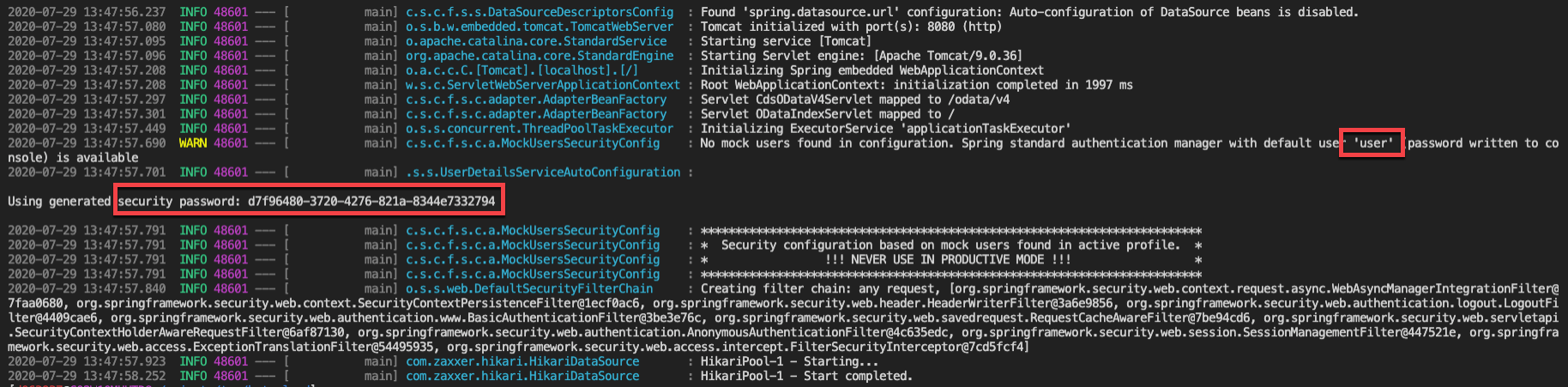
-
Debugger will stop.
-
Change Line 11 to System.out.println("hotreload");
-
Press the "Hot Code Replace" Button in the Debugger Tools.

-
"Cannot find any changed classes for hot replace!" will appear.
[attach a sample project reproducing the error]
https://github.com/maxstreifeneder/HotCode-Replace
Current Result
"Cannot find any changed classes for hot replace!" when trying to use the Hot Code Replacement
Expected Result
Changed code in VS Code will be pushed to the running application using the debugging capabilities