Repository navigation
Development/debug build crashes on android after downloading update #1272

Description
Activity
alexandergoncharov-zz commented
on May 7, 2018 ContributorHi Ujwal Setlur (@ujwal-setlur),
Thanks for reporting!
I reproduced your issue. I'll investigate it a little bit later.Thanks,
Alexanderalexandergoncharov-zz commented
on May 7, 2018 ContributorAbout debug builds with code-push: I'm afraid it is No, debug builds use code-push functionality. But if you will try to update app throw codePush with enabling liveReload server You would just get app version which you use on liveReload server. It may seems that update isn't working.
From documentation(Here: https://github.com/Microsoft/react-native-code-push#releasing-updates):
NOTE: CodePush updates should be tested in modes other than Debug mode. In Debug mode, React Native app always downloads JS bundle generated by packager, so JS bundle downloaded by CodePush does not apply.
Thanks,
AlexanderAny Update with this? Dealing with the same issue
Reacted by Tilo Menzel-Viole, Thilagavathi, C-A de Salaberry and Omal Perera+1
alexandergoncharov-zz commented
on Jun 6, 2018 ContributorHi all,
Sorry for long delay.Found that the issue is reproducing only in
Live Reloadmode.
As hot workaround you can just comment your CodePush calling during developing your app. But don't forget to uncomment it when you will release your updates.
If you would like to test CodePush logic(that your updates successful will be installed to your user devices) you should use only Release build.
Investigation of the reason of issue in progress.Thanks,
Alexanderalexandergoncharov-zz commented
on Jul 4, 2018 ContributorHi all,
Sorry for long delay.I opened PR for this issue: #1332.
Could please someone test it?Thanks,
AlexanderI will test it today. Thanks!
alexandergoncharov-zz commented
on Jul 5, 2018 ContributorUjwal Setlur (@ujwal-setlur), Thanks for help!
Please let me know about your results.
13 remaining items
g33ktony, nope I didn't. Thing to note is that this happens only on debug build for Android. App id is the same between release and debug builds
alexandergoncharov-zz commented
on Nov 13, 2018 ContributorHi Jim Chou (@wenkangzhou), g33ktony , Ujwal Setlur (@ujwal-setlur) ,
I see that you all have the issue like that. Could you please provide logs, versions, reprosteps or dummy project with reproducing issue?
Thanks,
AlexanderHi Jim Chou (@wenkangzhou), g33ktony , Ujwal Setlur (@ujwal-setlur) ,
I see that you all have the issue like that. Could you please provide logs, versions, reprosteps or dummy project with reproducing issue?
Thanks,
Alexanderreact-native: 0.57.3
react-native-code-push: ^5.4.2
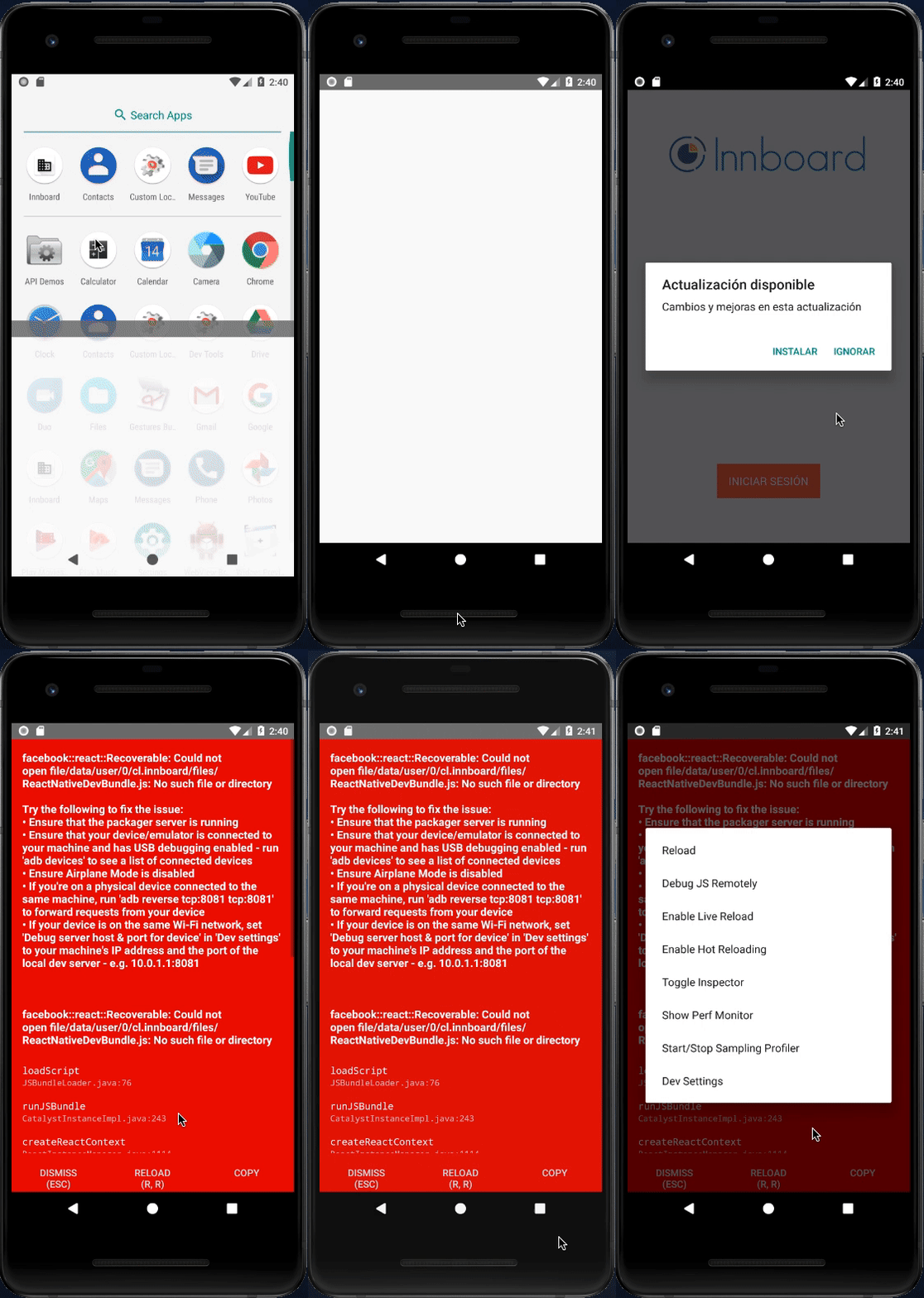
react-native 0.56.0
react-native-code-push 5.3.5
and also tested it with
react-native-code-push 5.4.2
code-push was working fine some days before, but recently I did one npm install and it messed up everything. Red screen shows and on
react-native log-androidshows this11-15 17:40:46.009 4486 4506 D ReactNative: [CodePush] Applying full update. 11-15 17:40:46.025 4486 4562 I ReactNativeJS: [CodePush] Installing update. 11-15 17:40:46.052 4486 4563 D ReactNative: [CodePush] Loading JS bundle from "/data/user/0/com<app_package_nam>e/files/CodePush/ed3cd25941b72c1fc8efc1ccc5b07f4535474e528fcf3250200510506981680c/index.android.bundle" 11-15 17:40:46.052 4486 4486 D ReactNative: ReactInstanceManager.recreateReactContextInBackgroundInner() 11-15 17:40:46.054 4486 4562 I ReactNativeJS: [CodePush] Restarting app 11-15 17:40:46.089 4486 4486 D ReactNative: ReactInstanceManager.onJSBundleLoadedFromServer() 11-15 17:40:46.090 4486 4486 D ReactNative: ReactInstanceManager.recreateReactContextInBackground() 11-15 17:40:46.090 4486 4486 D ReactNative: ReactInstanceManager.runCreateReactContextOnNewThread() 11-15 17:40:46.090 4486 4486 D ReactNative: ReactInstanceManager.tearDownReactContext() 11-15 17:40:46.096 4486 4486 D ReactNative: CatalystInstanceImpl.destroy() start 11-15 17:40:46.102 4486 4759 D ReactNative: ReactInstanceManager.createReactContext() 11-15 17:40:46.277 4486 4759 D ReactNative: Initializing React Xplat Bridge. 11-15 17:40:46.287 4486 4759 D ReactNative: Initializing React Xplat Bridge before initializeBridge 11-15 17:40:46.297 4486 4506 D ReactNative: CatalystInstanceImpl.destroy() end 11-15 17:40:46.300 4486 4759 D ReactNative: Initializing React Xplat Bridge after initializeBridge 11-15 17:40:46.300 4486 4759 D ReactNative: CatalystInstanceImpl.runJSBundle()and also it makes app crash in release version.
Got it working, after code-pushing the current code. Suggestion test staging one first. and note down the current version, so that you can roll-back to right version. working good, in release version also.
I think the problem was, react-native-code-push pushing the older binaries to updated code.Sorry I have this problem too RN:0.57.7 , "react-native-code-push": "^5.5.0",
I have updated to react-native-code-push: 5.5.0 and I still having the same issue
react: 16.6.0-alpha.8af6728
react-native: 0.57.4
react-native-code-push: 5.5.1I have the same issue in Android
"react": "16.6.3"
"react-native": "0.58.4"
"haul": "^1.0.0-rc.12"
"react-native-code-push": "^5.5.2"The same issue using Android 9 emulator
Same here using
debugReacted by KitYeungDevi am using "react-native-code-push": "^5.6.0" and got this issue, please telll me why? thanks
Reacted by Dachi Natsvlishvili and iaminvictusIf use
Debugmode:react-native run-android, happen this issue;
If useReleasemode:react-native run-android --variant=release, update version success.Alexander Goncharov (@alexandergoncharov)
Anyway, have any better way to test code push in debug mode?I'm getting the same with latest RN.
"react-native": "0.59.8"
"react-native-code-push": "5.6.0"same issue
"react-native-code-push": "^5.6.0",
"react-native": "^0.59.8",


Thanks so much for filing an issue or feature request! Please fill out the following (wherever relevant):
Steps to Reproduce
Expected Behavior
New bundle should run
Actual Behavior
New bundle crashes, and code-push reverts to existing bundle.
Error
facebook::react::Recoverable: Could not open file ReactNativeDevBundle.js: No such file or directory
Environment
Why do debug builds even use code-push? I thought debug builds bypass code-push? Only release builds should use code-push, right?