Auto import suggests from umd instead of module in ionic 3 #25204

Description

From @surajrao on June 25, 2018 9:19
- VSCode Version: 1.24.1
- OS Version:Mac OS High Sierra (10.13.5)
Steps to Reproduce:
- Start a new ionic project.
ionic start myApp tabs
- Try to import a component from ionic-angular.
The auto import seems to import from ionic-angular/umd which has ionic-angular/umd/index.d.ts
instead of ionic-angular which also includes ionic-angular/index.d.ts.
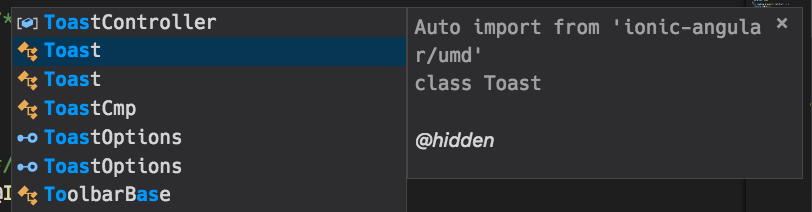
This results in the below error on running.
    Uncaught Error: Cannot find module "."
        at webpackMissingModule (index.js:3)
        at e.code (index.js:3)
        at Object.<anonymous> (index.js:9)
        at __webpack_require__ (bootstrap 62d6a5897825ac327001:54)
        at Object.690 (slide.transition.ts:67)
        at __webpack_require__ (bootstrap 62d6a5897825ac327001:54)
        at Object.495 (main.js:1885)
        at __webpack_require__ (bootstrap 62d6a5897825ac327001:54)
        at Object.487 (notification-api.ts:6)
        at __webpack_require__ (bootstrap 62d6a5897825ac327001:54)
Related StackOverflow post: ionic-uncaught-error-cannot-find-module
Does this issue occur when all extensions are disabled?: Yes
Is this because of the ionic project structure or an issue with vscode import?
"ionic-angular": "3.9.2"
typescript version in workspace - 2.9.1
Copied from original issue: microsoft/vscode#52786