Repository navigation
FOR JSON PATH throws off syntax validation in query editor #12
Description
Activity
Charles Gagnon (@Charles-Gagnon) do you know whether we are using the latest parser?
Looks like it, yeah.
https://github.com/Microsoft/sqltoolsservice/blob/main/Packages.props#L28
<PackageReference Update="Microsoft.SqlServer.Management.SqlParser" Version="160.21292.55" />https://www.nuget.org/packages/Microsoft.SqlServer.Management.SqlParser/
Does this repro in SSMS? That's usually what I do first to check if this is an issue in the parser or in ADS.
chatted with Matteo, SSMS also has the same problem, this needs to be fixed in sql parser. put this in backlog for now and will look into it when I get time.
Reacted by Tim CookeFor future reference, if I ever run into another parsing issue that reproduces in SSMS, is there a better repository I should have reported this to?
Tim Cooke (@timothylcooke) it doesn't matter, it is the same group of folks working on these repos, and logically, i think it makes sense to report here to make it easy for other users to find (most of the ADS users do not know sqltoolsservice).
Reacted by Tim Cooke


Issue Type: Bug
The text
FOR JSON PATHseems to be ignored by syntax validation in the query editor.Start with a valid query. There are no syntax errors and the query returns results:
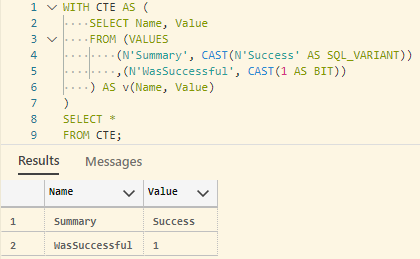
Now, if we simply add
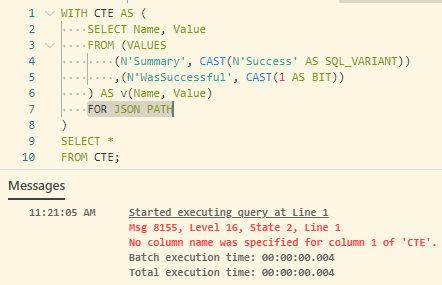
FOR JSON PATH, we get no syntax error in the editor, but when we try to run the query, it errors because we didn't name the (JSON) column. It's invalid syntax, but the editor thinks the CTE has two named columns.This is also evident in Intellisense: the CTE is interpreted as having two named columns, even though, because of
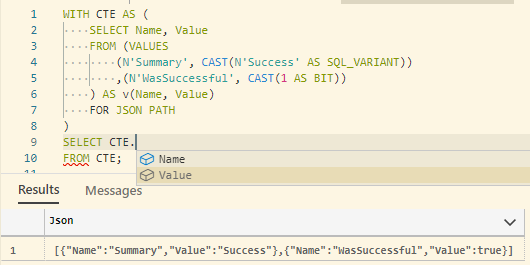
FOR JSON PATH, it just has one unnamed column.If we explicitly name the column name, the editor thinks there is a syntax error (bug). The editor thinks the CTE still has two columns. SQL returns the expected value (expected behavior).
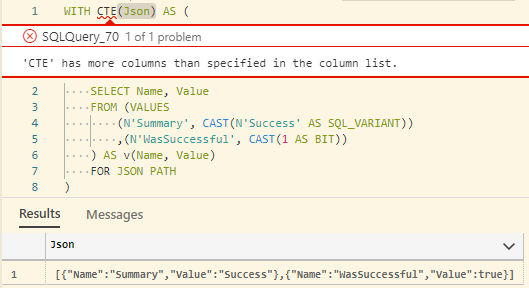
If we specify two names in the CTE definition, the editor thinks it's valid syntax (bug), but it throws a SQL error when you execute it (expected behavior):
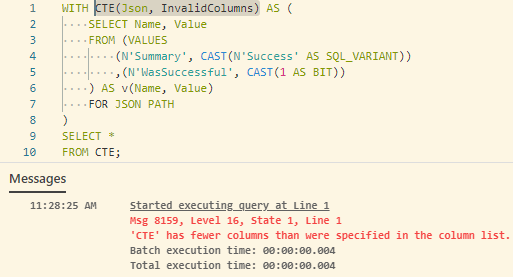
We get the same behavior regardless of whether or not the CTE is defined with the
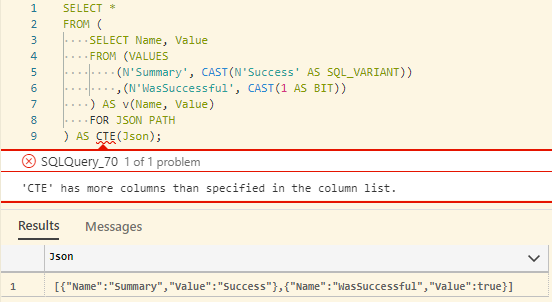
WITHkeyword.We get the same behavior with table variables, not just the

VALUESkeyword.Azure Data Studio version: azuredatastudio 1.34.0 (83a4316cf89cbf961a0f09a72c861379cfd01fa9, 2021-12-15T20:47:33.863Z)
OS version: Windows_NT x64 10.0.19043
Restricted Mode: No
System Info
gpu_compositing: enabled
multiple_raster_threads: enabled_on
oop_rasterization: enabled
opengl: enabled_on
rasterization: enabled
skia_renderer: enabled_on
video_decode: enabled
vulkan: disabled_off
webgl: enabled
webgl2: enabled