Target Platform
Please list the platform(s) that your application is targeting and remove platforms you are not targeting:
Target Application
Please provide the name of the application that is rendering the card (ex: Outlook, Teams, etc)
Teams
Problem Description
Please enter a description of the issue. If you just have a question, please post on StackOverflow instead
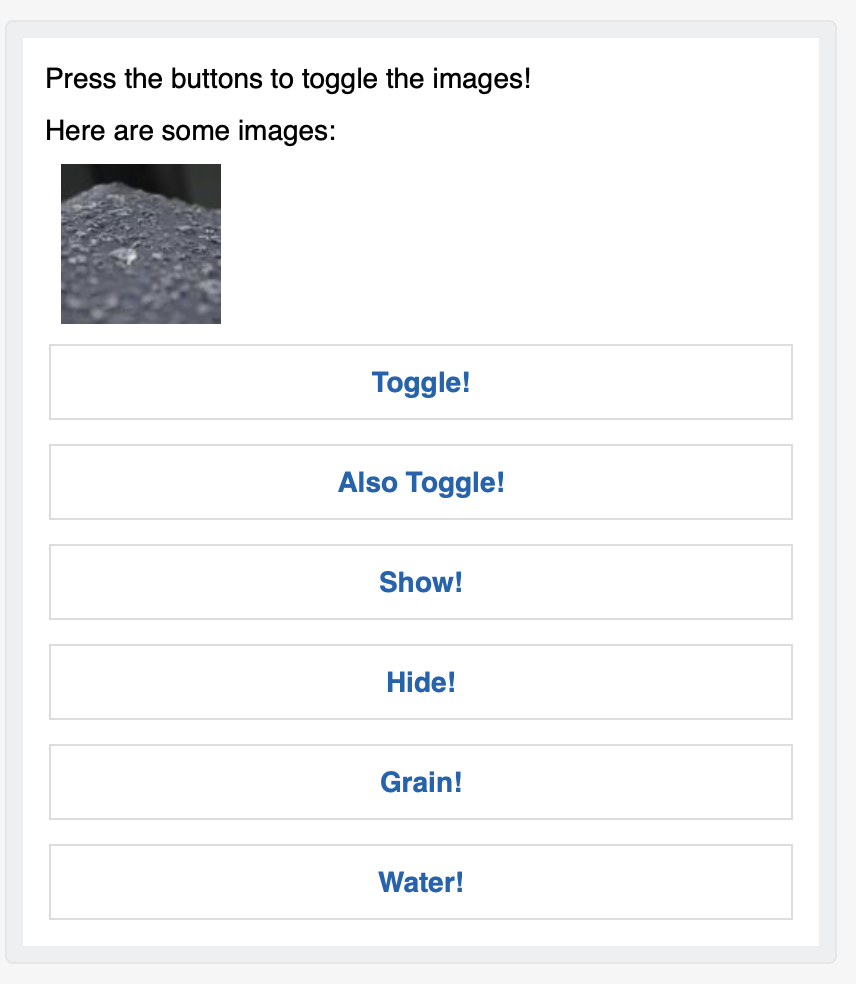
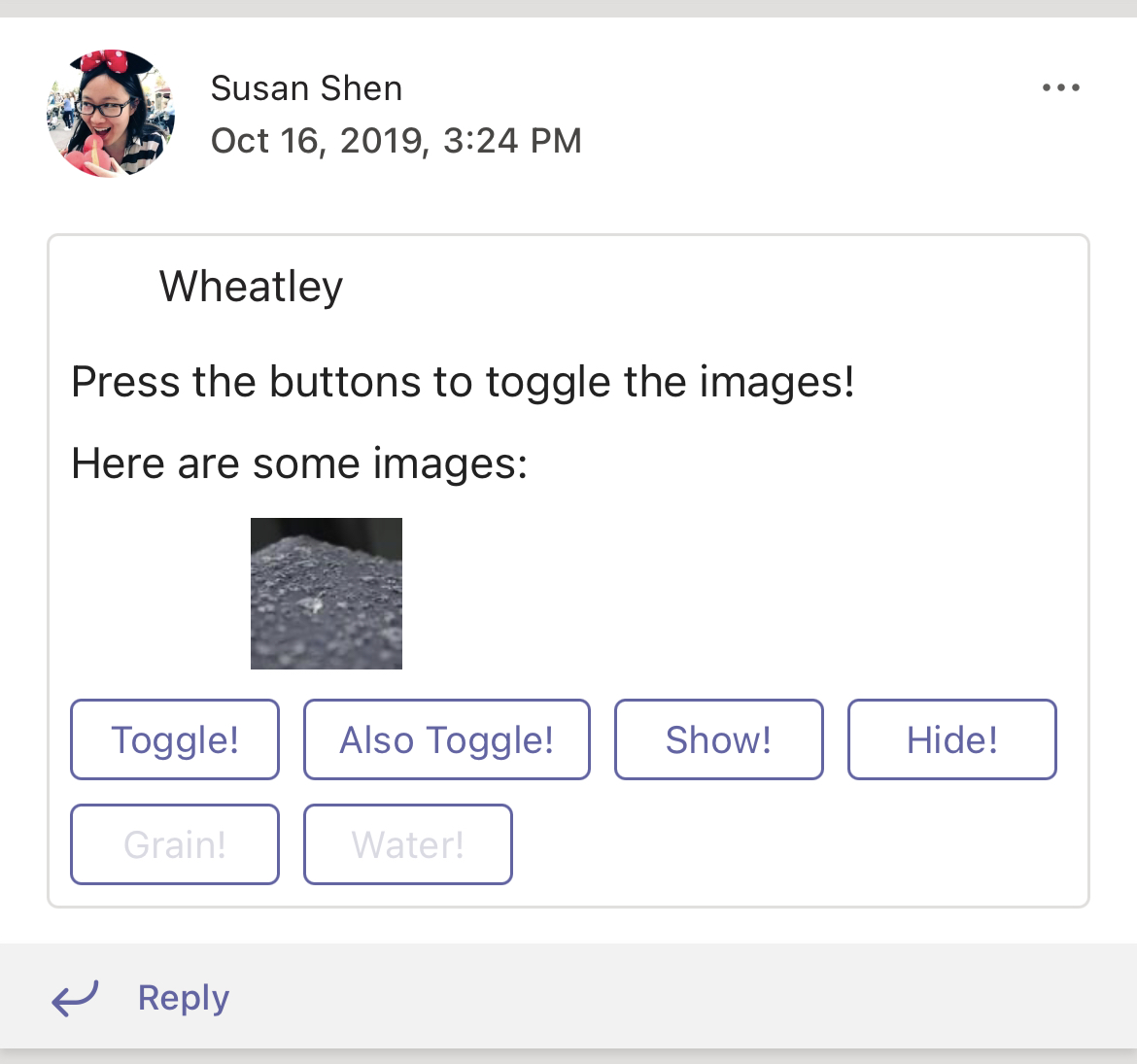
when there are more than 1 item in the "columns" and each item has their width set to "auto", the items don't move to the left when the previous item in the queue gets hidden. The designer does move the items to the left(check the json and the repro steps). Note below in the screenshot, iPhone_water shows the image is somewhere in the middle, when you tap on "water" vs the designer_water, when you tap on "water" has the image left aligned.
Screenshot
Please provide a screenshot of the problem (if possible)
Card JSON
Please provide the JSON of the Card that is being rendered
{"body":[{"type":"TextBlock","text":"Press the buttons to toggle the images!","wrap":true},{"id":"textToToggle","isVisible":false,"type":"TextBlock","text":"Here are some images:"},{"columns":[{"width":"auto","items":[{"height":"auto","style":"person","id":"imageToToggle","size":"medium","isVisible":false,"type":"Image","url":"https://picsum.photos/100/100?image=112"}],"type":"Column"},{"width":"auto","items":[{"size":"medium","id":"imageToToggle2","isVisible":false,"url":"https://picsum.photos/100/100?image=123","height":"auto","type":"Image"}],"type":"Column"}],"type":"ColumnSet"}],"version":"1.2","type":"AdaptiveCard","actions":[{"title":"Toggle!","targetElements":["textToToggle","imageToToggle","imageToToggle2"],"type":"Action.ToggleVisibility"},{"title":"Also Toggle!","targetElements":["textToToggle","imageToToggle","imageToToggle2"],"type":"Action.ToggleVisibility"},{"title":"Show!","targetElements":[{"isVisible":true,"elementId":"textToToggle"},{"isVisible":true,"elementId":"imageToToggle"},{"isVisible":true,"elementId":"imageToToggle2"}],"type":"Action.ToggleVisibility"},{"title":"Hide!","targetElements":[{"isVisible":false,"elementId":"textToToggle"},{"isVisible":false,"elementId":"imageToToggle"},{"isVisible":false,"elementId":"imageToToggle2"}],"type":"Action.ToggleVisibility"},{"title":"Grain!","targetElements":[{"isVisible":true,"elementId":"textToToggle"},{"isVisible":true,"elementId":"imageToToggle"},{"isVisible":false,"elementId":"imageToToggle2"}],"type":"Action.ToggleVisibility"},{"title":"Water!","targetElements":[{"isVisible":true,"elementId":"textToToggle"},{"isVisible":false,"elementId":"imageToToggle"},{"isVisible":true,"elementId":"imageToToggle2"}],"type":"Action.ToggleVisibility"}],"$schema":"http://adaptivecards.io/schemas/adaptive-card.json"}
Sample Code
Please provide any relevant code samples to help reproduce the issue
Version of SDK
What version are you using? Ex: NuGet 1.0.2, or latest main, etc...
pod file 2.8.0-beata1

Target Platform
Please list the platform(s) that your application is targeting and remove platforms you are not targeting:
Target Application
Please provide the name of the application that is rendering the card (ex: Outlook, Teams, etc)
Teams
Problem Description
Please enter a description of the issue. If you just have a question, please post on StackOverflow instead
when there are more than 1 item in the "columns" and each item has their width set to "auto", the items don't move to the left when the previous item in the queue gets hidden. The designer does move the items to the left(check the json and the repro steps). Note below in the screenshot, iPhone_water shows the image is somewhere in the middle, when you tap on "water" vs the designer_water, when you tap on "water" has the image left aligned.
Screenshot
Please provide a screenshot of the problem (if possible)


Card JSON
Please provide the JSON of the Card that is being rendered
{"body":[{"type":"TextBlock","text":"Press the buttons to toggle the images!","wrap":true},{"id":"textToToggle","isVisible":false,"type":"TextBlock","text":"Here are some images:"},{"columns":[{"width":"auto","items":[{"height":"auto","style":"person","id":"imageToToggle","size":"medium","isVisible":false,"type":"Image","url":"https://picsum.photos/100/100?image=112"}],"type":"Column"},{"width":"auto","items":[{"size":"medium","id":"imageToToggle2","isVisible":false,"url":"https://picsum.photos/100/100?image=123","height":"auto","type":"Image"}],"type":"Column"}],"type":"ColumnSet"}],"version":"1.2","type":"AdaptiveCard","actions":[{"title":"Toggle!","targetElements":["textToToggle","imageToToggle","imageToToggle2"],"type":"Action.ToggleVisibility"},{"title":"Also Toggle!","targetElements":["textToToggle","imageToToggle","imageToToggle2"],"type":"Action.ToggleVisibility"},{"title":"Show!","targetElements":[{"isVisible":true,"elementId":"textToToggle"},{"isVisible":true,"elementId":"imageToToggle"},{"isVisible":true,"elementId":"imageToToggle2"}],"type":"Action.ToggleVisibility"},{"title":"Hide!","targetElements":[{"isVisible":false,"elementId":"textToToggle"},{"isVisible":false,"elementId":"imageToToggle"},{"isVisible":false,"elementId":"imageToToggle2"}],"type":"Action.ToggleVisibility"},{"title":"Grain!","targetElements":[{"isVisible":true,"elementId":"textToToggle"},{"isVisible":true,"elementId":"imageToToggle"},{"isVisible":false,"elementId":"imageToToggle2"}],"type":"Action.ToggleVisibility"},{"title":"Water!","targetElements":[{"isVisible":true,"elementId":"textToToggle"},{"isVisible":false,"elementId":"imageToToggle"},{"isVisible":true,"elementId":"imageToToggle2"}],"type":"Action.ToggleVisibility"}],"$schema":"http://adaptivecards.io/schemas/adaptive-card.json"}
Sample Code
Please provide any relevant code samples to help reproduce the issue
Version of SDK
What version are you using? Ex: NuGet 1.0.2, or latest main, etc...
pod file 2.8.0-beata1