

Use your Texecom Premier Elite alarm from Home Assistant (and Apple Home), through the SmartCom you already have. Install it from HACS, type your SmartCom's address, and Home Assistant reads your zones from the panel. No add-on, no MQTT, no files to edit.

Unofficial. Not made or supported by Texecom. Tested on a Premier Elite 24 (firmware V6.05.03) with a SmartCom. Tried it on another panel? Tell us how it went, even if it all worked.
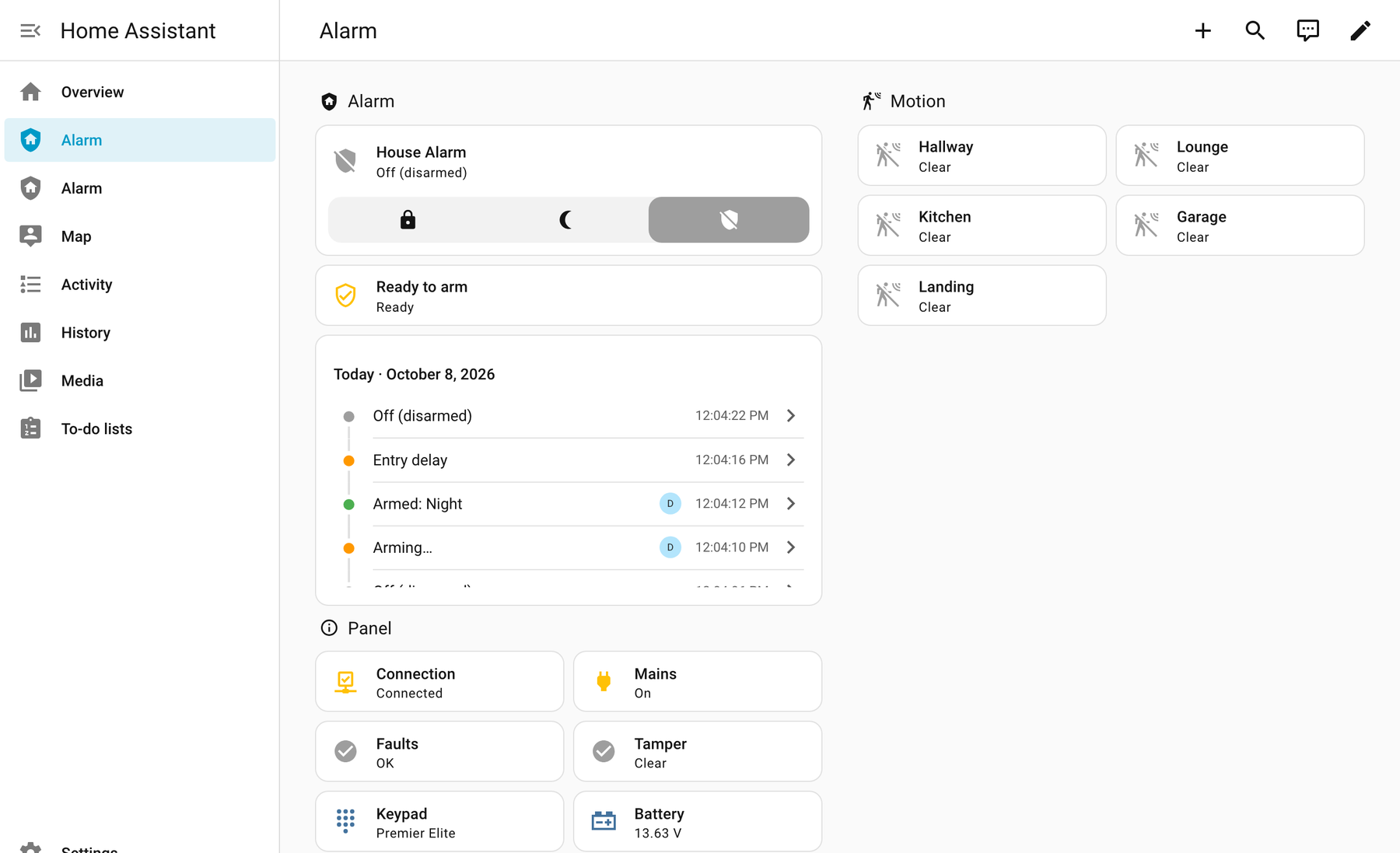
- 🛡️ An alarm you can set to Away, Night or Home, or turn off, and see when it's arming, waiting for you to come in, or going off, and whether it's ready to arm. Changes at the keypad show straight away.
- 🚪 A sensor for every zone, named as on your panel: doors, windows, motion, smoke and gas.
- 📋 A ready-made Alarm dashboard, built for you at the end of setup.
- 🔋 Panel health: connection, mains power, battery, tampers, and what the keypad says.
- 👤 Who did it: changed by Sam rather than User 3, with names you give keypad users (or fill in from the names stored in the panel), and an activity list in plain words: didn't arm: Kitchen was active, reported a tamper…
- 🔔 Notifications in Home Assistant when the alarm couldn't arm, the panel is on battery, or a tamper opens, saying what to check.
- ⚡ One-click automations: arm when everyone leaves (or ask you first), and tell your phone when the alarm goes off. Add them →
- 🍏 Apple Home too, through Home Assistant's built-in HomeKit Bridge.
- A Texecom Premier Elite panel with a SmartCom (the box the Texecom app uses) or a ComIP.
- The panel's UDL code (its remote-access code). Texecom's default is 1234, and most panels keep it.
- Home Assistant 2025.3 or newer, with HACS.
ℹ️ The SmartCom talks to one thing at a time: while Home Assistant is connected, the Texecom app can't. Your alarm (and the app's alarm notifications) carry on as normal. Turn off Homebridge or texecom2mqtt first if you use them.
-
Find your SmartCom's address in your router's list of devices (something like
192.168.1.50), and reserve it so it never changes. -
Install: click Add to HACS above, then Download, then restart Home Assistant.
-
Add the integration: click below, choose Texecom Connect, and enter the address and UDL code (leave the port at 10001).
-
Choose your arm modes: which part arm Night and Home use (or Not used), keep Add an Alarm dashboard ticked, and click Submit. Done 🎉

Step-by-step guide with pictures →
| I want to… | Read |
|---|---|
| Set it up step by step, or understand part arms | Setting it up |
| Know what the states, sensors and options mean | Using it |
| Give keypad users names, or change the options | Options |
| Use it in the Home app on iPhone | Apple Home |
| Arm automatically when everyone leaves, or get told when it goes off | Automations |
| Fix a problem | Troubleshooting |
| Build the Alarm dashboard by hand (if Home Assistant couldn't) | Build the dashboard yourself |
| Use a COM port set to Crestron instead of a SmartCom | Crestron |
| Move over from Homebridge or texecom2mqtt | Coming from Homebridge |
Something wrong? Report a bug · Questions? Discussions
The code is split into small compartments, each with one job and its own tests, so a fix or feature touches one place. Start with the developer guide; AI coding agents should read AGENTS.md first.
The Texecom Connect protocol support follows the publicly released texecom-connect by Joseph Heenan (Apache-2.0), and arming and the zone/area reads are adapted from texecom2mqtt by Daniel Chesterton (MIT). The Crestron support grew out of the Homebridge plugin by Kieran Jones, max-christian and Chris Posthumus (MIT); the protocol work is shared with the Homebridge plugin fork. Full details are in NOTICE.
- Not affiliated with Texecom. Texecom, Premier Elite, SmartCom, ComIP and Wintex are trademarks of Texecom Ltd, used here only to say which products this works with. This is an independent, unofficial project, not made, endorsed or supported by Texecom.
- No Texecom material. The repository contains no Texecom documentation, firmware, software or logos. The protocol support is built on the open-source projects credited in NOTICE, used under their licences, and on testing with the owner's own panel.
- No warranty; use at your own risk. This software is provided as is (see LICENSE). It isn't a certified security product or a replacement for your alarm's own keypads, monitoring or app. Don't rely on Home Assistant alone to know whether your alarm is set or going off.
- Rights holders. If you are Texecom, or hold rights in anything here, and want something changed or removed, please open an issue or use GitHub's own content removal process. Requests will be dealt with promptly and in good faith, including taking the project down if asked.