Read the article...
This article explains how we ported NuttX from QEMU Arm64 Kernel Build to PINE64 Yuzuki Avaota-A1 SBC based on Allwinner A527 SoC ... Completed within 24 Hours!
Why are we doing this?
-
Anyone porting NuttX from QEMU to Real SBC? This walkthrough shall be mighty helpful!
-
Avaota-A1 SBC is Open Source Hardware (CERN OHL Licensed). PINE64 sells it today, maybe we'll see more manufacturers.
-
This could be the First Port of Arm64 in NuttX Kernel Build. (NXP i.MX93 might be another?)
-
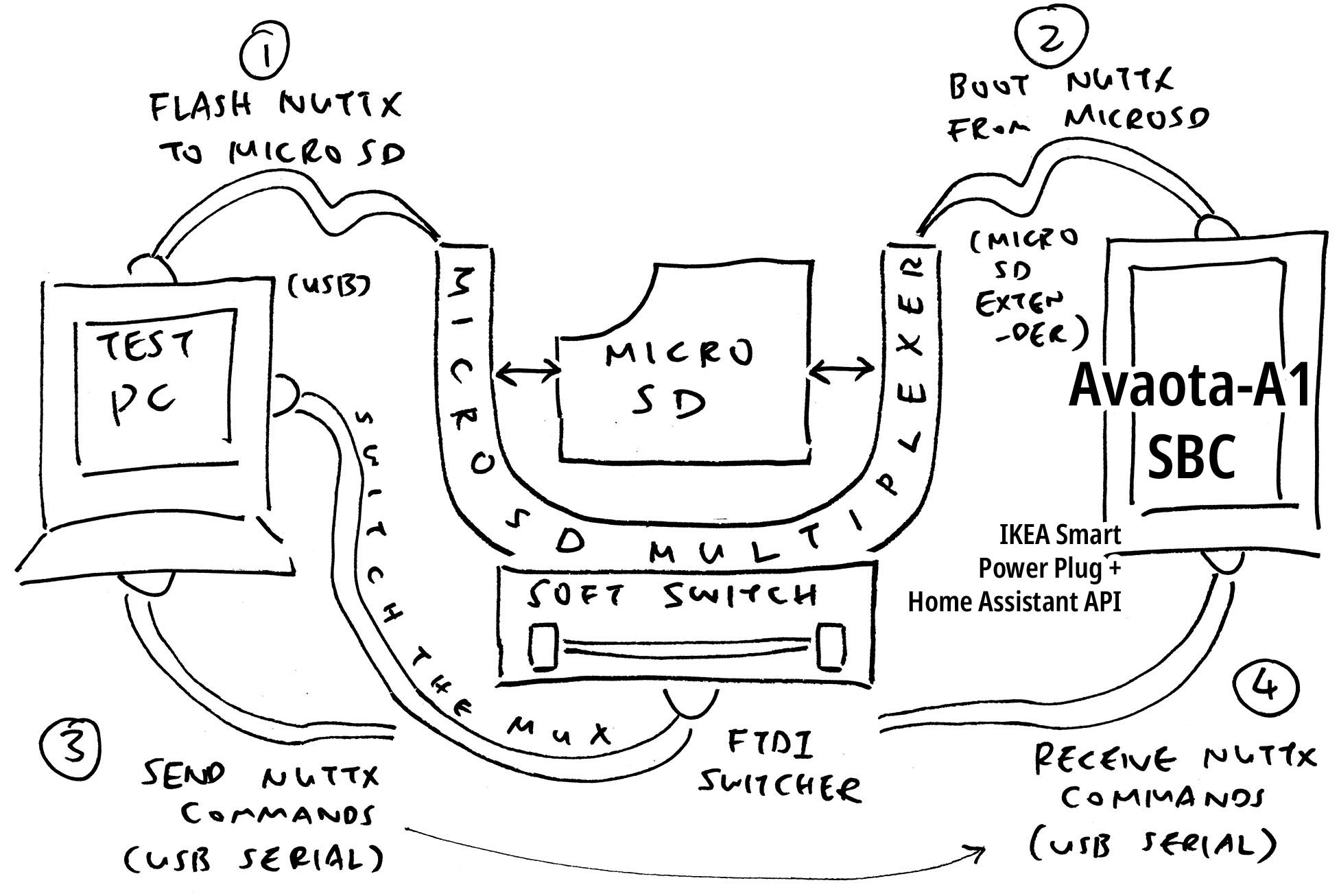
We'll run it as PR Test Bot for validating Arm64 Pull Requests on Real Hardware. PR Test Bot will be fully automated thanks to the MicroSD Multiplexer.
We're ready for volunteers to build NuttX Drivers for Avaota-A1 / Allwinner A527 (GPIO, SPI, I2C, MIPI CSI / DSI, Ethernet, WiFi, ...) Please lemme know! 🙏
-
Allwinner A523 User Manual (A527 is similar to A523)
(BTW I bought all the hardware covered in this article. Nope, nothing was sponsored: Avaota-A1, SDWire, IKEA TRETAKT)
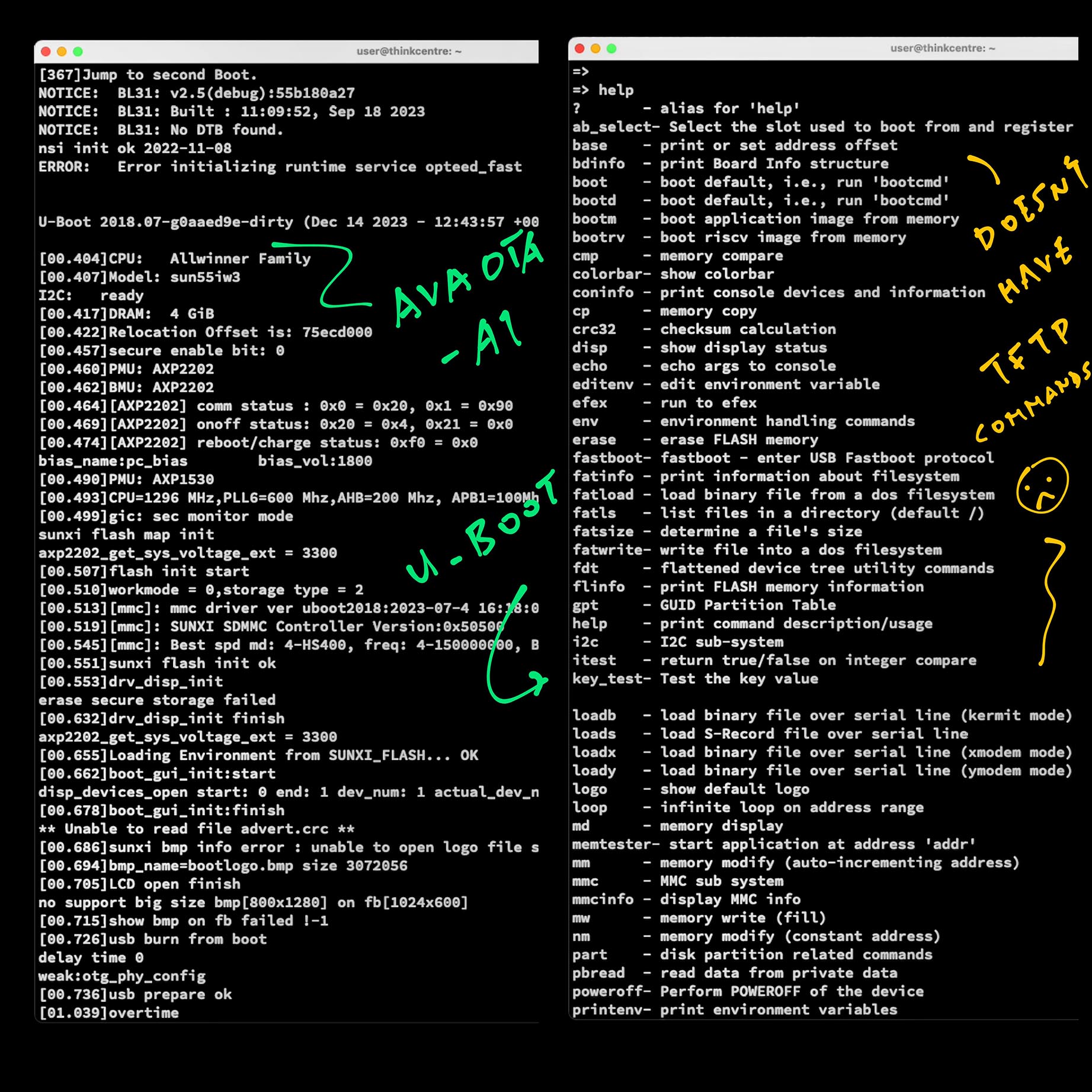
Isn't it faster to port NuttX with U-Boot TFTP?
Yeah for RISC-V Ports we boot NuttX over TFTP. But Avaota U-Boot doesn't support TFTP, so it's back to MicroSD sigh. (Pic below)
Well thankfully we have a MicroSD Multiplexer that will make MicroSD Swapping a lot easier! (Not forgetting our Smart Power Plug)
Download the Latest AvaotaOS Release (Ubuntu Noble GNOME) and uncompress it...
wget https://github.com/AvaotaSBC/AvaotaOS/releases/download/0.3.0.4/AvaotaOS-0.3.0.4-noble-gnome-arm64-avaota-a1.img.xz
xz -d AvaotaOS-0.3.0.4-noble-gnome-arm64-avaota-a1.img.xz
Write the .img file to a MicroSD with Balena Etcher.
We'll overwrite the Image file by nuttx.bin...
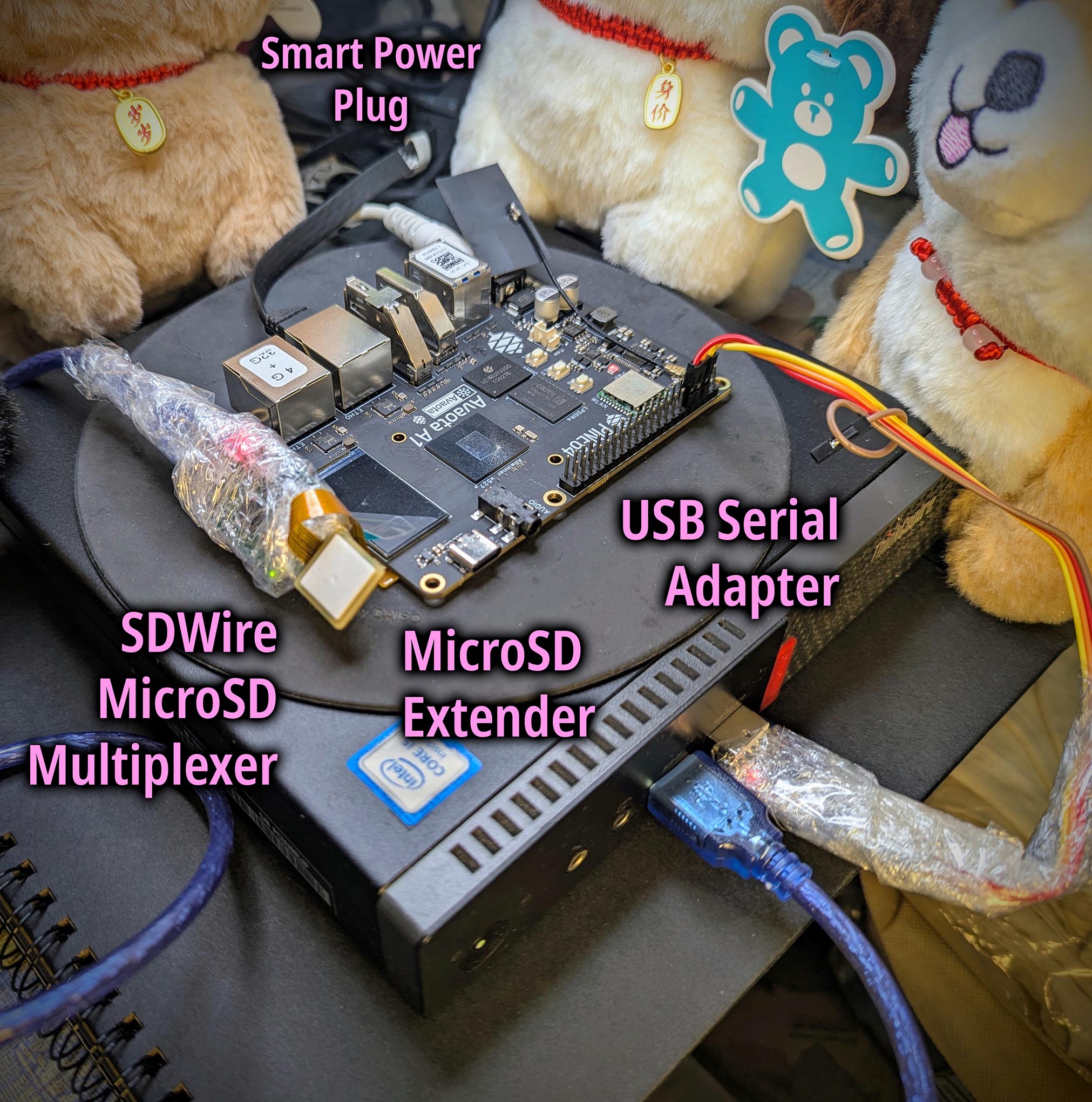
Our Avaota-A1 SBC is connected to SDWire MicroSD Multiplexer and Smart Power Plug (pic above). So our Build Script will do everything for us:
-
Copy NuttX to MicroSD
-
Swap MicroSD from our Test PC to SBC
-
Power up SBC and boot NuttX!
See the Build Script:
## Build NuttX and Apps (NuttX Kernel Build)
git clone https://github.com/lupyuen2/wip-nuttx nuttx --branch avaota
git clone https://github.com/lupyuen2/wip-nuttx-apps apps --branch avaota
cd nuttx
tools/configure.sh qemu-armv8a:knsh
make -j
make -j export
pushd ../apps
./tools/mkimport.sh -z -x ../nuttx/nuttx-export-*.tar.gz
make -j import
popd

## Generate the Initial RAM Disk
genromfs -f initrd -d ../apps/bin -V "NuttXBootVol"

## Prepare a Padding with 64 KB of zeroes
head -c 65536 /dev/zero >/tmp/nuttx.pad

## Append Padding and Initial RAM Disk to the NuttX Kernel
cat nuttx.bin /tmp/nuttx.pad initrd \
  >Image

## Get the Home Assistant Token, copied from http://localhost:8123/profile/security
## token=xxxx
set +x  ##  Disable echo
. $HOME/home-assistant-token.sh
set -x  ##  Enable echo

set +x  ##  Disable echo
echo "----- Power Off the SBC"
curl \
    -X POST \
    -H "Authorization: Bearer $token" \
    -H "Content-Type: application/json" \
    -d '{"entity_id": "automation.starpro64_power_off"}' \
    http://localhost:8123/api/services/automation/trigger
set -x  ##  Enable echo

## Copy NuttX Image to MicroSD
## No password needed for sudo, see below
scp Image thinkcentre:/tmp/Image
ssh thinkcentre ls -l /tmp/Image
ssh thinkcentre sudo /home/user/copy-image.sh

set +x  ##  Disable echo
echo "----- Power On the SBC"
curl \
    -X POST \
    -H "Authorization: Bearer $token" \
    -H "Content-Type: application/json" \
    -d '{"entity_id": "automation.starpro64_power_on"}' \
    http://localhost:8123/api/services/automation/trigger
set -x  ##  Enable echo

## Wait for SBC to finish booting
sleep 30

set +x  ##  Disable echo
echo "----- Power Off the SBC"
curl \
    -X POST \
    -H "Authorization: Bearer $token" \
    -H "Content-Type: application/json" \
    -d '{"entity_id": "automation.starpro64_power_off"}' \
    http://localhost:8123/api/services/automation/trigger
set -x ## Enable echo(copy-image.sh is explained below)
NuttX boots to NSH Shell. And passes OSTest yay!
Here's the latest NuttX Boot Log:
[    0.000255][I]  _____     _           _____ _ _
[    0.006320][I] |   __|_ _| |_ ___ ___|  |  |_| |_
[    0.012456][I] |__   | | |  _| -_|  _|    -| | _|
[    0.018566][I] |_____|_  |_| |___|_| |__|__|_|_|
[    0.024719][I]       |___|
[    0.030820][I] ***********************************
[    0.036948][I]  SyterKit v0.4.0 Commit: e4c0651
[    0.042781][I]  github.com/YuzukiHD/SyterKit
[    0.048882][I] ***********************************
[    0.054992][I]  Built by: arm-none-eabi-gcc 13.2.1
[    0.061119][I]
[    0.063943][I] Model: AvaotaSBC Avaota A1 board.
[    0.069856][I] Core: Arm Octa-Core Cortex-A55 v65 r2p0
[    0.076356][I] Chip SID = 0300ff1071c048247590d120506d1ed4
[    0.083280][I] Chip type = A527M000000H Chip Version = 2
[    0.091391][I] PMU: Found AXP717 PMU, Addr 0x35
[    0.098200][I] PMU: Found AXP323 PMU
[    0.112870][I] DRAM BOOT DRIVE INFO: V0.6581
[    0.118326][I] Set DRAM Voltage to 1160mv
[    0.123524][I] DRAM_VCC set to 1160 mv
[    0.247920][I] DRAM retraining ten
[    0.266135][I] [AUTO DEBUG]32bit,2 ranks training success!
[    0.296290][I] Soft Training Version: T2.0
[    1.819657][I] [SOFT TRAINING] CLK=1200M Stable memtest pass
[    1.826565][I] DRAM CLK =1200 MHZ
[    1.830992][I] DRAM Type =8 (3:DDR3,4:DDR4,6:LPDDR2,7:LPDDR3,8:LPDDR4)
[    1.843100][I] DRAM SIZE =4096 MBytes, para1 = 310a, para2 = 10001000, tpr13 = 6061
[    1.853431][I] DRAM simple test OK.
[    1.858011][I] Init DRAM Done, DRAM Size = 4096M
[    2.278300][I] SMHC: sdhci0 controller initialized
[    2.305826][I]   Capacity: 59.48GB
[    2.310439][I] SHMC: SD card detected
[    2.319537][I] FATFS: read bl31.bin addr=48000000
[    2.339744][I] FATFS: read in 13ms at 5.92MB/S
[    2.345498][I] FATFS: read scp.bin addr=48100000
[    2.374729][I] FATFS: read in 22ms at 8.00MB/S
[    2.380481][I] FATFS: read extlinux/extlinux.conf addr=40020000
[    2.389436][I] FATFS: read in 1ms at 0.29MB/S
[    2.395095][I] FATFS: read splash.bin addr=40080000
[    2.403142][I] FATFS: read in 1ms at 12.66MB/S
[    3.193943][I] FATFS: read /Image addr=40800000
[    3.341455][I] FATFS: read in 143ms at 8.86MB/S
[    3.347308][I] FATFS: read /dtb/allwinner/sun55i-t527-avaota-a1.dtb addr=40400000
[    3.400140][I] FATFS: read in 19ms at 7.46MB/S
[    3.405891][I] FATFS: read /uInitrd addr=43000000
[    4.113508][I] FATFS: read in 702ms at 9.04MB/S
[    4.119356][I] Initrd load 0x43000000, Size 0x00632414
[    5.376346][W] FDT: bootargs is null, using extlinux.conf append.
[    5.688989][I] EXTLINUX: load extlinux done, now booting...
[    5.695984][I] ATF: Kernel addr: 0x40800000
[    5.701523][I] ATF: Kernel DTB addr: 0x40400000
[    5.891085][I] disable mmu ok...
[    5.895615][I] disable dcache ok...
[    5.900478][I] disable icache ok...
[    5.905342][I] free interrupt ok...
NOTICE:  BL31: v2.5(debug):9241004a9
NOTICE:  BL31: Built : 13:37:46, Nov 16 2023
NOTICE:  BL31: No DTB found.
NOTICE:  [SCP] :wait arisc ready....
NOTICE:  [SCP] :arisc version: []
NOTICE:  [SCP] :arisc startup ready
NOTICE:  [SCP] :arisc startup notify message feedback
NOTICE:  [SCP] :sunxi-arisc driver is starting
ERROR:   Error initializing runtime service opteed_fast
123- Ready to Boot Primary CPU
- Boot from EL2
- Boot from EL1
- Boot to C runtime for OS Initialize
ABarm64_mmu_init:
setup_page_tables:
enable_mmu_el1:
enable_mmu_el1: UP_MB
enable_mmu_el1: Enable the MMU and data cache
up_allocate_kheap: CONFIG_RAM_END=0x48000000, g_idle_topstack=0x40847000
qemu_bringup:
mount_ramdisk:
nx_start_application: ret=0
board_app_initialize:

NuttShell (NSH) NuttX-12.4.0
nsh> uname -a
NuttX 12.4.0 6c5c1a5f9f-dirty Mar  8 2025 21:57:02 arm64 qemu-armv8a
nsh> free
      total       used       free    maxused    maxfree  nused  nfree name
  125538304      33848  125504456      52992  125484976     58      5 Kmem
    4194304     245760    3948544               3948544               Page
nsh> ps
  PID GROUP PRI POLICY   TYPE    NPX STATE    EVENT     SIGMASK            STACK    USED FILLED COMMAND
    0     0   0 FIFO     Kthread   - Ready              0000000000000000 0008176 0000928  11.3%  Idle_Task
    1     0 192 RR       Kthread   - Waiting  Semaphore 0000000000000000 0008112 0000992  12.2%  hpwork 0x40834568 0x408345b8
    2     0 100 RR       Kthread   - Waiting  Semaphore 0000000000000000 0008112 0000992  12.2%  lpwork 0x408344e8 0x40834538
    4     4 100 RR       Task      - Running            0000000000000000 0008128 0002192  26.9%  /system/bin/init
nsh> ls -l /dev
/dev:
 crw-rw-rw-           0 console
 crw-rw-rw-           0 null
 brw-rw-rw-    16777216 ram0
 crw-rw-rw-           0 ttyS0
 crw-rw-rw-           0 zero
nsh> hello
Hello, World!!
nsh> getprime
Set thread priority to 10
Set thread policy to SCHED_RR
Start thread #0
thread #0 started, looking for primes < 10000, doing 10 run(s)
thread #0 finished, found 1230 primes, last one was 9973
Done
getprime took 162 msec
nsh> hello
Hello, World!!
nsh> getprime
Set thread priority to 10
Set thread policy to SCHED_RR
Start thread #0
thread #0 started, looking for primes < 10000, doing 10 run(s)
thread #0 finished, found 1230 primes, last one was 9973
Done
getprime took 162 msec
nsh> ostest
...
Final memory usage:
VARIABLE  BEFORE   AFTER
======== ======== ========
arena        a000    26000
ordblks         2        4
mxordblk     6ff8    1aff8
uordblks     27e8     6700
fordblks     7818    1f900
user_main: Exiting
ostest_main: Exiting with status 0
nsh>
How did we get here? Let's walk through the steps...
We used these docs (A527 is a variant of A523)
- https://linux-sunxi.org/A523
- https://linux-sunxi.org/File:A527_Datasheet_V0.93.pdf
- https://linux-sunxi.org/File:A523_User_Manual_V1.1_merged_cleaned.pdf
We take NuttX for Arm64 QEMU knsh (Kernel Build) and tweak it iteratively for Avaota-A1 SBC, based on Allwinner A527 SoC...
SDWire Mux needs plenty of Sudo Passwords to flip the mux, mount the filesystem, copy to MicroSD.
Let's make it Sudo Password-Less with visudo: https://help.ubuntu.com/community/Sudoers
## Start the Sudoers Editor
sudo visudo

## Add this line:
user ALL=(ALL) NOPASSWD: /home/user/copy-image.sh
Edit /home/user/copy-image.sh...
set -e  ## Exit when any command fails
set -x  ## Echo commands
whoami  ## I am root!

## Copy /tmp/Image to MicroSD
sd-mux-ctrl --device-serial=sd-wire_02-09 --ts
sleep 5
mkdir -p /tmp/sda1
mount /dev/sda1 /tmp/sda1
cp /tmp/Image /tmp/sda1/
ls -l /tmp/sda1

## Unmount MicroSD and flip it to the Test Device (Avaota-A1 SBC)
umount /tmp/sda1
sd-mux-ctrl --device-serial=sd-wire_02-09 --dut
(Remember to chmod +x /home/user/copy-image.sh)
Now we can run copy-image.sh without a password yay!
## Sudo will NOT prompt for password yay!
sudo /home/user/copy-image.sh

## Also works over SSH: Copy NuttX Image to MicroSD
## No password needed for sudo yay!
scp nuttx.bin thinkcentre:/tmp/Image
ssh thinkcentre ls -l /tmp/Image
ssh thinkcentre sudo /home/user/copy-image.shFrom A523 User Manual, Page 1839
Module Name Base Address
UART0 0x02500000

Register Name Offset Description
UART_RBR 0x0000 UART Receive Buffer Register
UART_THR 0x0000 UART Transmit Holding Register
UART_DLL 0x0000 UART Divisor Latch Low Register
UART_DLH 0x0004 UART Divisor Latch High Register
UART_IER 0x0004 UART Interrupt Enable Register
UART_IIR 0x0008 UART Interrupt Identity Register
UART_FCR 0x0008 UART FIFO Control Register
UART_LCR 0x000C UART Line Control
Change start address to 0x40800000
Fix Image Load Offset. Print 123
Prints 123 yay!
Enable 16650 UART
Wait for 16550 UART to be ready to transmit
Add boot logging
Prints more yay!
- Ready to Boot Primary CPU
- Boot from EL2
- Boot from EL1
- Boot to C runtime for OS Initialize
AB
Enable Logging for Scheduler and MMU
Disable CONFIG_MMU_DUMP_PTE
init_xlat_tables: mmap: virt 1082130432x phys 1082130432x size 4194304x
Fix MMU Logging
Now stuck at: enable_mmu_el1: Enable the MMU and data cache
CONFIG_ARCH_PGPOOL_PBASE should match pgram
Still stuck at: enable_mmu_el1: Enable the MMU and data cache
From A523 User Manual, Memory Map: Page 42
BROM & SRAM
S_BROM 0x0000 0000---0x0000 AFFF 44 K

PCIE
PCIE_SLV 0x2000 0000---0x2FFF FFFF 256 MB

DRAM Space
DRAM SPACE 0x4000 0000---0x13FFF FFFF
4 GB
RISC-V core accesses theDRAM address:
0x4004 0000---0x7FFFFFFF
Remove UART1
Add MMU Logging
Remove PCI from MMU Regions
Set CONFIG_DEVICEIO_BASEADDR to 0x00000000, size 1 GB (0x40000000)
up_allocate_kheap: heap_start=0x0x40843000, heap_size=0xfffffffffffbd000
Assert CONFIG_RAM_END > g_idle_topstack
Assertion fails
up_allocate_kheap: CONFIG_RAM_END=0x40800000, g_idle_topstack=0x40843000
dump_assert_info: Assertion failed
CONFIG_RAM_SIZE should match CONFIG_RAMBANK1_SIZE
GIC Failed
gic_validate_dist_version: No GIC version detect
arm64_gic_initialize: no distributor detected, giving up ret=-19
From A523 User Manual, Page 263
Module Name Base Address Comments
GIC
GIC600_MON_4 0x03400000 General interrupt controller(23*64KB)

Register Name Offset Description
GICD_CTLR 0x00000 Distributor Control Register
GICR_CTLR_C0 0x60000 Redistributor Control Register
GICR_CTLR_C1 0x80000 Redistributor Control Register
GICR_CTLR_C2 0xA0000 Redistributor Control Register
GICR_CTLR_C3 0xC0000 Redistributor Control Register
GICR_CTLR_C4 0xE0000 Redistributor Control Register
GICR_CTLR_C5 0x100000 Redistributor Control Register
GICR_CTLR_C6 0x120000 Redistributor Control Register
GICR_CTLR_C7 0x140000 Redistributor Control Register
GICDA_CTLR 0x160000 Distributor Control Register
Set Address of GICD, GICR
Disable MM Logging
/system/bin/init is missing yay!
Remove HostFS for Semihosting
OK the Initial Filesystem is no longer available:
Add the Initial RAM Disk
Enable Logging for RAM Disk
default_fatal_handler: (IFSC/DFSC) for Data/Instruction aborts: alignment fault
Our RAM Disk Copier is accessing misligned addresses. Let's fix the alignment...
Align RAM Disk Address to 8 bytes. Search from Idle Stack Top instead of EDATA.
Log the Mount Error
Mounting of ROMFS fails
nx_start_application: ret=-15
dump_assert_info: Assertion failed : at file: init/nx_bringup.c:361
Which is...
#define ENOTBLK             15
#define ENOTBLK_STR         "Block device required"
Why is /dev/ram0 not a Block Device?
$ grep INIT .config
# CONFIG_BOARDCTL_FINALINIT is not set
# CONFIG_INIT_NONE is not set
CONFIG_INIT_FILE=y
CONFIG_INIT_ARGS=""
CONFIG_INIT_STACKSIZE=8192
CONFIG_INIT_PRIORITY=100
CONFIG_INIT_FILEPATH="/system/bin/init"
CONFIG_INIT_MOUNT=y
CONFIG_INIT_MOUNT_SOURCE="/dev/ram0"
CONFIG_INIT_MOUNT_TARGET="/system/bin"
CONFIG_INIT_MOUNT_FSTYPE="romfs"
CONFIG_INIT_MOUNT_FLAGS=0x1
CONFIG_INIT_MOUNT_DATA=""
We check the logs...
Enable Filesystem Logging
Failed to find /dev/ram0
find_blockdriver: pathname="/dev/ram0"
find_blockdriver: ERROR: Failed to find /dev/ram0
nx_mount: ERROR: Failed to find block driver /dev/ram0
nx_start_application: ret=-15
Is /dev/ram0 created? Ah we forgot to Mount the RAM Disk!
Let's mount the RAM Disk...
Mount the RAM Disk
/system/bin/init starts successfully yay!
qemu_bringup:
mount_ramdisk:
nx_start_application: ret=0
nx_start_application: Starting init task: /system/bin/init
nxtask_activate: /system/bin/init pid=4,TCB=0x408469f0
nxtask_exit: AppBringUp pid=3,TCB=0x40846190
board_app_initialize:
nx_start: CPU0: Beginning Idle Loop
NSH Prompt won't appear until we fix the UART Interrupt...
From A523 User Manual, Page 256
Interrupt Number Interrupt Source Interrupt Vector Description
34 UART0 0x0088
So we set the UART0 Interrupt...
Set UART0 Interrupt to 34
Disable Logging for MM and Scheduler
Disable MMU Debugging
NSH Prompt appears! And passes OSTest yay!