Formulary is a new library for creating dynamic, declarative, table view forms for iOS.
There's no lack of declarative TableView form libraries for iOS.
Formulary is inspired by XLForm, written in Swift, and designed for developer flexibility. It is intended to stay small and possibly as a foundation for ther libraries.
Development-oriented features include:
- Form components are Swift protocols
- Lots of points of control to override default behavior
- Easy to integrate with existing model classes
Other cool features:
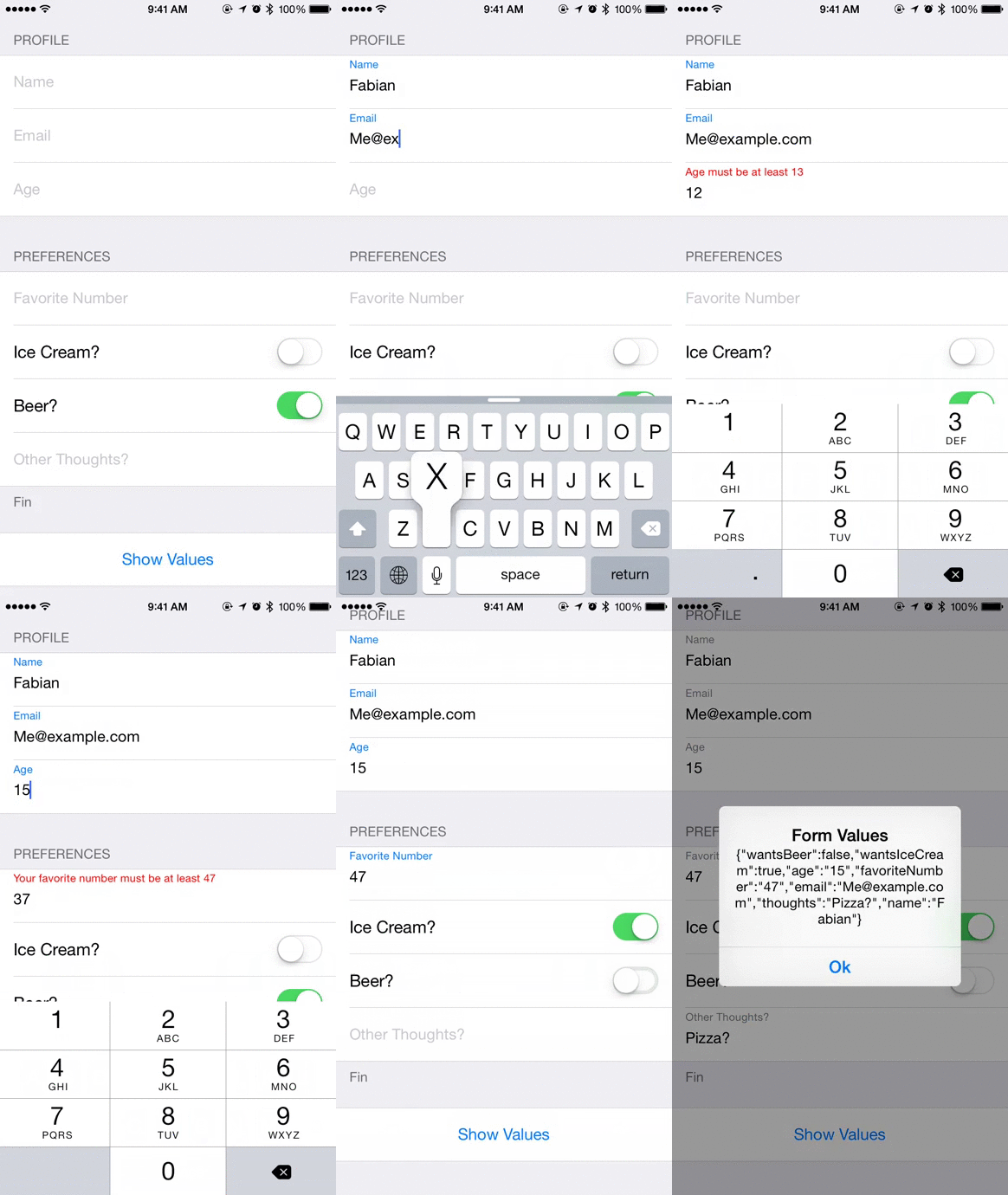
- "Floating Labels" for form fields.
- Composable validation functions
self.form = Formulary.ConcreteForm(sections: [
    Formulary.ConcreteFormSection(rows: [
        Formulary.ConcreteFormRow(name:"Name", tag: "name", type: .Text, validation: RequiredString("Name")),
        Formulary.ConcreteFormRow(name:"Email", tag: "email", type: .Text),
        Formulary.ConcreteFormRow(name:"Age", tag: "age", type: .Number, validation: MinimumNumber("Age", 13))],
        name:"Profile"),
    Formulary.ConcreteFormSection(rows: [
        Formulary.ConcreteFormRow(name:"Favorite Number", tag: "favoriteNumber", value: nil, type: .Decimal, validation: MinimumNumber("Your favorite number", 47) && MaximumNumber("Your favorite number", 47)),
        Formulary.ConcreteFormRow(name:"Ice Cream?", tag: "wantsIceCream", value: false, type: .Switch),
        Formulary.ConcreteFormRow(name:"Beer?", tag: "wantsBeer", value: true, type: .Switch),
        Formulary.ConcreteFormRow(name:"Other Thoughts?", tag: "thoughts", type: .Text),],
        name:"Preferences",
        footerName: "Fin"),
    Formulary.ConcreteFormSection(rows: [
        Formulary.ConcreteFormRow(name:"Show Values", tag: "show", type: .Button, action: { _ in

            let data = NSJSONSerialization.dataWithJSONObject(values(self.form) as NSDictionary, options: nil, error: nil)!
            let s = NSString(data: data, encoding: NSUTF8StringEncoding)

            let alert = UIAlertController(title: "Form Values", message: s, preferredStyle: .Alert)
            alert.addAction(UIAlertAction(title: "Ok", style: .Default, handler: nil))
            self.presentViewController(alert, animated: true, completion: nil)
        })
        ])
    ]
)
Fabian Canas (@fcanas)
Formulary is available under the MIT license.