SVG and PNG files "disappears" after editing a copy of it. Endless "Loading" cycling indicator is displayed... #2623


Description

 * Nemo version: nemo 4.6.5 at first, now 4.8.4
 * Issue with windowed nemo
 * Distribution: Linux Mint Cinnamon 20 at first, now 20.1
 * GPU: Intel 2nd Generation Core Processor Family Integrated Graphics
 * Graphics Driver: i915
 * 64 bit architecture
Similar to #2628, #2623, #2621, #1922
Other similar issues on this page. Please scroll down.
Update: I also did some similar steps like the ones listed here, but using the Drawing application to create and modify a PNG file. So this bug is not limited to Inkscape and applies to both SVG and PNG files, and maybe others too.
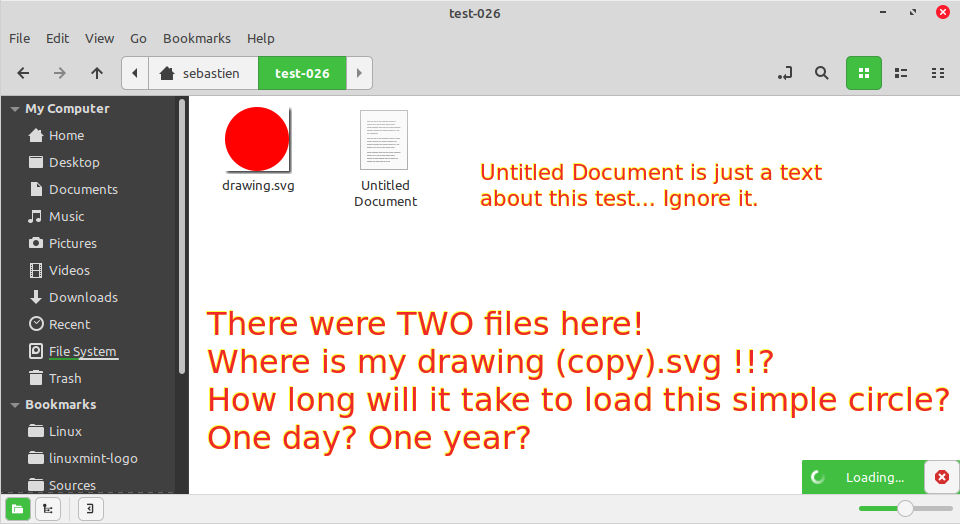
Issue
I create a simple SVG file and make a copy. Then i edit this copy. Then i open the directory to see it, but my edited copy is apparently lost, and there is a "Loading" cycling image that keeps being displayed.
Steps to reproduce
NOTE 1: MAKE SURE YOU NEVER CLOSE NEMO during all the following steps.
NOTE 2: Please do the following file operations using only Nemo GUI. Think like an artist. Keep it simple.
- Create a new directory, e.g.: ~/test-XX
- Create a filled circle using Inkscape. (Version 1.0.1, but version 0.x probably does the same.)
- Save it into your new test directory (~/test-XX/circle.svg).
- Using Nemo, duplicate this SVG file: select it, then click Edit > Duplicate.
- Open your duplicated ~/test-XX/circle (copy).svg in Inkscape. Don’t edit and save yet. WAIT.
- Make sure the thumbnails were generated in Nemo GUI. You saw the original circle thumbnail and it was okay. You also saw the duplicated circle thumbnail and it was okay.
- Now, go to the parent directory (just click on the "up" arrow) so you don’t see your duplicated circle in Nemo, you hide it, but without closing Nemo! (OR, alternately, you could have closed the Nemo window, as long as there was another Nemo window opened so you NEVER quit and restart Nemo...)
- Using Inkscape, change this duplicated circle fill to another color. Save it.
- Open this test directory. See? Your edited copy disappeared and Nemo looks like being stuck in an endless loading cycle...
Getting out of this directory and then back again solves this. It is solved easily, but this can happen frequently and so it is really bothering.
Expected behaviour
I would expect to see my file with is name and a small thumbnail.
Actual behavior
My file disappeared!