feat: guide - next.js and prisma integration #618
Conversation


WalkthroughA new MDX documentation file was added providing a comprehensive step-by-step integration guide for Kinde authentication with Next.js, Prisma ORM, and SQLite, including setup instructions, code examples, environment configuration, and testing procedures. Changes
Sequence Diagram(s)sequenceDiagram
participant User
participant NextJS as Next.js App
participant Kinde as Kinde Auth
participant PrismaDB as Prisma + SQLite
User->>NextJS: Click login
NextJS->>Kinde: Redirect to Kinde
User->>Kinde: Authenticate
Kinde->>NextJS: Redirect to /api/auth/success
rect rgba(100, 200, 100, 0.2)
Note over NextJS,PrismaDB: User persistence flow (new)
NextJS->>NextJS: Extract user data from Kinde
NextJS->>PrismaDB: Upsert user record
PrismaDB->>NextJS: User stored/updated
end
NextJS->>User: Redirect to dashboard
Estimated code review effort🎯 1 (Trivial) | ⏱️ ~3 minutes
Poem
Pre-merge checks and finishing touches✅ Passed checks (3 passed)
✨ Finishing touches
🧪 Generate unit tests (beta)
Thanks for using CodeRabbit! It's free for OSS, and your support helps us grow. If you like it, consider giving us a shout-out. Comment |

Deploying kinde-docs-preview with
|

| Latest commit: |
a7448c7
|
| Status: | ✅ Deploy successful! |
| Preview URL: | https://f8ceeaa2.kinde-docs-preview.pages.dev |
| Branch Preview URL: | https://tamal-feat-kinde-prisma-orm.kinde-docs-preview.pages.dev |
![coderabbitai[bot]](https://avatars.githubusercontent.com/in/347564?s=60&v=4)

There was a problem hiding this comment.
Actionable comments posted: 3
🧹 Nitpick comments (4)
src/content/docs/integrate/third-party-tools/kinde-nextjs-prisma.mdx (4)
80-97: Useprismacode block language for better syntax highlighting.The Prisma schema is currently wrapped in a
yamlcode block, which may not highlight the schema correctly. Useprismainstead for proper syntax highlighting.- ```yaml + ```prisma generator client { provider = "prisma-client-js" } datasource db { provider = "sqlite" url = env("DATABASE_URL") } model User { id Int @id @default(autoincrement()) kindeId String @unique email String @unique firstName String lastName String } - ``` + ```
162-191: Add error handling for database constraint violations.The route handler throws a generic error if the user is missing data, but doesn't handle the case where the email or kindeId already exists (unique constraint violations). Add try/catch logic to provide better error handling and recovery.
Consider wrapping the
createoperation in a try/catch block to handlePrisma.PrismaClientKnownRequestErrorfor unique constraint violations, and gracefully retry with an update instead.
115-115: Tighten the wording for clarity.The sentence is slightly wordy. Consider shortening it to improve readability:
-Remember to run these commands every time you make changes to the `schema.prisma` file to keep your database and Prisma Client in sync.
+Run these commands whenever you update `schema.prisma` to keep your database and Prisma Client in sync.
248-248: Use more distinctive phrasing to enhance the tone.The phrase "Feel free to explore" is informal. Consider a more professional alternative:
-Feel free to explore more of [Prisma's](https://www.prisma.io/) capabilities and continue to refine your application's authentication and database integration.
+Explore [Prisma's](https://www.prisma.io/) capabilities further and continue to refine your application's authentication and database integration.
📜 Review details
Configuration used: CodeRabbit UI
Review profile: CHILL
Plan: Pro
📒 Files selected for processing (1)
src/content/docs/integrate/third-party-tools/kinde-nextjs-prisma.mdx(1 hunks)
🧰 Additional context used
🧠 Learnings (1)
📚 Learning: 2024-11-12T06:00:08.396Z
Learnt from: marcosmartini
Repo: kinde-oss/documentation PR: 253
File: src/content/docs/properties/work-with-properties/property-groups.mdx:13-13
Timestamp: 2024-11-12T06:00:08.396Z
Learning: In the project documentation, the `/kinde-apis/management` and `/kinde-apis/frontend` pages use a third-party API reference and client that loads a Single Page Application (SPA). Therefore, links to sections within these pages are valid, even if they appear to point to non-existent sections in static analysis, and should not be flagged.
Applied to files:
src/content/docs/integrate/third-party-tools/kinde-nextjs-prisma.mdx
🪛 LanguageTool
src/content/docs/integrate/third-party-tools/kinde-nextjs-prisma.mdx
[style] ~115-~115: Consider shortening or rephrasing this to strengthen your wording.
Context: ...er to run these commands every time you make changes to the schema.prisma file to keep your d...
(MAKE_CHANGES)
[style] ~248-~248: Consider using a less common alternative to make your writing sound more unique and professional.
Context: ...nd enhance your application as needed. Feel free to explore more of [Prisma's](https://www....
(FEEL_FREE_TO_STYLE_ME)
🔇 Additional comments (1)
src/content/docs/integrate/third-party-tools/kinde-nextjs-prisma.mdx (1)
59-67: Verify PackageManagers component implementation & renderingFound MDX usages (src/content/docs/integrate/third-party-tools/kinde-nextjs-prisma.mdx — lines ~61,63) and a docs entry describing PackageManagers (public/_llms-full.txt), but I could not find the component implementation in the repo. Confirm the PackageManagers component exists (or which plugin provides it) and that it renders the correct npm / pnpm / yarn install commands for pkg='prisma -D' and pkg='@prisma/client'.
| ## Step 3: Save user data to the database after authentication | ||
|
|
||
| 1. Create a new directory named `success` inside the **src/app/api/auth/** directory by typing the following command in your terminal: | ||
|
|
||
| ```bash | ||
| mkdir src/app/api/auth/success | ||
| ``` | ||
|
|
||
| 2. Create a `route.ts` file inside the newly created directory by running the following command. | ||
|
|
||
| This file will act as a GET route to interface with the database and handle user authentication data. | ||
|
|
||
| ```bash | ||
| touch src/app/api/auth/success/route.ts | ||
| ``` | ||
|
|
||
| 3. Open the `route.ts` file in your code editor, add the following code, and then save the file. | ||
|
|
||
| ```tsx | ||
| import prisma from "@/db"; | ||
| import { getKindeServerSession } from "@kinde-oss/kinde-auth-nextjs/server"; | ||
| import { NextResponse } from "next/server"; | ||
|
|
||
| export async function GET() { | ||
| const { getUser } = getKindeServerSession(); | ||
| const user = await getUser(); | ||
|
|
||
| if (!user || user == null || !user.id) | ||
| throw new Error("something went wrong with authentication" + user); | ||
|
|
||
| let dbUser = await prisma.user.findUnique({ | ||
| where: { kindeId: user.id }, | ||
| }); | ||
|
|
||
| if (!dbUser) { | ||
| dbUser = await prisma.user.create({ | ||
| data: { | ||
| kindeId: user.id, | ||
| firstName: user.given_name ?? "", | ||
| lastName: user.family_name ?? "", | ||
| email: user.email ?? "", // Using nullish coalescing operator to provide a default empty string value | ||
| }, | ||
| }); | ||
| } | ||
|
|
||
| return NextResponse.redirect("http://localhost:3000/dashboard"); | ||
| } | ||
| ``` | ||
|
|
||
| When the code runs, it: | ||
|
|
||
| - Imports the Prisma instance from the `db.ts` file. | ||
| - Imports functions to interact with the Kinde Server Session and handle the Next.js response. | ||
| - Defines a **GET** route to retrieve the authenticated user's information. | ||
| - Checks if the user is already stored in the database and updates the database with user information if not. | ||
| 4. Open the `.env` file in your project and update the `KINDE_POST_LOGIN_REDIRECT_URL` field with the following value: | ||
|
|
||
| ```tsx | ||
| KINDE_POST_LOGIN_REDIRECT_URL=http://localhost:3000/api/auth/success | ||
| ``` | ||
|
|
||
| This ensures that after a successful login, the user is redirected to this route, which updates the database and then redirects the user. | ||
|
|
||
| 5. Go to the **Details** page of your Kinde dashboard and add `http://localhost:3000/api/auth/success` to the list of **Callback URLs.** | ||
| 6. Select **Save**. | ||
|
|
||
| 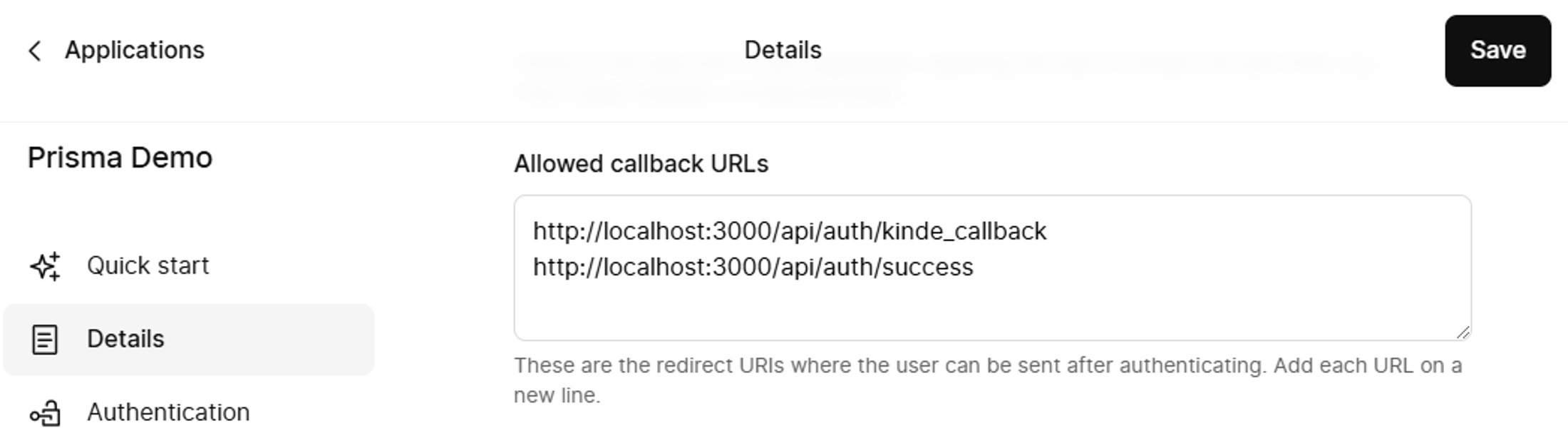 | ||
|
|
There was a problem hiding this comment.
Add guidance for creating the /dashboard route.
The guide redirects users to /dashboard after authentication but never explains how to create this page. Users will encounter a 404 error when following this guide.
Add a brief section after Step 3 (or at the end of Step 3) showing how to create a basic dashboard page. At minimum, include:
- Instructions to create
src/app/dashboard/page.tsx - A basic component that displays the logged-in user or a success message
- Mention this is a placeholder and can be customized
🤖 Prompt for AI Agents
In src/content/docs/integrate/third-party-tools/kinde-nextjs-prisma.mdx around
lines 144 to 211, the guide redirects users to /dashboard but never shows how to
create that page; add a short subsection immediately after Step 3 instructing
readers to create src/app/dashboard/page.tsx, describing that the file should
export a basic React Server Component (or client component if preferred) which
displays the logged-in user info or a simple success/welcome message, note that
this is a placeholder that can be customized, and include a brief instruction to
protect or extend the page to fetch the authenticated user when integrating with
Kinde.
| 3. Open the `route.ts` file in your code editor, add the following code, and then save the file. | ||
|
|
||
| ```tsx | ||
| import prisma from "@/db"; |
There was a problem hiding this comment.
Fix import/export mismatch that will cause runtime errors.
The import statement uses a default import, but db.ts exports a named export. This will result in prisma being undefined at runtime.
-import prisma from "@/db";
+import { prisma } from "@/db";
📝 Committable suggestion
‼️ IMPORTANT
Carefully review the code before committing. Ensure that it accurately replaces the highlighted code, contains no missing lines, and has no issues with indentation. Thoroughly test & benchmark the code to ensure it meets the requirements.
| import prisma from "@/db"; | |
| import { prisma } from "@/db"; |
🤖 Prompt for AI Agents
In src/content/docs/integrate/third-party-tools/kinde-nextjs-prisma.mdx around
line 163, the file currently uses a default import (import prisma from "@/db")
but db.ts exports a named export, causing prisma to be undefined at runtime;
update the import to use the named export (import { prisma } from "@/db") or
alternatively adjust db.ts to export default prisma so the import and export
match, then rebuild and verify no runtime import errors.
| }); | ||
| } | ||
|
|
||
| return NextResponse.redirect("http://localhost:3000/dashboard"); |
There was a problem hiding this comment.
Replace hardcoded redirect URL with environment variable.
The redirect is hardcoded to http://localhost:3000/dashboard, which will break in production and staging environments. Use an environment variable instead.
-  return NextResponse.redirect("http://localhost:3000/dashboard");
+  return NextResponse.redirect(new URL("/dashboard", process.env.APP_URL || "http://localhost:3000"));
Then add the environment variable to the .env configuration step (around line 199).
📝 Committable suggestion
‼️ IMPORTANT
Carefully review the code before committing. Ensure that it accurately replaces the highlighted code, contains no missing lines, and has no issues with indentation. Thoroughly test & benchmark the code to ensure it meets the requirements.
| return NextResponse.redirect("http://localhost:3000/dashboard"); | |
| return NextResponse.redirect(new URL("/dashboard", process.env.APP_URL || "http://localhost:3000")); |
🤖 Prompt for AI Agents
In src/content/docs/integrate/third-party-tools/kinde-nextjs-prisma.mdx around
line 189 the redirect is hardcoded to "http://localhost:3000/dashboard"; replace
this with a call to an environment variable (e.g.,
process.env.NEXT_PUBLIC_APP_URL or NEXT_PUBLIC_DASHBOARD_URL) concatenated with
"/dashboard" so deployments use the correct base URL, and update the .env
configuration section near line 199 to document and include that environment
variable with an example value for local development.
 tamalchowdhury
changed the title
tamalchowdhury
changed the title
tamalchowdhury
changed the title
tamalchowdhury
changed the title

next.js and prisma integration guide
Related issues & labels (optional)
Summary by CodeRabbit